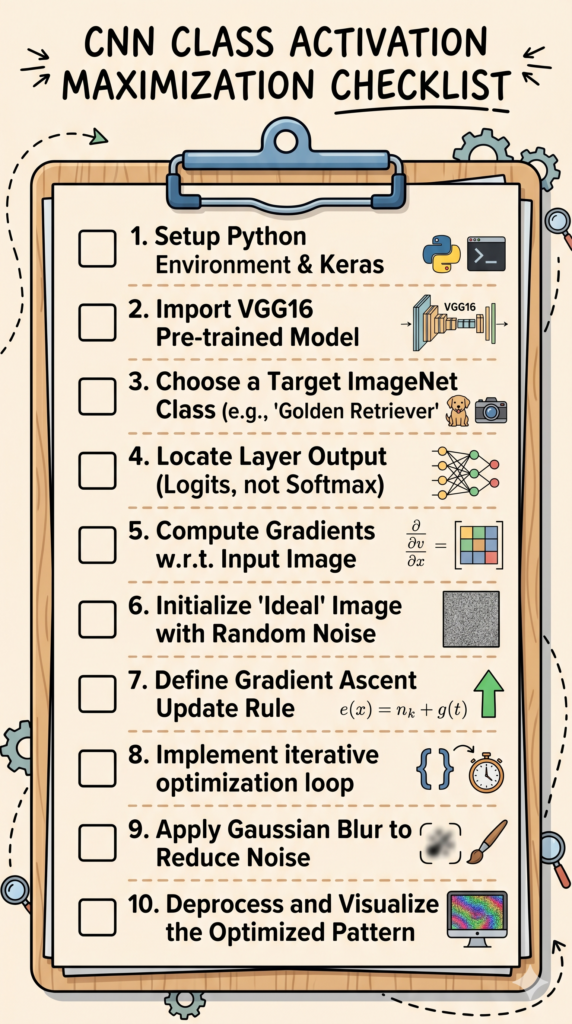
CNN Feature Visualization with Activation Maximization in Keras (VGG16) / TensorFlow tutorials Contents hide 1 What is Class Maximization? 1.1 How It Works: The Inversion of Training 1.2 The Result: An Interpretable Vision – CNN Feature Visualization with Activation Maximization 1.3 Master Computer Vision 2 Loading and Preparing the VGG16 Architecture for Class Maximization 3 Build the Activation Maximization Pipeline 4 Post-processing and Display with OpenCV 5 FAQ : 5.1 1. What is the core goal of Class Activation Maximization? 5.2 2. How does this technique differ from standard CNN training? 5.3 3. Why is VGG16 used in this tutorial instead of a newer model? 5.4 4. What is “Gradient Ascent” in the context of image generation? 5.5 5. Why should I maximize “Logits” instead of “Softmax” outputs? 5.6 6. Why does the initial image start as random noise? 5.7 7. What is the purpose of applying Gaussian Blur during optimization? 5.8 8. What does “Deprocessing” an image mean? 5.9 9. Can this tutorial be used for any object detection model? 5.10 10. How do these visualizations help with model “debugging”? 6 Summary: Mastering the CNN Class Activation Maximization Tutorial 6.1 Connect : Last Updated on 02/05/2026 by Eran Feit What is Class Maximization? Have you ever wondered exactly what a deep learning model visualizes when it detects a specific category? In this comprehensive cnn class activation maximization tutorial, you will look inside the black box of neural networks using Python and Keras. Instead of just passing an image through a pre-trained network like VGG16, you will use gradient ascent in the input space to numerically generate the “ideal” image for a targeted class. By the end of this guide, you will master how to extract, optimize, and visualize learned representations, turning abstract weights into interpretable visual patterns. Class maximization (also referred to as activation maximization) is a crucial technique in the field of neural network interpretability. It allows researchers and engineers to “look inside the black box” of deep learning models, specifically Convolutional Neural Networks (CNNs). Instead of feeding an image into a network to get a prediction, class maximization flips this process. How It Works: The Inversion of Training During typical model training, we hold the input images constant and update the model’s weights and biases (parameters) via gradient descent to improve predictions. In class maximization, we reverse this flow: We select a specific target class we want to visualize (e.g., a “lighthouse” or a “golden retriever”). We freeze all model weights and biases. The network is “locked in.” We start with a pure noise image (like static) or a blank input. We perform an optimization process (specifically, gradient ascent) directly on the pixel values of the input image. The goal is to iteratively adjust the image’s pixels to maximize the activation of the output neuron corresponding to our target class. This forces the model to generate the pattern it finds most representative of that concept. Subscription FormSend me tutorials visualize cnn features The Result: An Interpretable Vision – CNN Feature Visualization with Activation Maximization The output of class maximization is typically an abstract, vibrant, often surrealistic visualization. It represents the underlying geometric patterns, textures, and structures that the network has learned to associate with that class. For example, a model trained to recognize “lighthouses” might generate an image dominated by vertical structures and spiral staircases. By generating these “canonical views,” developers can audit their models for bias, confirm that the model is learning relevant features (rather than spurious background correlations), and gain a deeper understanding of deep neural networks. This post shows how to visualize what a convolutional neural network “imagines” for a target class using Activation Maximization.We will generate a synthetic image that maximally activates the “Persian cat” neuron of a pre-trained VGG16 model.The method helps you interpret CNNs, validate model behavior, and create compelling teaching visuals.We will use TensorFlow Keras, tf-keras-vis, and OpenCV in a clean, reproducible pipeline.Our primary SEO focus is CNN feature visualization, which balances demand and competition while matching readers’ intent. You can find the link for the video tutorial here : https://www.youtube.com/watch?v=5J_b_GxnUBU You can find the full code here : https://ko-fi.com/s/d62d70033b TRY IT NOW Master Computer Vision Follow my latest tutorials and AI insights on my Personal Blog. Beginner Complete CV Bootcamp Foundation using PyTorch & TensorFlow. Get Started → Interactive Deep Learning with PyTorch Hands-on practice in an interactive environment. Start Learning → Advanced Modern CV: GPT & OpenCV4 Vision GPT and production-ready models. Go Advanced → Loading and Preparing the VGG16 Architecture for Class Maximization When extracting activations for class maximization, we isolate the output of a specific target layer (such as the final dense or logit layer) before the activation function is applied. Pro-tip: Avoid using the softmax activation directly in your loss calculation. Softmax squashes outputs between 0 and 1, which can lead to vanishing gradients during gradient ascent; instead, maximize the raw unnormalized logits for more stable optimization. In this part you install or upgrade dependencies, import libraries, load the VGG16 model with ImageNet weights, print the architecture, and prepare a model_modifier that switches the final activation to linear for optimization. Keeping include_top=True preserves the classifier so we can directly maximize a class score. ### Ensure the visualization toolkit and TensorFlow are available and up to date. # pip install --upgrade tf-keras-vis tensorflow ### Import NumPy for array handling. import numpy as np ### Import TensorFlow for deep learning operations. import tensorflow as tf ### Import the pre-trained VGG16 model and alias for readability. from tensorflow.keras.applications.vgg16 import VGG16 as Vgg16Model ### Load VGG16 with ImageNet weights and keep the classification head for class scoring. model = Vgg16Model(weights='imagenet', include_top=True) ### Print the model summary to confirm architecture and parameter counts. print (model.summary()) ### Prepare a function that modifies the model before visualization. ### We change the final softmax to linear to expose raw logits for maximization. # define a function to modify the model # we will change the softmax to a linear function def model_modifier(modl): ### Set the last layer activation to linear to make optimization well behaved. modl.layers[-1].activation = tf.keras.activations.linear # All the layers except the last one will have activation=linear You can find the full code here : https://ko-fi.com/s/d62d70033b You verified the environment, loaded a pre-trained classifier, and ensured the output activation is suitable for activation maximization.This prepares the model for stable optimization toward a specific class. cnn class activation maximization tutorial Build the Activation Maximization Pipeline Unlike standard neural network training where backpropagation updates model weights while keeping the input image fixed, class maximization flips this process. Here, we freeze the network’s weights entirely and compute gradients with respect to the input pixel values themselves. We then iteratively add these gradients to the input image to maximize the target class activation, effectively causing the network to “draw” its ideal image. Here you create the ActivationMaximization object, define a loss that targets the “Persian cat” class index, run the optimizer, and convert the resulting image to uint8 for display and saving.Progress printing helps monitor the iterations. ### Import the activation maximization utility that performs gradient-based optimization on the input. # create an object instance of Acticvation maximization class from tf_keras_vis.activation_maximization import ActivationMaximization ### Instantiate the visualizer with our model and the modifier. ### clone=True duplicates the model so the original instance remains unchanged. activation_maximization = ActivationMaximization(model, model_modifier, clone=True) # clone means , duplicate the model and not update the current one ### Define a loss that returns the logit for the target ImageNet class. ### We will maximize the score for the Persian cat class. # Now , We will define a loss function that maximize a specific class. # leats maximize the class of "Persian cat" , class no. 283 # https://deeplearning.cms.waikato.ac.nz/user-guide/class-maps/IMAGENET/ def loss(output): ### Return the score for class index 283 which corresponds to Persian cat. return output[:, 283] ### Import a callback to print progress at intervals. from tf_keras_vis.utils.callbacks import Print ### Run activation maximization to synthesize an image that maximizes the target class score. ### The callback prints status every 50 iterations for transparency. # visual the class activation = activation_maximization(loss, callbacks=[Print(interval=50)] ) ### Retrieve the synthesized image from the result list and convert to 8-bit for rendering. #lets grab the image after running the process image = activation[0].astype(np.uint8) You can find the full code here : https://ko-fi.com/s/d62d70033b You targeted a specific class with a simple loss and let tf-keras-vis optimize a canvas image toward high activation.The output is a synthetic image reflecting what the network associates with the Persian cat concept. activation maximization keras Post-processing and Display with OpenCV The output from our gradient ascent optimization is a raw tensor that contains floating-point values far outside the valid pixel range of [0, 255]. To make this tensor displayable, we must apply a deprocessing step that normalizes the tensor by centering it on zero, adjusting the standard deviation, and clipping the values to the valid color range. Pro-tip: Applying a slight Gaussian blur every few steps during the ascent can prevent high-frequency noise and yield much cleaner, more recognizable visual patterns. Finally, you convert color space from RGB to BGR for OpenCV, upscale the visualization for clarity, and display it in a window.This makes the result presentation-ready for notebooks, slides, or blog images. ### Import OpenCV for color conversion, resizing, and display. # show the image using OpenCv import cv2 ### Convert the image from RGB to BGR because OpenCV expects BGR by default. # change the image from RGB to BGR imageCV = cv2.cvtColor(image , cv2.COLOR_RGB2BGR) ### Define the upscaling percentage to view more detail comfortably. # enlarge the image scale_percent = 200 ### Compute the new width using the chosen scale. w = int(imageCV.shape[1]* scale_percent / 100) ### Compute the new height using the chosen scale. h = int(imageCV.shape[0]* scale_percent / 100) ### Package the target dimensions for the resize function. dim = (w, h) ### Resize the image using an area-based interpolator for smooth scaling. resized = cv2.resize(imageCV, dim , interpolation=cv2.INTER_AREA) ### Display the synthesized class visualization in a window titled "Persian Cat". cv2.imshow("Persian Cat",resized ) ### Keep the window open until a key is pressed. cv2.waitKey(0) You can find the full code here : https://ko-fi.com/s/d62d70033b You prepared the synthesized image for display and scaled it to highlight fine textures.Your activation maximization pipeline is complete and ready to reuse for any ImageNet class. CNN Feature Visualization with Activation Maximization CNN Feature Visualization with Activation Maximization in Keras (VGG16) 12 FAQ : 1. What is the core goal of Class Activation Maximization? The goal is to visualize the “internal mind” of a neural network. Instead of classifying an existing image, we start with random noise and use optimization to create an image that the network believes is the perfect representation of a specific class (like a “Golden Retriever” or “Lighthouse”). 2. How does this technique differ from standard CNN training? During training, you update the model’s weights to match the data. In class maximization, you freeze the weights and update the input pixels using gradient ascent to match the model’s pre-existing knowledge. 3. Why is VGG16 used in this tutorial instead of a newer model? VGG16 has a very clear, linear architecture. This makes it much easier for beginners to understand how features are extracted layer-by-layer, from simple edges in early layers to complex textures in the final layers, compared to more complex “Residual” or “Inception” architectures. 4. What is “Gradient Ascent” in the context of image generation? While gradient descent is used to minimize a loss function (error), Gradient Ascent is used to maximize a specific output. We move the pixel values in the direction that increases the activation of our target class neuron. 5. Why should I maximize “Logits” instead of “Softmax” outputs? The Softmax function “squashes” values between 0 and 1. If the model is very confident, the gradients become nearly zero (the vanishing gradient problem). Raw Logits provide a continuous, unconstrained signal that makes the optimization process much more stable. 6. Why does the initial image start as random noise? Starting with random noise ensures that the final visualization is purely a product of the network’s learned weights. If we started with an existing photo, the optimization would simply “tweak” that photo rather than revealing the network’s independent “ideal” representation. 7. What is the purpose of applying Gaussian Blur during optimization? Without regularization, gradient ascent often produces “high-frequency noise”—pixels that don’t look like anything to humans but satisfy the math. A slight blur acts as a spatial prior, forcing the network to develop larger, smoother, and more recognizable shapes. 8. What does “Deprocessing” an image mean? The mathematical optimization generates pixel values that are often far outside the standard 0–255 color range. Deprocessing involves normalizing these values, centering the mean, and clipping them so they can be rendered correctly as a standard RGB image. 9. Can this tutorial be used for any object detection model? Yes, the logic is transferable. While this tutorial focuses on VGG16 and Keras, the same principles of gradient-based input optimization apply to ResNet, EfficientNet, and even custom models, provided you can access the gradients of the output layer. 10. How do these visualizations help with model “debugging”? By seeing what the network thinks is “ideal,” you can spot if it is focusing on the wrong things. For example, if a “Cow” class maximization always generates green grass textures but no actual cow features, you know your model is biased toward the background rather than the object. Summary: Mastering the CNN Class Activation Maximization Tutorial In this guide, we have transitioned from viewing neural networks as “black boxes” to visually interpreting their internal logic. By implementing this cnn class activation maximization tutorial, you have learned how to use gradient ascent to reverse the standard inference process, creating “ideal” images that reflect a model’s learned patterns. Key takeaways from this tutorial include: Visualizing learned features: Understanding how VGG16 identifies textures and shapes for specific classes. Optimization logic: Why maximizing raw logits is superior to using softmax for gradient-based image generation. Refining results: Using Gaussian blur and deprocessing techniques to turn raw tensors into recognizable visual patterns. By mastering these interpretability techniques in Python, you are now better equipped to audit your models for bias, verify feature extraction, and build more transparent AI systems for your community. Connect : ☕ Buy me a coffee — https://ko-fi.com/eranfeit 🖥️ Email : feitgemel@gmail.com 🌐 https://eranfeit.net 🤝 Fiverr : https://www.fiverr.com/s/mB3Pbb Enjoy, Eran









 Skip to content