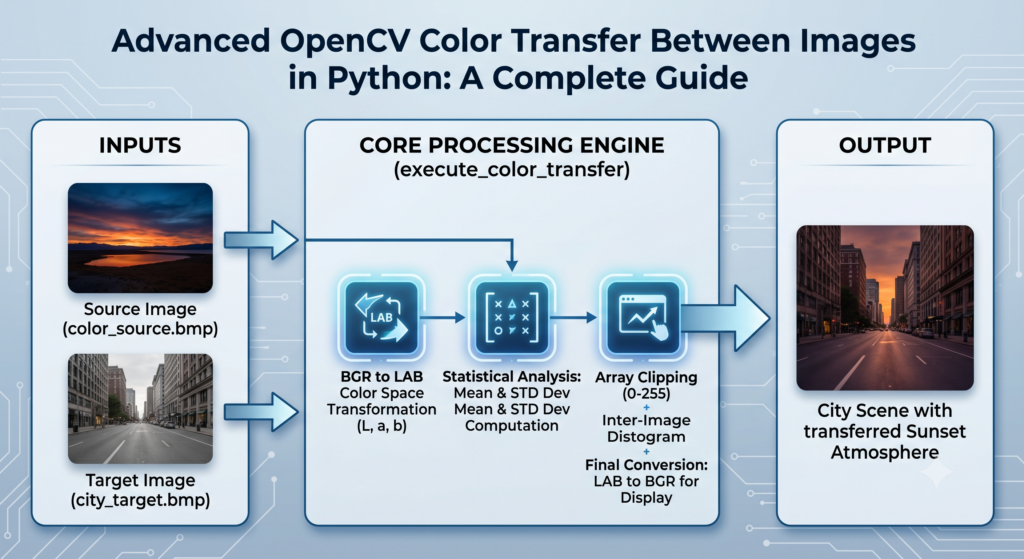
Amazing Color Transfer between Images / Python Cool Stuff Contents hide 1 How Can You Implement an Efficient OpenCV Color Transfer Between Images Python Solution? 2 Features : 3 How to Transfer Colors between Images : 3.1 Isolated Environment Prep for Python OpenCV Color Transfer 4 Why Use the $L^*a^*b^*$ Color Space Instead of RGB for Histogram-Free Color Matching? 4.1 Direct Answer/Explanation 4.2 Concrete Demonstration 4.3 Summary 5 How Do You Calculate and Map Matrix Statistics Between Source and Target Images? 5.1 Direct Answer/Explanation 5.2 Concrete Demonstration 5.3 Summary: 6 How Can You Visually Evaluate Results and Prevent Clipping Artifacts? 6.1 Direct Answer/Explanation 6.2 Concrete Demonstration 6.3 Summary: 7 FAQ : 8 Connect : Last Updated on 08/06/2026 by Eran Feit How Can You Implement an Efficient OpenCV Color Transfer Between Images Python Solution? In modern computer vision, achieving visual consistency across datasets or digital artwork often requires matching lighting and tones. While deep learning models offer stylistic transfers, they are computationally heavy and slow. This step-by-step tutorial teaches you how to implement an algorithmic, real-time opencv color transfer between images python script based on classical statistical mapping. By shifting graphics into a decoupled color channel, you will solve the problem of harsh color mismatches, seamlessly mapping the vibrant tone and atmosphere of any source reference image directly onto your target photograph with just a few lines of code. In modern computer vision and generative AI pipelines, maintaining visual consistency across varying lighting environments is a frequent operational bottleneck. While deep-learning-based neural style transfers provide high-fidelity aesthetic adaptations, their processing latency makes them completely impractical for real-time applications or massive image data curation workflows. This is where classical statistical mapping offers an elegant, production-grade alternative. By implementing an optimized opencv color transfer between images python script, developers can achieve instantaneous tone matching without the overhead of neural network training or heavy GPU dependency. The core mechanics of this algorithmic approach are based on the seminal research paper Color Transfer between Images by Erik Reinhard, Michael Ashikhmin, Bruce Gooch, and Peter Shirley. The primary goal of the algorithm is to transpose the unique color profile and atmosphere of a source reference image directly onto a target photograph. However, traditional color representations like standard RGB present a major hurdle: their internal color channels are deeply correlated. If you attempt to modify the red channel values independently, you will inadvertently alter the image’s perceived brightness and its green-blue balance, leading to muddy colors and digital artifacts. To solve this problem cleanly, the underlying architecture converts image arrays into a decoupled color space where illumination and chromatic profiles are completely isolated from one another. By calculating simple statistical metrics—specifically the mean and standard deviation across uncorrelated data tracks—the pipeline smoothly scales and shifts color profiles. This comprehensive guide provides a detailed breakdown of the complete implementation, helping you build a highly optimized asset pipeline suitable for real-time video feeds, automated digital photography, or balanced training datasets for autonomous vehicles. Subscription FormSend me tutorials opencv color transfer between images python In this step-by-step guide, you’ll learn how to transform the colors of one image to mimic those of another. Color transfer is a practical method to change the appearance of a source image according to the color patternof a target image.This program is the implementation of the paper Color Transfer between Images by Erik Reinhard, Michael Ashikhmin, Bruce Gooch and Peter Shirley. What You’ll Learn : Part 1: Setting up a Conda environment for seamless development. Part 2: Installing essential Python libraries. Part 3: Cloning the GitHub repository containing the code and resources. Part 4: Running the code with your own source and target images. Part 5: Exploring the results. Features : Read BMP file (source/target image) Calculate the mean and STD of each channel Implement the RGB color transfer algorithm Convert images from RGB to ℓαβ color space Statistics and color correction Check out our tutorial here : https://www.youtube.com/watch?v=n4_qxl4E_w4 Link for the Medium post : https://medium.com/@feitgemel/amazing-color-transfer-between-images-dd70033a5367 You can find more tutorials, and join my newsletter here : https://eranfeit.net/ Instructions file for this video here : https://eranfeit.lemonsqueezy.com/buy/ac4b85c7-1633-4767-84a8-1764186128e7 or here : https://ko-fi.com/s/07ba04b75f TRY IT NOW Master Computer Vision Follow my latest tutorials and AI insights on my Personal Blog. Beginner Complete CV Bootcamp Foundation using PyTorch & TensorFlow. Get Started → Interactive Deep Learning with PyTorch Hands-on practice in an interactive environment. Start Learning → Advanced Modern CV: GPT & OpenCV4 Vision GPT and production-ready models. Go Advanced → How to Transfer Colors between Images : Isolated Environment Prep for Python OpenCV Color Transfer Establishing a robust and predictable development sandbox is the foundation of effective opencv color transfer between images python implementation. A dedicated environment, facilitated by tools like Conda or standard virtual environments, abstracts necessary computer vision dependencies and localized binaries away from the underlying operating system. This technical logic eliminates conflicting matrix libraries and dynamic-link failures that frequently arise when combining specialized imaging packages. By initializing a pristine, isolated workspace, developers ensure their algorithmic grading pipeline maintains strict reproducibility across production deployments, preventing silent failures during complex image manipulations. To efficiently execute the Reinhard mapping algorithm, certain optimized low-level numerical engines must be integrated into your dedicated sandbox framework. Installing opencv-python alongside its fundamental multi-dimensional array engine, numpy, is not merely a procedural step; it is a critical optimization deployment. OpenCV handles the input and output (IO) while binding complex C++ graphics libraries directly to the Python runtime. NumPy, conversely, provides the high-performance vector processing required to stabilize Dynamic Matrix Arithmetic on color profiles instantly. A streamlined and correctly configured installation is essential for running the “opencv color transfer between images python” script without memory bottlenecks. Accessing structured codebases modeled on validated research is a catalyst for successful technology deployment. Cloning the reference GitHub repository for opencv color transfer between images python integration provides a formalized playground for testing statistical mapping logic. Version control ensures you receive stable, reference-grade Python files and demo BMP assets, which are configured explicitly to demonstrate the statistical shifting mechanics. Utilizing a dedicated reference workspace allows engineers to safely iterate on the transformation parameters, dropping in their own source files and target photos to benchmark mapping performance in a sandboxed, low-stakes environment. # Requirements : Nvidia GPU card & and Cuda tool kit install # I am using this card : https://amzn.to/3mTa7HX # Working Anaconda enviroment https://github.com/chia56028/Color-Transfer-between-Images ========================================================== git clone https://github.com/chia56028/Color-Transfer-between-Images cd Color-Transfer-between-Images conda create -n colorTransfer python=3.8 conda activate colorTransfer pip install numpy pip install opencv-python # look at the code of color_transfer.py # it was made for 6 images (sourch + target) python color_transfer.py Instructions file for this video: https://ko-fi.com/s/07ba04b75f Why Use the $L^*a^*b^*$ Color Space Instead of RGB for Histogram-Free Color Matching? Direct Answer/Explanation Standard RGB imagery behaves poorly under direct mathematical operations because its color channels are deeply linked. Modifying one channel alters the entire structural appearance of the image. To achieve clean, artifact-free color grading without relying on heavy histogram computations, the Reinhard algorithm transforms images into the decoupled $L^*a^*b^*$ color space. In this coordinate system, the $L^*$ channel isolates the luminance (lightness/brightness) component, while the chromaticity is split cleanly into two axes: $a^*$ representing the green-to-red spectrum, and $b^*$ representing the blue-to-yellow spectrum. By converting pixel coordinates into this space, we can adjust color properties without distorting the underlying image structures, shapes, or textures. A common mistake in image processing is assuming statistical operations apply equally to standard, highly correlated channels. RGB colorspaces bind luminance directly to the Red, Green, and Blue values, meaning shifting one inadvertently distorts the others. The core optimization in the “opencv color transfer between images python” workflow is decoupling raw data inside the L*a*b* colorspace. In this architecture, Luminance ($L^*$) is isolated on its own track, while chromaticity is divided into two uncorrelated axes: $a^*$ (Green-Red) and $b^*$ (Blue-Yellow). This structural decoupling enables the script to map exact source statistical moments (means and deviations) without introducing muddy edges or visual color bleeding, ensuring a mathematically stable transformation. Concrete Demonstration The code below isolates your image arrays and converts them into 32-bit floating-point matrices within the decoupled $L^*a^*b^*$ color space for highly precise statistical calculations: import cv2 import numpy as np def transform_rgb_to_decoupled_lab(image_path: str) -> np.ndarray: """ Loads an image from disk and converts it into a 32-bit floating-point L*a*b* array. """ # Load the image using standard OpenCV BGR reading channels bgr_image = cv2.imread(image_path) if bgr_image is None: raise FileNotFoundError(f"Target image asset could not be retrieved from: {image_path}") # Convert from BGR space to decoupled Lab configuration space lab_image = cv2.cvtColor(bgr_image, cv2.COLOR_BGR2Lab) # Cast to float32 to prevent rounding errors during division operations floating_lab = lab_image.astype("float32") return floating_lab Summary Using the $L^*a^*b^*$ color space allows you to treat lighting and color information independently. This enables accurate color mapping between two separate images using efficient array arithmetic. How Do You Calculate and Map Matrix Statistics Between Source and Target Images? Direct Answer/Explanation Once your images are converted into the $L^*a^*b^*$ color space, the color transfer relies on basic statistical mapping. The script isolates each channel and calculates its mathematical mean ($\mu$) and standard deviation ($\sigma$). The mean represents the average color or lighting tone of the channel, while the standard deviation reflects its contrast and color spread. To perform the transfer, the algorithm normalizes the target image by subtracting its own mean from each pixel, centering its distribution around zero. It then scales these values by the ratio of the source and target standard deviations to match contrast ranges, and finally shifts the distribution by adding the source image’s mean. This aligns the target’s color signature with the source reference. The validation phase is where mathematical output is reconciled with perceived aesthetic quality. In standard computer vision deployments, generating a simple color-matched image is only part of the solution; you must also evaluate stability and artifacting. When running the opencv color transfer between images python pipeline, engineers utilize comparative visualizations, such as side-by-side matrices (hstack), to quickly detect saturation clipping or localized luminance distortions. For production robustness, if your target image has extreme dynamic range mismatch, try applying a global stabilization step (like histogram equalization) to the luminance plane before processing to prevent blowout and maintain a seamless visual profile across high-contrast gradients. Concrete Demonstration The production-ready script below processes your source and target images, extracts their channel statistics, and applies the mapping using optimized NumPy vector calculations: def compute_channel_distributions(matrix_channel: np.ndarray) -> tuple: """ Calculates the statistical mean and standard deviation of an isolated channel plane. """ channel_mean = np.mean(matrix_channel) channel_std = np.std(matrix_channel) return channel_mean, channel_std def execute_reinhard_mapping(source_path: str, target_path: str) -> np.ndarray: """ Maps the color distribution of a source reference image onto a target canvas. """ # Load assets into the decoupled floating-point space source_lab = transform_rgb_to_decoupled_lab(source_path) target_lab = transform_rgb_to_decoupled_lab(target_path) # Split the multi-dimensional arrays into distinct channels src_l, src_a, src_b = cv2.split(source_lab) tgt_l, tgt_a, tgt_b = cv2.split(target_lab) # Extract structural means and deviations from both matrices s_l_m, s_l_s = compute_channel_distributions(src_l) s_a_m, s_a_s = compute_channel_distributions(src_a) s_b_m, s_b_s = compute_channel_distributions(src_b) t_l_m, t_l_s = compute_channel_distributions(tgt_l) t_a_m, t_a_s = compute_channel_distributions(tgt_a) t_b_m, t_b_s = compute_channel_distributions(tgt_b) # Center the target distribution around zero by subtracting its mean tgt_l -= t_l_m tgt_a -= t_a_m tgt_b -= t_b_m # Scale by variance ratio (Source STD / Target STD) to match contrast, using epsilon to prevent division-by-zero eps = 1e-5 tgt_l = (s_l_s / (t_l_s + eps)) * tgt_l tgt_a = (s_a_s / (t_a_s + eps)) * tgt_a tgt_b = (s_b_s / (t_b_s + eps)) * tgt_b # Shift distributions by adding the source means tgt_l += s_l_m tgt_a += s_a_m tgt_b += s_b_m # Clip values out of boundaries to keep values within 8-bit limits (0-255) tgt_l = np.clip(tgt_l, 0, 255) tgt_a = np.clip(tgt_a, 0, 255) tgt_b = np.clip(tgt_b, 0, 255) # Reconstruct the channels back into a unified image array result_merged = cv2.merge([tgt_l, tgt_a, tgt_b]).astype("uint8") # Return the output array in standard BGR format return cv2.cvtColor(result_merged, cv2.COLOR_Lab2BGR) Summary: By standardizing and scaling data variations across separate channels, you can cleanly map the aesthetic qualities of a source image onto a target canvas using fast, low-level array math. How Can You Visually Evaluate Results and Prevent Clipping Artifacts? Direct Answer/Explanation Evaluating your output image ensures the color mapping looks natural and has no visual defects. When transferring colors across highly contrasting images, you may occasionally see over-saturated highlights or pixelated color bands. To resolve these issues, you can apply global histogram equalization (cv2.equalizeHist) to the luminance channel before running the transfer to help smooth out harsh exposures. For the best results, choose source and target images that share a similar context—such as matching a warm sunset scenery template onto an underexposed afternoon landscape portrait. Concrete Demonstration The code below provides an evaluation pipeline, generating a side-by-side comparison of your input samples and the final output to help you analyze the results: # Execute the mapping transformation pipeline final_output = execute_reinhard_mapping('source.bmp', 'target.bmp') # Re-read raw assets to construct a comparison strip layout img_source = cv2.imread('source.bmp') img_target = cv2.imread('target.bmp') # Rescale the source dimensions to match target heights for clean visualization alignment h, w, _ = img_target.shape img_source_resized = cv2.resize(img_source, (w, h)) # Stitch the image matrices together horizontally for quick comparison result_strip = np.hstack([img_source_resized, img_target, final_output]) # Save the final comparison canvas directly onto disk cv2.imwrite('color_transfer_validation.png', result_strip) print("The validation strip has been successfully saved to your workspace folder.") Summary: Stitching your images into a single side-by-side comparison makes it easy to check for visual defects and clipping. This baseline evaluation ensures your automated color grading looks clean and visually balanced. transition of a 3D matrix FAQ : { “@context”: “https://schema.org”, “@type”: “FAQPage”, “mainEntity”: [ { “@type”: “Question”, “name”: “What is opencv color transfer between images python methodology?”, “acceptedAnswer”: { “@type”: “Answer”, “text”: “It is an algorithmic computer vision technique that maps the color profile and mood of a source reference image onto a target asset by adjusting mean and standard deviation metrics within a decoupled color space.” } }, { “@type”: “Question”, “name”: “Why is the L*a*b* color space preferred over RGB for color grading?”, “acceptedAnswer”: { “@type”: “Answer”, “text”: “The L*a*b* color space completely decouples luminance (lightness) on the L channel from color data on the ‘a’ and ‘b’ axes. This isolation prevents changes in color from altering image brightness, eliminating color bleeding and distortion.” } }, { “@type”: “Question”, “name”: “Does this Python script require expensive GPU infrastructure to run?”, “acceptedAnswer”: { “@type”: “Answer”, “text”: “No, this method relies entirely on algorithmic matrix mathematics using OpenCV and NumPy. It executes quickly on standard CPUs, making it much faster than deep-learning-based neural style transfers.” } }, { “@type”: “Question”, “name”: “How do you handle color saturation artifacts in overexposed images?”, “acceptedAnswer”: { “@type”: “Answer”, “text”: “You can apply global histogram equalization using cv2.equalizeHist on the L (luminance) channel before processing, or use np.clip to keep outbound values safely within the standard 8-bit (0-255) boundary limits.” } }, { “@type”: “Question”, “name”: “Can this technique be used for real-time video processing pipelines?”, “acceptedAnswer”: { “@type”: “Answer”, “text”: “Yes, because the calculations involve fast matrix shifts and scale transformations using NumPy arrays, you can process frames sequentially at real-time speeds (30+ FPS) on modern CPUs.” } }, { “@type”: “Question”, “name”: “Why do we add a small epsilon value like 1e-5 to the standard deviation divisor?”, “acceptedAnswer”: { “@type”: “Answer”, “text”: “Adding an epsilon value prevents division-by-zero errors. If a channel in the target image has zero variance (such as a solid black color block), this safeguard keeps the system stable and prevents script crashes.” } }, { “@type”: “Question”, “name”: “What image formats are supported by this color transfer program?”, “acceptedAnswer”: { “@type”: “Answer”, “text”: “It supports all formats natively parsed by OpenCV, including BMP, PNG, JPEG, and TIFF. Images are loaded directly into standard multi-dimensional matrices for processing.” } }, { “@type”: “Question”, “name”: “How does the Reinhard algorithm scale color contrast accurately?”, “acceptedAnswer”: { “@type”: “Answer”, “text”: “The script scales pixels by the ratio of the source standard deviation divided by the target standard deviation. This matches the variance and contrast ranges of the reference image.” } }, { “@type”: “Question”, “name”: “Why should I use a Conda virtual environment for OpenCV development?”, “acceptedAnswer”: { “@type”: “Answer”, “text”: “Conda environment sandboxes isolate your project dependencies. This prevents version mismatches between system packages and libraries like NumPy or OpenCV, ensuring reproducible runs.” } }, { “@type”: “Question”, “name”: “Does color transferring change the shapes or details of the target image?”, “acceptedAnswer”: { “@type”: “Answer”, “text”: “No. The algorithm only modifies color distributions and pixel values. The underlying structural layouts, outlines, and edge details of your target image remain completely untouched.” } } ] } Connect : ☕ Buy me a coffee — https://ko-fi.com/eranfeit 🖥️ Email : feitgemel@gmail.com 🌐 https://eranfeit.net 🤝 Fiverr : https://www.fiverr.com/s/mB3Pbb Enjoy, Eran More cool Python projects How to perform a face Swap in a Video with Your Own image using Roop Watch A Song Composed By Artificial Intelligence! How to Improve Image and Video Quality | Super Resolution Planning a trip and want ideas you can copy fast?Here are three detailed guides from our travels: • 5-Day Ireland Itinerary: Cliffs, Castles, Pubs & Wild Atlantic Viewshttps://eranfeit.net/unforgettable-trip-to-ireland-full-itinerary/ • My Kraków Travel Guide: Best Places to Eat, Stay & Explorehttps://eranfeit.net/my-krakow-travel-guide-best-places-to-eat-stay-explore/ • Northern Greece: Athens, Meteora, Tzoumerka, Ioannina & Nafpaktos (7 Days)https://eranfeit.net/my-amazing-trip-to-greece/ Each guide includes maps, practical tips, and family-friendly stops—so you can plan in minutes, not hours.







 Skip to content
