Last Updated on 22/04/2026 by Eran Feit
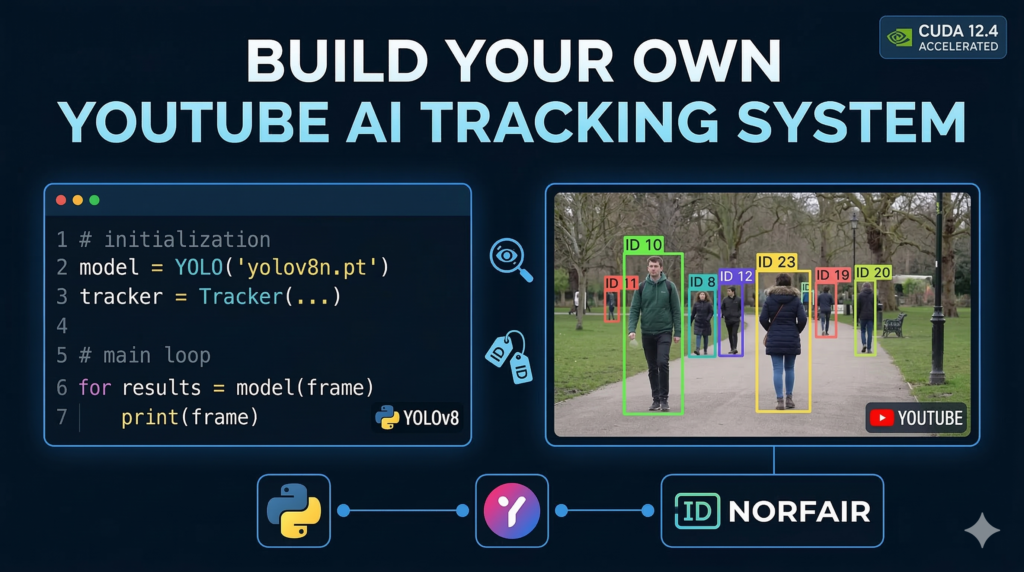
This article provides a comprehensive technical walkthrough on implementing a professional-grade YOLOv8 Norfair tracking pipeline. By bridging the gap between raw object detection and persistent identity management, the guide addresses one of the most common hurdles in computer vision: maintaining a stable lock on subjects as they move through dynamic environments. Readers will learn how to transition from basic bounding boxes that flicker and reset to a robust system that assigns unique, long-term IDs to every individual on screen.
For developers and AI researchers, this guide offers significant practical value by providing a production-ready workflow for 2026. Instead of working with static video files, you will discover how to ingest live data directly from YouTube, allowing for real-time testing on diverse, real-world scenarios. This hands-on approach ensures that you aren’t just copy-pasting code, but actually understanding the underlying logic of Kalman filters and Euclidean distance used in modern YOLOv8 Norfair tracking architectures.
The tutorial achieves this by breaking down the complex integration of four major Python libraries into a clear, modular structure. We begin by configuring a high-performance environment optimized for CUDA 12.4 and PyTorch 2.5.0, ensuring that your hardware is fully utilized for low-latency inference. By the end of this article, you will have a working script that handles the heavy lifting of stream ingestion, model inference, and tracker synchronization with minimal overhead.
To ensure success, the guide elaborates on the mathematical intuition behind object persistence. We dive into how the Norfair tracker evaluates the “cost” of moving objects, making it the perfect companion for the speed of YOLOv8. Whether you are building an automated surveillance system, a sports analytics tool, or a traffic monitoring app, this article serves as the definitive blueprint for deploying YOLOv8 Norfair tracking in your own projects.
Why You Should Master YOLOv8 Norfair Tracking for Your Next Project The core objective of implementing YOLOv8 Norfair tracking is to solve the problem of temporal consistency in video analysis. While standard object detection identifies a “person” in a single frame, it has no memory of that person in the next. Tracking adds this critical dimension of time, turning isolated snapshots into a continuous narrative. By using Norfair, a lightweight and highly customizable library, we can take the fast, accurate detections from YOLOv8 and link them together into “tracks.” This allows a system to recognize that the person who disappeared behind an obstacle at frame 100 is the exact same individual who reappears at frame 120.
At a high level, this system works by predicting the future position of a detected object based on its past velocity and direction. When YOLOv8 produces a new set of detections, Norfair uses Euclidean distance to calculate which new detection is most likely to be the same object from the previous frame. This mathematical matching is what creates “Persistent IDs.” For developers, the target is to achieve “id-switching” resistance, ensuring that the number “ID: 5” stays glued to the same person throughout the entire video stream, even in crowded scenes where people overlap or cross paths.
This combination is particularly powerful because of its efficiency and modularity. Unlike heavier tracking algorithms that might require massive computational resources, YOLOv8 Norfair tracking is designed to run in real-time on modern GPUs. It provides the flexibility to track any object class—from people and vehicles to custom-trained items—making it a universal tool for AI developers. By focusing on the center points of detections, the system remains incredibly fast, allowing you to process high-resolution YouTube streams at 30 frames per second or higher, depending on your hardware acceleration.
Python YOLOv8 Norfair implementation Let’s build a system that actually “watches” YouTube for you The main goal of this script is to transform a standard YouTube stream into an intelligent, data-driven environment. Instead of just playing a video, we are teaching your computer to recognize human presence and, more importantly, maintain a consistent “memory” of each person as they move across the screen. By combining a high-performance detector with a robust tracker, we move past simple image recognition and into the territory of real-time spatial analysis.
At the heart of this tutorial is the distinction between detection and tracking . While the YOLOv8 model is incredibly fast at pointing out where a person is in a single snapshot, it has no idea if the person it sees in one frame is the same one it saw a millisecond ago. That is where Norfair comes in. It acts as the “connective tissue,” calculating the distance between points across frames to ensure that an individual maintains a unique identity even as they walk, turn, or briefly disappear behind an object.
The architecture of the code is designed to be modular and efficient. We use VidGear to handle the heavy lifting of video buffering and streaming, which is notoriously tricky when dealing with YouTube’s specific protocols. By piping those frames directly into YOLOv8 , we get high-speed bounding boxes. These detections are then filtered—specifically for humans—and passed to the Norfair Tracker , which handles the Euclidean distance math to keep the labels stable and the movement smooth.
By the time you finish running this, you won’t just have a video window with some boxes on it; you’ll have a functional pipeline that can be adapted for all sorts of real-world uses. Whether you want to count how many people enter a specific area, analyze the flow of a crowd, or even trigger alerts based on movement patterns, this code provides the foundational “eyes” and “logic” required for an autonomous AI monitoring system.
Link to the video tutorial here
Download the code for the tutorial here or here
Master Computer Vision
Follow my latest tutorials and AI insights on my
Personal Blog .
Beginner Complete CV Bootcamp
Foundation using PyTorch & TensorFlow.
Get Started → Interactive Deep Learning with PyTorch
Hands-on practice in an interactive environment.
Start Learning → Advanced Modern CV: GPT & OpenCV4
Vision GPT and production-ready models.
Go Advanced →
YOLOv8 Norfair tracking Let’s build a system that actually “watches” YouTube for you The main goal of this script is to transform a standard YouTube stream into an intelligent, data-driven environment. Instead of just playing a video, we are teaching your computer to recognize human presence and, more importantly, maintain a consistent “memory” of each person as they move across the screen. By combining a high-performance detector with a robust tracker, we move past simple image recognition and into the territory of real-time spatial analysis.
At the heart of this tutorial is the distinction between detection and tracking . While the YOLOv8 model is incredibly fast at pointing out where a person is in a single snapshot, it has no idea if the person it sees in one frame is the same one it saw a millisecond ago. That is where Norfair comes in. It acts as the “connective tissue,” calculating the distance between points across frames to ensure that an individual maintains a unique identity even as they walk, turn, or briefly disappear behind an object.
The architecture of the code is designed to be modular and efficient. We use VidGear to handle the heavy lifting of video buffering and streaming, which is notoriously tricky when dealing with YouTube’s specific protocols. By piping those frames directly into YOLOv8 , we get high-speed bounding boxes. These detections are then filtered—specifically for humans—and passed to the Norfair Tracker , which handles the Euclidean distance math to keep the labels stable and the movement smooth.
By the time you finish running this, you won’t just have a video window with some boxes on it; you’ll have a functional pipeline that can be adapted for all sorts of real-world uses. Whether you want to count how many people enter a specific area, analyze the flow of a crowd, or even trigger alerts based on movement patterns, this code provides the foundational “eyes” and “logic” required for an autonomous AI monitoring system
Installation and Environment Setup Before we can run this advanced tracking system, we need to build a rock-solid foundation. Streaming from YouTube while running real-time AI requires specific versions of libraries to avoid memory leaks or compatibility issues. Follow these steps to set up your dedicated Conda environment.
# 1. Create Conda environment conda create - n norfair python = 3.11 conda activate norfair # 2. Install Libraries pip install opencv - python == 4.10.0.84 pip install norfair [ metrics , video ] == 2.2.0 # 3. Install Pytorch # check Cuda version nvcc -- version # Install Pytorch 2.5.0 with Cuda 12.4 conda install pytorch == 2.5.0 torchvision == 0.20.0 torchaudio == 2.5.0 pytorch - cuda = 12.4 - c pytorch - c nvidia # 4.install YoloV8 pip install ultralytics == 8.1.0 # 5. More installations pip install vidgear == 0.3.4 pip install yt_dlp == 2026.3.3 Setting the Stage for Video Data To build an intelligent system that “watches” YouTube, we first need a reliable way to bring that video data into our Python environment. Handling live streams can be a nightmare because of buffering, resolution changes, and YouTube’s own delivery protocols. By using VidGear , we create a high-speed, stable bridge that feeds frames directly to our YOLOv8 Norfair tracking engine without the usual lag.
In this section, we focus on establishing that connection. The goal is to turn a simple URL into a sequence of images that our AI can analyze one by one. Think of this as the digital plumbing required to transport the “water” (video) to the “filter” (AI).
We are using a specific stream mode to ensure we get the highest efficiency. This allows the script to keep up with the action in real-time, which is essential for any YOLOv8 Norfair tracking application where missing even a few frames can break the continuity of an object’s unique ID.
# ### Import the necessary tools for vision , AI , and streaming import cv2 from ultralytics import YOLO from vidgear.gears import CamGear from norfair import Detection , Tracker , draw_tracked_objects import numpy as np # ### Initialize the YouTube stream using CamGear for low - latency delivery stream = CamGear ( source = " https://www.youtube.com/watch?v=msn0zfdEk58 " , stream_mode = True , logging = True ) . start ()
Giving the Machine Eyes Now that the stream is flowing, we need to teach the computer what it’s looking at. We load the YOLOv8 nano model , which is the perfect balance between speed and accuracy for real-time projects. It acts as the “eyes” of our YOLOv8 Norfair tracking system, scanning every incoming frame to identify people.
We define a confidence threshold to ensure we only act on detections we are sure about. By setting this to 0.25, we ignore the “noise” and focus on clear sightings of individuals. We specifically target the person class ID, because in this tutorial, we want to monitor human movement specifically.
This part of the code is the foundation of the AI’s intelligence. Without a solid detection model, the YOLOv8 Norfair tracking system wouldn’t have anything to follow. YOLOv8 performs the heavy lifting of spatial awareness, giving us the coordinates we need for the next phase.
# ### Load the YOLOv8 nano model which is optimized for real - time speed model = YOLO ( ' yolov8n.pt ' ) # ### Set the minimum confidence score to filter out weak detections threshold = 0.25 # ### Define the specific class ID for " person " according to the COCO dataset person_class_id = 0 Keeping Track of Every Soul Detection is great, but it has no memory; it sees a person in Frame A and a person in Frame B but doesn’t know they are the same individual. This is where the YOLOv8 Norfair tracking logic enters the story. Norfair serves as the “brain” that links detections over time, giving each person a consistent ID number.
We initialize the tracker using Euclidean distance , which is a mathematical way of saying “if a person in this frame is very close to where a person was in the last frame, they are likely the same person.” The distance threshold helps the AI decide when to consider someone a new arrival or a continuing presence. This prevents the “flickering” of IDs that often plagues simpler systems.
By setting up this tracker, we transform raw coordinates into actual trajectories. We are moving from “where is a person” to “where is this specific person going” within our YOLOv8 Norfair tracking pipeline. This is crucial for applications like foot-traffic analysis or security monitoring.
# ### Initialize the Norfair tracker to maintain object identities over time # ### We use Euclidean distance with a 100 - pixel threshold to link points tracker = Tracker ( distance_function = " euclidean " , distance_threshold = 100 )
real-time multi-object tracking The Continuous Stream of Logic The “Heartbeat” of our script is the main loop, where the data, the eyes, and the brain finally work together. In every cycle, we grab a new frame from the YouTube stream and hand it over to the YOLO model for a quick check. We then filter those results to ensure we are only performing YOLOv8 Norfair tracking on the humans we care about.
Because Norfair expects a specific data format, we convert the YOLO bounding boxes into Detection objects . We use the center point of the person’s box as the tracking coordinate, which simplifies the math and makes the movement tracking much smoother. This translation step is where the raw AI output becomes usable data for our YOLOv8 Norfair tracking logic.
Finally, we update the tracker with these new points. The tracker handles the internal math of matching old IDs to new positions, even if the person briefly stops moving or overlaps with someone else. It’s a high-speed conversation between the detector and the tracker happening dozens of times per second.
# ### Start the processing loop to handle the video stream frame by frame while True: # ### Read the current frame from the VidGear stream frame = stream. read () # ### If there are no more frames , exit the loop if frame is None: break # ### Run the YOLOv8 detection on the current frame detections = model ( frame ) results = detections [ 0 ] # ### Filter results for confidence and class , then convert to Norfair format norfair_detections = [ Detection ( points = np . array ([( box [ 0 ] + box [ 2 ]) / 2 , ( box [ 1 ] + box [ 3 ]) / 2 ])) for box in results . boxes . data . tolist () if box [ 4 ] > threshold and int ( box [ 5 ]) == person_class_id ] # ### Update the tracker with the latest detections to maintain IDs tracked_objects = tracker. update ( detections = norfair_detections ) Seeing is Believing The final part of our journey is all about visualization and making the invisible YOLOv8 Norfair tracking logic visible to us. We use OpenCV to draw green rectangles around every person the AI detects and label them with their class name. This provides immediate visual feedback that our system is working as intended.
Beyond the boxes, we use Norfair’s built-in drawing tools to overlay the tracking IDs. This allows you to see the “breadcrumb trail” or the unique number assigned to each person on the screen. It’s the satisfying moment where code turns into a live, interactive YOLOv8 Norfair tracking dashboard.
We also include the “kill switch”—the ability to press ‘q’ to stop the stream and clean up the computer’s memory. Properly stopping the stream and closing windows is vital to prevent your script from hanging or leaking resources. With this, your YOLOv8 Norfair tracking system is officially complete!
# ### Draw the persistent tracking points on the video frame draw_tracked_objects ( frame , tracked_objects ) # ### Loop through raw YOLO results to draw bounding boxes and labels for result in results.boxes.data. tolist () : x1 , y1 , x2 , y2 , score , class_id = result if score > threshold and int ( class_id ) == person_class_id: # ### Draw a green rectangle around the detected person cv2. rectangle ( frame , ( int ( x1 ), int ( y1 )) , ( int ( x2 ), int ( y2 )) , ( 0 , 255 , 0 ) , 2 ) # ### Add the text label " PERSON " above the bounding box cv2. putText ( frame , results.names [ int ( class_id )] . upper (), ( int ( x1 ), int ( y1 ) - 10 ), cv2.FONT_HERSHEY_SIMPLEX , 0.5 , ( 0 , 255 , 0 ) , 1 , cv2.LINE_AA ) # ### Display the final processed frame in a window cv2. imshow ( " Video Stream " , frame ) # ### Exit the loop if the user presses the ' q ' key if cv2. waitKey ( 1 ) & 0x FF == ord ( ' q ' ) : break # ### Safely stop the stream and close all display windows stream. stop () cv2. destroyAllWindows () FAQ What is the main difference between YOLOv8 and Norfair? YOLOv8 is a detector that identifies objects in single frames, while Norfair is a tracker that links these detections over time to provide persistent identity.
Can I use this code for a local video file? Yes, simply update the CamGear source to your local path and set stream_mode to False to process offline video files.
Why use Euclidean distance for tracking? Euclidean distance is computationally efficient and effectively matches object positions between consecutive frames in real-time scenarios.
How do I track cars instead of people? Change the person_class_id variable from 0 to 2 in the code to target the ‘car’ class from the COCO dataset.
What should I do if the video stream lags? Ensure you are using the ‘nano’ version of YOLOv8 and check that your GPU drivers are correctly configured for acceleration.
Do I need a GPU for this tutorial? While not strictly required, a GPU is necessary to achieve the high frame rates needed for smooth real-time tracking.
What does the confidence threshold control? The threshold filters out uncertain detections, ensuring that only high-probability objects are passed to the tracking engine.
Why convert bounding boxes to center points? Tracking center points simplifies the movement vector math and results in more stable ID assignments across frames.
Is yt_dlp mandatory? Yes, it is the backend engine that allows the script to parse and stream live YouTube video content directly into Python.
Can I track multiple objects at once? Yes, you can expand the class filtering logic to include multiple IDs, such as tracking both people and vehicles simultaneously.
Conclusion Building a real-time tracking system for YouTube streams is a significant milestone in any computer vision journey. Through this tutorial, we have successfully bridged the gap between raw web video and intelligent data analysis. By combining the lightning-fast detection of YOLOv8 with the persistent “memory” of the Norfair Tracker , you now have a tool capable of understanding movement patterns, counting visitors, or monitoring live events with high precision.
The beauty of this pipeline lies in its modularity. You can easily swap out the “nano” model for a larger one if you need more accuracy, or adapt the tracking logic to follow different objects like vehicles or animals. As you move forward, consider exploring more advanced features of Norfair, such as kalman filters for predicting motion or custom distance functions for complex environments. The foundation you’ve built today is the first step toward creating truly autonomous monitoring systems.
Connect : ☕ Buy me a coffee — https://ko-fi.com/eranfeit
🖥️ Email : feitgemel@gmail.com
🌐 https://eranfeit.net
🤝 Fiverr : https://www.fiverr.com/s/mB3Pbb
Enjoy,
Eran
 Skip to content