 Skip to content
Last Updated on 17/01/2026 by Eran Feit
Unetr image segmentation represents a cutting-edge approach in computer vision that combines the power of transformer architectures with the task of pixel-level segmentation. Traditional convolutional neural networks (CNNs) like U-Net have been the standard for segmentation tasks for years, but transformers — originally developed for natural language processing — bring unique strengths, especially in capturing long-range dependencies and global context. When adapted for image segmentation, transformer-based models such as UNETR can analyze relationships across the entire image, leading to higher accuracy and better generalization on complex visual patterns.
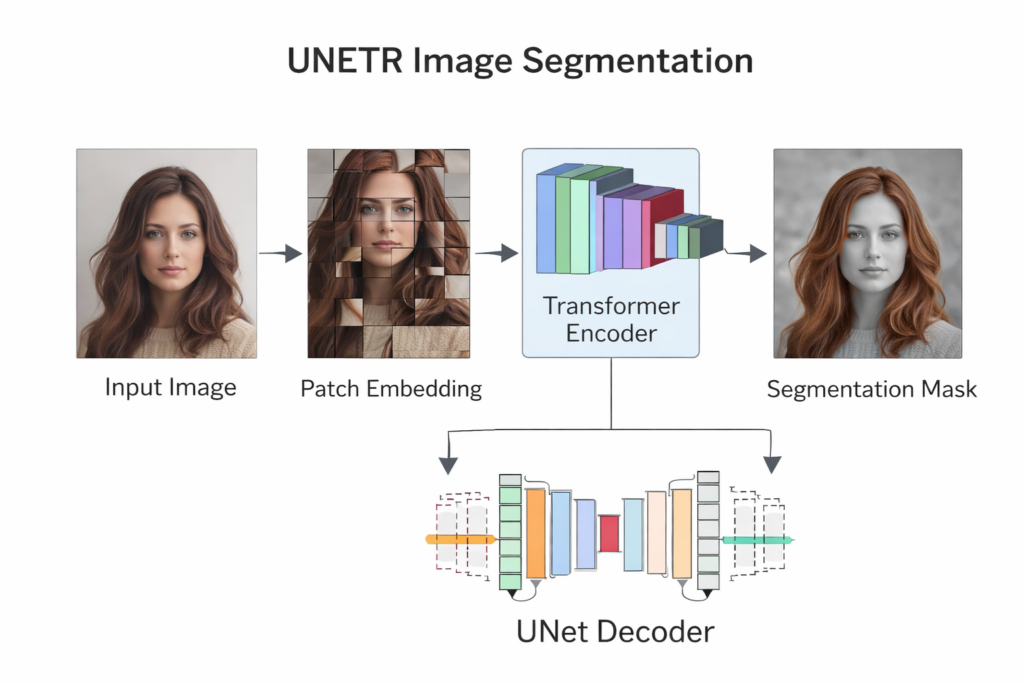
At its core, UNETR (short for UNEt with TRansformers) bridges two influential ideas: the hierarchical representation learning of CNNs and the self-attention mechanisms of transformers. In semantic segmentation, the goal is to assign a class label to each pixel in an image. This requires both precise local feature extraction to determine edges and textures and a broad understanding of the image layout to distinguish between objects. UNETR tackles this by encoding patches of the input image into a sequence of embeddings that the transformer layers can process, preserving spatial information while learning intricate patterns.
The application of Unetr image segmentation is particularly beneficial for detailed segmentation tasks where context matters. For example, in medical imaging, identifying fine structures within scans or isolating specific tissues requires models that can interpret subtle variations across different regions of the image. The transformer backbone excels at learning global context, helping to resolve ambiguities that local filters alone might miss. Similarly, in tasks like hair segmentation in real-world photos, the contours and boundaries of hair can be complex and varied, making transformer-enhanced models well suited for the job.
Training a UNETR model involves preparing datasets of images and corresponding pixel masks, often converting raw data formats into structured image files. Once trained, the model can predict segmentation masks on new images, enabling applications like background removal, augmented reality, or detailed analysis in automated systems. The blend of transformer capabilities with the structural decoding power of U-Net gives UNETR models a distinct edge in challenging segmentation scenarios.
What Unetr image segmentation Really Means (At a High Level)
When we talk about Unetr image segmentation, we’re discussing a modern method for teaching machines to understand exactly which pixels belong to which object in an image — and doing it with a backbone that’s inspired by transformer networks. Unlike older techniques that rely solely on convolutional layers to scan for patterns in small local patches, UNETR introduces a mechanism for the model to look across the entire image at once.
At a high-level, the goal of UNETR is to maintain a rich understanding of both local details and global context. Image segmentation is inherently a pixel-precise task; if the model mislabels even a small border, the output can look unnatural or be unusable for sensitive applications. Transformers help by using self-attention — a way for the model to decide which parts of the image relate to each other, regardless of spatial distance — which is especially useful in complex scenes where the correct interpretation relies on understanding larger structures.
Training a UNETR model usually starts with splitting an image into smaller patches, then converting those patches into a sequence that a transformer can process. This is similar to how sentences are tokenized in language models, except here the tokens represent image regions. The transformer encoder then processes this sequence to capture relationships across the full image. Meanwhile, the decoder combines these learned representations back into a full-size image mask, reconstructing each pixel’s label.
The output of Unetr image segmentation gives you a pixel-wise classification map — a mask — that highlights the object of interest (for example, hair in a photograph). These masks can be used for visualization, further analysis, or downstream tasks like compositing or real-time video processing. Because UNETR leverages both transformer vision capability and encoder-decoder structure, it performs particularly well on tasks where complexity and detail are equally important.

Building a Practical UNETR Image Segmentation Pipeline with Python & TensorFlow
This tutorial walks through a complete, end-to-end workflow for unetr image segmentation, focusing not just on the theory — but on real, working Python code. The goal of the project is to train a UNETR-based segmentation model that can accurately detect and segment hair in images. To do that, the code covers everything from preparing the dataset, converting Parquet files into usable image-mask pairs, preprocessing them into patches for the transformer encoder, training the UNETR model, and finally testing it on unseen data to generate segmentation masks.
The first stage of the codebase makes sure your working environment is correctly set up. A dedicated Conda environment is created so dependencies like TensorFlow, OpenCV, PyArrow, and supporting libraries are installed cleanly. This ensures compatibility with the model code and avoids version conflicts — something that is especially important when dealing with deep learning frameworks. Once the environment is configured, the dataset is downloaded and converted from Parquet format into regular image and mask files that are easy to load and process.
From there, the focus shifts to preparing the data for the model. The code reads each image and mask, resizes them to a standard resolution, and converts images into small patches. These patches are then flattened and fed into the transformer encoder inside the UNETR architecture. This patch-based strategy allows the model to learn both local detail and global context. Masks are normalized and shaped so the model learns pixel-wise classification, which is essential for segmentation tasks.
The final part of the workflow is where everything comes together. The model is trained with callbacks for checkpointing, logging, and learning rate scheduling, helping it converge more effectively. Once trained, the code loads the best model and runs it on a set of test images. The predictions are reconstructed back into full-resolution masks and displayed side-by-side with the original image and ground-truth labels. This gives a clear visual comparison of how well the UNETR model learned to perform hair segmentation — closing the loop from raw dataset to meaningful, real-world output.
Link to the video tutorial : https://youtu.be/f1UdSemIlh0
You can download the code here : https://eranfeit.lemonsqueezy.com/checkout/buy/bc36d134-06aa-46fd-b9e3-8bdd0f907574 or here : https://ko-fi.com/s/11e9fbdea9
Link to the post for Medium.com users : https://medium.com/vision-transformers-tutorials/hair-segmentation-using-transformers-unetr-image-segmentation-3a762474e58d
Reinvent your look in seconds by uploading your photo and using Funy AI’s Hairstyle and Hair Color changers. This all in one platform also provides an extensive suite of free AI tools to generate and edit videos and images – from text to video and gender swap videos to headshot generators, background removers and photo enhancers explore the full toolkit here
You can follow my blog here : https://eranfeit.net/blog/
Want to get started with Computer Vision or take your skills to the next level ?
Great Interactive Course : “Deep Learning for Images with PyTorch” here : https://datacamp.pxf.io/zxWxnm
If you’re just beginning, I recommend this step-by-step course designed to introduce you to the foundations of Computer Vision – Complete Computer Vision Bootcamp With PyTorch & TensorFlow
If you’re already experienced and looking for more advanced techniques, check out this deep-dive course – Modern Computer Vision GPT, PyTorch, Keras, OpenCV4
Hair segmentation using Transformers | UNETR Image Segmentation
unetr image segmentation is a powerful deep learning technique that combines modern transformer architectures with traditional encoder-decoder segmentation pipelines.
In this tutorial you will see a full hands-on workflow in Python and TensorFlow — from setting up your environment, preparing the dataset, converting raw Parquet files into image masks, training a UNETR model, and finally testing it.
Each section presents the code, explained in a human-friendly way so you not only run it but understand the purpose of every step.
Setting Up Your Python Environment for UNETR
Before diving into segmentation code, you need a stable Python environment with all necessary libraries.
In this first part, the code creates a Conda environment and installs specific versions of core Python packages that ensure compatibility with TensorFlow, OpenCV, and data processing tools used throughout the workflow.
This setup is critical for reproducibility and avoiding version conflicts when you run heavy deep learning training routines.
Below is the setup code that you run once to prepare your system.
conda create -n UnetR python=3.11 conda activate UnetR pip install pandas==2.2.3 pip install pyarrow==18.1.0 pip install pillow==11.0.0 pip install tqdm==4.67.1 pip install tensorflow[and-cuda]==2.17.1 pip install tensorflow==2.17.1 pip install opencv-python==4.10.0.84 pip install scikit-learn==1.6.0 pip install patchify==0.2.3 Summary:
You now have a dedicated Python environment with all the right libraries to run the UNETR hair segmentation pipeline.
Preparing the Dataset from Parquet Files
In this section you take the Figaro hair segmentation dataset, which is stored in Parquet format, and convert it into standard image files.
Deep learning models work with image and mask pairs on disk, so this step converts raw bytes in Parquet fields into PNGs you can load in training.
The following code loops through every row of the Parquet file, saves the corresponding image and mask to appropriate folders, and builds a structured dataset on disk.
### Import the pandas library to handle Parquet file reading and manipulation. import pandas as pd ### Import the os library for file and directory operations. import os ### Import the Image class from PIL to convert raw bytes to image files. from PIL import Image ### Import io to treat raw bytes like file streams. import io ### Import tqdm for showing a progress bar over iterations. from tqdm import tqdm ### Define a function to extract images and labels from a Parquet file and save them as PNGs. def extract_images_from_parquet(parquet_file, output_base_folder, dataset_type): ### Load the Parquet file into a pandas DataFrame. df = pd.read_parquet(parquet_file) ### Create folders for images and mask labels. dataset_folder = os.path.join(output_base_folder, dataset_type) image_folder = os.path.join(dataset_folder, "images") label_folder = os.path.join(dataset_folder, "masks") os.makedirs(image_folder, exist_ok=True) os.makedirs(label_folder, exist_ok=True) ### Loop through every row and save the image and label with a progress bar. print(f"Processing {dataset_type} dataset...") for idx, row in tqdm(df.iterrows(), total=len(df), desc=f"Saving {dataset_type} images"): image_data = row['image'] if isinstance(image_data, dict) and 'bytes' in image_data: image = Image.open(io.BytesIO(image_data['bytes'])) image.save(os.path.join(image_folder, f"image_{idx}.png")) label_data = row['label'] if isinstance(label_data, dict) and 'bytes' in label_data: label = Image.open(io.BytesIO(label_data['bytes'])) label.save(os.path.join(label_folder, f"label_{idx}.png")) print(f"{dataset_type.capitalize()} images and labels saved successfully.") ### Set local paths for Parquet files for train and test sets. train_parquet_file = "D:/Data-Sets-Object-Segmentation/figaro_hair_segmentation_1000/train-00000-of-00001-910d2af14081f419.parquet" test_parquet_file = "D:/Data-Sets-Object-Segmentation/figaro_hair_segmentation_1000/validation-00000-of-00001-55044d1c657fc998.parquet" ### Define where to save the extracted images and masks. output_folder = "D:/Data-Sets-Object-Segmentation/figaro_hair_segmentation_1000" ### Extract and save images and labels for both train and test sets. extract_images_from_parquet(train_parquet_file, output_folder, "train") extract_images_from_parquet(test_parquet_file, output_folder, "test") Summary:
Your dataset now lives in a clean folder structure with PNG images and corresponding masks — ready for training.
Building the UNETR Training Pipeline
With the data prepared on disk, it’s time to define how you’ll train the UNETR model.
This part of the code loads the saved images and masks, prepares them into patch-based input suitable for transformers, and defines the model training loop with callbacks to save the best results and control learning.
The goal here is to take raw images, split them into patches (so transformers can process them), normalize values, and feed them into a customized UNETR model that combines transformer encoding and U-Net style decoding for segmentation.
### Import OS for handling paths and directories. import os ### Import NumPy for numerical operations on images and patches. import numpy as np ### Import CV2 for image loading and resizing. import cv2 ### Import glob for listing image files. from glob import glob ### Import shuffle utility from sklearn (not used directly but useful for randomization). from sklearn.utils import shuffle ### Import TensorFlow and relevant Keras components. import tensorflow as tf from tensorflow.keras.callbacks import ModelCheckpoint, CSVLogger, ReduceLROnPlateau, EarlyStopping from tensorflow.keras.optimizers import Adam, SGD from sklearn.model_selection import train_test_split ### Import patchify to break images into smaller patches. from patchify import patchify ### Import UNETR model builder and loss function definitions. from unetr_2d import build_unetr_2d from metrics import dice_loss ### Define configuration for UNETR (image size, patch size, number of transformer layers). cf = {} cf["image_size"] = 256 cf["num_channels"] = 3 cf["num_layers"] = 12 cf["hidden_dim"] = 128 cf["mlp_dim"] = 32 cf["num_heads"] = 6 cf["dropout_rate"] = 0.1 cf["patch_size"] = 16 cf["num_patches"] = (cf["image_size"]**2)//(cf["patch_size"]**2) cf["flat_patches_shape"] = ( cf["num_patches"], cf["patch_size"]*cf["patch_size"]*cf["num_channels"] ) ### Create output directories safely. def create_dir(path): if not os.path.exists(path): os.makedirs(path) ### Load dataset image and mask file lists and split them into training, validation, and test subsets. def load_dataset(path, split=0.1): X = sorted(glob(os.path.join(path, "train", "images", "*.png"))) Y = sorted(glob(os.path.join(path, "train", "masks", "*.png"))) split_size = int(len(X) * split) train_x, valid_x = train_test_split(X, test_size=split_size, random_state=42) train_y, valid_y = train_test_split(Y, test_size=split_size, random_state=42) test_x = sorted(glob(os.path.join(path, "test", "images", "*.png"))) test_y = sorted(glob(os.path.join(path, "test", "masks", "*.png"))) return (train_x, train_y), (valid_x, valid_y), (test_x, test_y) ### Functions for reading images and masks, creating patches suitable for transformers. def read_image(path): path = path.decode() image = cv2.imread(path, cv2.IMREAD_COLOR) image = cv2.resize(image, (cf["image_size"], cf["image_size"])) image = image / 255.0 patch_shape = (cf["patch_size"], cf["patch_size"], cf["num_channels"]) patches = patchify(image, patch_shape, cf["patch_size"]) patches = np.reshape(patches, cf["flat_patches_shape"]) patches = patches.astype(np.float32) return patches def read_mask(path): path = path.decode() mask = cv2.imread(path, cv2.IMREAD_GRAYSCALE) mask = cv2.resize(mask, (cf["image_size"], cf["image_size"])) mask = mask / 255.0 mask = mask.astype(np.float32) mask = np.expand_dims(mask, axis=-1) return mask def tf_parse(x, y): def _parse(x, y): x = read_image(x) y = read_mask(y) return x, y x, y = tf.numpy_function(_parse, [x, y], [tf.float32, tf.float32]) x.set_shape(cf["flat_patches_shape"]) y.set_shape([cf["image_size"], cf["image_size"], 1]) return x, y def tf_dataset(X, Y, batch=2): ds = tf.data.Dataset.from_tensor_slices((X, Y)) ds = ds.map(tf_parse).batch(batch).prefetch(10) return ds Summary:
You now have a pipeline that reads images, converts them into transformer-friendly patches, and bundles them into TensorFlow datasets for training.
Training the UNETR Segmentation Model
Now that the dataset pipeline is ready, the next step is to actually train the UNETR model.
This part of the code seeds randomness for reproducibility, prepares output folders, defines hyperparameters, builds the UNETR model, compiles it with Dice loss, and starts the training loop with callbacks like checkpointing and early stopping.
The goal is to teach the model how to recognize hair pixels vs background pixels based on the training dataset.
Here is the full training script section:
### Ensure consistent results by setting NumPy and TensorFlow random seeds. if __name__ == "__main__": ### Set NumPy seed. np.random.seed(42) ### Set TensorFlow seed. tf.random.set_seed(42) ### Create a directory to store trained model files and logs. create_dir("D:/Temp/Models/Unet-Binray") ### Define training hyperparameters. batch_size = 8 lr = 0.1 num_epochs = 500 ### Define where the trained model and logs will be stored. model_path = os.path.join("D:/Temp/Models/Unet-Binray", "model.keras") csv_path = os.path.join("D:/Temp/Models/Unet-Binray", "log.csv") ### Set dataset path. dataset_path = "D:/Data-Sets-Object-Segmentation/figaro_hair_segmentation_1000" ### Load dataset splits for training, validation, and testing. (train_x, train_y), (valid_x, valid_y), (test_x, test_y) = load_dataset(dataset_path) ### Build TensorFlow datasets from image and mask file lists. train_dataset = tf_dataset(train_x, train_y, batch=batch_size) valid_dataset = tf_dataset(valid_x, valid_y, batch=batchSize) ### Build the UNETR model based on the configuration dictionary. model = build_unetr_2d(cf) ### Compile the model using Dice loss and SGD optimizer. model.compile(loss=dice_loss, optimizer=SGD(lr)) ### Print model summary. print(model.summary()) ### Define callbacks for saving best model, adjusting learning rate, logging training, and stopping early. callbacks = [ ModelCheckpoint(model_path, verbose=1, save_best_only=True), ReduceLROnPlateau(monitor='val_loss', factor=0.1, patience=5, min_lr=1e-7, verbose=1), CSVLogger(csv_path), EarlyStopping(monitor='val_loss', patience=20, restore_best_weights=False) ] ### Train the UNETR model using dataset pipelines and callbacks. model.fit( train_dataset, epochs=num_epochs, validation_data=valid_dataset, callbacks=callbacks ) Summary:
At the end of this step, you will have a trained UNETR model saved as model.keras, ready to make segmentation predictions.
Custom Dice Metric and the UNETR Architecture Definition
The model relies on Dice loss, a segmentation-friendly metric that measures how well the predicted mask overlaps with the ground truth mask.
Alongside that, the UNETR architecture is defined using transformer encoder blocks on patch embeddings, combined with a U-Net-style decoder that reconstructs pixel-level predictions.
Below are the supporting files: metrics.py and unetr_2d.py.
Save the following code as metrics.py
### Import NumPy and TensorFlow for mathematical operations and tensors. import numpy as np import tensorflow as tf ### Define a small constant to avoid division by zero. smooth = 1e-15 ### Define the Dice coefficient metric to measure segmentation overlap. def dice_coef(y_true, y_pred): y_true = tf.keras.layers.Flatten()(y_true) y_pred = tf.keras.layers.Flatten()(y_pred) intersection = tf.reduce_sum(y_true * y_pred) return (2. * intersection + smooth) / (tf.reduce_sum(y_true) + tf.reduce_sum(y_pred) + smooth) ### Define Dice loss as one minus Dice coefficient. def dice_loss(y_true, y_pred): return 1.0 - dice_coef(y_true, y_pred) Save the following code as unetr_2d.py
### Import OS and math utilities. import os from math import log2 ### Import TensorFlow and Keras layers. import tensorflow as tf import tensorflow.keras.layers as L from tensorflow.keras.models import Model ### Define MLP feedforward block. def mlp(x, cf): x = L.Dense(cf["mlp_dim"], activation="gelu")(x) x = L.Dropout(cf["dropout_rate"])(x) x = L.Dense(cf["hidden_dim"])(x) x = L.Dropout(cf["dropout_rate"])(x) return x ### Define transformer encoder block using attention and residual connections. def transformer_encoder(x, cf): skip_1 = x x = L.LayerNormalization()(x) x = L.MultiHeadAttention( num_heads=cf["num_heads"], key_dim=cf["hidden_dim"] )(x, x) x = L.Add()([x, skip_1]) skip_2 = x x = L.LayerNormalization()(x) x = mlp(x, cf) x = L.Add()([x, skip_2]) return x ### Define convolution and deconvolution helper blocks. def conv_block(x, num_filters, kernel_size=3): x = L.Conv2D(num_filters, kernel_size=kernel_size, padding="same")(x) x = L.BatchNormalization()(x) x = L.ReLU()(x) return x def deconv_block(x, num_filters, strides=2): x = L.Conv2DTranspose(num_filters, kernel_size=2, padding="same", strides=strides)(x) return x ### Build the complete UNETR model. def build_unetr_2d(cf): input_shape = (cf["num_patches"], cf["patch_size"]*cf["patch_size"]*cf["num_channels"]) inputs = L.Input(input_shape) patch_embed = L.Dense(cf["hidden_dim"])(inputs) positions = tf.range(start=0, limit=cf["num_patches"], delta=1) pos_embed = L.Embedding(input_dim=cf["num_patches"], output_dim=cf["hidden_dim"])(positions) x = patch_embed + pos_embed skip_connection_index = [3, 6, 9, 12] skip_connections = [] for i in range(1, cf["num_layers"]+1, 1): x = transformer_encoder(x, cf) if i in skip_connection_index: skip_connections.append(x) z3, z6, z9, z12 = skip_connections z0 = L.Reshape((cf["image_size"], cf["image_size"], cf["num_channels"]))(inputs) shape = ( cf["image_size"]//cf["patch_size"], cf["image_size"]//cf["patch_size"], cf["hidden_dim"] ) z3 = L.Reshape(shape)(z3) z6 = L.Reshape(shape)(z6) z9 = L.Reshape(shape)(z9) z12 = L.Reshape(shape)(z12) total_upscale_factor = int(log2(cf["patch_size"])) upscale = total_upscale_factor - 4 if upscale >= 2: z3 = deconv_block(z3, z3.shape[-1], strides=2**upscale) z6 = deconv_block(z6, z6.shape[-1], strides=2**upscale) z9 = deconv_block(z9, z9.shape[-1], strides=2**upscale) z12 = deconv_block(z12, z12.shape[-1], strides=2**upscale) if upscale < 0: p = 2**abs(upscale) z3 = L.MaxPool2D((p, p))(z3) z6 = L.MaxPool2D((p, p))(z6) z9 = L.MaxPool2D((p, p))(z9) z12 = L.MaxPool2D((p, p))(z12) x = deconv_block(z12, 128) s = deconv_block(z9, 128) s = conv_block(s, 128) x = L.Concatenate()([x, s]) x = conv_block(x, 128) x = conv_block(x, 128) x = deconv_block(x, 64) s = deconv_block(z6, 64) s = conv_block(s, 64) s = deconv_block(s, 64) s = conv_block(s, 64) x = L.Concatenate()([x, s]) x = conv_block(x, 64) x = conv_block(x, 64) x = deconv_block(x, 32) s = deconv_block(z3, 32) s = conv_block(s, 32) s = deconv_block(s, 32) s = conv_block(s, 32) s = deconv_block(s, 32) s = conv_block(s, 32) x = L.Concatenate()([x, s]) x = conv_block(x, 32) x = conv_block(x, 32) x = deconv_block(x, 16) s = conv_block(z0, 16) s = conv_block(s, 16) x = L.Concatenate()([x, s]) x = conv_block(x, 16) x = conv_block(x, 16) outputs = L.Conv2D(1, kernel_size=1, padding="same", activation="sigmoid")(x) return Model(inputs, outputs, name="UNETR_2D") Summary:
These scripts define the UNETR architecture and scoring metric that make hair segmentation accurate and transformer-powered.
Testing the Trained UNETR Model on New Images
Once the model is trained, the final script loads the best saved checkpoint and runs predictions on the test dataset.
Each image is converted back to patch format, fed into the transformer encoder, reconstructed into a full mask, and saved side-by-side with the original and ground truth for visual comparison.
Here is the testing code:
### Import core libraries for filesystem, math, and image processing. import os import numpy as np import cv2 import pandas as pd from glob import glob from tqdm import tqdm import tensorflow as tf from patchify import patchify ### Import dataset loader and helper. from Step2TrainUnetRModel import load_dataset, create_dir from metrics import dice_loss ### Define the UNETR configuration. cf = {} cf["image_size"] = 256 cf["num_channels"] = 3 cf["num_layers"] = 12 cf["hidden_dim"] = 128 cf["mlp_dim"] = 32 cf["num_heads"] = 6 cf["dropout_rate"] = 0.1 cf["patch_size"] = 16 cf["num_patches"] = (cf["image_size"]**2)//(cf["patch_size"]**2) cf["flat_patches_shape"] = ( cf["num_patches"], cf["patch_size"]*cf["patch_size"]*cf["num_channels"] ) ### Main testing logic. if __name__ == "__main__": ### Fix random seeds. np.random.seed(42) tf.random.set_seed(42) ### Create folder to store results. resultsFolder = "D:/Temp/Models/Unet-Binray/results" create_dir(resultsFolder) ### Load best saved model. model_path = os.path.join("D:/Temp/Models/Unet-Binray", "model.keras") model = tf.keras.models.load_model(model_path, custom_objects={"dice_loss": dice_loss}) ### Load dataset. dataset_path = "D:/Data-Sets-Object-Segmentation/figaro_hair_segmentation_1000" (train_x, train_y), (valid_x, valid_y), (test_x, test_y) = load_dataset(dataset_path) print(f"Train: \t{len(train_x)} - {len(train_y)}") print(f"Valid: \t{len(valid_x)} - {len(valid_y)}") print(f"Test: \t{len(test_x)} - {len(test_y)}") ### Loop through test images and predict masks. for x, y in tqdm(zip(test_x, test_y), total=len(test_x)): name = os.path.basename(x) print(name) image = cv2.imread(x, cv2.IMREAD_COLOR) image = cv2.resize(image, (cf["image_size"], cf["image_size"])) x = image / 255.0 patch_shape = (cf["patch_size"], cf["patch_size"], cf["num_channels"]) patches = patchify(x, patch_shape, cf["patch_size"]) patches = np.reshape(patches, cf["flat_patches_shape"]) patches = patches.astype(np.float32) patches = np.expand_dims(patches, axis=0) mask = cv2.imread(y, cv2.IMREAD_GRAYSCALE) mask = cv2.resize(mask, (cf["image_size"], cf["image_size"])) mask = mask / 255.0 mask = np.expand_dims(mask, axis=-1) mask = np.concatenate([mask, mask, mask], axis=-1) pred = model.predict(patches, verbose=0)[0] pred = np.concatenate([pred, pred, pred], axis=-1) line = np.ones((cf["image_size"], 10, 3)) * 255 cat_images = np.concatenate([image, line, mask*255, line, pred*255], axis=1) save_image_path = os.path.join(resultsFolder, name) cv2.imwrite(save_image_path, cat_images) cat_images_for_display = cat_images.astype(np.uint8) cv2.imshow("Result", cv2.cvtColor(cat_images_for_display, cv2.COLOR_RGB2BGR) ) cv2.waitKey(1) cv2.destroyAllWindows() Summary:
You now visually compare original images, ground-truth hair masks, and UNETR predictions — confirming how well unetr image segmentation works in practice.
FAQ — UNETR Image Segmentation
What is UNETR image segmentation?
It is a segmentation method that combines transformer encoders with a U-Net style decoder for pixel-level classification.
Why use transformers for image segmentation?
Transformers learn global relationships across the whole image, improving segmentation quality.
What dataset is used here?
The Figaro hair segmentation dataset is used for training and testing.
What is Dice loss?
Dice loss measures overlap between predicted and true segmentation masks, making it ideal for segmentation tasks.
Can the model run on CPU?
Yes, but GPU hardware is recommended for faster training performance.
Conclusion
This tutorial walked through a complete unetr image segmentation pipeline — from preparing a hair segmentation dataset, converting Parquet data into image files, preprocessing inputs into patches, training a transformer-powered UNETR model, and finally testing it on real images.
By combining transformer encoders with a U-Net decoder, UNETR brings powerful global context understanding into pixel-level segmentation. That makes it especially effective for hair, medical images, and other tasks where fine detail matters.
The code shown here is designed to be practical and reproducible. You install the right environment, prepare your dataset carefully, define your model using modern deep learning techniques, and evaluate results visually.
Whether you are new to segmentation or already experienced in deep learning, UNETR gives you a state-of-the-art way to work with pixel-based predictions in a structured and scalable workflow.
Connect :
☕ Buy me a coffee — https://ko-fi.com/eranfeit
🖥️ Email : feitgemel@gmail.com
🤝 Fiverr : https://www.fiverr.com/s/mB3Pbb
Enjoy,
Eran