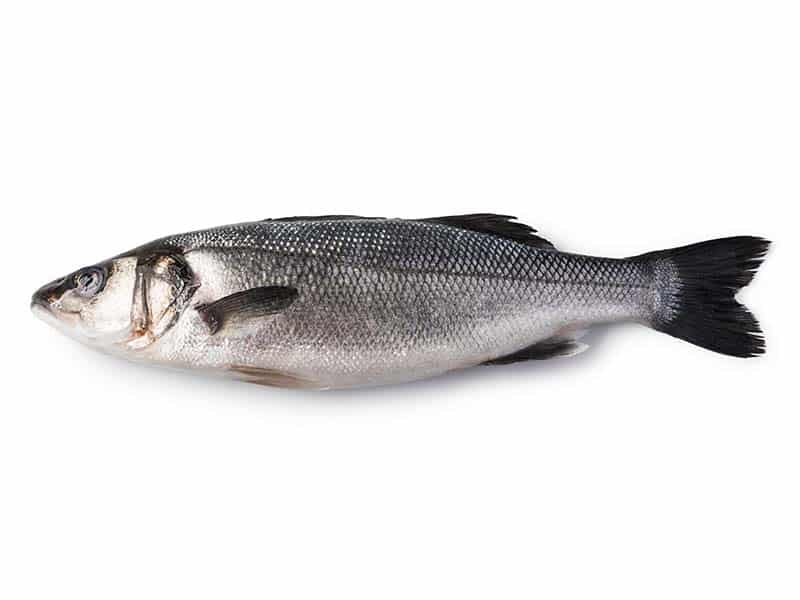
How To Actually Fine-Tune MobileNetV2 | Classify 9 Fish Species / TensorFlow tutorials, Image Classification Contents hide 1 🎣 Classify Fish Images Using MobileNetV2 & TensorFlow 🧠 1.1 Want the exact dataset so your results match mine? 2 Installation : 3 Part 1 : Prepare the data 4 Part 2 : Build The Model based on Transfer Learning 5 Part 3 : Test the model (Inference) 6 Connect : Last Updated on 27/09/2026 by Eran Feit 🎣 Classify Fish Images Using MobileNetV2 & TensorFlow 🧠 In this hands-on video, I’ll show you how I built a deep learning model that can classify 9 different species of fish using MobileNetV2 and TensorFlow 2.10 — all trained on a real dataset! This Tensorflow image recognition tutorial covers from dataset splitting to live predictions with OpenCV, and demonstrate image classification pipeline. 🚀 What you’ll learn: How to preprocess & split image datasets How to use ImageDataGenerator for clean input pipelines How to customize MobileNetV2 for your own dataset How to freeze layers, fine-tune, and save your model How to run predictions with OpenCV overlays! 👉 Watch the full tutorial here: https://youtu.be/9FMVlhOGDoo You can download the full code here : https://eranfeit.lemonsqueezy.com/buy/5d89850f-e8e4-4b3b-b396-51063302dacb or : https://ko-fi.com/s/44ce6c2ad8 You can find more tutorials, and join my newsletter here : https://eranfeit.net/ Want the exact dataset so your results match mine? If you want to reproduce the same training flow and compare your results to mine, I can share the dataset structure and what I used in this tutorial. Send me an email and mention the name of the tutorial / dataset , so I know what you’re requesting. 🖥️ Email: feitgemel@gmail.com Face Manipulation Pipelines Free Face Swap: How to Swap Any Video with Local AI (No Limits) Execute unlimited, offline high-resolution face swapping on your local GPU without cloud subscriptions. Subscription FormSend me tutorials TRY IT NOW Master Computer Vision Follow my latest tutorials and AI insights on my Personal Blog. Beginner Complete CV Bootcamp Foundation using PyTorch & TensorFlow. Get Started → Interactive Deep Learning with PyTorch Hands-on practice in an interactive environment. Start Learning → Advanced Modern CV: GPT & OpenCV4 Vision GPT and production-ready models. Go Advanced → Installation : The code is based on this components : # ───────────────────────────── # Environment requirements # ───────────────────────────── # pip install tensorflow==2.10 # deep-learning framework # pip install numpy # numerical arrays # pip install opencv-python # image I/O + basic CV # Python version : 3.9.16 You can download the full code here : https://ko-fi.com/s/44ce6c2ad8 Part 1 : Prepare the data This part of the code prepares the dataset for a deep learning classification model. It automates the process of: Reading the raw image folders (each representing a different fish species), Creating a new folder structure for training and validation, Splitting the images in each category into training (85%) and validation (15%) sets, Copying them into separate subdirectories for train and validate, maintaining the original category structure. # Import required libraries import os import random import shutil # Define the split ratio: 85% for training, 15% for validation splitsize = .85 categories = [] # Path to the raw dataset directory that contains folders for each class source_folder = "E:/Data-sets/A Large Scale Fish Dataset/Fish_Dataset/Fish_Dataset" # List all entries (files/folders) in the source directory folders = os.listdir(source_folder) print(folders) # Collect only the folder names (classes), ignoring any files for subfolder in folders: if os.path.isdir(source_folder + "/" + subfolder): categories.append(subfolder) # Sort the categories alphabetically for consistency categories.sort() print(categories) # Define the target folder for the processed dataset target_folder = "E:/Data-sets/A Large Scale Fish Dataset/Fish_Dataset/dataset_for_model" # Create the target directory if it doesn't exist existDataSetPath = os.path.exists(target_folder) if existDataSetPath==False: os.mkdir(target_folder) # ------------------------------ # Function: split_data # Purpose: split a folder of images into training and validation sets # ------------------------------ def split_data(SOURCE , TRAINING, VALIDATION, SPLIT_SIZE): files=[] # Loop over all files in the source folder for filename in os.listdir(SOURCE): file = SOURCE + filename print(file) # Ignore empty files (size = 0) if os.path.getsize(file) > 0 : files.append(filename) else: print(filename + " is 0 length , ignot it ....") print(len(files)) # Randomly shuffle the list and split based on the split ratio trainingLength = int(len(files) * SPLIT_SIZE ) shuffleSet = random.sample(files , len(files)) trainingSet = shuffleSet[0:trainingLength] validSet = shuffleSet[trainingLength:] # Copy the training files to the training folder for filename in trainingSet : thisFile = SOURCE + filename destination = TRAINING + filename shutil.copyfile(thisFile , destination) # Copy the validation files to the validation folder for filename in validSet : thisFile = SOURCE + filename destination = VALIDATION + filename shutil.copyfile(thisFile , destination) # Define paths for train and validate folders trainPath = target_folder + "/train" print(trainPath) validatePath = target_folder + "/validate" # Create the train and validate folders if they don't exist exitsDataSetPth = os.path.exists(trainPath) print(exitsDataSetPth) if not(exitsDataSetPth): os.mkdir(trainPath) exitsDataSetPth = os.path.exists(validatePath) if exitsDataSetPth==False: os.mkdir(validatePath) # ------------------------------ # Loop over each category and prepare folders # ------------------------------ for category in categories: # Paths where training and validation images of this category will be stored trainDestPath = trainPath + "/" + category validateDestPath = validatePath + "/" + category print(trainDestPath) # Create category subfolders if they don’t exist if os.path.exists(trainDestPath)==False : os.mkdir(trainDestPath) if os.path.exists(validateDestPath)==False : os.mkdir(validateDestPath) # Define source and destination paths sourePath = source_folder + "/" + category + "/" trainDestPath = trainDestPath + "/" validateDestPath = validateDestPath + "/" # Log the source and destination of copying print("Copy from : "+sourePath + " to : " + trainDestPath + " and " +validateDestPath) # Split and copy the data split_data(sourePath , trainDestPath , validateDestPath , splitsize) You can download the full code here : https://ko-fi.com/s/44ce6c2ad8 Part 2 : Build The Model based on Transfer Learning This code builds a deep learning image classification model using transfer learning with the pre-trained MobileNetV2 as a base. It adds custom fully connected layers on top, compiles the model with the Adam optimizer and a low learning rate, and then trains it on the fish dataset prepared earlier. After training, the model is saved to disk for later inference. The approach leverages ImageNet pre-trained weights to reduce training time and improve performance on a smaller dataset by only training the new top layers. # Import necessary Keras modules from tensorflow.keras import Model from tensorflow.keras.applications.mobilenet_v2 import MobileNetV2 , preprocess_input from tensorflow.keras.preprocessing.image import ImageDataGenerator from tensorflow.keras.layers import Dense, GlobalAveragePooling2D from tensorflow.keras.optimizers import Adam # Define paths to training and validation datasets train_path = "E:/Data-sets/A Large Scale Fish Dataset/Fish_Dataset/dataset_for_model/train" validation_path = "E:/Data-sets/A Large Scale Fish Dataset/Fish_Dataset/dataset_for_model/validate" # ------------------------------ # Create image generators with preprocessing (MobileNet expects input preprocessed this way) # ------------------------------ trainGenerator = ImageDataGenerator( preprocessing_function=preprocess_input ).flow_from_directory( train_path, target_size=(224, 224), # Resize images to MobileNetV2 expected size batch_size=30 ) validGenerator = ImageDataGenerator( preprocessing_function=preprocess_input ).flow_from_directory( validation_path, target_size=(224, 224), batch_size=30 ) # ------------------------------ # Build the transfer learning model # ------------------------------ # Load pre-trained MobileNetV2 without its top (classification) layers baseModel = MobileNetV2(weights='imagenet', include_top=False) # Add custom layers on top x = baseModel.output x = GlobalAveragePooling2D()(x) # Reduce spatial dimensions into a single vector x = Dense(512, activation='relu')(x) # First custom fully-connected layer x = Dense(256, activation='relu')(x) # Second custom fully-connected layer x = Dense(128, activation='relu')(x) # Third custom fully-connected layer # Final prediction layer (9 classes, softmax for multi-class) predictLayer = Dense(9, activation='softmax')(x) # Create the full model from input to custom output model = Model(inputs=baseModel.input, outputs=predictLayer) # Print model summary to visualize architecture print(model.summary()) # ------------------------------ # Freeze all the layers in base MobileNetV2 (except last 5 layers we added) # ------------------------------ for layer in model.layers[:-5]: # Freeze everything except last layers (our custom layers) layer.trainable = False # ------------------------------ # Compile the model # ------------------------------ epochs = 5 optimizer = Adam(learning_rate=0.0001) # Use a small learning rate for transfer learning model.compile( loss="categorical_crossentropy", # Multi-class classification loss optimizer=optimizer, metrics=['accuracy'] ) # ------------------------------ # Train the model on the training data and validate on validation set # ------------------------------ model.fit( trainGenerator, validation_data=validGenerator, epochs=epochs ) # ------------------------------ # Save the trained model to disk # ------------------------------ path_for_saved_model = "E:/Data-sets/A Large Scale Fish Dataset/Fish_Dataset/dataset_for_model/fishV2.h5" model.save(path_for_saved_model) You can download the full code here : https://ko-fi.com/s/44ce6c2ad8 Part 3 : Test the model (Inference) This is the test image : How To Actually Fine-Tune MobileNetV2 | Classify 9 Fish Species 8 This code loads the trained MobileNetV2 model and performs image classification on a test image. It: Loads and resizes a new image, Preprocesses it to match MobileNetV2 input format, Uses the model to predict which fish species is present, Maps the prediction index to the correct class name, Annotates the image with the prediction label using OpenCV, Saves and displays the annotated image. This is the final step that simulates real-world prediction/inference after training. # Import necessary libraries import os from tensorflow.keras.preprocessing import image from tensorflow.keras.applications.mobilenet_v2 import MobileNetV2 , preprocess_input from PIL import Image import numpy as np import tensorflow as tf import cv2 # ------------------------------ # Get the list of class names (categories) used during training # ------------------------------ categories = os.listdir("E:/Data-sets/A Large Scale Fish Dataset/Fish_Dataset/dataset_for_model/train") categories.sort() # Sort to match the training label order print(categories) # ------------------------------ # Load the trained model from the saved .h5 file # ------------------------------ path_for_saved_model = "E:/Data-sets/A Large Scale Fish Dataset/Fish_Dataset/dataset_for_model/fishV2.h5" model = tf.keras.models.load_model(path_for_saved_model) # Optional: Uncomment to print the model architecture # print(model.summary()) # ------------------------------ # Define a function to classify a single image # ------------------------------ def classify_image(imageFile): x = [] # Load the image using PIL img = Image.open(imageFile) img.load() # Resize image to match MobileNetV2 expected input size img = img.resize((224,224), Image.ANTIALIAS) # Convert the PIL image to numpy array format x = image.img_to_array(img) # Expand dimensions to add batch size (1, 224, 224, 3) x = np.expand_dims(x , axis=0) # Preprocess the image to match MobileNetV2 input scaling x = preprocess_input(x) # Debug: print the shape of the image input print(x.shape) # Run prediction pred = model.predict(x) # Get the index of the highest probability categoryValue = np.argmax(pred , axis=1) print(categoryValue) # Extract the index as an integer categoryValue = categoryValue[0] print(categoryValue) # Map prediction index to class name result = categories[categoryValue] return result # ------------------------------ # Run classification on a test image # ------------------------------ imagePath = "Best-image-classification-models/Classify-Images-Transfer-Learning-MobileNet-V2/Sea-Bass-test.jpg" resultText = classify_image(imagePath) # Perform prediction print(resultText) # ------------------------------ # Load the original image using OpenCV and overlay the predicted label # ------------------------------ img = cv2.imread(imagePath) # Draw the predicted label on the image img = cv2.putText(img , resultText , (50,50) , cv2.FONT_HERSHEY_SIMPLEX, 1, (0,0,0), 2) # Display the image with prediction in a popup window cv2.imshow("img", img) # Save the result image to disk img = cv2.imwrite("E:/Data-sets/A Large Scale Fish Dataset/Fish_Dataset/dataset_for_model/testFish.png", img) # Wait for a key press and close the window cv2.waitKey(0) cv2.destroyAllWindows() You can download the full code here : https://ko-fi.com/s/44ce6c2ad8 Multimodal AI Foley Video to Audio AI: Turn Silent Clips into Audio Synthesize synchronized sound effects and background ambiances automatically from silent video footage. Connect : ☕ Buy me a coffee — https://ko-fi.com/eranfeit 🖥️ Email : feitgemel@gmail.com 🌐 https://eranfeit.net 🤝 Fiverr : https://www.fiverr.com/s/mB3Pbb Planning a trip and want ideas you can copy fast?Here are three detailed guides from our travels: • 5-Day Ireland Itinerary: Cliffs, Castles, Pubs & Wild Atlantic Viewshttps://eranfeit.net/unforgettable-trip-to-ireland-full-itinerary/ • My Kraków Travel Guide: Best Places to Eat, Stay & Explorehttps://eranfeit.net/my-krakow-travel-guide-best-places-to-eat-stay-explore/ • Northern Greece: Athens, Meteora, Tzoumerka, Ioannina & Nafpaktos (7 Days)https://eranfeit.net/my-amazing-trip-to-greece/ Each guide includes maps, practical tips, and family-friendly stops—so you can plan in minutes, not hours. Enjoy, Eran






 Skip to content