Last Updated on 17/05/2026 by Eran Feit
Implementing advanced motion detection in video with OpenCV is a fundamental milestone for computer vision engineers building traffic monitoring or automated surveillance pipelines. While basic background subtraction looks simple on paper, deploying it to production requires handling physical environmental noise, dynamic lighting shifts, and hardware limitations. In this guide, we will optimize Python scripts to track moving objects cleanly and efficiently.
Algorithm Speed Accuracy Best Use Case Frame Differencing Ultra Fast Low Static indoor environments with high FPS. MOG2 Balanced High Outdoor scenes with shadows and changing light. KNN Moderate Very High Scenes with very little movement or complex backgrounds.
Motion detection is the cornerstone of any video surveillance, human-computer interaction, or traffic monitoring pipeline. While the ultimate goal is simple—separate moving foreground objects from a static background—the specific implementation choice within the OpenCV library can make or break your system’s performance. OpenCV provides several background subtraction methods, and there is no single “best” solution that works universally for every scenario. This guide provides a deep comparative analysis of three dominant classical approaches: Frame Differencing , BackgroundSubtractorMOG2 , and BackgroundSubtractorKNN . We will evaluate them across critical real-world metrics, including computational speed, shadow suppression accuracy, and resilience to dynamic environmental noise, helping you select the precise algorithm that fits your hardware constraints and accuracy requirements.
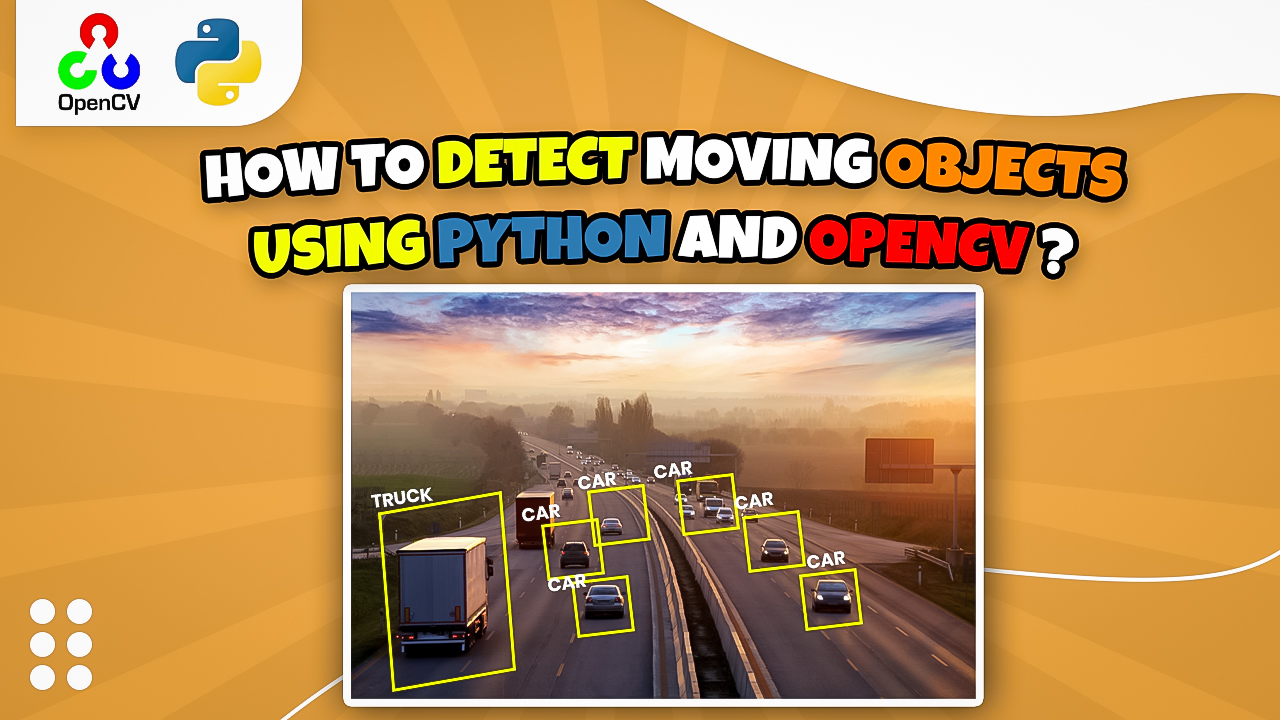
In this tutorial, we will focus on how to detect moving objects in video using OpenCV and Python without relying on heavy deep learning frameworks. By leveraging built-in computer vision algorithms, you can achieve real-time performance on standard CPU hardware. This step-by-step guide will walk you through the entire pipeline required to isolate motion masks and track vehicles or pedestrians effectively.
The core challenge in computer vision is distinguishing between “semantic motion” (an intruder, a vehicle) and “environmental noise” (shadows, swaying trees, or camera sensor flicker). Simple algorithms struggle with the latter, leading to high false-positive rates that swamp tracking systems with useless data. Advanced statistical models like MOG2 and KNN use temporal history to understand the “normal” state of a pixel, allowing them to ignore repetitive motions. This article deep dives into the technical logic of each method, providing ready-to-use Python implementations to benchmark on your own datasets.
Beyond simple visual output, the reliability of a motion detection system depends on its ability to adapt to gradual lighting changes. For instance, as the sun moves across the sky, a static background model will quickly become obsolete unless it possesses a mechanism for learning and adaptation. This is where modern OpenCV algorithms outshine legacy methods, offering probabilistic modeling that updates in real-time. By the end of this comparison, you will have a clear understanding of when to prioritize sheer speed and when to prioritize the complex filtering and shadow handling provided by Gaussian Mixture Models.
OpenCV motion detection Python tutorial Comparison : Selecting the Optimal Pipeline Choosing the right algorithm depends entirely on your specific environmental constraints and deployment hardware. If you are building a simple hobby project or running on a legacy CPU with absolutely no room for statistical modeling, Frame Differencing is your necessary starting point. It provides a “good enough” detection for simple triggers but will fail in any environment with dynamic lighting or shadows. It is the “fast and dirty” method of the computer vision world, requiring heavy post-processing (morphological opening/closing) to be useful.
For high-precision indoor work, BackgroundSubtractorKNN is often the winner. Its ability to maintain sharp boundaries and its sample-based modeling make it excellent for detecting subtle human movements or gestures. However, you must be prepared to handle the associated CPU and memory costs. If your application involves identifying specific gestures, counting small objects, or analyzing consumer behavior close to a fixed camera, the extra silhouette detail provided by KNN is worth the computational performance trade-off.
For almost everything else—especially professional outdoor security, traffic monitoring, long-term environmental studies, and surveillance—BackgroundSubtractorMOG2 is the superior choice. Its ability to gracefully handle dynamic backgrounds, its efficient model updates on modern architecture, and its robust built-in shadow detection make it the most reliable classical all-rounder. It strikes the perfect “Goldilocks” balance: significantly more accurate and adaptive than frame differencing, yet more computationally efficient than KNN for most real-world video streams.
Feature Frame Differencing MOG2 KNN Computational Speed Ultra-Fast Medium-Fast Slowest Memory Usage Minimal Medium High (scales with history) Shadow Detection None (Fails) Excellent (labels gray) Good (labels gray) Dynamic Backgrounds Fails Excellent Good Edge Precision Fragile (hollows) Good Excellent
Expert Strategy: To get the best results from any of these algorithms, always pre-process your frames. Resizing a high-resolution 1080p frame to 640×480 before passing it to the apply() function can boost your FPS by up to 300% with negligible loss in detection accuracy for human-sized objects, significantly stabilizing your pipeline.
1. Legacy Speed: Frame Differencing with OpenCV Before compiling our script for advanced motion detection in video with OpenCV, ensure your local environment has the proper computer vision dependencies installed.
Frame differencing is the most rudimentary form of motion detection. It works by calculating the absolute difference between two consecutive frames. If a pixel’s intensity changes significantly between Frame A and Frame B, it is marked as motion. This method is incredibly fast because it involves no complex modeling or probability distributions; it is a basic mathematical operation. For high-speed applications on hardware with extremely limited CPU resources, such as a basic microcontroller, an early-generation Raspberry Pi, or an old mobile device, this is often the only viable real-time solution available.
However, frame differencing lacks memory. Because it only compares two snapshots in time, it cannot distinguish between a person walking and a light being turned on across the entire room. It is also highly susceptible to “aperture effects,” where the interior of a large, uniformly colored moving object (like a white truck) may not show as motion because the pixel values haven’t changed significantly in the center of the object between frames. This results in hollow or fragmented detection masks that require significant post-processing to rectify.
Furthermore, this method has zero capacity for shadow suppression. Any change in lighting, including the movement of a shadow cast by an object, is interpreted as physical movement. In outdoor environments, this leads to a “shimmering” effect where the entire mask becomes noisy due to subtle changes in sunlight or wind moving leaves. Despite these critical flaws, it remains a valuable baseline for understanding the fundamentals of pixel-wise subtraction before moving to advanced statistical models.
One common use case for frame differencing today is in low-power “wake-up” triggers. A low-resolution, low-frame-rate stream can be monitored with this lightweight method; only when a significant delta is detected does the system “wake up” a more powerful, computationally expensive Deep Learning model for object classification. This saves massive amounts of battery life in remote IoT deployments where constant Gaussian modeling would be prohibitively expensive.
Below is the standard Python implementation for frame differencing in OpenCV. Note how simple the core logic is.
import cv2 cap = cv2.VideoCapture ( ' video.mp4 ' ) ret , frame1 = cap.read () ret , frame2 = cap.read () while cap.isOpened () : # Compute absolute difference between frames diff = cv2.absdiff ( frame1 , frame2 ) # Convert to grayscale to remove color data (reduces computation) gray = cv2.cvtColor ( diff , cv2.COLOR_BGR2GRAY ) # Apply blur to reduce camera sensor noise blur = cv2.GaussianBlur ( gray , ( 5 , 5 ) , 0 ) # Threshold the image to convert delta to a binary mask _ , thresh = cv2.threshold ( blur , 20 , 255 , cv2.THRESH_BINARY ) cv2.imshow ( " Frame Differencing " , thresh ) # Prepare frames for the next iteration frame1 = frame2 ret , frame2 = cap.read () if cv2.waitKey ( 1 ) & 0xFF == ord ( ' q ' ) : break cap.release () cv2.destroyAllWindows () In the code above, we use cv2.absdiff to find the raw delta between frames. The use of cv2.GaussianBlur is absolutely essential here; this step removes high-frequency sensor noise that would otherwise trigger false positives in the thresholding step. Without the blur, the mask would capture tiny pixel fluctuations that aren’t related to actual physical movement.
When you write the script to detect moving objects in video using OpenCV and Python , the core efficiency relies on how well you clean up your frame frames. By passing the video capture feed through a mixture-of-gaussians background subtractor, we can separate static background elements from the actual dynamic foreground tracking data. Let’s analyze how the specific Python parameters impact our motion detection precision.c
2. Statistical Precision: BackgroundSubtractorKNN The K-Nearest Neighbors (KNN) background subtractor represents a significant step up in sophistication from frame differencing. Instead of comparing just two consecutive frames, KNN maintains a running set of recently sampled pixel values for every location in the image. It classifies a new pixel in the current frame as background if its value is “close enough” (using a distance metric) to a cluster of these previously seen values. This “memory” allows the algorithm to handle backgrounds that aren’t perfectly static, such as a computer monitor flickering or a fan spinning in the distance.
One of the primary advantages of KNN is its ability to produce very clean, sharp foreground masks with solid silhouettes. Because it relies on actual stored samples rather than a theoretical statistical distribution (like MOG2), it often captures the edges of moving objects with higher fidelity. This makes KNN a favorite for indoor applications, such as gesture recognition pipelines or retail analytics, where the camera is close to the subject and edge precision is vital for downstream object classification tasks.
However, this precision comes at a high computational cost. KNN is computationally expensive to update. As the history parameter increases, the algorithm must store and compare more samples per pixel. In a standard 1080p video stream, this translates to millions of distance calculations per frame. On edge devices or low-powered hardware, this can lead to severe latency issues and frame drops. Additionally, while it technically supports shadow detection, KNN can sometimes be “over-sensitive” to background noise, requiring developers to carefully tune the dist2Threshold parameter.
Another nuisance peculiar to KNN is its “ghosting” behavior. When an object that was part of the background starts moving (like a parked car pulling away), KNN may leave a “ghost” silhouette of the object behind for several frames until the background model eventually updates to reflect the new empty space. While all model-based methods suffer from this to some degree, KNN’s sample-based approach makes it particularly noticeable. Tuning the history parameter is the only way to balance how quickly these ghosts disappear versus how stable the overall model remains.
Below is the standard Python implementation for utilizing the KNN subtractor. Note the integration of shadow detection.
import cv2 cap = cv2.VideoCapture ( ' video.mp4 ' ) # history=500 frames, dist2Threshold=400.0, detectShadows=True knn_subtractor = cv2.createBackgroundSubtractorKNN ( history = 500 , dist2Threshold = 400.0 , detectShadows = True ) while True: ret , frame = cap.read () if not ret: break # Generate the foreground mask # Mask will contain 0 (bg), 127 (shadow), or 255 (fg) fg_mask = knn_subtractor.apply ( frame ) # Optional: Remove shadows (value 127) to isolate solid movement # Threshold everything below 250 to black _ , fg_mask = cv2.threshold ( fg_mask , 250 , 255 , cv2.THRESH_BINARY ) cv2.imshow ( " KNN Mask (Shadows Removed) " , fg_mask ) if cv2.waitKey ( 30 ) & 0xFF == 27 : # Press Esc to exit break cap.release () cv2.destroyAllWindows () In this implementation, the detectShadows=True flag is a game-changer. It instructs OpenCV to label pixels that are darker than the background model but have the same color characteristics (chromaticity) as shadows with a gray pixel value of 127. By applying a subsequent cv2.threshold of 250, we effectively “delete” these gray shadow pixels, leaving only the solid white pixels representing the true moving objects. This is much more effective than simple frame differencing for real-world tracking.
3. The Industry Standard: BackgroundSubtractorMOG2 The MOG2 (Mixture of Gaussians) algorithm is the industry favorite because it doesn’t just look at the previous frame. It models each pixel’s color distribution as a mixture of K Gaussian distributions. This allows the system to ‘learn’ what is background and what is noise. For example, if you have a tree with leaves blowing in the wind, MOG2 identifies those moving leaves as background, whereas a simple frame difference would incorrectly mark them as moving objects. This makes it ideal for the car detection pipeline we are building today.
The Mixture of Gaussians (MOG2) algorithm is arguably the most popular and professional choice for classical computer vision applications. Instead of storing raw samples like KNN, MOG2 models every pixel as a statistical distribution consisting of several Gaussian models. This statistical approach allows the algorithm to elegantly handle “multi-modal” backgrounds. For example, if a pixel represents a tree leaf that sways between two slightly different positions, MOG2 will learn that both of those color/intensity values are “background,” whereas simpler models would constantly flag the leaf as motion.
MOG2 is specifically optimized for handling significant lighting changes over time. If the sun goes behind a cloud, the Gaussian distributions for every pixel shift together, allowing the model to adapt gracefully without triggering a massive, false-positive motion event across the entire screen. This “learning” capability is controlled by the learningRate parameter. A well-tuned MOG2 implementation can run for weeks in varying weather conditions without needing a manual reset, making it the backbone of professional outdoor traffic and security systems.
From a performance perspective, MOG2 is often faster and more efficient than KNN on modern, multicore CPUs because it updates a mathematical model rather than performing search operations through a sample space. It also provides a varThreshold parameter, which controls the Mahalanobis distance used to decide if a pixel fits the background model. This allows for fine-grained control over sensitivity; you can make the system ignore small, low-contrast movements (like sensor noise) while still capturing large, high-contrast objects like a person walking.
Moreover, MOG2 excels in “complex scene” modeling. In environments where the camera might vibrate slightly due to wind or heavy traffic, the Gaussian distributions naturally broaden their variance to account for that jitter. This inherent statistical robustness, combined with its efficient updating and adaptive nature, is why OpenCV BackgroundSubtractorMOG2 Python solutions are overwhelmingly preferred in the industrial surveillance market over almost any other classical computer vision method.
Below is the standard Python implementation for utilizing the MOG2 subtractor.
import cv2 cap = cv2.VideoCapture ( ' video.mp4 ' ) # history=500, varThreshold=16 (default), detectShadows=True mog2_subtractor = cv2.createBackgroundSubtractorMOG2 ( history = 500 , varThreshold = 16 , detectShadows = True ) while True: ret , frame = cap.read () if not ret: break # Generate the foreground mask # Optional learningRate: mog2_subtractor.apply(frame, learningRate=0.001) # Mask will contain 0 (bg), 127 (shadow), or 255 (fg) fg_mask = mog2_subtractor.apply ( frame ) cv2.imshow ( " MOG2 Mask " , fg_mask ) if cv2.waitKey ( 30 ) & 0xFF == 27 : # Press Esc to exit break cap.release () cv2.destroyAllWindows () The true beauty of the MOG2 implementation lies in its adaptability. In the code above, the varThreshold=16 is the standard default, but increasing this to 50, 100, or even higher will significantly reduce “salt and pepper” noise in high-ISO night footage. This flexibility, combined with its ability to handle dynamic scenes without computational collapse, is why MOG2 remains the primary classical solution for developers who need a reliable balance between high accuracy and manageable computational overhead.
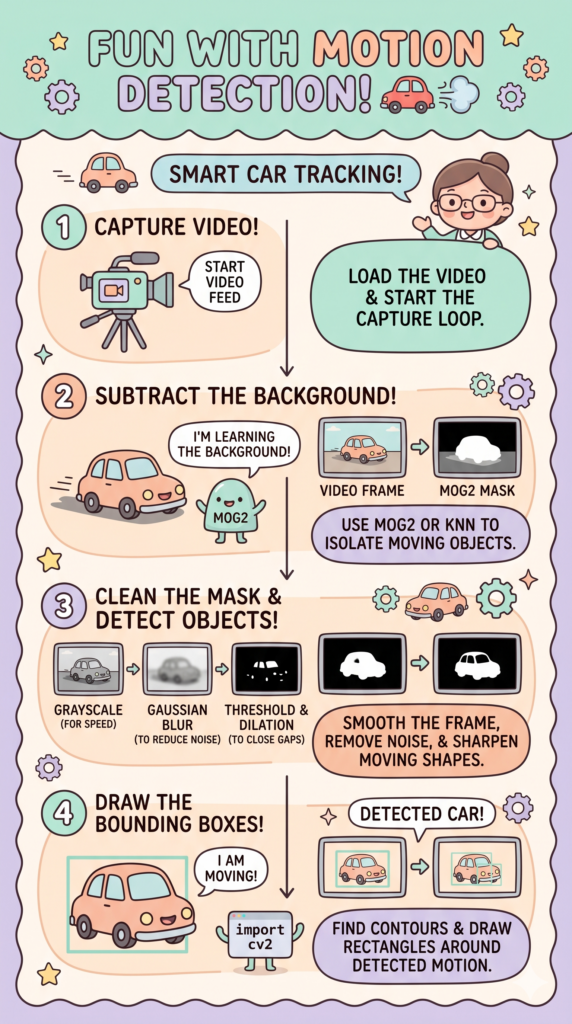
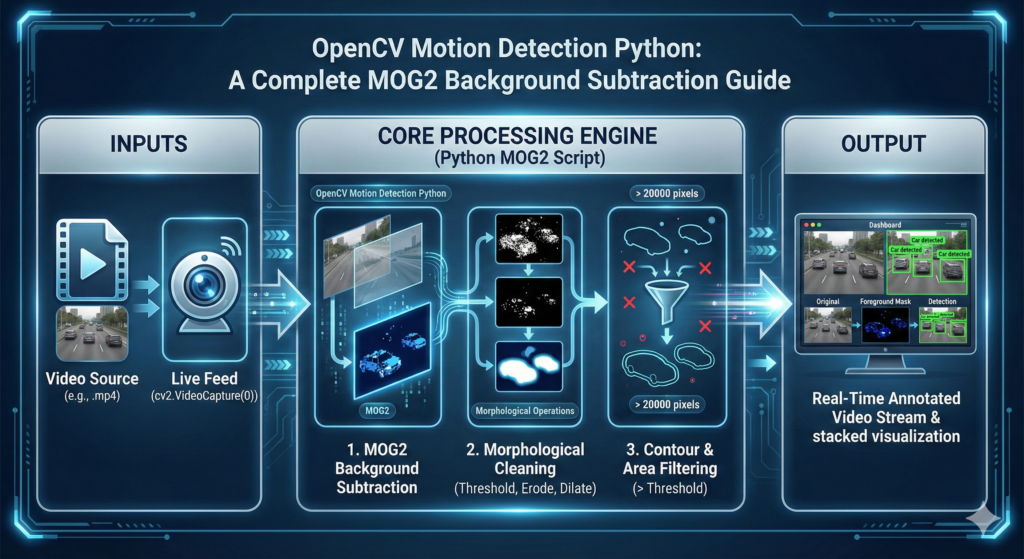
4. Implementation: The MOG2 Post-Processing Pipeline Now that we have compared the solutions and established MOG2 as the standard, let’s look at a complete professional implementation pipeline. The raw foreground mask generated by any of these subtractors is just the beginning. To make the data useful for actual decision-making (e.g., counting cars or alerting on a person), you must convert the white pixels of the mask into coordinate data. This involves a standardized sequence of operations: Background Subtraction -> Morphological Filtering -> Contour Detection -> Bounding Box Creation. Without these steps, your “motion detection” is just a video filter; with them, it becomes an intelligent data source.
The morphological filtering is particularly important when working with statistical subtractors. After MOG2 generates the mask, it often contains “pepper noise”—tiny random white specks in the background that aren’t actually moving objects. By applying cv2.morphologyEx with an opening kernel, you programmatically “erase” these specks. Conversely, if a detected person has “holes” in their silhouette (due to aperture effects or similar-colored clothing), a closing operation will fill those gaps, ensuring that cv2.findContours sees the person as one solid entity rather than a group of floating parts.
This post-processing is the vital bridge between raw pixel analysis and meaningful semantic data. By subsequently filtering the contours by area (e.g., ignoring blobs smaller than 600 pixels), you can programmatically ignore small animals, waving leaves, or wind-blown debris. This logic allows your application to trigger events—like starting a recording or sending a notification—only when a subject of a significant size (like a human or a car) enters the scene.
Below is the complete, production-ready MOG2 post-processing pipeline for drawing bounding boxes around moving objects.
import cv2 import numpy as np # Load a local video file cap = cv2.VideoCapture ( ' surveillance_footage.mp4 ' ) # 1. Initialize MOG2 Subtractor (DetectShadows=True is crucial) backSub = cv2.createBackgroundSubtractorMOG2 ( history = 500 , varThreshold = 25 , detectShadows = True ) # Define an 5x5 kernel for morphological operations kernel = np.ones (( 5 , 5 ) , np.uint8 ) while True: ret , frame = cap.read () if not ret: break # 2. Step A: Apply Subtractor to generate the initial foreground mask # Mask will contain gray values (127) for shadows fgMask = backSub.apply ( frame ) # 3. Step B: Post-Process the Mask # Apply MORPH_OPEN (erosion followed by dilation) to remove random 'pepper' noise fgMask = cv2.morphologyEx ( fgMask , cv2.MORPH_OPEN , kernel ) # Threshold the mask to remove shadows (label value 127 becomes 0, black) # Only keep pixel values that are very high probability foreground (near 255) _ , fgMask = cv2.threshold ( fgMask , 250 , 255 , cv2.THRESH_BINARY ) # 4. Step C: Extract object coordinates from the cleaned mask # RETR_EXTERNAL only finds outermost contours contours , _ = cv2.findContours ( fgMask , cv2.RETR_EXTERNAL , cv2.CHAIN_APPROX_SIMPLE ) for cnt in contours: # Step D: Apply Sensitivity Filter by Contour Area # Only draw boxes around significant blobs (e.g., > 600 pixels) if cv2.contourArea ( cnt ) > 600 : # Calculate coordinates for the bounding box x , y , w , h = cv2.boundingRect ( cnt ) # Draw the bounding box rectangle on the ORIGINAL frame cv2.rectangle ( frame , ( x , y ) , ( x + w , y + h ) , ( 0 , 255 , 0 ) , 2 ) cv2.putText ( frame , ' MOTION DETECTED ' , ( x , y - 10 ) , cv2.FONT_HERSHEY_SIMPLEX , 0.5 , ( 0 , 255 , 0 ) , 2 ) # Display the final visualized output cv2.imshow ( ' Final Motion Analysis Pipeline ' , frame ) # Optional: Display the cleaned foreground mask for debugging # cv2.imshow('Cleaned FG Mask', fgMask) if cv2.waitKey ( 30 ) & 0xFF == 27 : # Press Esc to exit break cap.release () cv2.destroyAllWindows () This full, ready-to-run pipeline demonstrates why the OpenCV BackgroundSubtractorMOG2 Python approach is favored by industry professionals. It provides a robust, adaptable, and highly customizable engine for any motion-based AI or analytics project. By understanding the technical trade-offs discussed in this guide, you can now confidently select the motion detection algorithm that best fits your specific computer vision challenge.
best background subtraction algorithm OpenCV Why Motion Detection Matters in Computer Vision The cv2.createBackgroundSubtractorMOG2 function builds a statistical model of the background and highlights moving objects, making it effective at isolating vehicles. It accepts three key parameters:
history – Number of frames used to construct the background model; lower values adapt quickly, higher values provide greater stability. The default history length is 500.varThreshold – Controls the squared Mahalanobis distance threshold between a pixel and the model to decide if it belongs to the background. Increasing this value reduces sensitivity to small variations (default is 16).detectShadows – Boolean flag indicating whether the algorithm should detect and mark shadows in gray; enabled by default, but may slow down processing. Set to false if shadow detection isn’t needed. Adjust these parameters to balance processing speed, noise reduction and detection accuracy.
Morphological Operations Cheat Sheet Operation Description Purpose Erosion Removes pixels on object boundaries:contentReference[oaicite:7]{index=7}. Eliminates small white noise and separates connected objects:contentReference[oaicite:8]{index=8}. Dilation Adds pixels to the boundaries of objects:contentReference[oaicite:9]{index=9}. Expands the foreground and closes small holes:contentReference[oaicite:10]{index=10}. Opening Erosion followed by dilation:contentReference[oaicite:11]{index=11}. Removes small objects while preserving overall shape. Closing Dilation followed by erosion:contentReference[oaicite:12]{index=12}. Fills small holes in objects to produce smoother masks.
Master Computer Vision
Follow my latest tutorials and AI insights on my
Personal Blog .
Beginner Complete CV Bootcamp
Foundation using PyTorch & TensorFlow.
Get Started → Interactive Deep Learning with PyTorch
Hands-on practice in an interactive environment.
Start Learning → Advanced Modern CV: GPT & OpenCV4
Vision GPT and production-ready models.
Go Advanced → Step-by-Step OpenCV Motion Detection Python MOG2 Implementation In this tutorial, we will dive into car detection python in videos using OpenCV and Python .
This tutorial answers the title: it shows you step by step how to transform raw video into structured object detection output using OpenCV’s background subtraction and contour detection methods.
This guide focuses specifically on car detection python techniques, ensuring a thorough understanding of the necessary tools and methods.
By the end of this post, you will have a working script that detects vehicles in real-world videos, and you’ll understand the core building blocks of video object detection : reading frames, background subtraction, morphological transformations, contour analysis, and object annotation.
We will divide the code into three parts for better understanding:
Setting up the environment and reading the video. Applying background subtraction and morphological transformations. Detecting cars, annotating frames, and displaying results. 👉 If you’re interested in more advanced classification projects, check out my tutorial on Alien vs Predator image classification with ResNet50 .
Capturing Live Video from a Webcam in OpenCV Real-time computer vision always starts with acquiring frames from a video source. In OpenCV, this is handled using cv2.VideoCapture(), which allows us to connect to a webcam or read from a video file. When we pass 0, OpenCV opens the default system camera. If you replace it with a file path, the same logic can process recorded footage instead of live input.
The VideoCapture object streams frames one by one inside a loop. Each frame represents a snapshot in time, and our algorithm processes them sequentially. This structure allows continuous monitoring — critical for motion detection systems such as traffic cameras or security feeds.
Checking the ret variable ensures that a frame was successfully read. If it fails (for example, if the camera disconnects or the video ends), the loop safely exits. This small detail prevents crashes and improves reliability in production systems.
OpenCV BackgroundSubtractorMOG2 Python tutorial # Import libraries import cv2 import numpy as np # Use webcam by setting 0 , or replace with video path cap = cv2 . VideoCapture (0)
Building the Motion Detection Pipeline: Step-by-Step Python Implementation Background subtraction works by modeling what the scene looks like when nothing is moving. The MOG2 (Mixture of Gaussians) algorithm continuously learns pixel intensity distributions and separates foreground motion from static background.
The history parameter controls how many past frames are used to build the background model. A larger history makes the model more stable but slower to adapt. The varThreshold determines how sensitive the algorithm is to pixel changes — lower values detect subtle movement but may increase noise.
Shadow detection is disabled here (detectShadows=False) to simplify the mask. While shadow detection can improve realism, it may introduce gray regions in the foreground mask that complicate contour extraction.
history = 100 varThreshold = 25 detectShadows = False bg_subtractor = cv2 . createBackgroundSubtractorMOG2 ( history = history , varThreshold = varThreshold , detectShadows = detectShadows ) The varThreshold parameter is the heartbeat of your detection engine. In a typical OpenCV motion detection Python MOG2 tutorial , a value of 16 is standard, but for outdoor traffic where shadows and wind-blown trees occur, increasing this to 25 or 35 reduces false positives. This threshold determines the Mahalanobis distance that classifies a pixel as foreground, essentially acting as the sensitivity dial for your motion sensor.
To understand how this classical approach differs from modern neural networks, check out the guide on SSD MobileNet v3 Object Detection Explained for Beginners .
Cleaning the Foreground Mask: Mastering Morphological Operations Raw foreground masks are often noisy. Small flickering regions may appear due to lighting changes, sensor noise, or minor background motion (like tree leaves). Morphological operations help clean these imperfections.
Erosion removes small white noise regions by shrinking foreground blobs. Dilation then expands the remaining regions to restore object size and strengthen detection stability. This erosion–dilation combination is a classic preprocessing step in motion detection pipelines.
Different structuring element shapes affect results. An elliptical kernel is gentler for erosion, preserving object contours, while a rectangular kernel strengthens expansion during dilation.
kernel_erode = cv2 . getStructuringElement ( cv2 . MORPH_ELLIPSE , ( 3 , 3 )) kernel_dilate = cv2 . getStructuringElement ( cv2 . MORPH_RECT , ( 3 , 3 )) Raw background subtraction often produces “salt and pepper” noise—tiny white pixels that don’t represent actual objects. By applying morphological transformations, you are essentially performing a spatial filter. This ensures that the subsequent contour detection step only processes significant, connected blobs, which drastically reduces the CPU load and prevents false-positive detections.
Localizing Moving Objects with Contour Detection and Bounding Boxes Once the foreground mask is cleaned, we detect object boundaries using contour extraction. cv2.findContours() identifies continuous white regions in the binary mask, which represent moving objects.
We filter small contours using a minimum area threshold. This step is crucial because small blobs typically represent noise rather than meaningful motion. The min_area value should be tuned depending on camera distance and object scale.
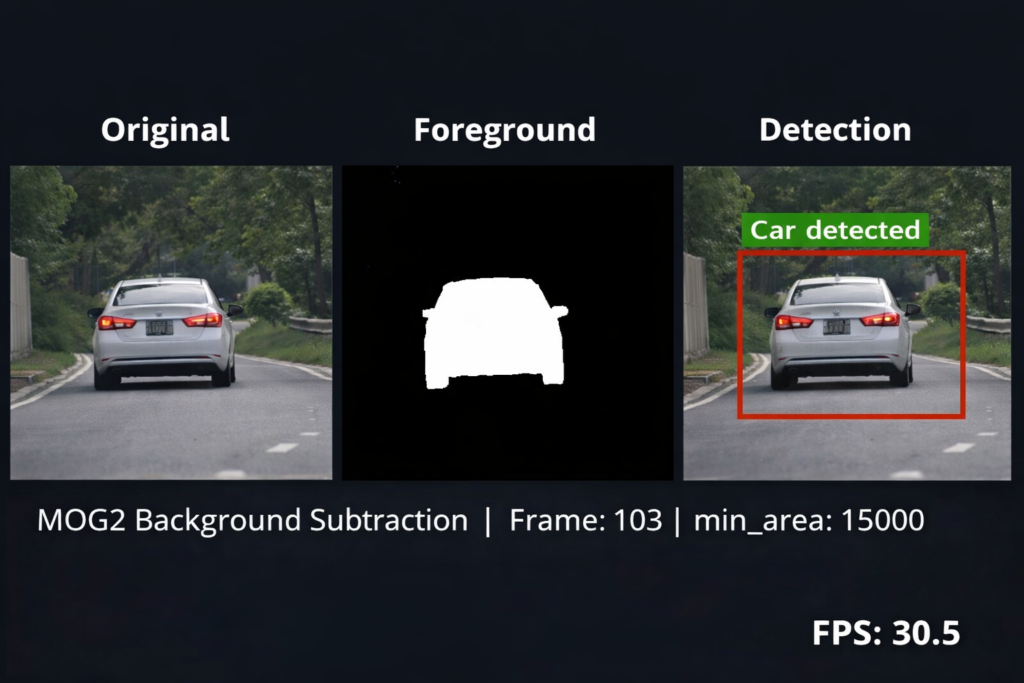
It’s important to clarify: this method detects moving objects , not semantic “cars.” The label “Car detected” is based on the assumption that the scene contains vehicles. Without deep learning, the system cannot distinguish between cars and other moving objects.
A common pitfall in motion detection is treating the raw mask as the final output. Raw masks are often ‘noisy’ with disconnected pixels. We use morphological operations—specifically erosion followed by dilation—to act as a spatial filter. This ‘closes’ the gaps within a moving vehicle’s silhouette, ensuring that cv2.findContours identifies a single solid object rather than a cloud of scattered points.
Contour loop and annotation:
for cnt in contours : if cv2 . contourArea ( cnt ) > min_area : x , y , w , h = cv2 . boundingRect ( cnt ) cv2 . rectangle ( annotated , ( x , y ) , ( x + w , y + h ) , ( 0 , 0 , 255 ) , 2 ) cv2 . putText ( annotated , " Car detected " , ( x , y - 10 ) , cv2 . FONT_HERSHEY_SIMPLEX , 0.5 , ( 0 , 255 , 0 ) , 1 ) Filtering by cv2.contourArea is what transforms a simple script into an intelligent system. By setting a minimum area threshold (e.g., 500 pixels), you effectively ignore environmental noise like birds or swaying branches. This ensures your OpenCV motion detection Python MOG2 tutorial logic focuses exclusively on significant targets like cars or pedestrians, drastically improving the precision of your bounding boxes.
Once you have mastered detection, you can visualize long-term activity patterns using an Object Detection Heatmap for Tracking Moving Dogs .
MOG2 background subtractor Python Performance Comparison: MOG2 vs. Deep Learning Models The main advantage of using MOG2 background subtractor Python is that it does not require training data, GPUs, or large pre-trained models. Unlike deep learning approaches, the MOG2 background subtractor Python algorithm dynamically models pixel distributions and adapts to scene changes in real time.
For applications such as traffic monitoring, parking lot analysis, or industrial motion detection, MOG2 background subtractor Python offers a lightweight and computationally efficient alternative. This makes it ideal for embedded systems like Raspberry Pi or CPU-only environments.
Real-Time Processing Loop and Frame Display Inside the main loop, each frame is processed in sequence: background subtraction, thresholding, morphology, contour detection, and visualization. This pipeline runs continuously until the user presses q.
The visualization step stacks three outputs side by side:
Original frame Foreground mask applied to the frame Annotated detection output This comparison helps debug performance and understand how each stage contributes to the final result.
Resizing the display window reduces computational load and improves UI responsiveness. Finally, releasing the camera and destroying windows ensures system resources are properly freed.
The apply() function is where the heavy lifting happens. It doesn’t just subtract frames; it calculates the probability of a pixel belonging to the background based on its history. This is why the first few seconds of your video might look ‘noisy’—the algorithm is currently building its statistical model of the scene.
Comparing MOG2 vs. KNN Background Subtraction in OpenCV Selecting the right background subtraction algorithm is a critical design decision that determines the accuracy and speed of your computer vision pipeline. The Mixture of Gaussians (MOG2 ) and K-Nearest Neighbors (KNN ) are the two primary methods provided by the cv2 module. While both aim to separate the foreground from the background, they operate on different mathematical foundations. MOG2 is a density-based approach that models every pixel as a distribution, making it exceptionally good at handling multi-modal backgrounds—scenes where a pixel might alternate between two states, such as a flickering lamp or a moving tree branch.
In contrast, the KNN method works by maintaining a set of previous pixel values and classifying a new pixel based on its proximity to those stored samples. Because it relies on a local neighborhood of data points rather than a continuous statistical model, KNN often produces a “sharper” foreground mask with less “ghosting” when an object starts moving after being stationary. However, this precision comes at the cost of sensitivity to noise; in high-grain video or low-light conditions, KNN can struggle with “salt and pepper” artifacts that require heavy morphological filtering to clean up.
From a performance standpoint, MOG2 is generally considered the more efficient choice for high-resolution video streams on modern CPUs. Because it updates a mathematical model rather than searching through a k-dimensional space of stored pixel samples, it scales better as the history parameter increases. MOG2 also includes a built-in shadow detection feature that marks shadows in gray (value 127), which is a vital feature for outdoor surveillance where sunlight can create false positives that look like solid moving objects.
Ultimately, the choice between MOG2 and KNN depends on your specific deployment environment. If your project involves a fixed indoor camera with consistent lighting, KNN might provide a cleaner silhouette of moving subjects. However, for professional-grade applications—such as traffic monitoring or outdoor security where environmental variables are unpredictable—OpenCV BackgroundSubtractorMOG2 Python implementations are the industry standard. This is due to their superior ability to adapt to gradual lighting shifts and ignore repetitive motion that doesn’t represent a true foreground object.
while True : ret , frame = cap . read () if not ret : break mask = bg_subtractor . apply ( frame ) _ , mask = cv2 . threshold ( mask , 20 , 255 , cv2 . THRESH_BINARY ) mask = cv2 . erode ( mask , kernel_erode , iterations = 1 ) mask = cv2 . dilate ( mask , kernel_dilate , iterations = 6 ) contours , _ = cv2 . findContours ( mask , cv2 . RETR_EXTERNAL , cv2 . CHAIN_APPROX_SIMPLE ) annotated = frame . copy () for cnt in contours : if cv2 . contourArea ( cnt ) > min_area : x , y , w , h = cv2 . boundingRect ( cnt ) cv2 . rectangle ( annotated , ( x , y ) , ( x + w , y + h ) , ( 0 , 0 , 255 ) , 2 ) cv2 . putText ( annotated , " Car detected " , ( x , y - 10 ) , cv2 . FONT_HERSHEY_SIMPLEX , 0.5 , ( 0 , 255 , 0 ) , 1 ) combined = np . hstack (( frame , cv2 . bitwise_and ( frame , frame , mask = mask ) , annotated )) cv2 . imshow ( " Original | Foreground | Detection " , cv2 . resize ( combined , None , fx = 0.4 , fy = 0.4 )) if cv2 . waitKey ( 1 ) & 0xFF == ord ( ' q ' ): break cap . release () cv2 . destroyAllWindows () By default, MOG2 marks shadows in gray (usually pixel value 127). If your goal is to trigger an alarm only for solid objects, you should apply a simple binary threshold after the apply() method to convert those gray shadow pixels to black, effectively removing environmental noise.
If you notice a lag in your video stream, it’s often due to the Gaussian calculations on high-res frames. A professional optimization trick is to use cv2.resize() to downscale your input to 640×480 before processing; the motion detection will remain accurate, but your CPU usage will drop significantly.
Production Optimization for Real-Time Video Streams Running computer vision algorithms on high-definition video feeds (like 1080p or 4K CCTV streams) can rapidly saturate CPU resources, causing dropped frames and lag. To achieve a production-grade execution of over 60+ FPS (Frames Per Second), especially on low-powered edge computing hardware like a Raspberry Pi, Jetson Nano, or local servers, we must introduce frame downsampling.
By reducing the frame dimensions by 50% before passing the matrix into the MOG2 background subtractor, you decrease the overall pixel processing overhead by roughly 75%. Because contour tracking relies on structural geometry rather than raw pixel resolution, this architectural tweak preserves tracking accuracy while drastically expanding processing throughput.
Furthermore, switching the processing loop to utilize grayscale frames exclusively, where appropriate, eliminates two entire color channels from your memory buffers, providing an instant speed boost to your application pipeline.
When Should You Use Background Subtraction Instead of Deep Learning? Background subtraction is ideal when:
You only care about motion You don’t need object classification You want lightweight performance You are running on CPU-only systems Deep learning models like YOLO are more accurate and can classify objects, but they require trained weights and more computational power.
Pro-Tip for Edge Deployment If you are deploying this OpenCV Motion Detection Python script on a Raspberry Pi or an NVIDIA Jetson Nano, remember that MOG2 is significantly more battery-efficient than YOLO. To further boost FPS, consider resizing the input frame to a lower resolution (e.g., 640×480) before applying the background subtractor. This reduces the number of pixel-wise Gaussian calculations without sacrificing detection accuracy for large objects like vehicles
Cleaning the Foreground Mask with Morphological Operations Raw output from a background subtractor is rarely perfect; it often contains “pepper” noise (random white pixels in the background) or “holes” within the detected moving objects. To resolve this, computer vision engineers use morphological transformations, specifically Erosion and Dilation . Erosion acts as a filter that strips away isolated white pixels by shrinking all white regions, effectively deleting noise. This ensures that the subsequent tracking steps aren’t distracted by irrelevant pixel fluctuations.
After erosion, a Dilation step is usually required to restore the size of the true moving objects. Dilation adds pixels to the boundaries of objects in an image, which helps in connecting fragmented parts of a single moving subject. For example, if a person is wearing a shirt that matches the background color, the subtractor might split their body into two separate masks. Applying a dilation operation bridges these gaps, creating a single, solid contour that is much easier for the computer to track.
For a more streamlined approach, the cv2.morphologyEx function offers an “Opening” and “Closing” operation. Opening is the combination of erosion followed by dilation, which is perfect for removing noise while preserving object size. Closing is the reverse—dilation followed by erosion—which is excellent for closing small holes inside the foreground mask. Implementing these two steps as a post-processing pipeline significantly improves the reliability of your motion detection system, especially when dealing with low-resolution webcams.
The choice of the “Kernel” or the structuring element size determines the strength of these operations. A small $3 \times 3$ kernel is sufficient for minor noise, while a $7 \times 7$ or $11 \times 11$ kernel might be necessary for heavy-duty filtering in surveillance footage. By layering these operations after the MOG2 subtraction, you ensure that the input to your findContours function is a clean, binary representation of the physical motion in the scene, which reduces the computational load on your tracking logic.
Integrating Motion Detection with Object Tracking Pipelines A foreground mask tells you that something is moving, but it doesn’t tell you what or where it is going over time. To turn a simple detector into a tracking system, you must convert the white pixels of the mask into coordinate data. Using cv2.findContours, you can extract the boundaries of each moving blob and calculate its bounding box using cv2.boundingRect. This provides the $[x, y, w, h]$ coordinates necessary to draw a visual rectangle around the subject, transforming raw data into actionable intelligence.
Once you have the bounding box, the next step is often to calculate the “Centroid” or the center point of the object. By comparing the centroid of an object in Frame A to its position in Frame B, you can determine the direction and speed of travel. This is the foundation of “Tripwire” systems used in retail analytics to count how many people enter a store. Without this coordinate-based logic, the motion detection remains a purely visual effect rather than a data-driven tool.
For more advanced AI applications, the OpenCV BackgroundSubtractorMOG2 Python output acts as a “Region of Interest” (ROI) filter. Instead of running a heavy Deep Learning model like YOLO on the entire 4K frame—which is computationally expensive—you can use the motion mask to identify active areas. You then crop these moving sections and send only the small crops to your neural network for classification. This “Motion-First” architecture allows for real-time performance even on hardware with limited GPU capabilities.
Finally, consider the concept of “Temporal Consistency.” Real-world tracking requires handling occlusions, such as when one person walks behind a pillar. Advanced pipelines integrate Kalman Filters or SORT (Simple Online and Realtime Tracking) algorithms with the MOG2 mask. These algorithms use the motion data to predict where an object should be in the next frame, even if it momentarily disappears. By combining the statistical power of MOG2 with predictive tracking, you can build a robust system capable of monitoring complex urban environments with minimal errors.
Final Thoughts Learning how to detect moving objects in video using OpenCV and Python is a fundamental milestone for any computer vision engineer. While basic background subtraction works exceptionally well for static camera setups, you can scale this logic further by integrating tracking IDs or feeding the isolated regions into a neural network. Experiment with the history and threshold values in your Python scripts to optimize the setup for your specific video environment.
This tutorial demonstrates that effective real-time motion detection can be built without deep learning . By combining background modeling, morphology, contour filtering, and visualization, you can create a practical vehicle detection system using only OpenCV.
This approach is especially useful for:
Traffic monitoring Parking lot analysis Security cameras Edge devices like Raspberry Pi or Jetson Nano Troubleshooting MOG2 Failures in Real-World Environments While background subtraction scripts work flawlessly in pristine lab environments, real-world outdoor deployments introduce complex environmental variables. If your background model is behaving poorly, apply these proven computer vision fixes:
1. Eliminating Micro-Movements and Wind Noise (Tree Leaves) If your foreground mask is littered with thousands of tiny, vibrating white pixel artifacts, your camera is picking up micro-movements like wind blowing through trees or camera sensor static. To fix this, always apply a structural Gaussian Blur with a 5×5 or 7×7 kernel to smooth out the frame frequencies before invoking the background subtractor loop:blurred_frame = cv2.GaussianBlur(frame, (5, 5), 0)fg_mask = bg_subtractor.apply(blurred_frame)
2. Compensating for Sudden Lighting Shifts (Clouds and Sun) Sudden atmospheric changes, such as a cloud blocking the sun, can cause the MOG2 model to mistakenly classify the entire frame as a moving object. To force the algorithm to adapt to environmental changes faster, dynamically manage the learning rate parameter inside your loop instead of leaving it to auto-calculate:fg_mask = bg_subtractor.apply(frame, learningRate=0.005)
3. Resolving the “Ghosting” Phenomenon with Stopped Vehicles When a moving vehicle stops completely at a red light, it will eventually blend into the background model and disappear from your contours tracking loop. When it drives away, it leaves behind a false “ghost” artifact. To counteract this behavior, scale up the history buffer initialization so the model remembers structural elements across a broader temporal window:bg_subtractor = cv2.createBackgroundSubtractorMOG2(history=2000, varThreshold=32, detectShadows=True)
FAQ – OpenCV BackgroundSubtractorMOG2 Python Frequently Asked Questions: OpenCV Motion Detection Q1: Why does my foreground mask have so much noise from leaves and trees? Answer: Camera sensor noise and micro-movements (like wind blowing through trees) create high-frequency pixel changes. To fix this, always apply a cv2.GaussianBlur() with a 5×5 kernel to smooth out subtle variations before processing your fgbg.apply(frame) matrix loop.
Q2: How can I distinguish between actual moving objects and their shadows? Answer: When using cv2.createBackgroundSubtractorMOG2(detectShadows=True), OpenCV marks shadows in gray (pixel value 127) instead of white (255). You can strip these shadows entirely from your contours calculation by running a strict binary threshold profile directly after generating your mask sheet.
Q3: What is the main difference between MOG2 and KNN background subtractors? Answer: MOG2 models each pixel via a Mixture of Gaussians to dynamically learn backgrounds with variable lighting adjustments over a given history buffer. KNN (K-Nearest Neighbors) checks local neighborhood structures instead; it is cleaner for slow-moving objects but computationally heavier on dense resolution streams.
When properly tuned, MOG2 background subtractor Python provides reliable foreground segmentation even under moderate lighting variations. Adjusting the history length and variance threshold ensures the MOG2 background subtractor Python model adapts smoothly without generating excessive noise.
Conclusion We have successfully built a Python project that detects cars in videos using OpenCV BackgroundSubtractorMOG2 Pythonbackground subtraction, morphological transformations, contour filtering, and bounding box annotation to identify cars in motion.
This project is a strong starting point for real-world applications such as traffic monitoring, parking lot management, and smart city solutions.
Summary and Next Steps in Computer Vision Mastering advanced motion detection in video with OpenCV and Python bridges the gap between basic video manipulation and building production-ready surveillance systems. While classical background modeling algorithms like MOG2 and KNN provide an incredibly lightweight, CPU-friendly alternative to deep learning pipelines, they shine brightest when paired with robust pre-processing steps like Gaussian blurs, threshold adjustments, and morphological operations.
To expand this framework further, the logical next step is to bind these isolated bounding box coordinates to an object tracking framework like SORT or DeepSORT, allowing your application to assign persistent IDs to individual moving targets. By choosing the right background parameters and structural constraints, you can deploy highly reliable computer vision applications capable of scaling seamlessly across minimal infrastructure configurations.
Important links : check out our video here here
You can find the full code here : https://ko-fi.com/s/2f2f851f93
You can find more similar tutorials in my blog posts page here : https://eranfeit.net/blog/
Connect : ☕ Buy me a coffee — https://ko-fi.com/eranfeit
🖥️ Email : feitgemel@gmail.com
🌐 https://eranfeit.net
🤝 Fiverr : https://www.fiverr.com/s/mB3Pbb
Enjoy,
Eran
 Skip to content