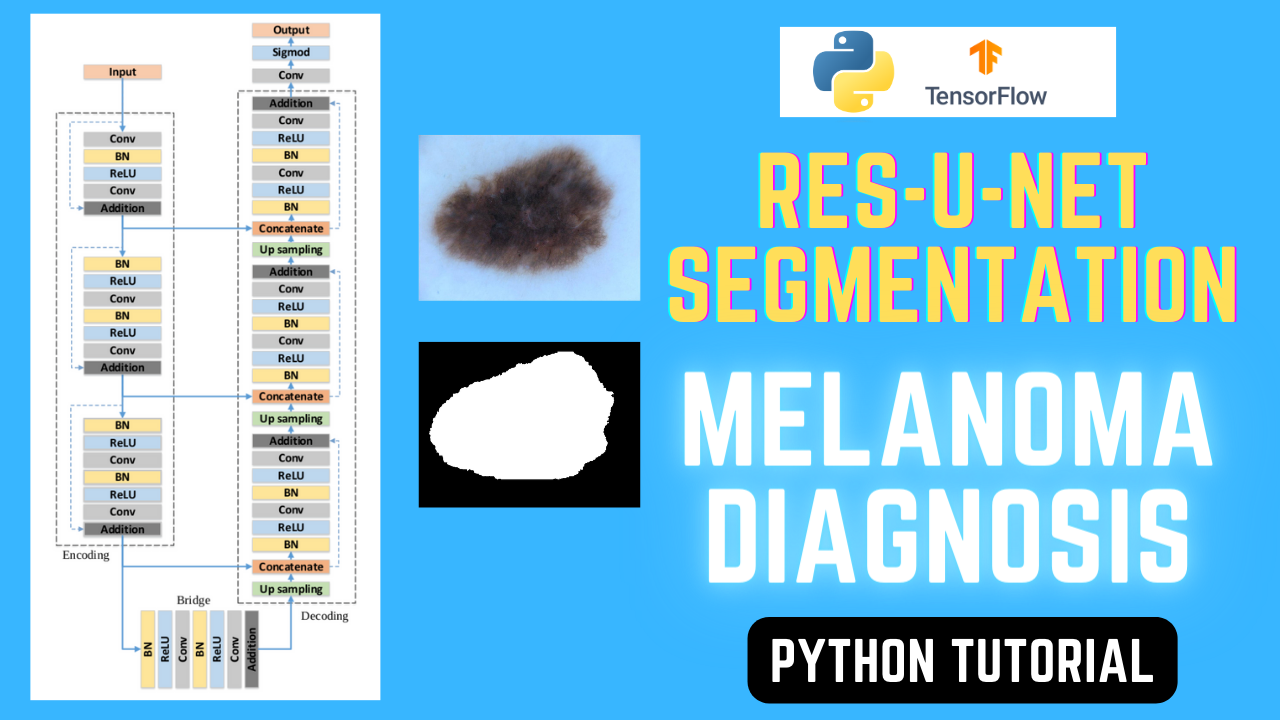
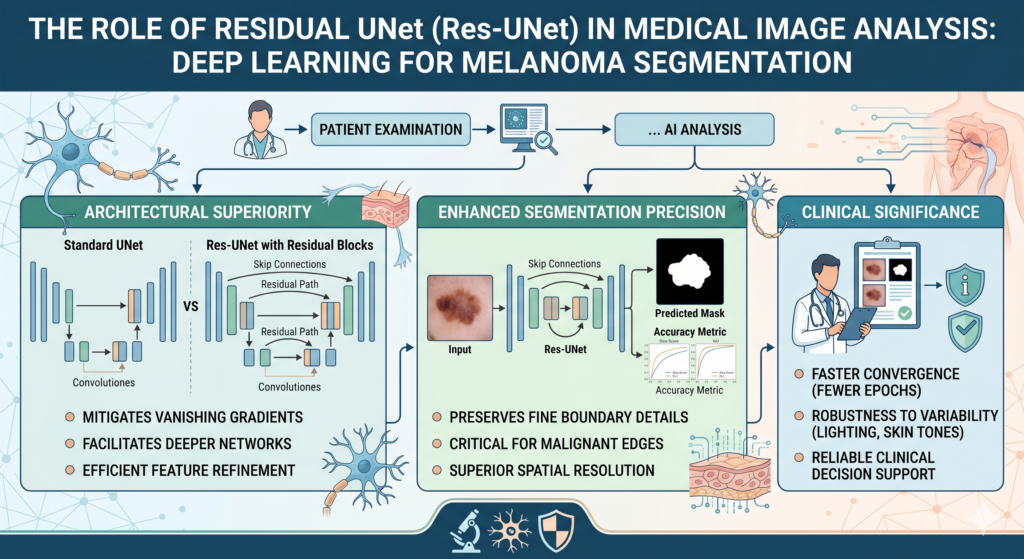
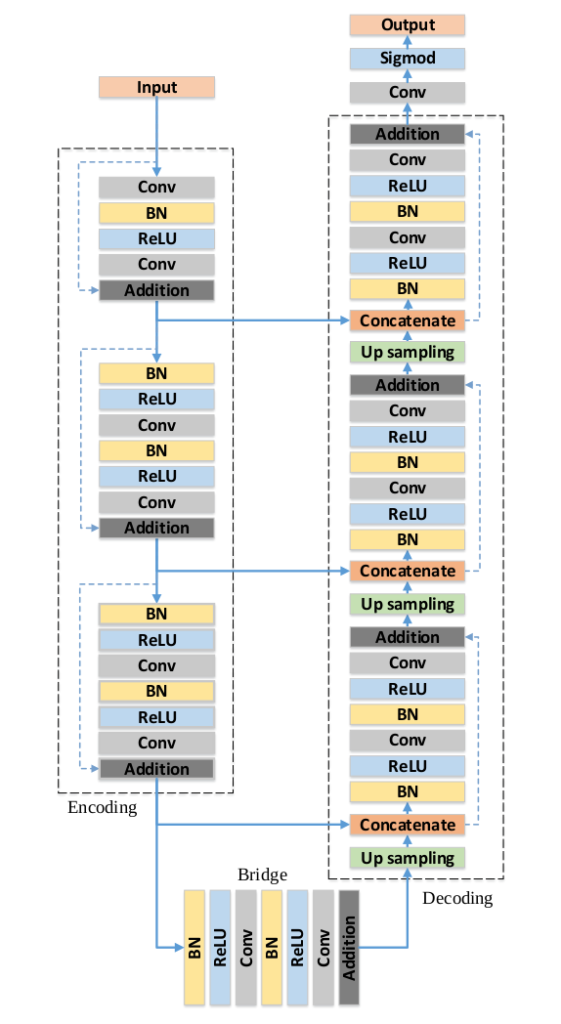
Deep Learning for Skin Melanoma Segmentation: A Res-UNet Approach in Python / TensorFlow tutorials, Unet Contents hide 1 The Role of Residual UNet (Res-UNet) in Medical Image Analysis 2 Introduction – Skin Melanoma Segmentation using ResUnet 3 Code for Skin Melanoma using ResUnet 4 Preparing Dermatoscopic Datasets for Semantic Segmentation 4.1 Introduction 4.2 Loading and Preprocessing the Dataset 4.3 Data Augmentation 4.4 Preparing Training and Validation Sets 5 Building the Res-UNet Architecture with Keras and TensorFlow 5.1 Helper Functions and Residual Blocks 5.2 Decoder Block and Skip Connections 5.3 Building the ResUNet Model 5.4 The FInal file : Step02BuildResUnetModel.py should be : 6 Training ResUNet for Melanoma Image Segmentation with TensorFlow 6.1 Introduction 6.2 Loading Training and Validation Data 6.3 Building the ResUNet Model 6.4 Training the Model with Callbacks 7 Evaluating Segmentation Accuracy and Performance Metrics 7.1 Introduction 7.2 Loading the Model and Preparing the Test Image 7.3 Processing and Displaying Predicted Masks 8 Connect : Last Updated on 11/05/2026 by Eran Feit The Role of Residual UNet (Res-UNet) in Medical Image Analysis The integration of residual learning into the classic UNet architecture represents a significant leap forward in medical image analysis, particularly for tasks requiring extreme precision like melanoma segmentation. While the standard UNet relies on simple convolutional stacks, Res-UNet incorporates “skip connections” within each functional block. These connections allow the gradient to bypass one or more layers, effectively mitigating the vanishing gradient problem. In a medical context, this means the network can be significantly deeper—capturing more complex features of a lesion—without losing the ability to train effectively on smaller datasets typical of clinical research. In semantic segmentation for oncology, the primary challenge is the preservation of spatial resolution and fine boundary details. Res-UNet excels here by combining the high-level semantic information from the contracting path with the low-level architectural features from the expansive path more efficiently. By using residual units, the model can learn identity mappings, which simplifies the optimization process. This ensures that the subtle, irregular edges of a malignant melanoma—often indistinguishable from healthy tissue to the untrained eye—are preserved through the encoding-decoding process rather than being smoothed over. Furthermore, Res-UNet addresses the high variability in medical imaging, such as differences in lighting, skin tone, and camera angles found in dermatoscopic images. The residual blocks act as a form of feature refinement, allowing the model to focus on the most relevant diagnostic markers while ignoring redundant noise. This architectural robustness is vital for medical professionals who require “explainable” or at least highly reliable outputs. When a model consistently identifies the correct boundaries of a lesion across diverse patient demographics, it builds the necessary trust for clinical decision support systems. Finally, from a computational perspective, Res-UNet provides a more efficient path to convergence. In deep learning for healthcare, where labeled data is expensive and scarce, the ability of residual units to facilitate faster and more stable training is a major advantage. By reducing the complexity of the mapping the network needs to learn, Res-UNet achieves higher Dice coefficients and Intersection over Union (IoU) scores compared to its predecessors. This efficiency does not just save GPU hours; it results in a more sensitive model capable of detecting early-stage malignancies that might have been overlooked by less sophisticated convolutional neural networks. Subscription FormSend me tutorials Deep Learning Skin Melanoma Segmentation using Res-UNet Introduction – Skin Melanoma Segmentation using ResUnet Early detection of skin cancer is critical, yet manual lesion tracing is time-consuming and prone to human error. This guide provides a robust technical solution for Deep Learning Skin Melanoma Segmentation using Res-UNet, an advanced architecture that combines the strengths of Residual Blocks with the UNet framework. By following this tutorial, you will solve the challenge of accurately isolating malignant boundaries in dermatoscopic images. We will move beyond simple classification to achieve pixel-level precision, ensuring your computer vision models are equipped for real-world clinical datasets where boundary clarity is paramount. ResUNet skin lesion segmentation TensorFlow is the goal of this tutorial.You’ll train a ResUNet in Keras to predict pixel-accurate masks from dermoscopic images, evaluate Dice/IoU, and visualize overlays on new samples.This is an educational computer-vision guide only and not medical advice. You’ll see the full workflow end-to-end: how the images and masks are loaded, how the ResUNet architecture is used for segmentation, how training is configured, and how to interpret the output masks on new examples. This post is written for machine learning education and computer vision practice. It is not medical advice and is not intended for diagnosis or clinical use. Dataset note (source + benchmarking)This tutorial is based on public dermoscopic datasets commonly used for skin-lesion segmentation research and benchmarking (for example, ISIC challenge segmentation data).If you use a different dataset, keep the same folder structure and mask format shown below, and the code will still apply. This tutorial provides a step-by-step guide on how to implement and train a ResUNet model for skin Melanoma detection and segmentation using TensorFlow and Keras. What You’ll Learn : Building ResUnet model : Learn how to construct the model using TensorFlow and Keras. Model Training: We’ll guide you through the training process, optimizing your model to distinguish Melanoma from non-Melanoma skin lesions. Testing and Evaluation: Run the pre-trained model on a new fresh images . Explore how to generate masks that highlight Melanoma regions within the images. Visualizing Results: See the results in real-time as we compare predicted masks with actual ground truth masks. Check out our tutorial here : https://www.youtube.com/watch?v=5inxPSZz7no You can find more tutorials, and join my newsletter here : https://eranfeit.net/ You can find the full code here : https://ko-fi.com/s/d9be3c9f9b Link to the post for Medium users here TRY IT NOW Master Computer Vision Follow my latest tutorials and AI insights on my Personal Blog. Beginner Complete CV Bootcamp Foundation using PyTorch & TensorFlow. Get Started → Interactive Deep Learning with PyTorch Hands-on practice in an interactive environment. Start Learning → Advanced Modern CV: GPT & OpenCV4 Vision GPT and production-ready models. Go Advanced → References (research + datasets) ISIC 2018 Challenge – Lesion Boundary Segmentation (Task 1) PH² Dataset (dermoscopic images for segmentation/classification benchmarking) HAM10000 (background dataset paper often referenced in skin-lesion research) Code for Skin Melanoma using ResUnet Send me an email for the dataset . it’s free 2594 images and 12970 corresponding ground truth response masks (5 for each image) – Size 10.5 Giga Preparing Dermatoscopic Datasets for Semantic Segmentation Introduction In this tutorial, we will walk through a complete Python pipeline for preparing melanoma images and their segmentation masks.The dataset we are using comes from the ISIC 2018 Challenge, which includes 2,594 dermoscopic images and 12,970 corresponding ground truth masks. Our goal is to prepare the data for training a ResUNet model, a powerful architecture that combines the strengths of U-Net and ResNet. ResNet’s skip connections help reduce the vanishing gradient problem, while U-Net’s encoder-decoder structure ensures pixel-level segmentation accuracy. We will cover the following steps: Loading the dataset images and segmentation masks. Performing data augmentation to improve generalization. Preparing training and validation sets in NumPy format for future deep learning models. Loading and Preprocessing the Dataset In this section, we set up our environment, load images and their masks, and resize them to smaller dimensions for training. ### Importing required libraries for image processing, numerical operations, and progress tracking import cv2 import numpy as np import pandas as pd import glob from tqdm import tqdm ### Defining target image dimensions Height = 128 Width = 128 ### Defining dataset paths for images and masks path = "E:/Data-sets/Melanoma/" imagespath = path + "ISIC2018_Task1-2_Training_Input/*.jpg" maskPath = path + "ISIC2018_Task1_Training_GroundTruth/*.png" ### Collecting all images and masks file paths listOfimages = glob.glob(imagespath) listOfMaskImages = glob.glob(maskPath) ### Printing the total number of images and masks print(len(listOfimages)) print(len(listOfMaskImages)) ### Loading a sample image and resizing it img = cv2.imread(listOfimages[0], cv2.IMREAD_COLOR) img = cv2.resize(img, (Width, Height)) ### Loading a sample mask in grayscale and resizing it mask = cv2.imread(listOfMaskImages[0], cv2.IMREAD_GRAYSCALE) mask = cv2.resize(mask, (Width, Height)) You can find the full code here : https://ko-fi.com/s/d9be3c9f9b Here we resized all images and masks to 128x128 pixels. The masks will later be converted to binary values (0 for background, 1 for lesion). Data Augmentation To make our model more robust, we apply augmentation techniques such as flipping and rotation. This helps generate more diverse training data. ### Importing the imgaug library for augmentations import imgaug as ia import imgaug.augmenters as iaa ### Horizontal flip hflip= iaa.Fliplr(p=1.0) hflipImg = hflip.augment_image(img) ### Vertical flip vflip= iaa.Flipud(p=1.0) vflipImg= vflip.augment_image(img) ### Random rotation between -50 and +20 degrees rot1 = iaa.Affine(rotate=(-50,20)) rotImg = rot1.augment_image(img) ### Resizing mask to smaller size for visualization mask16 = cv2.resize(mask, (16, 16)) ### Converting mask pixel values to binary (0 or 1) mask16[mask16 > 0] = 1 print(mask16) You can find the full code here : https://ko-fi.com/s/d9be3c9f9b These augmentations are applied to both images and masks, ensuring they remain aligned. We also normalize the mask values to only 0 (background) and 1 (lesion), making it compatible for segmentation training. Preparing Training and Validation Sets Finally, we prepare training and validation sets with augmentations applied to every image-mask pair, and then save them as NumPy arrays for fast loading during training. ### Creating lists to store images and masks allImages = [] maskImages = [] ### Iterating through all images and masks for imgFile,imgMask in tqdm(zip(listOfimages,listOfMaskImages) , total=len(listOfimages)): img = cv2.imread(imgFile, cv2.IMREAD_COLOR) img = cv2.resize(img, (Width, Height)) img = img / 255.0 img = img.astype(np.float32) allImages.append(img) mask = cv2.imread(imgMask, cv2.IMREAD_GRAYSCALE) mask = cv2.resize(mask, (Width, Height)) mask[mask > 0] = 1 maskImages.append(mask) ### Data augmentation (hflip, vflip, rotation) hflip= iaa.Fliplr(p=1.0) vflip= iaa.Flipud(p=1.0) rot1 = iaa.Affine(rotate=(-50,20)) allImages.append(hflip.augment_image(img)) maskImages.append(hflip.augment_image(mask)) allImages.append(vflip.augment_image(img)) maskImages.append(vflip.augment_image(mask)) allImages.append(rot1.augment_image(img)) maskImages.append(rot1.augment_image(mask)) ### Converting lists to NumPy arrays allImageNP = np.array(allImages) maskImagesNP = np.array(maskImages).astype(int) ### Saving training data np.save("e:/temp/Unet-Train-Melanoa-Images.npy", allImageNP) np.save("e:/temp/Unet-Train-Melanoa-Masks.npy", maskImagesNP) ### Preparing validation dataset with the same steps... # (similar code applies for validation) You can find the full code here : https://ko-fi.com/s/d9be3c9f9b At this stage, the dataset is ready.We have preprocessed, augmented, and saved both the training and validation sets. These NumPy arrays can now be directly loaded into a ResUNet model for segmentation training. This preprocessing pipeline ensures that the melanoma dataset is balanced, augmented, and stored in an efficient format. It’s a critical step before training deep learning models like ResUNet, which are widely used in medical image segmentation tasks. Medical imaging datasets, particularly those involving melanoma, often suffer from extreme class imbalance where the background pixels vastly outnumber the lesion pixels. To combat this, we implement specific normalization techniques that ensure the model focuses on the structural features of the skin lesion rather than noise or lighting artifacts common in dermatoscopy. Building the Res-UNet Architecture with Keras and TensorFlow In this tutorial, we will implement the ResUNet architecture using TensorFlow Keras.ResUNet is a powerful model that combines the U-Net design for image segmentation with ResNet-style residual connections. The idea behind ResUNet is to take advantage of U-Net’s encoder-decoder structure while also introducing skip connections that help gradients flow more smoothly, solving the vanishing gradient problem.This makes ResUNet a robust choice for medical image segmentation, object detection preprocessing, and many other computer vision tasks. We will cover the following steps: Building helper functions for batch normalization, activation, and residual blocks. Defining encoder, bridge, and decoder blocks. Constructing the final ResUNet model in Keras. ResUNet The following 3 parts code should be saved as one file with the name “Step02BuildResUnetModel.py” Helper Functions and Residual Blocks We start by importing the required Keras layers and defining helper functions that simplify our model construction. The inclusion of Residual Blocks within the standard UNet skip-connections is the ‘secret sauce’ here. It allows the gradient to flow through deeper layers without vanishing, which is essential when the model needs to learn fine-grained textures of malignant versus benign skin cells. ### Importing required Keras layers and model class from tensorflow.keras.layers import Conv2D, BatchNormalization , Activation, MaxPool2D, UpSampling2D, Concatenate, Input from tensorflow.keras.models import Model ### Defining a function that applies Batch Normalization followed by ReLU activation def batchnorm_relu(inputs): x = BatchNormalization()(inputs) x = Activation("relu")(x) return x ### Defining a residual block def residual_block(inputs, num_filters, strides=1): # Apply normalization and activation x = batchnorm_relu(inputs) # First convolution layer x = Conv2D(num_filters, 3, padding="same", strides=strides)(x) # Normalize and activate again x = batchnorm_relu(x) # Second convolution layer x = Conv2D(num_filters, 3, padding="same", strides=1)(x) # Shortcut connection with 1x1 convolution s = Conv2D(num_filters, 1, padding="same", strides=strides)(inputs) # Adding skip connection x = x + s return x You can find the full code here : https://ko-fi.com/s/d9be3c9f9b Here, the residual_block mimics the behavior of ResNet, ensuring that the model can learn deeper representations without losing information. Decoder Block and Skip Connections Next, we define the decoder block which performs upsampling and integrates skip connections from the encoder layers. ### Defining the decoder block def decoder_block(inputs, skip_features , num_filters): # Upsample the feature maps x = UpSampling2D((2,2))(inputs) # Concatenate with skip connection from encoder x = Concatenate()([x, skip_features]) # Apply residual block x = residual_block(x, num_filters, strides=1) return x You can find the full code here : https://ko-fi.com/s/d9be3c9f9b This block ensures that the decoder regains spatial resolution while still using the encoder’s contextual information. Building the ResUNet Model Finally, we bring everything together to construct the complete ResUNet architecture. ### Defining the main ResUNet model function def build_resunet(input_shape): # Define input layer inputs = Input(input_shape) # Encoder 1 - first block x = Conv2D(64, 3, padding="same", strides=1)(inputs) x = batchnorm_relu(x) x = Conv2D(64, 3, padding="same", strides=1)(x) # Adding shortcut connection s = Conv2D(64,1 , padding="same", strides=1)(inputs) s1 = x + s # Encoder 2 and 3 s2 = residual_block(s1, 128, strides=2) s3 = residual_block(s2, 256, strides=2) # Bridge b = residual_block(s3 , 512, strides=2) # Decoder 1, 2, 3 with skip connections d1 = decoder_block(b, s3, 256) d2 = decoder_block(d1, s2, 128) d3 = decoder_block(d2, s1 , 64) # Final classifier layer with sigmoid activation outputs = Conv2D(1, 1, padding="same", activation="sigmoid")(d3) # Build the model model = Model(inputs, outputs) return model ### Running the script if __name__ == "__main__": model = build_resunet((256,256,3 )) print(model.summary()) You can find the full code here : https://ko-fi.com/s/d9be3c9f9b The encoder compresses the input into feature-rich representations, the bridge provides deeper context, and the decoder reconstructs pixel-level segmentation maps. The final sigmoid classifier outputs probabilities for each pixel, ideal for binary segmentation tasks. The ResUNet architecture is highly effective for tasks such as medical image segmentation (e.g., skin lesions, tumors, and organ boundaries) and can also be extended to multi-class segmentation with minor modifications. The FInal file : Step02BuildResUnetModel.py should be : from tensorflow.keras.layers import Conv2D, BatchNormalization , Activation, MaxPool2D, UpSampling2D, Concatenate, Input from tensorflow.keras.models import Model def batchnorm_relu(inputs): x = BatchNormalization()(inputs) x = Activation("relu")(x) return x def residual_block(inputs, num_filters, strides=1): # Conv layer x = batchnorm_relu(inputs) x = Conv2D(num_filters, 3, padding="same", strides=strides)(x) x = batchnorm_relu(x) x = Conv2D(num_filters, 3, padding="same", strides=1)(x) # shortcut connection s = Conv2D(num_filters, 1, padding="same", strides=strides)(inputs) x = x + s return x def decoder_block(inputs, skip_features , num_filters): x = UpSampling2D((2,2))(inputs) x = Concatenate()([x, skip_features]) x = residual_block(x, num_filters, strides=1) return x # The main function def build_resunet(input_shape): inputs = Input(input_shape) # Encoder 1 - First block x = Conv2D(64, 3, padding="same", strides=1)(inputs) x = batchnorm_relu(x) x = Conv2D(64, 3, padding="same", strides=1)(x) s = Conv2D(64,1 , padding="same", strides=1)(inputs) # this is the sortcut s1 = x + s # Encoder 2 and 3 - Block 2 and 3 s2 = residual_block(s1, 128, strides=2) # the strides = 2 s3 = residual_block(s2, 256, strides=2 ) # the strides = 2 # the bridge b = residual_block(s3 , 512, strides=2) # decoder 1 , 2, 3 d1 = decoder_block(b, s3, 256) d2 = decoder_block(d1, s2, 128) d3 = decoder_block(d2, s1 , 64) # Classifier outputs = Conv2D(1, 1, padding="same", activation="sigmoid")(d3) # THE MODEL model = Model(inputs, outputs) return model if __name__ == "__main__": model = build_resunet((256,256,3 )) print(model.summary()) You can find the full code here : https://ko-fi.com/s/d9be3c9f9b When compiling the model, consider using a combination of Dice Loss and Binary Cross-Entropy. While Cross-Entropy evaluates individual pixels, Dice Loss optimizes for the overlap between the predicted mask and the ground truth, which is far more effective for the irregularly shaped boundaries found in melanoma. Training ResUNet for Melanoma Image Segmentation with TensorFlow Introduction In this tutorial, we continue our melanoma segmentation project by training the ResUNet model we previously built.We will load the preprocessed dataset (images and masks saved as NumPy arrays), configure the model with training hyperparameters, and train it using callbacks for better optimization. By the end of this step, we’ll have a trained ResUNet model saved to disk, ready for inference on unseen melanoma images. Loading Training and Validation Data We start by loading the prepared training and validation datasets that were previously saved as .npy NumPy files ### Importing numpy for loading the saved arrays import numpy as np ### Printing a message to indicate start of training data loading print("start loading the train data :") ### Loading training images and masks allImagesNP = np.load("e:/temp/Unet-Train-Melanoa-Images.npy") maskImagesNP = np.load("e:/temp/Unet-Train-Melanoa-Masks.npy") ### Printing a message to indicate start of validation data loading print("start loading the validation data :") ### Loading validation images and masks allValidateImageNP = np.load("e:/temp/Unet-Test-Melanoa-Images.npy") maskValidateImages = np.load("e:/temp/Unet-Test-Melanoa-Masks.npy") ### Confirm data loaded successfully print("Finish save the Data ..........................") ### Printing dataset shapes print(allImagesNP.shape) print(maskImagesNP.shape) print(allValidateImageNP.shape) print(maskValidateImages.shape) ### Defining image dimensions Height = 128 Width = 128 You can find the full code here : https://ko-fi.com/s/d9be3c9f9b Here we load both the training and validation datasets. Printing the shapes ensures that the arrays are consistent and aligned. Building the ResUNet Model Now we build the ResUNet architecture and set up the optimizer, loss function, and evaluation metrics. ### Importing TensorFlow and the custom ResUNet model import tensorflow as tf from Step02BuildResUnetModel import build_resunet ### Importing useful Keras callbacks from keras.callbacks import ModelCheckpoint, ReduceLROnPlateau, EarlyStopping ### Defining input shape for the model shape = (128, 128, 3) ### Setting hyperparameters lr = 1e-4 # learning rate batch_size = 8 epochs = 50 ### Building the ResUNet model model = build_resunet(shape) ### Printing model summary print(model.summary()) ### Defining Adam optimizer with learning rate opt = tf.keras.optimizers.Adam(lr) ### Compiling the model with binary crossentropy loss and accuracy metric model.compile(loss="binary_crossentropy", optimizer=opt, metrics=['accuracy']) You can find the full code here : https://ko-fi.com/s/d9be3c9f9b We use binary crossentropy loss since this is a binary segmentation problem (lesion vs. background).The Adam optimizer is chosen for its efficiency in deep learning tasks Training the Model with Callbacks Finally, we define callbacks for saving the best model, reducing learning rate on plateau, and stopping early to avoid overfitting. ### Calculating training and validation steps stepsPerEpoch = np.ceil(len(allImagesNP)/batch_size) validationSteps = np.ceil(len(allValidateImageNP)/batch_size) ### Path to save the best model best_model_file = "e:/temp/MelanomaResUnet.h5" ### Defining callbacks callbacks = [ ModelCheckpoint(best_model_file, verbose=1, save_best_only=True), ReduceLROnPlateau(monitor="val_loss", patience=5, factor=0.1, verbose=1, min_lr=1e-7), EarlyStopping(monitor="val_accuracy", patience=20, verbose=1) ] ### Training the model history = model.fit( allImagesNP, maskImagesNP, batch_size=batch_size, epochs=epochs, verbose=1, validation_data=(allValidateImageNP, maskValidateImages), validation_steps=validationSteps, steps_per_epoch=stepsPerEpoch, shuffle=True, callbacks=callbacks ) You can find the full code here : https://ko-fi.com/s/d9be3c9f9b ModelCheckpoint saves the best-performing model during training. ReduceLROnPlateau lowers the learning rate if validation loss does not improve. EarlyStopping halts training if validation accuracy does not improve for several epochs, preventing overfitting. At the end of training, the best ResUNet model is saved as MelanomaResUnet.h5 for future inference. This completes the training pipeline for melanoma segmentation using ResUNet.With this model, we can now move on to evaluating performance on test data and performing real-world predictions on new images. Evaluating Segmentation Accuracy and Performance Metrics Introduction Now that we have trained our ResUNet model, the next step is to test it on unseen melanoma images.In this tutorial, we will: Load the saved ResUNet model. Prepare a test image for inference. Generate a predicted segmentation mask. Compare it with the ground truth mask for evaluation Loading the Model and Preparing the Test Image First, we load the trained ResUNet model and preprocess a sample test image to feed into the network. ### Importing required libraries import numpy as np import tensorflow as tf import cv2 ### Defining the path to the best saved model best_model_file = "e:/temp/MelanomaResUnet.h5" ### Loading the trained ResUNet model model = tf.keras.models.load_model(best_model_file) ### Printing the model summary print(model.summary()) ### Setting image dimensions Height=128 Width = 128 ### Loading one test image in color format img = cv2.imread("E:/Data-sets/Melanoma/ISIC2018_Task1-2_Test_Input/ISIC_0012302.jpg", cv2.IMREAD_COLOR) ### Resizing the test image to match model input img2 = cv2.resize(img, (Width,Height)) ### Normalizing pixel values to range [0,1] img2 = img2 / 255.0 ### Expanding dimensions to match batch format (1, H, W, C) imgForModel = np.expand_dims(img2, axis=0) ### Making prediction with the model p = model.predict(imgForModel) ### Extracting the predicted mask resultMask = p[0] print(resultMask.shape) You can find the full code here : https://ko-fi.com/s/d9be3c9f9b Here, the model outputs a segmentation mask with probability values for each pixel. Processing and Displaying Predicted Masks Next, we convert the probability mask into a binary mask, resize it, and compare it with the ground truth. ### Converting predicted probabilities into binary mask # Values <= 0.5 become background (0 - black) # Values > 0.5 become lesion (255 - white) resultMask[resultMask <= 0.5] = 0 resultMask[resultMask > 0.5] = 255 ### Scaling down the image for display scale_precent = 25 width = int(img.shape[1] * scale_precent / 100) height = int(img.shape[0] * scale_precent / 100) dim = (width, height) ### Resizing the original image img = cv2.resize(img, dim, interpolation=cv2.INTER_AREA) ### Resizing the predicted mask mask = cv2.resize(resultMask, dim, interpolation=cv2.INTER_AREA) ### Loading the ground truth mask and resizing trueMaskfile = "E:/Data-sets/Melanoma/ISIC2018_Task1_Test_GroundTruth/ISIC_0012302_segmentation.png" trueMask = cv2.imread(trueMaskfile, cv2.IMREAD_COLOR) trueMask = cv2.resize(trueMask, dim, interpolation=cv2.INTER_AREA) ### Displaying original, predicted, and ground truth masks cv2.imshow("original image", img) cv2.imshow("predicted mask ", mask) cv2.imshow("trueMask mask ", trueMask) ### Saving predicted mask to disk cv2.imwrite("e:/temp/predicted.jpg", mask) ### Waiting for key press to close display windows cv2.waitKey(0) You can find the full code here : https://ko-fi.com/s/d9be3c9f9b Here we binarize the prediction, resize it, and then compare it with the ground truth segmentation mask.This visual comparison helps us see how well the model detects the lesion area in the melanoma image. With this step, we successfully ran inference using our ResUNet model.We can now extend this process to multiple test images, calculate performance metrics such as IoU (Intersection over Union) or Dice coefficient, and refine the model further. Related tutorials U-Net medical segmentation with TensorFlow/Keras (polyp segmentation) How to build a U-Net for melanoma detection using TensorFlow/Keras U-Net image segmentation tutorial (Oxford-IIIT Pets) Connect : ☕ Buy me a coffee — https://ko-fi.com/eranfeit 🖥️ Email : feitgemel@gmail.com 🌐 https://eranfeit.net 🤝 Fiverr : https://www.fiverr.com/s/mB3Pbb Planning a trip and want ideas you can copy fast?Here are three detailed guides from our travels: • 5-Day Ireland Itinerary: Cliffs, Castles, Pubs & Wild Atlantic Viewshttps://eranfeit.net/unforgettable-trip-to-ireland-full-itinerary/ • My Kraków Travel Guide: Best Places to Eat, Stay & Explorehttps://eranfeit.net/my-krakow-travel-guide-best-places-to-eat-stay-explore/ • Northern Greece: Athens, Meteora, Tzoumerka, Ioannina & Nafpaktos (7 Days)https://eranfeit.net/my-amazing-trip-to-greece/ Each guide includes maps, practical tips, and family-friendly stops—so you can plan in minutes, not hours. Enjoy, Eran






 Skip to content