Last Updated on 27/09/2026 by Eran Feit
Automating the analysis of medical imagery is one of the most impactful applications of AI today. In this guide, you will master Medical Image Segmentation with U-Net and TensorFlow by building a robust pipeline to isolate lung structures from chest X-rays. Many developers struggle with low accuracy in medical AI due to poor data handling or incorrect architecture. By the end of this tutorial, you will solve the challenge of pixel-level classification, moving beyond simple image categorization to precise anatomical mapping—a critical skill for any Computer Vision engineer in the healthcare sector.
The Future of Radiology: Master Medical AI This article provides a comprehensive hands-on guide to Medical Image Segmentation with U-Net and TensorFlow: A Lung X-Ray Tutorial , focusing on the intersection of deep learning and clinical diagnostics. We dive deep into the technical implementation of a neural network designed specifically to identify and isolate anatomical structures within chest radiographs. By shifting from simple classification to pixel-level precision, you will learn how to build a system capable of assisting medical professionals in identifying lung boundaries with mathematical accuracy.
The value of this guide lies in its transition from theory to production-ready code. For developers and data scientists, mastering Medical Image Segmentation with U-Net and TensorFlow: A Lung X-Ray Tutorial is a critical step in entering the healthcare AI sector, where the “black box” nature of standard models is insufficient. You will gain a clear understanding of how to handle sensitive medical data formats, manage class imbalance, and interpret the specific metrics that define success in a radiological context.
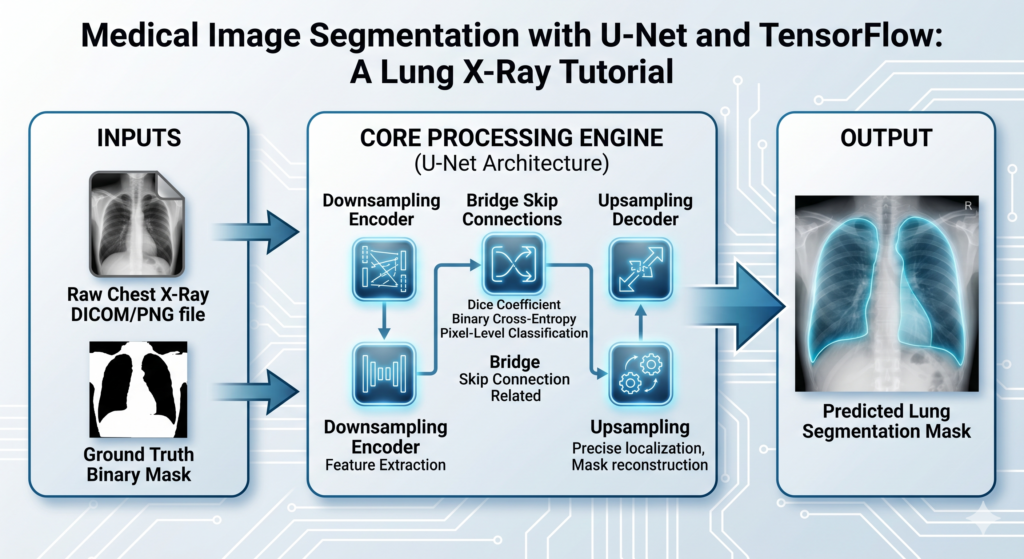
We achieve this by breaking down the complexity of the U-Net architecture into digestible, functional phases. The tutorial begins with rigorous data preprocessing techniques to ensure your model receives high-quality signals, followed by the step-by-step construction of the encoder-decoder layers. By the end of this article, you will have a working pipeline that takes a raw X-ray as input and generates a precise binary mask of the lung area, demonstrating a complete end-to-end workflow for biomedical engineering.
Beyond the code, this article bridges the gap between software development and medical insight. By implementing Medical Image Segmentation with U-Net and TensorFlow: A Lung X-Ray Tutorial , you are not just writing Python scripts; you are exploring the “Why” behind feature extraction in medical imaging. We elaborate on how spatial information is preserved through skip connections and why certain loss functions are better suited for medical masks, ensuring you leave with both a working model and the high-level intuition required to solve similar challenges in the field.
Medical Image Segmentation with U-Net and TensorFlow A Lung X-Ray Tutorial Why Medical Image Segmentation with U-Net and TensorFlow is a Game-Changer for Lung X-Rays Medical image segmentation is the process of partitioning a digital image into multiple segments to simplify or change the representation of an image into something that is more meaningful and easier to analyze. In the specific context of chest radiographs, the target is the lung field itself. Isolating these areas is the foundational step for more advanced diagnostic tasks, such as calculating lung volume, detecting nodules, or identifying the presence of pneumonia. Without accurate segmentation, automated diagnostic tools would struggle to differentiate between healthy tissue and potential anomalies.
At a high level, the U-Net architecture has become the gold standard for this task because of its unique symmetric structure. Unlike traditional convolutional neural networks that compress an image down to a single label, the U-Net consists of a contracting path to capture context and a symmetric expanding path that enables precise localization. This “U” shape allows the model to learn the “what” (the characteristics of lung tissue) and the “where” (the exact pixel coordinates of the lung boundary) simultaneously. In a field like radiology, where a few pixels can be the difference between a correct and incorrect diagnosis, this level of precision is non-negotiable.
Implementing this using the TensorFlow framework provides the scalability and performance optimization necessary for handling high-resolution medical images. The process involves teaching the model to recognize patterns of grayscale intensity and anatomical shapes through thousands of iterations. By utilizing a training dataset where every lung has been manually “masked” by experts, the model learns to replicate that expertise. The ultimate goal is to create an AI assistant that can process thousands of X-rays in seconds, providing a consistent “second opinion” for radiologists and ensuring that no critical detail is overlooked during the screening process.
This tutorial provides a step-by-step guide on how to implement and train a UNet Tensorflow model for Melanoma detection using TensorFlow and Keras.
🔍 What You’ll Learn 🔍:
Building U-net model : Learn how to construct the model using TensorFlow and U-net Keras.
Unet Tensorflow Model Training : We’ll guide you through the training process, optimizing your model to generate masks in the lungs position
Testing and Evaluation : Run the pre-trained model on a new fresh images , and visual the test image next to the predicted mask .
Check out our tutorial here : https://youtu.be/-AejMcdeOOM?si=JibmFeIoXPaiVVZC
Link for the full code here : https://eranfeit.lemonsqueezy.com/buy/33b5c656-1272-4429-95c8-a81354569c7f or here: https://ko-fi.com/s/3f1fdb4316
You can find more tutorials, and join my newsletter here : https://eranfeit.net/
This tutorial is based on the U-net Architecture :
How to segment X-Ray lungs using UNet and Tensorflow 11 Here is the code for segment X-Ray lungs using U-net and Tensorflow :
Send me an email for the dataset .
Master Computer Vision
Follow my latest tutorials and AI insights on my
Personal Blog .
Beginner Complete CV Bootcamp
Foundation using PyTorch & TensorFlow.
Get Started → Interactive Deep Learning with PyTorch
Hands-on practice in an interactive environment.
Start Learning → Advanced Modern CV: GPT & OpenCV4
Vision GPT and production-ready models.
Go Advanced → Part 1 : Dataset loading and Preprocessing : This code processes the Montgomery County X-ray Dataset, which contains chest X-rays and their corresponding lung segmentation masks (left and right lungs separately).
The code loads these images, preprocesses them, and prepares them for training a segmentation Unet Tensorflow model. It performs tasks like resizing images, normalizing pixel values, combining left and right lung masks, and splitting the data into training and validation sets.
In medical imaging, consistency is more critical than in general-purpose CV. Before feeding X-rays into the model, we must standardize the grayscale intensity values. This ensures that the U-Net focuses on morphological features rather than variations in lighting or equipment calibration from different hospital sources.
# Import required libraries import cv2 # OpenCV library for image processing import numpy as np # NumPy for numerical operations import glob # For finding files matching a pattern from tqdm import tqdm # For displaying progress bars # Define image dimensions for resizing Height = 256 Width = 256 # Define file paths for images and masks path = " E:/Data-sets/Lung Segmentation/MontgomerySet/ " imagesPath = path + " CXR_png/*.png " # Path to X-ray images leftMaskPath = path + " ManualMask/leftMask/*.png " # Path to left lung masks rightMaskPath = path + " ManualMask/rightMask/*.png " # Path to right lung masks # Get lists of all image files using glob print ( " Images in folder , left mask images , right mask images : " ) listOfImages = glob . glob ( imagesPath ) # Get list of X-ray images listOfLeftMaskImages = glob . glob ( leftMaskPath ) # Get list of left mask images listOfRightMaskImages = glob . glob ( rightMaskPath ) # Get list of right mask images # Print number of images found in each category print ( len ( listOfImages )) print ( len ( listOfLeftMaskImages )) print ( len ( listOfRightMaskImages )) # Load and display a sample image and its masks img = cv2 . imread ( listOfImages [ 0 ], cv2 . IMREAD_COLOR ) # Read first X-ray image print ( img . shape ) # Print original image dimensions # Resize X-ray image to target dimensions img = cv2 . resize ( img , ( Width , Height )) # Load left and right lung masks for the first image left_mask = cv2 . imread ( listOfLeftMaskImages [ 0 ], cv2 . IMREAD_GRAYSCALE ) right_mask = cv2 . imread ( listOfRightMaskImages [ 0 ], cv2 . IMREAD_GRAYSCALE ) # Resize both masks to target dimensions left_mask = cv2 . resize ( left_mask , ( Width , Height )) right_mask = cv2 . resize ( right_mask , ( Width , Height )) # Combine left and right masks into a single mask finalMask = left_mask + right_mask # Display the images and masks cv2 . imshow ( " img " , img ) cv2 . imshow ( " left_mask " , left_mask ) cv2 . imshow ( " right_mask " , right_mask ) cv2 . imshow ( " finalMask " , finalMask ) cv2 . waitKey ( 0 ) # Wait for key press before continuing # Demonstrate mask value processing mask16 = cv2 . resize ( left_mask , ( 16 , 16 )) # Resize mask to smaller dimensions for demonstration print ( mask16 ) # Print original mask values # Convert mask values to binary (0 and 1) mask16 [ mask16 > 0 ] = 1 print ( " ====================================== " ) print ( mask16 ) # Print binary mask values # Initialize empty lists for storing processed images and masks allImages = [] maskImages = [] # Process all images and masks print ( " start loading the train images and masks + images augmentation X3 " ) for imgFile , leftMask , rightMask in tqdm ( zip ( listOfImages , listOfLeftMaskImages , listOfRightMaskImages ), total = len ( listOfImages )): # Load and preprocess X-ray image img = cv2 . imread ( imgFile , cv2 . IMREAD_COLOR ) img = cv2 . resize ( img , ( Width , Height )) # Resize image img = img / 255.0 # Normalize pixel values to range [0,1] img = img . astype ( np . float32 ) # Convert to float32 allImages . append ( img ) # Load and process mask images leftMask = cv2 . imread ( leftMask , cv2 . IMREAD_GRAYSCALE ) rightMask = cv2 . imread ( rightMask , cv2 . IMREAD_GRAYSCALE ) mask = leftMask + rightMask # Combine masks mask = cv2 . resize ( mask , ( Width , Height )) # Resize mask mask [ mask > 0 ] = 1 # Convert to binary mask maskImages . append ( mask ) # Convert lists to NumPy arrays allImagesNP = np . array ( allImages ) maskImagesNP = np . array ( maskImages ) maskImagesNP = maskImagesNP . astype ( int ) # Convert masks to integer type # Print shapes of processed data print ( " Shapes of train images and masks : " ) print ( allImagesNP . shape ) print ( maskImagesNP . shape ) # Split data into training and validation sets from sklearn . model_selection import train_test_split split = 0.1 # 10% validation split # Perform train-test split train_imgs , valid_imgs = train_test_split ( allImagesNP , test_size = split , random_state = 42 ) train_masks , valid_masks = train_test_split ( maskImagesNP , test_size = split , random_state = 42 ) # Print shapes of training and validation sets print ( " Shapes of train images and masks : " ) print ( train_imgs . shape ) print ( train_masks . shape ) print ( " Shapes of Validat images and masks : " ) print ( valid_imgs . shape ) print ( valid_masks . shape ) # Save processed data to NumPy files print ( " Save the data : " ) np . save ( " e:/temp/Unet-Train-Lung-Images.npy " , train_imgs ) np . save ( " e:/temp/Unet-Train-Lung-Masks.npy " , train_masks ) np . save ( " e:/temp/Unet-Validate-Lung-Images.npy " , valid_imgs ) np . save ( " e:/temp/Unet-Validate-Lung-Masks.npy " , valid_masks ) print ( " Finish save the data " ) Link for the full code : https://ko-fi.com/s/3f1fdb4316
Part 2 : The Unet Tensoflow model (Save it as “Step02Model.py”) : This code implements a U-Net Keras model using TensorFlow and Keras. U-Net is a popular architecture for image segmentation tasks, with an encoder-decoder structure and skip connections. The model takes an input image and produces a segmentation mask. The architecture consists of a convolutional block helper function and the main model-building function.
This code defines a U-Net architecture with:
An encoder path that reduces spatial dimensions while increasing feature channels A bridge section at the bottom with the highest number of filters A decoder path that increases spatial dimensions while decreasing feature channels Skip connections that connect corresponding encoder and decoder levels A final output layer that produces a binary segmentation mask The Unet Tensorflow model is particularly effective for medical image segmentation tasks, like the lung segmentation task it’s being used for here.
Key features:
Uses repeated blocks of Conv2D, BatchNormalization, and ReLU activation Implements skip connections to preserve spatial information Uses max pooling for downsampling and upsampling for decoder path Produces a binary segmentation mask through sigmoid activation Follows the classic U-Net architecture pattern of contracting and expanding paths The U-Net’s ‘skip connections’ are its greatest strength. By concatenating high-resolution features from the contracting path to the upsampled outputs, the model retains spatial localization that is often lost in standard CNNs. This is why U-Net remains the gold standard for detecting fine boundaries like the pleural edges of the lungs.
# Import required TensorFlow and Keras libraries import tensorflow as tf from tensorflow . keras . layers import * # Import all Keras layers from tensorflow . keras . models import Model # Import Keras Model class # Define a convolutional block function that will be used throughout the network def conv_block ( x , num_filters ): # First convolutional layer x = Conv2D ( num_filters , ( 3 , 3 ), padding = " same " )( x ) # Apply 3x3 convolution x = BatchNormalization ()( x ) # Normalize the activations x = Activation ( " relu " )( x ) # Apply ReLU activation function # Second convolutional layer x = Conv2D ( num_filters , ( 3 , 3 ), padding = " same " )( x ) # Apply another 3x3 convolution x = BatchNormalization ()( x ) # Normalize the activations x = Activation ( " relu " )( x ) # Apply ReLU activation function return x # Define the main U-Net model building function def build_model ( shape ): # Define the number of filters for each level of the network num_filters = [ 64 , 128 , 256 , 512 ] # Filters double at each level # Create the input layer with specified shape inputs = Input (( shape )) # List to store skip connections skip_x = [] x = inputs # Encoder path (Contracting path) for f in num_filters : x = conv_block ( x , f ) # Apply convolution block skip_x . append ( x ) # Store the output for skip connection x = MaxPool2D (( 2 , 2 ))( x ) # Apply max pooling to reduce dimensions # Bridge (Bottom of the U) x = conv_block ( x , 1024 ) # Apply convolution block with 1024 filters # Reverse the filter list and skip connections for the decoder path num_filters . reverse () # Reverse filter order for decoder skip_x . reverse () # Reverse skip connections order # Decoder path (Expanding path) for i , f in enumerate ( num_filters ): x = UpSampling2D (( 2 , 2 ))( x ) # Upsample the feature map xs = skip_x [ i ] # Get corresponding skip connection x = Concatenate ()([ x , xs ]) # Concatenate with skip connection x = conv_block ( x , f ) # Apply convolution block # Output layer x = Conv2D ( 1 , ( 1 , 1 ), padding = " same " )( x ) # 1x1 convolution to get final output x = Activation ( " sigmoid " )( x ) # Sigmoid activation for binary segmentation # Create and return the model return Model ( inputs , x ) Link for the full code : https://ko-fi.com/s/3f1fdb4316
Part 3 : Train the Unet Tensorflow model : This script loads preprocessed image data for training and validating a U-Net Keras model for lung segmentation.
It sets up a Unet TensorFlow based deep learning model, compiles it with an Adam optimizer and binary cross-entropy loss, and trains it using predefined hyperparameters while applying model checkpointing, learning rate reduction, and early stopping callbacks.
import numpy as np ### Import NumPy, a library for numerical computing, which is used for handling arrays. # load the data ### Print a message indicating the start of data loading. print ( " start lodaing " ) ### Load the training images from a `.npy` file. allImagesNp = np . load ( " e:/temp/Unet-Train-Lung-Images.npy " ) ### Load the corresponding masks (segmentation labels) for training images. maskImagesNp = np . load ( " e:/temp/Unet-Train-Lung-Masks.npy " ) ### Load the validation images. allValidateImagesNP = np . load ( " e:/temp/Unet-Validate-Lung-Images.npy " ) ### Load the validation masks. maskValidateImagesNP = np . load ( " e:/temp/Unet-Validate-Lung-Masks.npy " ) ### Print the shapes of the loaded datasets to verify correct dimensions. print ( allImagesNp . shape ) print ( maskImagesNp . shape ) print ( allValidateImagesNP . shape ) print ( maskValidateImagesNP . shape ) ### Define the height and width of the input images. Height = 256 Width = 256 # build the model ### Import TensorFlow and necessary Keras utilities for defining and training the model. import tensorflow as tf ### Import `build_model` function from `Step02Model` to construct the U-Net model. from Step02Model import build_model ### Import Keras callbacks for saving the best model, adjusting learning rate, and stopping early. from keras . callbacks import ModelCheckpoint , ReduceLROnPlateau , EarlyStopping ### Define the input shape (256x256 with 3 color channels), learning rate, batch size, and epochs. shape = ( 256 , 256 , 3 ) lr = 1e-4 # 0.0001 batchSize = 4 epochs = 50 ### Build the U-Net model. model = build_model ( shape ) ### Print the model architecture summary. print ( model . summary ()) ### Use the Adam optimizer with the defined learning rate. opt = tf . keras . optimizers . Adam ( lr ) ### Compile the model with binary cross-entropy loss and accuracy as a metric. model . compile ( loss = " binary_crossentropy " , optimizer = opt , metrics = [ ' accuracy ' ]) ### Compute the number of steps per epoch for training and validation. stepsPerEpoch = np . ceil ( len ( allImagesNp ) / batchSize ) validationSteps = np . ceil ( len ( allValidateImagesNP ) / batchSize ) ### Define the file path where the best model will be saved. best_model_file = " e:/temp/lung-Unet.h5 " ### Set up callbacks: ### - Save the best model based on validation loss. ### - Reduce the learning rate if validation loss does not improve for 5 epochs. ### - Stop training if validation accuracy does not improve for 20 epochs. callbacks = [ ModelCheckpoint ( best_model_file , verbose = 1 , save_best_only =True ), ReduceLROnPlateau ( monitor = " val_loss " , patience = 5 , factor = 0.1 , verbose = 1 , min_lr = 1e-7 ), EarlyStopping ( monitor = " val_accuracy " , patience = 20 , verbose = 1 ) ] ### Train the model using the loaded data. ### Use mini-batches, shuffle data, validate after each epoch, and apply callbacks. history = model . fit ( allImagesNp , maskImagesNp , batch_size = batchSize , epochs = epochs , verbose = 1 , validation_data = ( allValidateImagesNP , maskValidateImagesNP ), validation_steps = validationSteps , steps_per_epoch = stepsPerEpoch , shuffle =True , callbacks = callbacks ) Link for the full code : https://ko-fi.com/s/3f1fdb4316
When evaluating lung segmentation, standard accuracy is often misleading due to class imbalance (more background pixels than lung pixels). Instead, focus on the Intersection over Union (IoU) or Dice Coefficient. These metrics specifically measure the overlap between your predicted mask and the ground truth, providing a realistic view of clinical viability.
Part 4 : Test the Unet Tensorflow model ( inference) : This script loads a pre-trained U-Net Keras model for lung segmentation, processes a test image, predicts the segmented lung region, and displays both the original image and the predicted mask.
It resizes the image, normalizes pixel values, applies a binary threshold to the mask, and visualizes the results using OpenCV.
import numpy as np import tensorflow as tf import cv2 ### Import necessary libraries: ### - NumPy for handling arrays. ### - TensorFlow for loading the trained model and making predictions. ### - OpenCV for image processing. # load the saved model ### Define the path to the best saved model. best_model_file = " e:/temp/lung-Unet.h5 " ### Load the pre-trained U-Net model from the specified file. model = tf . keras . models . load_model ( best_model_file ) ### Print the model architecture summary. print ( model . summary ()) ### Define the width and height of the input image for resizing. Width = 256 Height = 256 # load test image ### Define the path to the test image. testImagePath = " TensorFlowProjects/Unet-Projects/Lung Segmentation/Lung-test-Image-From-Google.jpeg " ### Read the test image using OpenCV. img = cv2 . imread ( testImagePath ) ### Resize the image to match the input size expected by the model. img2 = cv2 . resize ( img , ( Width , Height )) ### Normalize the pixel values by dividing by 255 (scaling to the range [0,1]). img2 = img2 / 255.0 ### Expand dimensions to match the model's input shape (batch size of 1). imgForModel = np . expand_dims ( img2 , axis = 0 ) ### Perform prediction using the trained model. p = model . predict ( imgForModel ) ### Extract the predicted segmentation mask. resultMask = p [ 0 ] ### Print the shape of the predicted mask to verify dimensions. print ( resultMask . shape ) # Process the prediction output ### Since this is a binary segmentation task: ### - Any value below or equal to 0.5 is set to 0 (black, no object detected). ### - Any value above 0.5 is set to 255 (white, object detected). resultMask [ resultMask <= 0.5 ] = 0 resultMask [ resultMask > 0.5 ] = 255 ### Define the scaling percentage for displaying images. scale_precent = 60 # Resize factor for display purposes. ### Compute the new width and height based on the scale percentage. w = int ( img . shape [ 1 ] * scale_precent / 100 ) h = int ( img . shape [ 0 ] * scale_precent / 100 ) ### Define the new image dimensions. dim = ( w , h ) ### Resize the original image for display. img = cv2 . resize ( img , dim , interpolation = cv2 . INTER_AREA ) ### Resize the predicted mask for display. mask = cv2 . resize ( resultMask , dim , interpolation = cv2 . INTER_AREA ) ### Display the original test image. cv2 . imshow ( " first image " , img ) ### Display the predicted segmentation mask. cv2 . imshow ( " Predicted mask " , mask ) ### Wait for a key press to close the displayed images. cv2 . waitKey ( 0 ) Link for the full code : https://ko-fi.com/s/3f1fdb4316
The Unet Tensorflow result : How to segment X-Ray lungs using UNet and Tensorflow 12 How to segment X-Ray lungs using UNet and Tensorflow 13 Connect : ☕ Buy me a coffee — https://ko-fi.com/eranfeit
🖥️ Email : feitgemel@ gmail .com
🌐 https://eranfeit.net
🤝 Fiverr : https://www.fiverr.com/s/mB3Pbb
Planning a trip and want ideas you can copy fast?
• 5-Day Ireland Itinerary: Cliffs, Castles, Pubs & Wild Atlantic Viewshttps://eranfeit.net/unforgettable-trip-to-ireland-full-itinerary/
• My Kraków Travel Guide: Best Places to Eat, Stay & Explorehttps://eranfeit.net/my-krakow-travel-guide-best-places-to-eat-stay-explore/
• Northern Greece: Athens, Meteora, Tzoumerka, Ioannina & Nafpaktos (7 Days)https://eranfeit.net/my-amazing-trip-to-greece/
Each guide includes maps, practical tips, and family-friendly stops—so you can plan in minutes, not hours.
Enjoy,
Eran
 Skip to content