 Skip to content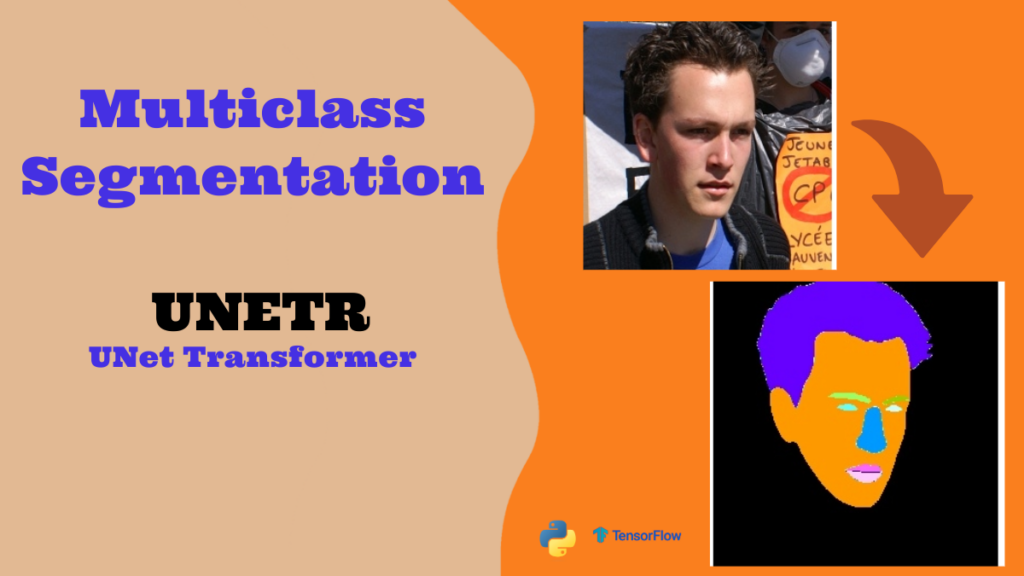
Last Updated on 08/01/2026 by Eran Feit
Introduction
Multiclass image segmentation is a powerful deep learning approach that allows us to separate an image into multiple meaningful regions, where each pixel is assigned to a specific category. Instead of simply deciding whether a pixel belongs to an object or not, multiclass image segmentation goes further and recognizes several different classes within the same image. This becomes especially useful in real-world computer vision tasks where images naturally contain many structures, like faces, medical scans, traffic scenes, or satellite imagery.
With multiclass image segmentation, models learn to understand the spatial layout and relationships between different objects and regions. The result is a pixel-wise map showing where each class exists inside the image. For example, in face parsing tasks, the model doesn’t just detect the face—it identifies skin, hair, eyes, lips, and more as separate regions. This fine-grained understanding gives developers and researchers deeper insights into visual content.
The rise of deep learning architectures such as U-Net, transformers, and hybrid models has made multiclass image segmentation more accurate and scalable than ever. These models learn complex visual features and handle variations in lighting, pose, and background, making segmentation robust in challenging environments. Today, segmentation models play a key role in healthcare, autonomous driving, AR/VR, biometrics, and more.
By building and training a multiclass image segmentation model, you gain hands-on experience with advanced neural network design, dataset handling, visualization techniques, and evaluation of pixel-wise predictions. This helps bridge theory and practice, turning abstract machine learning concepts into real working systems that analyze images at a very detailed level.

A closer look at multiclass image segmentation
Multiclass image segmentation focuses on understanding every pixel in an image and assigning it to one of several predefined categories. Instead of looking at the whole image and classifying it into a single label, the model treats the image as a dense grid of information. Each pixel is important, and the goal is to correctly label each one. This is what makes segmentation such a powerful and demanding task compared to traditional classification.
The main target of multiclass image segmentation is to allow machines to “see” images the way humans do. When we look at a picture, we instinctively recognize the different regions and objects within it. Deep learning models attempt to replicate this level of perception. They learn from labeled datasets, where every pixel belongs to a certain class, and gradually improve their ability to generalize to new, unseen images.
At a high level, segmentation models extract visual features from an image, capture contextual relationships, and reconstruct a pixel-wise output mask. Architectures like transformer-based encoders, U-shaped decoders, and skip-connections help the model retain both global understanding and fine-detail accuracy. This combination ensures that small objects, edges, and boundaries are segmented cleanly.
Multiclass segmentation is particularly valuable when precision matters. In medical imaging, different tissues must be accurately separated. In face analysis, subtle features like lips, eyebrows, and hairlines all form distinct regions. In autonomous systems, roads, vehicles, pedestrians, and traffic signs must be segmented correctly for safe navigation. This makes multiclass image segmentation a core capability in modern AI-driven visual systems.

Building a Working Pipeline for Multiclass Image Segmentation With UNETR
This tutorial walks through the full process of building a multiclass image segmentation model using the UNETR architecture in TensorFlow. The goal of the code is to take an input image and classify every pixel into one of several classes, such as skin, eyes, lips, and hair in a face-parsing task. Instead of recognizing only one object, the model learns to segment multiple regions at once, which is why this approach is called multiclass image segmentation. The code is designed to help you understand not only how the model works, but also how the data is prepared, trained, and evaluated in a real deep-learning workflow.
The tutorial starts by configuring the UNETR model and defining the parameters needed for training. You’ll see how the images are resized, normalized, and broken into patches before being fed into the transformer encoder. This is a key part of the UNETR design, where images are converted into patches so the model can learn global patterns across the whole image. The masks are also prepared and converted into one-hot encoded labels so every pixel belongs to the correct class.
Next, the code walks through the model training stage. You’ll define callbacks, checkpoints, learning-rate scheduling, and validation monitoring so the model improves over time. The training process logs performance, saves the best weights, and helps prevent overfitting. This is where the model actually learns to map images to segmentation masks across all the different classes.
Finally, the testing script loads the trained model and runs predictions on new images. It converts the predicted class maps back into colored segmentation masks so you can visually compare the results. The tutorial also shows how to loop through an entire test dataset, save results, and display them side-by-side with the original input. By the end, you’ll have a complete multiclass image segmentation pipeline — from dataset loading, preprocessing, and model training, all the way to visualization and evaluation of the output masks.

Link to the video tutorial : https://youtu.be/rrtTfqiCc24
You can find the code here : https://eranfeit.lemonsqueezy.com/checkout/buy/eabedb17-12fb-4572-8dad-04bbfc9a7246 or here : https://ko-fi.com/s/145aeb9537
Link to the post for Medium.com users : https://medium.com/vision-transformers-tutorials/how-to-use-unetr-for-multiclass-image-segmentation-95773b0d3d0f
You can follow my blog here : https://eranfeit.net/blog/
Want to get started with Computer Vision or take your skills to the next level ?
Great Interactive Course : “Deep Learning for Images with PyTorch” here : https://datacamp.pxf.io/zxWxnm
If you’re just beginning, I recommend this step-by-step course designed to introduce you to the foundations of Computer Vision – Complete Computer Vision Bootcamp With PyTorch & TensorFlow
If you’re already experienced and looking for more advanced techniques, check out this deep-dive course – Modern Computer Vision GPT, PyTorch, Keras, OpenCV4

How to Use UNETR for Multiclass Image Segmentation
Multiclass image segmentation is a powerful computer vision technique where every pixel of an image is labeled as belonging to one of many classes.
In this tutorial, you’ll learn how to build a full multiclass image segmentation pipeline using the UNETR architecture in TensorFlow.
The target of this guide is to help you understand how to prepare the dataset, build and train a model, and run predictions — all while explaining every part of the code clearly and practically.
By the end of this post, you’ll have a fully working segmentation model that can take input images from the LaPa face parsing dataset and output color-coded masks that represent different facial regions.
Setting Up the Environment and Dependencies
Before diving into the model code itself, you need a proper environment with all required libraries installed.
This code segment defines the Conda environment creation and installs Python packages such as TensorFlow, OpenCV, patchify, and more that are essential for the workflow.
Each command sets up a piece of the environment so your segmentation code can run smoothly without version conflicts or missing dependencies.
### Create a new conda environment with Python 3.11. conda create -n UnetR python=3.11 ### Activate that environment so all later installs go into it. conda activate UnetR ### Install data handling and image processing libraries. pip install pandas==2.2.3 pip install pyarrow==18.1.0 pip install pillow==11.0.0 pip install tqdm==4.67.1 ### Install TensorFlow GPU (Linux) or CPU (Windows) versions. pip install tensorflow[and-cuda]==2.17.1 pip install tensorflow==2.17.1 ### Install OpenCV, scikit-learn, and patchify. pip install opencv-python==4.10.0.84 pip install scikit-learn==1.6.0 pip install patchify==0.2.3 pip install matplotlib==3.10.0 Before running the rest of the code, make sure this setup completes successfully.
This environment preparation ensures the rest of the tutorial runs without hiccups, especially when training deep learning models.
Downloading the LaPa Face Parsing Dataset
Link to the dataset : https://drive.google.com/file/d/1XOBoRGSraP50_pS1YPB8_i8Wmw_5L-NG/view?usp=sharing
To train the UNETR model for multiclass image segmentation, we’ll be using the LaPa (Landmark-guided Face Parsing) dataset. This dataset contains more than 22,000 face images with pixel-level segmentation maps. Each image is labeled across 11 different classes such as skin, eyes, eyebrows, lips, hair, and background. This makes it an excellent dataset for learning and experimenting with pixel-wise segmentation.
The dataset comes already organized into train, validation, and test folders, which means you can plug it directly into the code without manually sorting files. Each image also has a corresponding segmentation mask in PNG format, where each pixel value represents a different facial class. The segmentation labels help the model learn exactly which pixel belongs to which part of the face.
After downloading the dataset, extract it into a folder on your system. In the tutorial code, you’ll notice that the dataset path is referenced like this:
D:/Data-Sets-Object-Segmentation/LaPa You can keep the same folder name or adjust the path in your script to match where you saved it. Just make sure the internal folder structure remains:
LaPa ├── train ├── val └── test Once the dataset is in place, the code will automatically load the images and masks, match them correctly, and prepare them for training. From there, you’re ready to move forward and train the UNETR model on real multiclass image segmentation data.
Loading and Preparing the Dataset
In this section, we focus on loading and preparing the LaPa dataset for training, validation, and testing.
The LaPa dataset contains facial images and their corresponding segmentation labels, where every pixel belongs to one of 11 classes such as background, skin, eyes, and hair.
### Import essential libraries for file operations and image processing. import os import numpy as np import cv2 from glob import glob from sklearn.utils import shuffle import tensorflow as tf from tensorflow.keras.callbacks import ModelCheckpoint, CSVLogger, ReduceLROnPlateau, EarlyStopping from tensorflow.keras.optimizers import Adam, SGD from sklearn.model_selection import train_test_split from patchify import patchify from UnetrModelStructure import build_unetr_2d ### Configuration dictionary for image, patch, and model dimensions. cf = {} cf["image_size"] = 256 cf["num_classes"] = 11 # We have one background and the rest 10 classes cf["num_channels"] = 3 cf["num_layers"] = 12 cf["hidden_dim"] = 128 cf["mlp_dim"] = 32 cf["num_heads"] = 6 cf["dropout_rate"] = 0.1 cf["patch_size"] = 16 cf["num_patches"] = (cf["image_size"]**2)//(cf["patch_size"]**2) cf["flat_patches_shape"] = ( cf["num_patches"], cf["patch_size"]*cf["patch_size"]*cf["num_channels"] ) ### Function to create a directory if it doesn't already exist. def create_dir(path): if not os.path.exists(path): os.makedirs(path) ### Function to load image and label file paths from directory. def load_dataset(path): train_x = sorted(glob(os.path.join(path, "train", "images", "*.jpg"))) train_y = sorted(glob(os.path.join(path, "train", "labels", "*.png"))) valid_x = sorted(glob(os.path.join(path, "val", "images", "*.jpg"))) valid_y = sorted(glob(os.path.join(path, "val", "labels", "*.png"))) test_x = sorted(glob(os.path.join(path, "test", "images", "*.jpg"))) test_y = sorted(glob(os.path.join(path, "test", "labels", "*.png"))) return (train_x, train_y), (valid_x, valid_y), (test_x, test_y) ### Function to read and preprocess image files. def read_image(path): path = path.decode() image = cv2.imread(path, cv2.IMREAD_COLOR) image = cv2.resize(image, (cf["image_size"], cf["image_size"])) image = image / 255.0 ### Convert image into smaller patches using patchify. patch_shape = (cf["patch_size"], cf["patch_size"], cf["num_channels"]) patches = patchify(image, patch_shape, cf["patch_size"]) patches = np.reshape(patches, cf["flat_patches_shape"]) patches = patches.astype(np.float32) return patches ### Function to read and preprocess mask files. def read_mask(path): path = path.decode() mask = cv2.imread(path, cv2.IMREAD_GRAYSCALE) mask = cv2.resize(mask, (cf["image_size"], cf["image_size"])) mask = mask.astype(np.int32) return mask ### TensorFlow wrapper to prepare datasets for training and testing. def tf_parse(x, y): def _parse(x, y): x = read_image(x) y = read_mask(y) y = tf.one_hot(y, cf["num_classes"]) return x, y x, y = tf.numpy_function(_parse, [x, y], [tf.float32, tf.float32]) x.set_shape(cf["flat_patches_shape"]) y.set_shape([cf["image_size"], cf["image_size"], cf["num_classes"]]) return x, y def tf_dataset(X, Y, batch=2): ds = tf.data.Dataset.from_tensor_slices((X, Y)) ds = ds.map(tf_parse).batch(batch).prefetch(10) return ds In this block, each function converts raw files into data structures suitable for TensorFlow training.
The patches help break down the original images into smaller segments so the transformer encoder can process them.
Building, Compiling, and Training the UNETR Model
Now that the data is ready, we build the UNETR model, compile it with the correct loss function, and start training.
The model learns by minimizing the loss on the training set while evaluating its performance on the validation set.
if __name__ == "__main__": ### Set random seeds for reproducibility. np.random.seed(42) tf.random.set_seed(42) ### Create output directories for saving best checkpoints and logs. create_dir("D:/Temp/Models/Unet-MultiClass") ### Hyperparameters for training. batch_size = 16 # Reduce to 8 if there are memory issues lr = 0.1 num_epochs = 500 model_path = os.path.join("D:/Temp/Models/Unet-MultiClass", "model.keras") csv_path = os.path.join("D:/Temp/Models/Unet-MultiClass", "log.csv") ### RGB codes for visualizing each class mask color. rgb_codes = [ [0, 0, 0], [0, 153, 255], [102, 255, 153], [0, 204, 153], [255, 255, 102], [255, 255, 204], [255, 153, 0], [255, 102, 255], [102, 0, 51], [255, 204, 255], [255, 0, 102] ] classes = [ "background", "skin", "left eyebrow", "right eyebrow", "left eye", "right eye", "nose", "upper lip", "inner mouth", "lower lip", "hair" ] ### Load dataset paths. dataset_path = "D:/Data-Sets-Object-Segmentation/LaPa" (train_x, train_y), (valid_x, valid_y), (test_x, test_y) = load_dataset(dataset_path) print(f"Train: \t{len(train_x)} - {len(train_y)}") print(f"Valid: \t{len(valid_x)} - {len(valid_y)}") print(f"Test: \t{len(test_x)} - {len(test_y)}") ### Prepare the Train and Validation TensorFlow datasets. train_dataset = tf_dataset(train_x, train_y, batch=batch_size) valid_dataset = tf_dataset(valid_x, valid_y, batch=batch_size) ### Build the UNETR model using configuration dictionary cf. model = build_unetr_2d(cf) ### Compile model with categorical crossentropy and an SGD optimizer. model.compile(loss="categorical_crossentropy", optimizer=SGD(lr)) ### Define callbacks for training. callbacks = [ ModelCheckpoint(model_path, verbose=1, save_best_only=True), ReduceLROnPlateau(monitor='val_loss', factor=0.1, patience=5, min_lr=1e-7, verbose=1), CSVLogger(csv_path), EarlyStopping(monitor='val_loss', patience=20, restore_best_weights=False) ] ### Train the model. model.fit( train_dataset, epochs=num_epochs, validation_data=valid_dataset, callbacks=callbacks ) This training loop runs for up to 500 epochs.
Callbacks like early stopping and learning rate reduction help the model converge effectively and avoid overfitting.
Testing a Single Image With the Trained UNETR Model
After training the UNETR model for multiclass image segmentation, a great first step is to test it on a single image.
This helps you quickly confirm that the model loads correctly, the preprocessing steps are consistent with training, and the prediction shape matches your expectations.
In this section, you configure the model, define helper functions to convert predicted class maps to RGB images, and visualize the segmentation output side by side with the original image.
The code below first reconstructs the same configuration used during training and loads the saved model from disk.
You then prepare one test image by resizing, normalizing, and converting it into patches before feeding it to the model.
The predictions are converted into a color-coded segmentation map, and Matplotlib displays the original and predicted images next to each other to give you an immediate view of how well multiclass image segmentation is working.
Here is the test image :

### Import the os module to work with file paths and directories. import os ### Import NumPy for numerical operations and array handling. import numpy as np ### Import OpenCV for reading, resizing, and writing images. import cv2 ### Import pandas in case you want to log or store tabular results. import pandas as pd ### Import glob to search for files matching specific patterns. from glob import glob ### Import tqdm to display progress bars during long loops. from tqdm import tqdm ### Import TensorFlow to load the trained model and run predictions. import tensorflow as tf ### Import patchify to split images into smaller patches for the transformer encoder. from patchify import patchify ### Import dataset loading and directory creation utilities from the training script. from Step1TrainModel import load_dataset, create_dir ### Import Matplotlib for plotting and visualizing images. import matplotlib.pyplot as plt """ UNETR Configration """ ### Create a configuration dictionary to store model and data parameters. cf = {} ### Set the input image size used for both training and testing. cf["image_size"] = 256 ### Define the total number of classes for multiclass image segmentation. cf["num_classes"] = 11 ### Specify the number of channels in the input images (RGB). cf["num_channels"] = 3 ### Set the number of transformer layers in the UNETR encoder. cf["num_layers"] = 12 ### Set the hidden dimension size used inside the transformer. cf["hidden_dim"] = 128 ### Define the MLP dimension used in the transformer feed-forward blocks. cf["mlp_dim"] = 32 ### Set the number of attention heads in the multi-head attention blocks. cf["num_heads"] = 6 ### Define the dropout rate to help prevent overfitting. cf["dropout_rate"] = 0.1 ### Set the patch size used to split the image into tokens. cf["patch_size"] = 16 ### Compute how many patches an image will be split into. cf["num_patches"] = (cf["image_size"]**2)//(cf["patch_size"]**2) ### Define the flattened shape of all patches for a single image. cf["flat_patches_shape"] = ( cf["num_patches"], cf["patch_size"]*cf["patch_size"]*cf["num_channels"] ) ### Define a helper function to convert grayscale class masks into RGB color maps. def grayscale_to_rgb(mask, rgb_codes): ### Get the height and width from the mask shape. h, w = mask.shape[0], mask.shape[1] ### Ensure the mask uses integer class IDs. mask = mask.astype(np.int32) ### Initialize an empty list to hold color values. output = [] ### Iterate over every pixel in the flattened mask. for i, pixel in enumerate(mask.flatten()): ### Append the corresponding RGB color for each class ID. output.append(rgb_codes[pixel]) ### Reshape the flat list back into an RGB image. output = np.reshape(output, (h, w, 3)) return output ### Define a function to save visual comparison between image, ground truth, and prediction. def save_results(image_x, mask, pred, save_image_path): ### Expand the ground truth mask to have a single channel dimension. mask = np.expand_dims(mask, axis=-1) ### Convert the grayscale ground truth mask into an RGB image. mask = grayscale_to_rgb(mask, rgb_codes) ### Expand the predicted mask to have a single channel dimension. pred = np.expand_dims(pred, axis=-1) ### Convert the grayscale prediction mask into an RGB image. pred = grayscale_to_rgb(pred, rgb_codes) ### Create a white vertical separator line between images. line = np.ones((image_x.shape[0], 10, 3)) * 255 ### Concatenate original image, ground truth, and prediction into one strip. cat_images = np.concatenate([image_x, line, mask, line, pred], axis=1) ### Save the concatenated image to disk. cv2.imwrite(save_image_path, cat_images) # OpenCV expects the input image to have a data type of uint8 or float32, but the cat_images variable has the type float64 (CV_64F) # lets convert it : ### Convert the concatenated image to uint8 so OpenCV can display it. cat_images_for_display = cat_images.astype(np.uint8) ### Show the result in an OpenCV window. cv2.imshow("Result", cat_images_for_display ) ### Wait briefly to allow the window to refresh (or for a key press). cv2.waitKey(1) # Wait for a key press to proceed (use a duration in ms for automatic display) ### Only run the following code when this script is executed directly. if __name__ == "__main__": """ Directory for storing files """ ### Define the folder where prediction result images will be saved. resultsFolder = "D:/Temp/Models/Unet-MultiClass/results" ### Create the results folder if it does not exist. create_dir(resultsFolder) """ Load the model """ ### Build the path to the saved Keras model file. model_path = os.path.join("D:/Temp/Models/Unet-MultiClass", "model.keras") ### Load the trained UNETR model from disk. model = tf.keras.models.load_model(model_path) """ Seeding """ ### Set NumPy random seed for reproducible results. np.random.seed(42) ### Set TensorFlow random seed for reproducible results. tf.random.set_seed(42) """ RGB Code and Classes """ ### Define the RGB colors for each class to visualize segmentation masks. rgb_codes = [ [0, 0, 0], [0, 153, 255], [102, 255, 153], [0, 204, 153], [255, 255, 102], [255, 255, 204], [255, 153, 0], [255, 102, 255], [102, 0, 51], [255, 204, 255], [255, 0, 102] ] ### Define human-readable labels for each class index. classes = [ "background", "skin", "left eyebrow", "right eyebrow", "left eye", "right eye", "nose", "upper lip", "inner mouth", "lower lip", "hair" ] # Test and predict one image ### Define the path to a single custom image for quick testing. imgPath = "Visual-Language-Models-Tutorials/Multiclass Image Segmentation using UNETR/Eran Feit.jpg" ### Read the test image in color using OpenCV. image = cv2.imread(imgPath, cv2.IMREAD_COLOR) ### Resize the image to match the expected input size. image = cv2.resize(image, (cf["image_size"], cf["image_size"])) ### Normalize the image to the [0, 1] range. image_normelize = image / 255.0 ### Define the patch shape that matches the training configuration. patch_shape = (cf["patch_size"], cf["patch_size"], cf["num_channels"]) ### Split the normalized image into patches for the transformer encoder. img_to_patches = patchify(image_normelize, patch_shape, cf["patch_size"]) ### Reshape the patches into a 2D array of flattened patch vectors. img_to_patches = np.reshape(img_to_patches, cf["flat_patches_shape"]) ### Cast the patch array to float32 to match the model input type. img_to_patches = img_to_patches.astype(np.float32) #[...] ### Add a batch dimension so the model sees one image in the batch. img_to_patches = np.expand_dims(img_to_patches, axis=0) # [1, ...] ### Run the model prediction on the prepared patches. pred = model.predict(img_to_patches, verbose=0)[0] ### Take the argmax over the class dimension to get a single class per pixel. pred = np.argmax(pred, axis=-1) ## [0.1, 0.2, 0.1, 0.6] -> 3 ### Convert the prediction to integer type for later processing. pred = pred.astype(np.int32) ### Add a channel dimension and convert the prediction to an RGB mask. pred = np.expand_dims(pred, axis=-1) pred = grayscale_to_rgb(pred, rgb_codes) # Display the original image and the prediction side by side ### Create a Matplotlib figure with two subplots for visualization. fig, axes = plt.subplots(1, 2, figsize=(12, 6)) # Display the original image ### Show the original image converted from BGR (OpenCV) to RGB (Matplotlib). axes[0].imshow(cv2.cvtColor(image, cv2.COLOR_BGR2RGB)) # Convert BGR to RGB for matplotlib ### Hide axis ticks and labels for a cleaner view. axes[0].axis('off') ### Set a title for the original image subplot. axes[0].set_title("Original Image") # Display the predicted image ### Show the predicted segmentation mask, already in RGB format. axes[1].imshow(pred) # Prediction is already RGB ### Hide axis ticks and labels for a cleaner view. axes[1].axis('off') ### Set a title for the predicted segmentation subplot. axes[1].set_title("Predicted Segmentation") ### Save the side-by-side figure to disk as a PNG file. plt.savefig('Visual-Language-Models-Tutorials/Multiclass Image Segmentation using UNETR/Eran Feit-result.png') ### Adjust layout to prevent overlap between titles and images. plt.tight_layout() ### Show the Matplotlib figure on screen. plt.show() # Run a loop to all test images folder # ==================================== In this first section, you verify that your multiclass image segmentation pipeline works end-to-end on a single image.
This helps catch any issues with preprocessing or model loading before moving on to processing the entire test dataset.
Running Predictions on the Full Test Set and Saving Results
After confirming the model works on a single image, it’s time to evaluate it on the full test dataset.
This second section loops through every image–mask pair in the test split, computes predictions, and saves a combined strip of original image, ground truth mask, and predicted segmentation.
This gives you a visual dataset of results that you can inspect to understand strengths and weaknesses of the multiclass image segmentation model across many samples.
The code uses tqdm to show progress as it iterates through the test set.
For each sample, it performs the same preprocessing as before: resizing, normalizing, patchifying the image, and converting model outputs into class IDs.
Each result is then passed to the save_results function so you can quickly review how well UNETR segments different facial regions, making it easier to debug, tune hyperparameters, or compare models.
""" Dataset """ ### Define the dataset path for loading train, validation, and test splits. dataset_path = "D:/Data-Sets-Object-Segmentation/LaPa" ### Use the previously defined function to load image and mask paths. (train_x, train_y), (valid_x, valid_y), (test_x, test_y) = load_dataset(dataset_path) ### Print the number of samples in each dataset split. print(f"Train: \t{len(train_x)} - {len(train_y)}") print(f"Valid: \t{len(valid_x)} - {len(valid_y)}") print(f"Test: \t{len(test_x)} - {len(test_y)}") """ Prediction """ ### Iterate through each test image and mask pair with a progress bar. for x, y in tqdm(zip(test_x, test_y), total=len(test_x)): """ Extracting the name """ ### Extract the file name so we can reuse it when saving results. name = os.path.basename(x) #print(name) #name = os.path.basename(x).split(".")[0] """ Reading the image """ ### Read the test image from disk in color. image = cv2.imread(x, cv2.IMREAD_COLOR) ### Resize the image to the configured input size. image = cv2.resize(image, (cf["image_size"], cf["image_size"])) ### Normalize the image pixel values to the [0, 1] range. x = image / 255.0 ### Define the patch shape as before for consistency with training. patch_shape = (cf["patch_size"], cf["patch_size"], cf["num_channels"]) ### Split the normalized test image into patches. patches = patchify(x, patch_shape, cf["patch_size"]) ### Reshape patches into the flattened patch representation. patches = np.reshape(patches, cf["flat_patches_shape"]) ### Convert patches to float32 to match model input type. patches = patches.astype(np.float32) #[...] ### Add a batch dimension to create a batch of size one. patches = np.expand_dims(patches, axis=0) # [1, ...] """ Read Mask """ ### Read the corresponding ground truth mask in grayscale. mask = cv2.imread(y, cv2.IMREAD_GRAYSCALE) ### Resize the mask to match the image size. mask = cv2.resize(mask, (cf["image_size"], cf["image_size"])) ### Convert the mask to integer type for class IDs. mask = mask.astype(np.int32) """ Prediction """ ### Predict the segmentation for the current image patches. pred = model.predict(patches, verbose=0)[0] ### Convert the class probability vector into discrete class IDs. pred = np.argmax(pred, axis=-1) ## [0.1, 0.2, 0.1, 0.6] -> 3 ### Ensure the prediction uses integer type IDs. pred = pred.astype(np.int32) """ Save the results """ ### Build the full output path for saving the result strip. save_image_path = os.path.join(resultsFolder, name) ### Save a side-by-side view of original image, ground truth, and prediction. save_results(image, mask, pred, save_image_path) ### Close all OpenCV windows at the end of the script. cv2.destroyAllWindows() With this second section, you move from a single-image demo to a complete evaluation routine for the entire test set.
The saved visual results make it easy to review model performance and refine your multiclass image segmentation pipeline over time.
The result :

FAQ — Multiclass Image Segmentation with UNETR
What is multiclass image segmentation?
Multiclass image segmentation labels every pixel of an image with one of several classes instead of just foreground and background. It is ideal for tasks where you need detailed region-level understanding.
How does UNETR improve multiclass image segmentation?
UNETR uses a transformer encoder on image patches to capture global context while a U-shaped decoder restores spatial detail. This combination often produces sharper and more accurate segmentation masks.
Why does the code use patchify on the input images?
Patchify splits each image into small, fixed-size patches that act as tokens for the transformer encoder. This lets the model treat the image as a sequence and learn long-range dependencies across all regions.
What role does the LaPa dataset play in this tutorial?
The LaPa dataset provides high-quality face images with pixel-level labels for 11 classes. It gives the UNETR model enough examples to learn detailed multiclass image segmentation of facial regions.
Do I need a GPU to train this UNETR model?
A GPU is highly recommended because transformers and multiclass segmentation can be computationally heavy. However, you can still run the code on a CPU if you are willing to accept much longer training times.
How can I change the number of classes in the model?
Update the num_classes value in the configuration and ensure your masks use matching class IDs. You should also adjust the RGB color map used for visualization so every class gets a unique color.
Why is one-hot encoding used for the masks?
One-hot encoding converts each pixel label into a vector where only the true class index is 1. This format matches the expectations of the categorical cross-entropy loss used for training the multiclass model.
How are predictions visualized after training?
Predictions are converted from class IDs into RGB colors using a predefined color map. The script concatenates the original image, ground-truth mask, and predicted mask into a single image for easy visual comparison.
What should I check if the model is not learning well?
First confirm that images and masks are correctly aligned and resized. You can then experiment with a lower learning rate, smaller batch size, or more training epochs to stabilize the training process.
Can I reuse this UNETR pipeline for other segmentation tasks?
Yes, you can reuse the same pipeline for many multiclass image segmentation tasks by changing the dataset, class configuration, and visualization colors. The core UNETR architecture remains appropriate for a wide range of domains.
Conclusion
Multiclass image segmentation is one of the most powerful ways to teach a model how to truly “understand” an image.
Instead of making a single prediction for the entire picture, the UNETR pipeline you built in this tutorial reasons about every pixel and decides which class it belongs to.
By combining a transformer encoder with a U-shaped decoder, the model captures global context while still preserving fine local detail — exactly what you need for accurate face parsing on the LaPa dataset.
The code walked you through each step of a real deep learning workflow: configuring the model, loading and preprocessing the dataset, converting images into patches, and turning masks into one-hot encoded targets.
You trained the UNETR architecture using callbacks that stabilize learning and then evaluated it by visualizing side-by-side comparisons of the original image, ground-truth mask, and predicted segmentation.
This end-to-end pipeline gives you a practical template you can reuse for many other multiclass image segmentation problems.
From here, you can extend the project in several directions.
You might fine-tune hyperparameters, experiment with different patch sizes, or incorporate additional metrics such as IoU and Dice score for each class.
You could also swap in a new dataset — for example, medical scans or street scenes — and adapt the num_classes and color map to match.
Because the code is modular, these experiments mostly require configuration changes rather than a complete rewrite.
Most importantly, you now have a solid understanding of how UNETR can be used for multiclass image segmentation in TensorFlow.
You’ve seen how modern transformer ideas fit naturally into segmentation tasks and how they complement more traditional architectures like U-Net.
With this foundation, you are ready to build more advanced segmentation models, integrate them into larger systems, and continue exploring the fast-evolving world of vision transformers and pixel-wise prediction.
Connect :
☕ Buy me a coffee — https://ko-fi.com/eranfeit
🖥️ Email : feitgemel@gmail.com
🤝 Fiverr : https://www.fiverr.com/s/mB3Pbb
Enjoy,
Eran