 Skip to content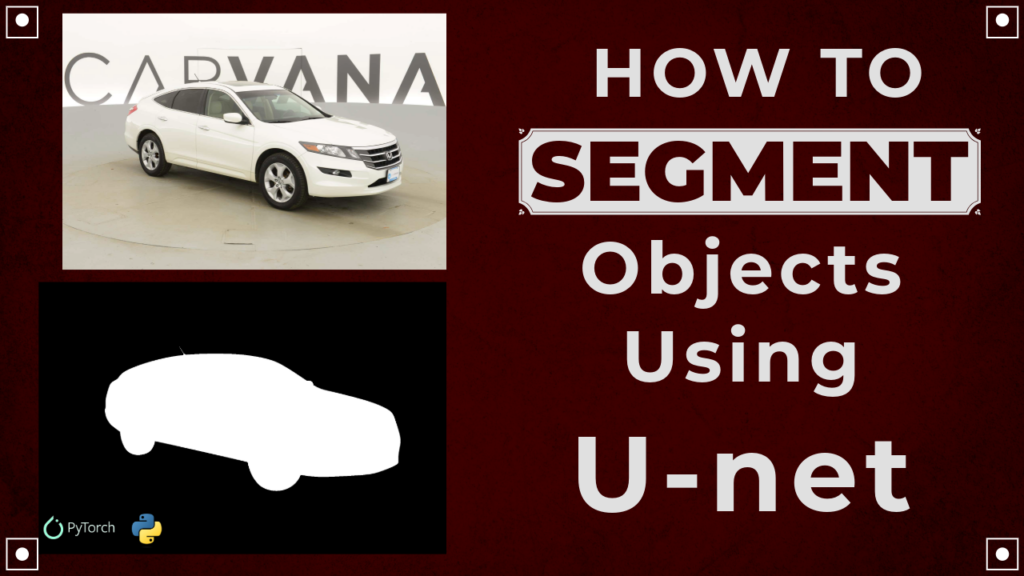
Last Updated on 03/03/2026 by Eran Feit
In this UNet PyTorch tutorial, you’re building a complete image segmentation workflow that feels like a real project, not a toy example.
Instead of stopping at “here’s the model,” you go end-to-end: preparing the dataset, training a U-Net from scratch, and then using the trained weights to predict masks on new images.
Segmentation is all about pixel-level decisions.
For every pixel in an image, the model learns whether it belongs to the object of interest or the background.
That’s exactly what you’re doing with the Carvana challenge: the input is a car photo, and the output is a binary mask that isolates the car cleanly.
The magic of U-Net is how it keeps both context and detail at the same time.
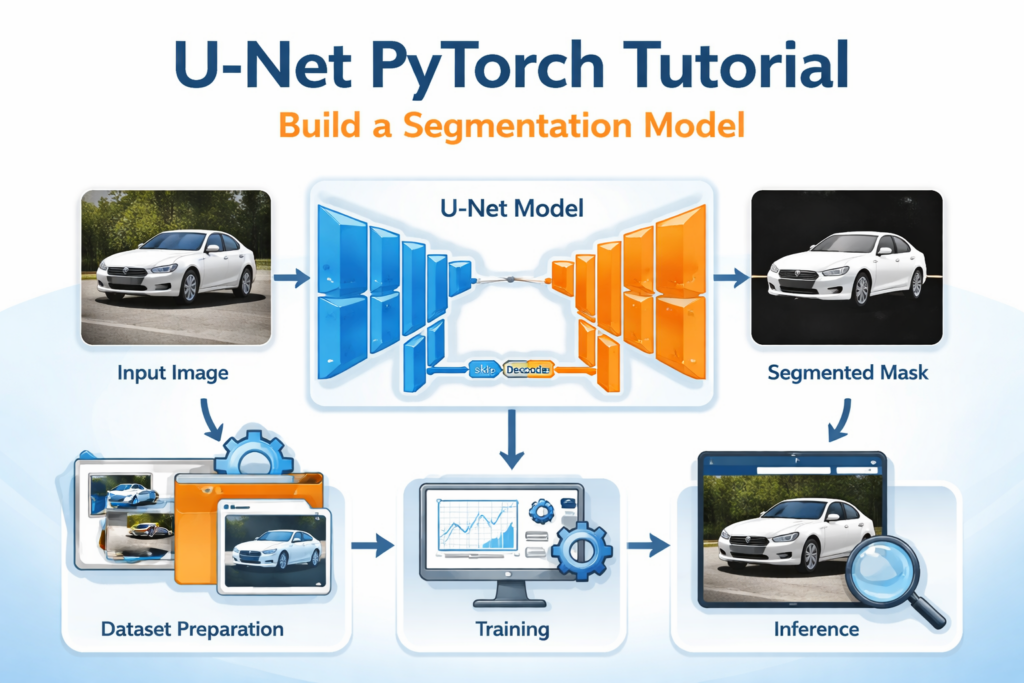
The encoder path compresses the image into strong feature representations, while the decoder path rebuilds spatial resolution.
Skip connections bridge both worlds, so the final mask doesn’t look “blurry” or lose object edges.
By the end of this tutorial, the workflow gives you practical skills you can reuse on other datasets too.
Once you understand the dataset class, the training loop, and inference utilities, swapping “cars” for “people,” “products,” or “medical scans” becomes mostly a data problem—not a model problem.
A practical U-Net PyTorch tutorial from dataset to inference
This tutorial is built around one clear goal: train a segmentation model that you can actually use.
That’s why the code isn’t just a single notebook cell.
It’s organized into a dataset loader, modular U-Net components, a training script, and inference scripts for single and multiple images.
At a high level, the pipeline is simple and powerful.
You load image–mask pairs, resize them to a consistent shape, convert them to tensors, and feed them into a U-Net.
During training, the model outputs a predicted mask map, and you optimize it against the ground-truth mask until the predictions become sharp and stable.
Your training loop follows the same structure used in real-world deep learning projects.
You define hyperparameters, split data into train/validation, iterate batches with a DataLoader, calculate loss, backpropagate, and track validation loss each epoch.
Using a sigmoid-friendly loss like BCEWithLogitsLoss for a single-class mask makes the model output behave exactly like a binary segmentation map.
Inference is where everything clicks.
You load the saved weights, preprocess images the same way you did during training, and run the model in evaluation mode to produce masks.
Then you threshold the output into a clean binary mask and visualize it—either as a quick single-image check or as a grid over multiple test images to see consistency across different angles and backgrounds.
What this code builds from start to finish
This U-Net PyTorch tutorial is designed to take you through a complete, practical segmentation pipeline that you can reuse in other projects.
The code isn’t just a model definition.
It’s a full workflow that prepares data, trains a U-Net from scratch, saves the weights, and then loads the trained model to generate segmentation masks on new images.
The first target of the code is to turn the Carvana dataset into something PyTorch can train on reliably.
That’s why the dataset classes are a big part of the project.
They handle reading images and masks from folders, converting formats correctly, resizing to a consistent size, and returning tensors that match what the network expects.
Once that part is stable, training becomes far less error-prone, because the model always receives clean batches of paired inputs and labels.
The second target is to train a U-Net in a way that matches real deep learning practice.
You define key hyperparameters like learning rate, batch size, and epochs.
You split the dataset into train and validation sets with a fixed seed for reproducibility.
Then the training loop iterates batch by batch, computes predictions, measures loss with a segmentation-friendly objective, runs backpropagation, and tracks both training and validation loss so you can see whether the model is improving or overfitting.
The final target of the code is to make the trained model usable, not just “trained.”
That’s why there are separate inference scripts for a single image and for a folder of images.
The model weights are loaded from the saved .pth file, the image preprocessing mirrors the training setup, and the output logits are converted into a clean binary mask.
This gives you a clear end result: you can visually confirm segmentation quality and quickly test how well the model generalizes across different car images.
Link to the video tutorial .
You can download the code here or here .
Best AI Photo Tools (Backgrounds, Objects, Headshots)
✅ Phot-AI packs more than 30 AI‑powered tools into one place—covering background and object removal/replacement, image extension and a suite of creative generators for art, icons and logos.
follow the link and start creating here
✅ Pixelcut uses AI to help you create professional photos and videos. You can instantly remove backgrounds, retouch, expand and upscale images, or generate new images and even videos from a simple text prompt or reference picture.
tap the link and start creating today!
✅ PhotoGPT AI acts as your personal photographer—just describe what you need and the platform generates high‑quality headshots or casual images within minutes.
Its built‑in photo editor lets you remove objects, replace backgrounds and make studio‑quality corrections with a single click.
You can even train your own AI model using a few selfies, receive context‑aware prompt suggestions and upscale images for print‑ready results.
Dive into this all‑in‑one AI photo studio here
My blog
Link to the Medium post and code here .
Want to get started with Computer Vision or take your skills to the next level ?
Great Interactive Course : “Deep Learning for Images with PyTorch” here
If you’re just beginning, I recommend this step-by-step course designed to introduce you to the foundations of Computer Vision – Complete Computer Vision Bootcamp With PyTorch & TensorFlow
If you’re already experienced and looking for more advanced techniques, check out this deep-dive course – Modern Computer Vision GPT, PyTorch, Keras, OpenCV4
U-Net PyTorch Tutorial: Build a Segmentation Model
If you’re looking for a U-Net PyTorch tutorial that feels like a real project, this one is built exactly that way.
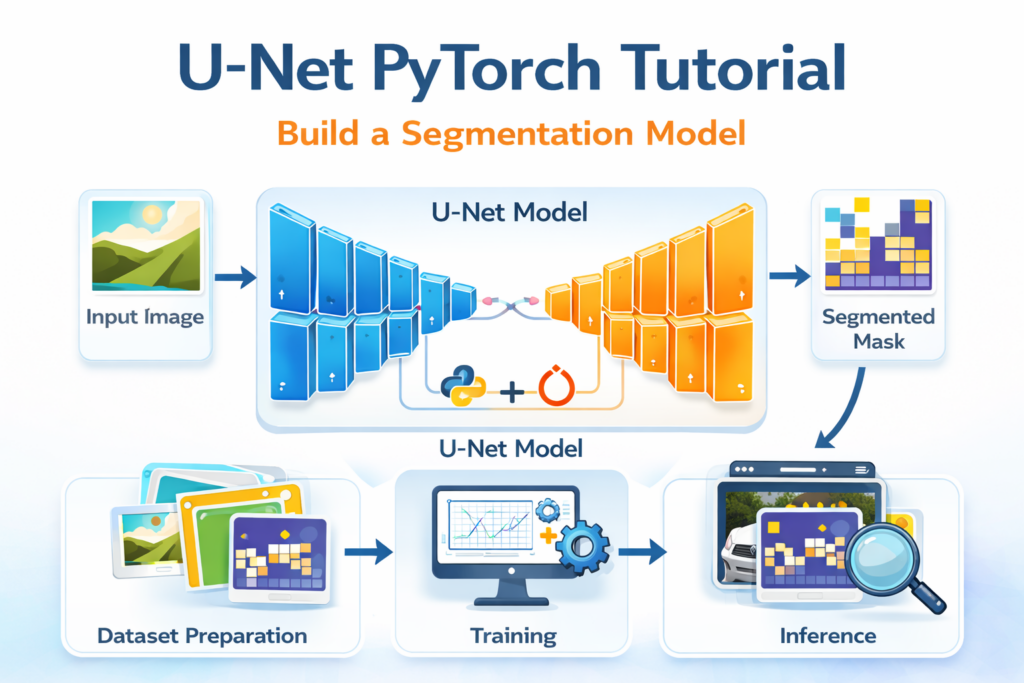
You’ll start by setting up a clean environment, then prepare the Carvana dataset, build U-Net from scratch, train it, and finally run inference on new images.
The goal is simple.
By the end, you’ll have a working segmentation model that predicts a car mask from an input image, using a full training and testing pipeline in PyTorch.
Along the way, you’ll also learn what each file is responsible for.
Dataset class for loading images and masks, U-Net building blocks, the full U-Net architecture, training loop, and inference scripts.
This is the kind of workflow you can reuse for your own segmentation datasets later.
Swap the dataset loader, adjust the number of classes, and you have a new project ready to go.
Set up a clean PyTorch environment for U-Net training
A good environment setup prevents 80% of the annoying issues later.
Here we create a dedicated conda environment, verify CUDA, and install PyTorch plus the small dependencies you’ll use during training and visualization.
Even if you run on CPU, this step still matters because it locks versions and keeps your project reproducible.
If you run on GPU, it also ensures your CUDA build matches your PyTorch install.
Want the exact dataset so your results match mine?
If you want to reproduce the same training flow and compare your results to mine, I can share the dataset structure and what I used in this tutorial. Send me an email and mention the name of the tutorial / dataset , so I know what you’re requesting.
### Create a new isolated conda environment for this project. conda create -n U-Net-Pytorch python=3.11 ### Activate the environment so installs happen inside it. conda activate U-Net-Pytorch ### Check your CUDA compiler version (useful when debugging GPU installs). nvcc --version ### Install PyTorch + torchvision + torchaudio with CUDA support (matching CUDA 12.4 here). conda install pytorch==2.5.0 torchvision==0.20.0 torchaudio==2.5.0 pytorch-cuda=12.4 -c pytorch -c nvidia ### Install tqdm for progress bars during training loops. pip install tqdm==4.67.1 ### Install matplotlib for plotting masks and predictions. pip install matplotlib==3.10.0 Summary.
You now have a dedicated environment with PyTorch, CUDA support (if available), and the minimal tools needed for training and visualization.
Download the Carvana dataset and prepare the folder structure
Before training anything, you need the dataset in the right format on disk.
Carvana is a classic segmentation dataset where each image has a matching mask image that indicates the car region.
The training code expects a simple structure with separate folders for images and masks.
Once your folders match what the dataset class expects, everything else becomes smooth and predictable.
### Keep the original folder names for train images and train masks. ### Expected structure inside your dataset root path: ### /train ### /train_masks ### /test Summary.
You’ve downloaded and extracted the dataset, and your directory structure matches what the dataset loader will read.
Build the dataset loader that feeds images and masks to PyTorch
A segmentation pipeline lives or dies by the dataset loader.
This dataset class is responsible for pairing each input image with its correct mask, resizing both consistently, and converting them to tensors.
Once you have a clean dataset class, your DataLoader becomes plug-and-play.
You can shuffle, batch, split into train and validation, and never worry about mismatched image-mask pairs.
Name this file : MyTrainDatasetClass.py
### Import os for file and directory handling. import os ### Import PIL Image for opening images and masks. from PIL import Image ### Import Dataset base class to create a custom PyTorch dataset. from torch.utils.data.dataset import Dataset ### Import torchvision transforms for resizing and tensor conversion. from torchvision import transforms ### Define a fixed image size so every sample has consistent dimensions. IMG_SIZE = 256 ### Create a dataset class for the Carvana training data. class CarvanaTrainDataset(Dataset): ### Initialize the dataset with the root dataset path. def __init__(self, root_path): ### Store the dataset root path for later use. self.root_path = root_path ### Build a sorted list of image file paths from the train folder. self.images = sorted([root_path+"/train/" + i for i in os.listdir(root_path + "/train/")]) ### Build a sorted list of mask file paths from the train_masks folder. self.masks = sorted([root_path+"/train_masks/" + i for i in os.listdir(root_path + "/train_masks/")]) ### Create a transform pipeline that resizes and converts to tensor. self.transform = transforms.Compose([ ### Resize images and masks to IMG_SIZE x IMG_SIZE. transforms.Resize((IMG_SIZE, IMG_SIZE)), ### Convert the PIL image to a PyTorch tensor in range [0, 1]. transforms.ToTensor() ]) ### Return one sample (image, mask) by index. def __getitem__(self , index): ### Open the RGB image file. img = Image.open(self.images[index]).convert("RGB") ### Open the mask file as grayscale (single channel). mask = Image.open(self.masks[index]).convert("L") ### Return transformed image and transformed mask tensors. return self.transform(img), self.transform(mask) ### Return the total number of samples in the dataset. def __len__(self): ### Use the number of images as dataset size. return len(self.images) Summary.
This dataset class guarantees every training step receives a correctly paired (image, mask) tensor pair with consistent sizing.
Implement the core U-Net blocks: double conv, downsample, upsample
U-Net is built from a few simple Lego pieces.
A double convolution block extracts features, downsampling compresses spatial size while increasing depth, and upsampling restores resolution while merging skip features.
When these blocks are clean, your U-Net file becomes much easier to read and debug.
It also makes it easy to modify later, like adding batch norm, dropout, or switching activations.
Name this file : unet_parts.py
### Import torch for tensor operations. import torch ### Import torch.nn for building neural network layers. import torch.nn as nn ### Define the classic double-convolution block used throughout U-Net. class DoubleConv(nn.Module): ### Initialize the block with input and output channel sizes. def __init__(self, in_channels, out_channels): ### Initialize the parent nn.Module. super().__init__() ### Build a sequential block: conv -> ReLU -> conv -> ReLU. self.conv_op = nn.Sequential( ### First 3x3 convolution with padding to preserve spatial size. nn.Conv2d(in_channels, out_channels, kernel_size=3, padding=1), ### Apply ReLU non-linearity in-place for efficiency. nn.ReLU(inplace=True), ### Second 3x3 convolution to refine features. nn.Conv2d(out_channels, out_channels, kernel_size=3, padding=1), ### Apply ReLU again. nn.ReLU(inplace=True) ) ### Forward pass through the double-conv block. def forward(self, x): ### Apply the sequential conv operations to input tensor. return self.conv_op(x) ### Define the downsampling block used in the encoder. class DownSample(nn.Module): ### Initialize with input and output channel sizes. def __init__(self, in_channels, out_channels): ### Initialize parent nn.Module. super().__init__() ### Use DoubleConv to extract features. self.conv = DoubleConv(in_channels, out_channels) ### Use MaxPool to downsample by factor of 2. self.pool = nn.MaxPool2d(kernel_size=2, stride=2) ### Forward pass returns both the feature map and pooled map. def forward(self, x): ### Compute feature map before pooling (used for skip connection). down = self.conv(x) ### Pool the feature map to reduce spatial dimensions. p = self.pool(down) ### Return skip features and pooled features. return down, p ### Define the upsampling block used in the decoder. class UpSample(nn.Module): ### Initialize with input and output channel sizes. def __init__(self, in_channels, out_channels): ### Initialize parent nn.Module. super().__init__() ### Use transposed convolution to upsample by factor of 2. self.up = nn.ConvTranspose2d(in_channels, in_channels // 2, kernel_size=2, stride=2) ### Apply DoubleConv after concatenating skip features. self.conv = DoubleConv(in_channels, out_channels) ### Forward pass takes decoder tensor x1 and skip tensor x2. def forward(self, x1, x2): ### Upsample decoder feature map. x1 = self.up(x1) ### Concatenate upsampled map with encoder skip map along channel dimension. x = torch.cat([x1, x2], 1) ### Refine merged features with DoubleConv. return self.conv(x) Summary.
You now have reusable encoder and decoder building blocks that form the backbone of U-Net.
Assemble the full U-Net architecture with skip connections
This is where everything comes together into the real model.
The encoder compresses the image into deep features, the bottleneck processes the tightest representation, and the decoder rebuilds the segmentation map back to full resolution.
Skip connections are the magic.
They preserve fine details by injecting earlier high-resolution features into later upsampling stages, which is exactly what segmentation needs.
Name this file : unet.py
### Import torch for tensor creation in the test section. import torch ### Import torch.nn for building the model layers. import torch.nn as nn ### Import U-Net building blocks from the parts file. from unet_parts import DoubleConv , DownSample , UpSample ### Define the full U-Net model. class UNet(nn.Module): ### Initialize the model with input channels and output class count. def __init__(self, in_channels, num_classes): ### Initialize parent nn.Module. super().__init__() ### Define encoder downsampling stages. self.down_convolution_1 = DownSample(in_channels, 64) self.down_convolution_2 = DownSample(64, 128) self.down_convolution_3 = DownSample(128, 256) self.down_convolution_4 = DownSample(256, 512) ### Define the bottleneck block at the bottom of U-Net. self.bottle_neck = DoubleConv(512, 1024) ### Define decoder upsampling stages. self.up_convolution_1 = UpSample(1024, 512) self.up_convolution_2 = UpSample(512, 256) self.up_convolution_3 = UpSample(256, 128) self.up_convolution_4 = UpSample(128, 64) ### Define the final 1x1 convolution that maps to num_classes channels. self.out = nn.Conv2d(in_channels=64, out_channels=num_classes, kernel_size=1) ### Define the forward pass through the network. def forward(self, x): ### Encoder stage 1 with skip output and pooled output. down_1, p1 = self.down_convolution_1(x) ### Encoder stage 2. down_2, p2 = self.down_convolution_2(p1) ### Encoder stage 3. down_3, p3 = self.down_convolution_3(p2) ### Encoder stage 4. down_4, p4 = self.down_convolution_4(p3) ### Bottleneck processing. bottle_neck = self.bottle_neck(p4) ### Decoder stage 1 with skip from down_4. up_1 = self.up_convolution_1(bottle_neck, down_4) ### Decoder stage 2 with skip from down_3. up_2 = self.up_convolution_2(up_1, down_3) ### Decoder stage 3 with skip from down_2. up_3 = self.up_convolution_3(up_2, down_2) ### Decoder stage 4 with skip from down_1. up_4 = self.up_convolution_4(up_3, down_1) ### Produce the final output logits map. out = self.out(up_4) ### Return the raw output logits. return out ### Check if it works : if __name__ == '__main__': ### Create a DoubleConv block for a quick sanity print. double_conv = DoubleConv(256,256) ### Print the block structure to verify layers. print(double_conv) ### Create a dummy input batch of shape (1, 3, 512, 512). input_image = torch.rand((1, 3, 512, 512)) ### Initialize the U-Net model with 3 input channels and 10 output classes. model = UNet(in_channels=3, num_classes=10) ### Run a forward pass with the dummy input. output = model(input_image) ### Print output tensor shape to validate dimensions. print("Output shape:", output.shape) # Should be (1, num_classes, 512, 512) Summary.
You now have a full U-Net implementation with skip connections and a shape test to confirm it runs end-to-end.
Train the U-Net model on Carvana with validation loss checks
This training script is the heart of the project.
It builds loaders, splits data into train and validation sets, trains for several epochs, and prints both training and validation loss so you can spot overfitting early.
The loss function here is BCEWithLogitsLoss.
That’s a great fit because this is binary segmentation, and the model outputs logits that you later threshold into a 0/1 mask.
### Import torch for core PyTorch functionality. import torch ### Import nn for loss functions and model utilities, and optim for optimizers. from torch import nn, optim ### Import DataLoader and random_split for batching and train/val splitting. from torch.utils.data import DataLoader, random_split ### Import tqdm for progress bars in loops. from tqdm import tqdm ### Import os for directory creation when saving models. import os ### Import the U-Net model definition. from unet import UNet ### Import the custom Carvana training dataset loader. from MyTrainDatasetClass import CarvanaTrainDataset ### Run training only when this script is executed directly. if __name__ == '__main__': ### Set the learning rate for AdamW optimizer. LEARNING_RATE = 3e-4 ### Set the batch size for training. BATCH_SIZE = 8 ### Set the number of training epochs. EPOCHS = 10 ### Set the dataset root folder path on disk. DATA_PATH = "D:/Data-Sets-Object-Segmentation/Carvana Image Masking Challenge" ### Set the file path where model weights will be saved. MODEL_SAVE_PATH = "D:/temp/models/CarvanaCarSegmentation/Car-unet.pth" ### Choose CUDA if available, otherwise fall back to CPU. DEVICE = torch.device("cuda" if torch.cuda.is_available() else "cpu") ### Create the dataset object that yields (image, mask). train_dataset = CarvanaTrainDataset(DATA_PATH) ### Create a seeded generator so splits are reproducible. generator = torch.Generator().manual_seed(42) ### Split the dataset into train and validation subsets. train_dataset , val_dataset = random_split(train_dataset, [0.8, 0.2], generator=generator) ### Wrap the training subset in a DataLoader for batching and shuffling. train_dataloader = DataLoader(dataset=train_dataset, batch_size=BATCH_SIZE, shuffle=True,) ### Wrap the validation subset in a DataLoader. val_dataloader = DataLoader(dataset=val_dataset, batch_size=BATCH_SIZE, shuffle=True,) ### Create the U-Net model and move it to the chosen device. model = UNet(in_channels=3, num_classes=1).to(DEVICE) ### Create the AdamW optimizer for stable training. optimizer = optim.AdamW(model.parameters(), lr=LEARNING_RATE) ### Use BCEWithLogitsLoss because this is binary segmentation with logits output. criterion = nn.BCEWithLogitsLoss() # Binary Cross Entropy with logits ### Loop through epochs with a progress bar. for epoch in tqdm(range(EPOCHS)): ### Set model to training mode. model.train() ### Track cumulative training loss. train_running_loss = 0.0 ### Iterate over training batches. for idx , img_mask in enumerate(tqdm(train_dataloader)): ### 0 index is image and 1 index is mask ### Move images to device and ensure float dtype. img = img_mask[0].float().to(DEVICE) ### Move masks to device and ensure float dtype. mask = img_mask[1].float().to(DEVICE) ### Forward pass to get predicted logits mask. y_pred = model(img) ### Clear gradients before backpropagation. optimizer.zero_grad() ### Compute loss between logits prediction and ground-truth mask. loss = criterion(y_pred, mask) ### Accumulate training loss for epoch average. train_running_loss += loss.item() ### Backpropagate gradients. loss.backward() ### Update model weights. optimizer.step() ### Compute mean training loss for the epoch. train_loss = train_running_loss / (idx + 1) ### Switch to evaluation mode for validation. model.eval() ### Track cumulative validation loss. val_running_loss = 0.0 ### Disable gradient computation for validation. with torch.no_grad(): ### Iterate over validation batches. for idx , img_mask in enumerate(tqdm(val_dataloader)): ### Move validation images to device. img = img_mask[0].float().to(DEVICE) ### Move validation masks to device. mask = img_mask[1].float().to(DEVICE) ### Forward pass on validation batch. y_pred = model(img) ### Compute validation loss. loss = criterion(y_pred, mask) ### Accumulate validation loss. val_running_loss += loss.item() ### Compute mean validation loss for the epoch. val_loss = val_running_loss / (idx + 1) ### Print a readable epoch summary separator. print("-"*30) ### Print training loss for the epoch. print(f"Train loss EPOCH {epoch+1}: {train_loss:.4f}") ### Print validation loss for the epoch. print(f"Validation loss EPOCH {epoch+1}: {val_loss:.4f}") ### Print separator again. print("-"*30) ### Create model folder if it does not exist. os.makedirs(os.path.dirname(MODEL_SAVE_PATH), exist_ok=True) ### Save only the model weights to disk. torch.save(model.state_dict(), MODEL_SAVE_PATH) ### Print where the model was saved. print(f"Model saved to {MODEL_SAVE_PATH}") ### Print completion message when done. print("Training complete.") Summary.
You trained U-Net with a stable optimizer, tracked train and validation loss, and saved the final model weights for inference.
Test the model on a single image and visualize the predicted mask
Single-image inference is the fastest way to sanity-check your model.
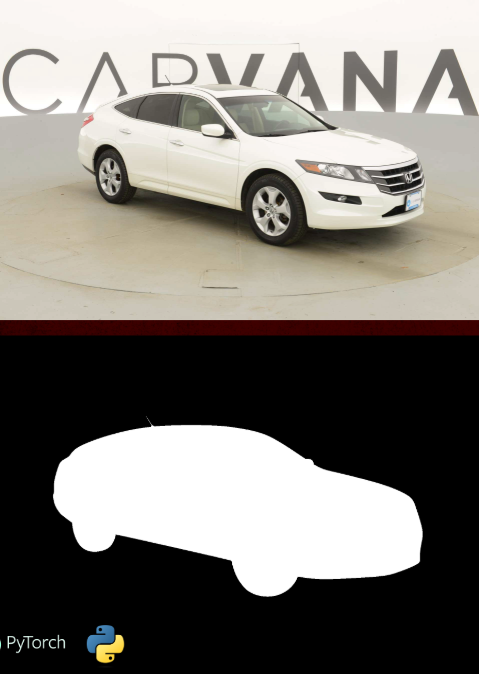
You load the saved weights, preprocess one image, run prediction, threshold the output into a binary mask, and display it next to the original image.
This script also highlights a key segmentation detail.
Your model outputs logits, so you convert them into a clean binary mask by thresholding values into 0 and 1.
Test image :

### Import torch for loading model weights and running inference. import torch ### Import matplotlib for visualization. import matplotlib.pyplot as plt ### Import torchvision transforms for resizing and tensor conversion. from torchvision import transforms ### Import PIL Image for loading the image file. from PIL import Image ### Import the U-Net model definition. from unet import UNet ### Import the test dataset class (not required for single image, but kept as in your script). from MyTestDatasetClass import CarvanaTestDataset ### Define a function that loads the model and predicts a single image mask. def single_image_inference(image_path , model_pth, device): ### Create the U-Net model and move it to the target device. model = UNet(in_channels=3, num_classes=1).to(device) ### Load saved model weights from disk. model.load_state_dict(torch.load(model_pth, map_location=torch.device(device))) ### Create preprocessing transforms to resize and convert to tensor. transform = transforms.Compose([ ### Resize input image to 512x512 for inference. transforms.Resize((512, 512)), ### Convert image to tensor in range [0, 1]. transforms.ToTensor() ]) ### Load the image, apply transforms, and move to device. img = transform(Image.open(image_path)).float().to(device) ### Add batch dimension so shape becomes (1, C, H, W). img = img.unsqueeze(0) ### Predict the mask logits by running model forward pass. pred_mask = model(img) ### Remove batch dimension and move back to CPU for visualization. img = img.squeeze(0).cpu().detach() ### Convert (C, H, W) to (H, W, C) for plotting. img = img.permute(1,2,0) ### Remove batch dimension from mask output and move to CPU. pred_mask = pred_mask.squeeze(0).cpu().detach() ### Convert mask tensor to (H, W, C) format for plotting. pred_mask = pred_mask.permute(1,2,0) ### Threshold the logits into a binary mask. pred_mask[pred_mask < 0] = 0 pred_mask[pred_mask > 0] = 1 ### Create a figure for side-by-side visualization. fig = plt.figure() ### Plot two subplots: image and predicted mask. for i in range(1,3): ### Add subplot to the figure. fig.add_subplot(1, 2, i) ### Show original image in first subplot. if i == 1: plt.imshow(img , cmap='gray') ### Show predicted mask in second subplot. else: plt.imshow(pred_mask , cmap='gray') ### Display the figure. plt.show() ### Run single-image inference when executed directly. if __name__ == "__main__": ### Define the path to a single test image. single_img_path = "Best-Semantic-Segmentation-models/U-Net/Car Segmentation - U-NET Image Segmentation using Pytorch/test_Img.jpg" ### Define the saved model weights path. model_pth = "D:/temp/models/CarvanaCarSegmentation/Car-unet.pth" ### Choose CUDA if available, otherwise CPU. device = "cuda" if torch.cuda.is_available() else "cpu" ### Run inference and visualization. single_image_inference(single_img_path , model_pth, device) Summary.
You loaded the trained U-Net weights, ran inference on one image, converted logits into a binary mask, and visualized the result.
The result :
Predict masks for multiple test images and show them as a grid
Batch testing is where your project starts to feel real.
Instead of checking one image, you loop over a folder of test images and generate predictions for each, then plot them in a clean grid.
This also makes it easier to spot patterns.
If masks are consistently shifted, too noisy, or missing edges, you’ll notice immediately when looking at several results together.
### MyTestDatasetClass.py ### Import os for listing test image files. import os ### Import PIL Image for opening test images. from PIL import Image ### Import Dataset base class. from torch.utils.data.dataset import Dataset ### Import torchvision transforms for resizing and tensor conversion. from torchvision import transforms ### Define consistent image size for test preprocessing. IMG_SIZE = 256 ### Create a dataset class for Carvana test images. class CarvanaTestDataset(Dataset): ### Initialize with dataset root path. def __init__(self, root_path): ### Store the dataset root path. self.root_path = root_path ### Build a sorted list of test image paths. self.images = sorted([root_path+"/test/" + i for i in os.listdir(root_path + "/test/")]) ### Masks are not included for test set in this class. #self.masks = sorted([root_path+"/train_masks/" + i for i in os.listdir(root_path + "/train_masks/")]) ### Create transform pipeline for resizing and tensor conversion. self.transform = transforms.Compose([ ### Resize test images to IMG_SIZE. transforms.Resize((IMG_SIZE, IMG_SIZE)), ### Convert to tensor. transforms.ToTensor() ]) ### Return one test image tensor. def __getitem__(self , index): ### Open test image and convert to RGB. img = Image.open(self.images[index]).convert("RGB") ### No mask for test images in this dataset class. #mask = Image.open(self.masks[index]).convert("L") ### Return transformed image tensor. return self.transform(img) ### Return dataset size. def __len__(self): ### Use number of test images. return len(self.images) ### Multi-image inference script ### Import torch for loading weights and running inference. import torch ### Import matplotlib for plotting grid results. import matplotlib.pyplot as plt ### Import torchvision transforms (not used directly here, but kept as in your script). from torchvision import transforms ### Import PIL Image (not used directly here, but kept as in your script). from PIL import Image ### Import the U-Net model definition. from unet import UNet ### Import the test dataset loader. from MyTestDatasetClass import CarvanaTestDataset ### Define a function that predicts multiple images and shows them in a grid. def pred_show_image_grid(data_path, model_pth, device): ### Create the model and move it to device. model = UNet(in_channels=3, num_classes=1).to(device) ### Load the trained model weights. model.load_state_dict(torch.load(model_pth, map_location=torch.device(device))) ### Load the test dataset from disk. image_dataset = CarvanaTestDataset(data_path) ### Store original images for plotting. images = [] ### Store predicted masks for plotting. pred_masks = [] ### Loop through each image in dataset. for img in image_dataset : ### Move image to device and ensure float dtype. img = img.float().to(device) ### Add batch dimension. img = img.unsqueeze(0) ### Predict mask logits for this image. pred_mask = model(img) ### Remove batch dimension from image for plotting. img = img.squeeze(0).cpu().detach() ### Convert to HWC format. img = img.permute(1,2,0) ### Remove batch dimension from predicted mask. pred_mask = pred_mask.squeeze(0).cpu().detach() ### Convert to HWC format. pred_mask = pred_mask.permute(1,2,0) ### Threshold logits into a binary mask. pred_mask[pred_mask < 0] = 0 pred_mask[pred_mask > 0] = 1 ### Append processed image to list. images.append(img) ### Append processed predicted mask to list. pred_masks.append(pred_mask) ### Create a subplot grid with 2 columns: image and mask. fig , axes = plt.subplots(len(images), 2, figsize=(10, 5 * len(images))) ### Loop through rows and plot each pair. for i in range(len(images)): ### Plot original image. axes[i, 0].imshow(images[i].numpy()) ### Hide axes. axes[i,0].axis('off') ### Plot predicted mask. axes[i, 1].imshow(pred_masks[i].numpy(), cmap='gray') ### Hide axes. axes[i, 1].axis('off') ### Improve spacing. plt.tight_layout() ### Show the grid. plt.show() ### Run multi-image inference when executed directly. if __name__ == "__main__": ### Point to the dataset root path (contains /test folder). data_path = "D:/Data-Sets-Object-Segmentation/Carvana Image Masking Challenge" ### Point to the saved model weights path. model_path = "D:/temp/models/CarvanaCarSegmentation/Car-unet.pth" ### Choose device automatically. device = "cuda" if torch.cuda.is_available() else "cpu" ### Run the grid prediction and visualization. pred_show_image_grid(data_path, model_path, device) Summary.
You created a test dataset loader, predicted masks across multiple images, thresholded logits into binary masks, and visualized everything in a clean grid.
FAQ
What is U-Net in simple terms?
U-Net is a neural network that turns an image into a pixel-level mask. It compresses features and then rebuilds them while keeping details via skip connections.
Why are skip connections important for segmentation?
They bring back high-resolution details from the encoder to the decoder. That helps the model draw cleaner boundaries and avoid blurry masks.
What does BCEWithLogitsLoss do in this project?
It trains binary segmentation using raw logits from the model. It is stable and avoids numerical issues compared to applying sigmoid manually first.
Why does the model output need thresholding?
The output is not a final mask, it’s logits. Thresholding converts those values into a clean 0/1 segmentation mask for display and saving.
What folder structure does the Carvana loader expect?
It expects a root folder with train images in /train and masks in /train_masks. For multi-image inference, it reads test images from /test.
Why might my predicted masks be all black?
A common cause is incorrect mask scaling or bad image-mask pairing. Verify your masks contain real foreground pixels and that your dataset lists are aligned.
How can I make the model generalize better?
Add augmentations like flips and color jitter, and monitor validation loss. You can also train longer with a scheduler if you are not overfitting.
What is the fastest way to debug the pipeline?
Visualize a few image and mask pairs from the dataset class before training. If those look correct, training and inference issues become much easier to diagnose.
How do I convert this into multi-class segmentation?
Set num_classes to your class count and output that many channels. Use CrossEntropyLoss and store class IDs per pixel in your masks.
What should I save for deployment: full model or state_dict?
Saving state_dict is lightweight and flexible, especially across machines. It also keeps your deployment code clean: rebuild the model and load weights.
Conclusion
This U-Net PyTorch tutorial gives you a complete segmentation workflow you can reuse in real projects.
You built the data pipeline, implemented U-Net from scratch, trained with validation checks, and ran inference on both single and multiple images.
The biggest win is that every piece is modular.
Your dataset class controls preprocessing, your U-Net blocks control architecture, your training script handles optimization, and your inference scripts handle visualization.
Once you’re comfortable with this baseline, you can improve results in practical ways.
Add augmentations, try Dice loss, train at higher resolution, and expand from binary masks to multi-class outputs when your dataset demands it.
Most importantly, this structure scales.
You can replace Carvana with your own dataset, update the dataset loader, and keep the rest of the pipeline almost identical.
Connect :
☕ Buy me a coffee — https://ko-fi.com/eranfeit
🖥️ Email : feitgemel@gmail.com
🤝 Fiverr : https://www.fiverr.com/s/mB3Pbb
Enjoy,
Eran