Last Updated on 27/09/2026 by Eran Feit
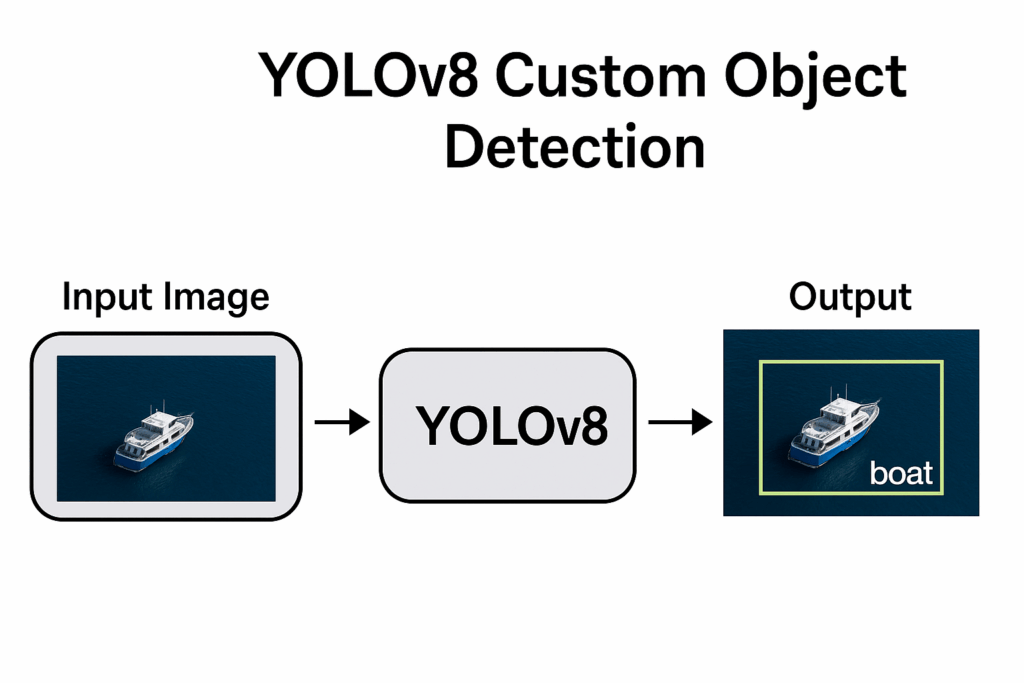
Object detection becomes truly powerful when the model understands your world instead of just COCO-style benchmarks. That’s where yolov8 custom object detection comes in. Instead of detecting generic categories like dogs or cars, you fine-tune YOLOv8 on your own dataset, with your own labels, and tailor the model to a specific domain such as ships at sea, defects on a production line, or vehicles in satellite imagery. The result is a detector that feels like it was built for your use case, because it actually was.
YOLOv8, the latest generation in the YOLO family from Ultralytics, improves on earlier versions with a redesigned backbone, a modern C2f-based architecture, and an anchor-free detection head that predicts object centers directly. These changes give it strong performance and efficiency for real-time applications, while still being straightforward to train and deploy on standard hardware.
When you train YOLOv8 on a custom dataset, the pipeline usually follows a familiar pattern: prepare and organize your images, convert annotations into YOLO format, describe your dataset in a simple YAML file, and then launch training with the Ultralytics API or Python package. From there, YOLOv8 optimizes the model weights so it can recognize the specific shapes, colors, and patterns that define your objects. Tutorials from the community show that this workflow scales from small experiments in notebooks all the way up to production-ready systems.
Once training is done, the same model can be used to run inference on images or videos in just a few lines of code. Because YOLOv8 is designed for real-time use, it can process frames quickly enough for live dashboards, monitoring systems, or interactive demos. Combined with a carefully prepared custom dataset, yolov8 custom object detection becomes a practical tool for solving focused problems, from ship tracking in Google Earth imagery to safety monitoring in industrial environments.
If you want a complete YOLOv8 YouTube object detection workflow (auto-labeling, training, and live inference), follow this step-by-step guide: https://eranfeit.net/how-to-use-yolov8-for-object-detection-on-youtube-videos/
Getting Comfortable with YOLOv8 Custom Object Detection YOLOv8 custom object detection is all about teaching a general-purpose model to specialize in a narrow task. Instead of relying on pre-trained weights that know “a little bit about everything,” you guide the model with labeled examples of exactly what you care about: ships versus background, healthy parts versus defective ones, or specific product types on a shelf. By repeatedly seeing images and their bounding boxes, the network learns to map raw pixels to object positions and classes that matter in your project.
At a high level, the workflow has three main targets: consistent data, correct annotation format, and stable training. First you collect and organize your dataset into clear train/validation splits, usually with separate images and labels folders so YOLOv8 can match each image with its text file. Then you ensure your annotations use the YOLO format, where every line describes one object with a class ID and normalized bounding box coordinates. If your labels start as Pascal VOC XML (for example from older tools or Kaggle datasets), you convert them into YOLO text files so the training code can read them efficiently.
The next target is model configuration. A simple YAML file points YOLOv8 to the train and val image directories and lists the class names the model will learn, such as boat for a ship-detection project. You then pick a model size (like yolov8n, yolov8s, or yolov8l) depending on your GPU and accuracy needs, and launch training with a command or Python call that specifies epochs, image size, batch size, and device. Under the hood, YOLOv8 handles data loading, augmentation, loss calculation, and checkpointing, while you monitor metrics like loss curves and mAP to see whether your custom detector is converging.
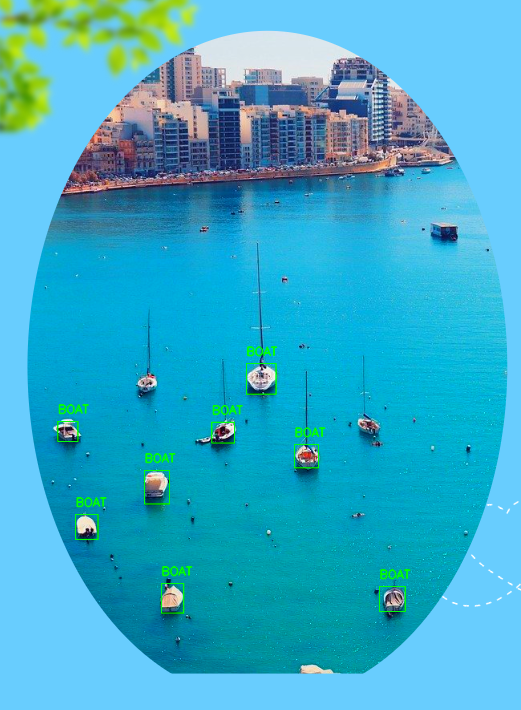
Finally, custom object detection becomes tangible when you run inference on new images or videos. You load the trained weights, feed in a test frame, and watch YOLOv8 return bounding boxes, confidence scores, and predicted class IDs for each detected object. Drawing these boxes on top of the frame turns abstract metrics into something visual and intuitive: ships outlined on open water, objects highlighted in a warehouse, or potholes boxed on a street. This closing loop—from data preparation through training and back to visual predictions—is what makes yolov8 custom object detection such a practical and satisfying workflow for real-world computer vision.
YOLOv8 Custom Object Detection: Full Code Walkthrough 10 Walking Through the YOLOv8 Custom Object Detection Code This tutorial is really about turning abstract ideas into working code.YOLOv8 custom object detection model that can spot ships in real images.
The first part of the code focuses on building a reliable foundation.
Next, the tutorial moves into preparing the dataset in a way YOLOv8 expects.xml.etree.ElementTree to parse each XML file, read the bounding boxes, and convert them into YOLO’s normalized text format..txt for every image.
After the labels are converted, the code switches to training mode.data.yaml that points to your train and val folders, choose hyperparameters like epochs, batch size, and image size, and launch the training process.
Link for the video tutorial : https://youtu.be/zAyPboTjcAA
Code for the tutorial here : https://eranfeit.lemonsqueezy.com/buy/b734bd4d-ad0f-4c03-b0ad-29c435d749b1 or here : https://ko-fi.com/s/57dd78cfa3
Link for Medium users : https://medium.com/object-detection-tutorials/yolov8-custom-object-detection-full-code-walkthrough-23fa476f834e
Master Computer Vision
Follow my latest tutorials and AI insights on my
Personal Blog .
Beginner Complete CV Bootcamp
Foundation using PyTorch & TensorFlow.
Get Started → Interactive Deep Learning with PyTorch
Hands-on practice in an interactive environment.
Start Learning → Advanced Modern CV: GPT & OpenCV4
Vision GPT and production-ready models.
Go Advanced → YOLOv8 custom object detection is what turns a general-purpose model into a specialist for your own world.
The full pipeline looks like this: set up a dedicated Conda environment with PyTorch and CUDA, prepare the Kaggle ships dataset, convert Pascal VOC XML files into YOLO label format, train a YOLOv8 model on your custom data, and finally run inference with OpenCV.YOLOv8 custom object detection that you can swap to any other object type by just changing the data and class names.
Getting the YOLOv8 environment ready Before we can train anything, we need a clean environment where CUDA, PyTorch, and YOLOv8 all play nicely together.YoloV8, checks your CUDA setup, and installs compatible versions of PyTorch and the Ultralytics library, plus an extra dependency used by YOLOv8.
### Create a new Conda environment named YoloV8 with Python 3.8 so YOLOv8 and PyTorch have a stable base. conda create -- name YoloV8 python = 3.8 ### Activate the new Conda environment so all further installs go into this sandbox. conda activate YoloV8 ### (Optional) Check that CUDA is available and which version is installed on your system. nvcc -- version ### Install PyTorch, TorchVision, and TorchAudio with CUDA 11.8 support from the official PyTorch and NVIDIA channels. conda install pytorch == 2.1 . 1 torchvision == 0.16 . 1 torchaudio == 2.1 . 1 pytorch - cuda = 11.8 - c pytorch - c nvidia ### Install the Ultralytics package that provides the YOLOv8 API for training and inference. pip install ultralytics == 8.1 . 0 ### Install lapx, a small dependency that YOLOv8 uses for some of its internal operations. pip install " lapx>=0.5.2 " Once this is done you have a repeatable, self-contained environment that you can reuse for other YOLOv8 custom object detection projects.
Getting the ships dataset into the right folder structure Want the exact dataset so your results match mine? If you want to reproduce the same training flow and compare your results to mine, I can share the dataset structure and what I used in this tutorial. Send me an email and mention the name of the tutorial / dataset , so I know what you’re requesting.
🖥️ Email: feitgemel@gmail.com
### Create a main folder on your drive where all ship detection data will live. C : / Data - sets / Ships detection / ### Inside the dataset, keep separate folders for training images and test images. C : / Data - sets / Ships detection / training / JPEGImages C : / Data - sets / Ships detection / test / JPEGImages ### Rename the JPEGImages folders to images (lowercase) so YOLOv8-style configs can reference them easily. C : / Data - sets / Ships detection / training / images C : / Data - sets / Ships detection / test / images ### Make sure your annotations folders are ready for the XML files. C : / Data - sets / Ships detection / training / annotations C : / Data - sets / Ships detection / test / annotations ### Create empty labels folders that will later hold YOLO-format text files. C : / Data - sets / Ships detection / training / labels C : / Data - sets / Ships detection / test / labels At this point your dataset is organized into images, annotations, and labels folders for both training and test splits, ready for the XML → YOLO conversion code.
Converting a single XML file into YOLO label format Before batch-processing everything, it’s helpful to test the conversion on a single file..txt label file in the correct format.
### Import the XML parsing library so we can read Pascal VOC annotation files. import xml . etree . ElementTree as ET ### Import the os module for working with paths and checking if folders exist. import os ### Define a function that converts one XML annotation file into a YOLO-format text file. def convert_xml_to_yolo ( xml_path , yolo_path , class_indices ): ### Parse the XML file from the given path. tree = ET . parse ( xml_path ) ### Grab the root element so we can query XML tags easily. root = tree . getroot () ### Read the image width from the <size> tag to normalize x coordinates. image_width = int ( root . find ( " .//size/width " ). text ) ### Read the image height from the <size> tag to normalize y coordinates. image_height = int ( root . find ( " .//size/height " ). text ) ### Open the YOLO output file in write mode so we can store one line per object. with open ( yolo_path , ' w ' ) as yolo_file : ### Loop over every <object> tag in the XML (each one is a labeled boat). for obj in root . findall ( " .//object " ): ### Read the class name (e.g. "boat") from the <name> tag. class_name = obj . find ( ' name ' ). text) ### Convert the class name into a numeric class index using our mapping. class_index = class_indices [ class_name ] ### Read the left (xmin) coordinate of the bounding box. xmin = int ( obj . find ( ' bndbox/xmin ' ). text ) ### Read the top (ymin) coordinate of the bounding box. ymin = int ( obj . find ( ' bndbox/ymin ' ). text ) ### Read the right (xmax) coordinate of the bounding box. xmax = int ( obj . find ( ' bndbox/xmax ' ). text ) ### Read the bottom (ymax) coordinate of the bounding box. ymax = int ( obj . find ( ' bndbox/ymax ' ). text ) ### Compute the x center of the box and normalize it by the image width. x_center = ( xmin + xmax ) / ( 2.0 * image_width ) ### Compute the y center of the box and normalize it by the image height. y_center = ( ymin + ymax ) / ( 2.0 * image_height ) ### Compute the box width and normalize it by the image width. box_width = ( xmax - xmin ) / image_width ### Compute the box height and normalize it by the image height. box_height = ( ymax - ymin ) / image_height ### Build one YOLO label line: class_id x_center y_center width height (all normalized). yolo_line = f " { class_index } { x_center :.6f } { y_center :.6f } { box_width :.6f } { box_height :.6f }\n " ### Write the label line to the text file so YOLOv8 can use it for training. yolo_file . write ( yolo_line ) ### Point to one example XML file from the training annotations folder. json_file_path = ' C:/Data-sets/Ships detection/training/annotations/GE_1.xml ' ### Define the target text file that will hold the YOLO label for this image. yolo_output_path = ' C:/Data-sets/Ships detection/training/labels/GE_1.txt ' ### Set up the mapping from class name to numeric class index (only "boat" in this dataset). class_indices = { " boat " : 0 } ### Make sure the labels folder exists before we try to write into it. lables_folder_path = ' C:/Data-sets/Ships detection/training/labels ' if not os . path . exists ( lables_folder_path ): os . makedirs ( lables_folder_path ) ### Run the conversion on the single XML file to produce one YOLO label file. convert_xml_to_yolo ( json_file_path , yolo_output_path , class_indices ) If this runs without errors and produces a .txt file with normalized numbers, your XML parsing logic is correct and ready to be scaled up.
Converting all XML files in the dataset to YOLO labels Now that a single-file conversion works, it’s time to process the entire dataset.
### Import the XML parsing module to read Pascal VOC annotation files. import xml . etree . ElementTree as ET ### Import the os module for working with folders and file paths. import os ### Define a helper that converts every XML file in a folder into a YOLO label file. def convert_xml_folder_to_yolo ( xml_folder , yolo_folder , class_indices ): ### Create the YOLO labels folder if it does not already exist. if not os . path . exists ( yolo_folder ): os . makedirs ( yolo_folder ) ### Loop through all files in the XML folder. for xml_file in os . listdir ( xml_folder ): ### Only work with files that end with .xml to avoid unrelated files. if xml_file . endswith ( " .xml " ): ### Build the full path to the XML annotation file. xml_path = os . path . join ( xml_folder , xml_file ) ### Build the corresponding YOLO label file name with a .txt extension. yolo_file = os . path . join ( yolo_folder , os . path . splitext ( xml_file )[ 0 ] + " .txt " ) ### Convert this single XML file into a YOLO label file. convert_xml_to_yolo ( xml_path , yolo_file , class_indices ) ### This function is identical to the single-file converter from the previous section. def convert_xml_to_yolo ( xml_path , yolo_path , class_indices ): ### Parse the XML file into an ElementTree object. tree = ET . parse ( xml_path ) ### Grab the root element for easy tag lookups. root = tree . getroot () ### Read the image width to normalize x coordinates. image_width = int ( root . find ( " .//size/width " ). text ) ### Read the image height to normalize y coordinates. image_height = int ( root . find ( " .//size/height " ). text ) ### Open the YOLO label file in write mode. with open ( yolo_path , ' w ' ) as yolo_file : ### Iterate over each labeled object in the XML. for obj in root . findall ( " .//object " ): ### Get the class name and map it to an index, or -1 if it is unknown. class_name = obj . find ( ' name ' ). text class_index = class_indices . get ( class_name , - 1 ) ### Skip objects whose class is not in our mapping. if class_index == - 1 : continue ### Read the bounding box corner coordinates from the XML. xmin = int ( obj . find ( ' bndbox/xmin ' ). text ) ymin = int ( obj . find ( ' bndbox/ymin ' ). text ) xmax = int ( obj . find ( ' bndbox/xmax ' ). text ) ymax = int ( obj . find ( ' bndbox/ymax ' ). text ) ### Compute the normalized x center of the box. x_center = ( xmin + xmax ) / ( 2.0 * image_width ) ### Compute the normalized y center of the box. y_center = ( ymin + ymax ) / ( 2.0 * image_height ) ### Compute the normalized box width. box_width = ( xmax - xmin ) / image_width ### Compute the normalized box height. box_height = ( ymax - ymin ) / image_height ### Build one YOLO label line in the expected format. yolo_line = f " { class_index } { x_center :.6f } { y_center :.6f } { box_width :.6f } { box_height :.6f }\n " ### Write this object annotation into the label file. yolo_file . write ( yolo_line ) ### Define the mapping from class name to class index used across the dataset. class_indices = { " boat " : 0 } ### Set the folder that contains all training XML files. xml_train_folder_path = ' C:/Data-sets/Ships detection/training/annotations ' ### Set the folder where YOLO training labels will be saved. yolo_train_output_folder = ' C:/Data-sets/Ships detection/training/labels ' ### Convert all XML files in the training folder into YOLO label files. convert_xml_folder_to_yolo ( xml_train_folder_path , yolo_train_output_folder , class_indices ) ### Set the folder that contains all test XML files. xml_test_folder_path = ' C:/Data-sets/Ships detection/test/annotations ' ### Set the folder for YOLO test labels. yolo_test_output_folder = ' C:/Data-sets/Ships detection/test/labels ' ### Convert all XML files in the test folder into YOLO label files. convert_xml_folder_to_yolo ( xml_test_folder_path , yolo_test_output_folder , class_indices ) After this runs successfully, your training/labels and test/labels folders will contain YOLO-format .txt files for every annotated ship image, and the data is finally ready for YOLOv8 custom object detection training.
Training a YOLOv8 custom object detection model on ships Now we connect the dataset to YOLOv8, configure the model, and launch training.
### Import the YOLO class from the ultralytics package so we can create and train models. from ultralytics import YOLO ### Define a main function to keep the training logic organized. def main (): ### Load a YOLOv8 model from its YAML configuration (here we use the large variant yolov8l). model = YOLO ( " yolov8l.yaml " ) ### Point to the data configuration file that describes train/val paths and class names. config_file_path = " Best-Object-Detection-models/Yolo-V8/Ships Detection/data.yaml " ### Define the root folder where YOLOv8 will store all training runs and results. project = " C:/Data-sets/Ships detection " ### Name this particular experiment so YOLOv8 saves it under a clear subfolder. experiment = " My-model " ### Choose a batch size that fits your GPU memory and speeds up training. batch_size = 16 ### Launch model training with your custom ships dataset and chosen hyperparameters. results = model . train ( data = config_file_path , epochs = 100 , name = experiment , project = project , batch = batch_size , device = 0 , patience = 10 , imgsz = 640 , verbose =True , val =True ) ### Make sure the training only runs when this script is executed directly. if __name__ == " __main__ " : main ()
And here is the data.yaml file that plugs your folders into YOLOv8:
# Path to training images for our ships dataset. train : C : / Data - sets / Ships detection / training / images # Path to validation images (we use the test split as validation here). val : C : / Data - sets / Ships detection / test / images # Class names used in this custom YOLOv8 ship detector. names : 0 : ' boat ' When training finishes, YOLOv8 will store all artifacts under C:/Data-sets/Ships detection/My-model, including weights/best.pt, which is the model we’ll use for inference.
Running inference with your trained YOLOv8 ship detector The final piece of the puzzle is using the trained model to detect ships in a new test image.
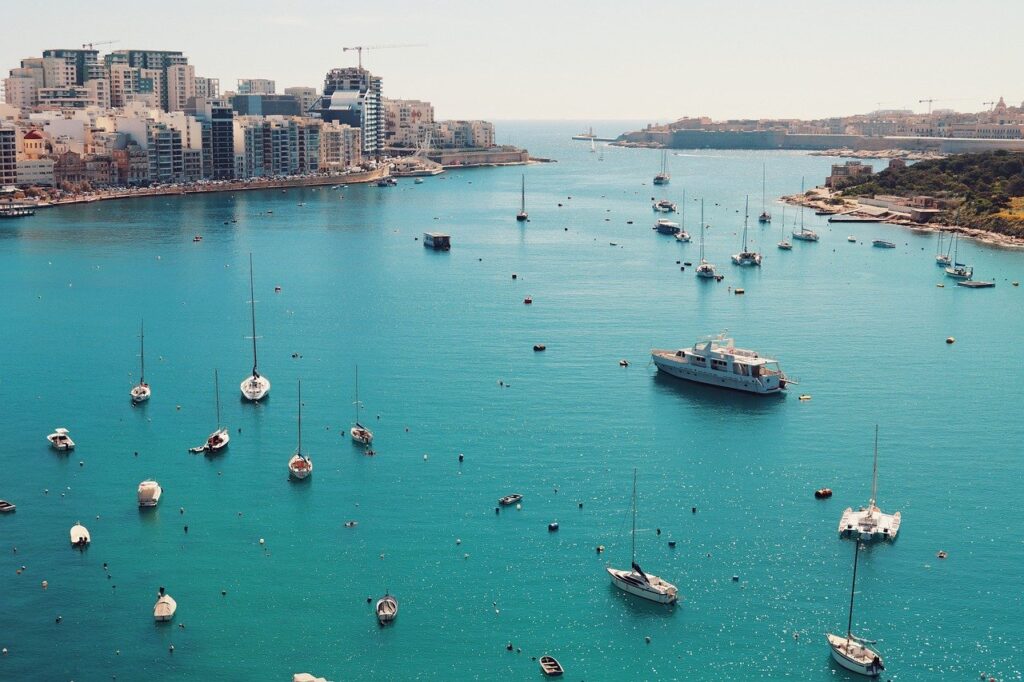
Here is the Test image :
YOLOv8 Custom Object Detection: Full Code Walkthrough 11 ### Import the YOLO class for running inference with our trained model. from ultralytics import YOLO ### Import OpenCV so we can read images, draw boxes, and show results on screen. import cv2 ### Import os to build portable file paths for the model weights. import os ### Set the path to a test image that contains ships we want to detect. imgTest = " Best-Object-Detection-models/Yolo-V8/Ships Detection/boats-test.jpg " ### Read the test image from disk using OpenCV. img = cv2 . imread ( imgTest ) ### Grab the image height and width so we can later use them if needed. H , W , _ = img . shape ### Make a copy of the original image that we will draw predictions on. imgpredict = img . copy () ### Build the full path to the trained YOLOv8 weights (best checkpoint from training). model_path = os . path . join ( " C:/Data-sets/Ships detection/My-model " , " weights " , " best.pt " ) ### Load the trained YOLOv8 model from the best checkpoint file. model = YOLO ( model_path ) ### Choose a confidence threshold so very low confidence predictions are ignored. threshold = 0.2 # start with a low value because ships come in many shapes and sizes ### Run the model on the image copy and take the first result object. results = model ( imgpredict )[ 0 ] ### Loop over each detected bounding box entry in the results. for result in results . boxes . data . tolist (): ### Unpack the box coordinates, confidence score, and class index from the detection. x1 , y1 , x2 , y2 , score , class_id = result ### Only draw the detection if the score is above the chosen threshold. if score > threshold : ### Draw a green rectangle around the detected boat on the prediction image. cv2 . rectangle ( imgpredict , ( int ( x1 ), int ( y1 )), ( int ( x2 ), int ( y2 )), ( 0 , 255 , 0 ), 1 ) ### Put the uppercase class name above the bounding box for easy reading. cv2 . putText ( imgpredict , results . names [ int ( class_id )]. upper (), ( int ( x1 ), int ( y1 - 10 )), cv2 . FONT_HERSHEY_SIMPLEX , 0.5 , ( 0 , 255 , 0 ), 1 , cv2 . LINE_AA ) ### Save the prediction image with drawn boxes to disk so you can inspect it later. cv2 . imwrite ( " c:/temp/predict.png " , imgpredict ) ### Show the prediction image in a window. cv2 . imshow ( " imgpredict " , imgpredict ) ### Optionally show the original image for comparison. cv2 . imshow ( " img " , img ) ### Wait for a key press before closing the windows so you can study the results. cv2 . waitKey ( 0 ) With this final block, your YOLOv8 custom object detection pipeline is complete—from raw XML annotations all the way to visual ship detections on new images.
Here is the result :
Ships detection FAQ – YOLOv8 Custom Object Detection What does YOLOv8 custom object detection mean? YOLOv8 custom object detection refers to training the YOLOv8 model on your own labeled images so it can recognize specific objects, such as ships or dental structures, instead of only generic classes.
Why do I convert VOC XML labels to YOLO format? YOLOv8 expects labels as text files with normalized bounding box coordinates, so converting from VOC XML ensures the training script can read your dataset correctly and efficiently.
How many images should I use for training? A few hundred well-labeled images per class is a practical baseline, but more diverse data generally improves accuracy and robustness for YOLOv8 custom object detection.
Which YOLOv8 model variant should I start with? If you have a strong GPU, you can use yolov8l for higher accuracy, while smaller models like yolov8n or yolov8s are better for laptops and real-time applications.
What is the role of the data.yaml file? The data.yaml file defines the paths to your train and validation images and lists your class names, telling YOLOv8 exactly where to load data from and how to map class IDs.
Why is my trained model not detecting any objects? If detections are empty, double-check that your labels are in YOLO format, data paths are correct, class names match, and that the confidence threshold is not set too high.
Can I add more classes to this ship detection project? Yes, you can extend the project by adding new class names to data.yaml and updating the class index mapping used during XML-to-YOLO conversion, as long as you provide labeled examples.
Do I need a GPU for this YOLOv8 tutorial? A GPU is recommended for faster training, but you can still run smaller YOLOv8 models and fewer epochs on CPU if you only need to prototype or learn the workflow.
How should I set the confidence threshold? Start with a threshold around 0.25 and tune it based on results: increase it to remove weak detections or lower it if the model is missing objects you know are present.
Can I reuse this code for other object detection tasks? You can reuse the same pipeline for any object type by changing the dataset paths, class names, and annotations, then retraining YOLOv8 with the new data.
Conclusion By now you’ve walked through an end-to-end YOLOv8 custom object detection pipeline, starting from a blank Conda environment and ending with a trained ship detector drawing boxes on new images.data.yaml, and train a YOLOv8 model that understands exactly one class: boats in satellite-style imagery.
The same pattern will carry you far beyond this example.
Most importantly, having this copy-paste-ready template means you don’t have to reinvent the wheel every time you start a new project.
Connect : ☕ Buy me a coffee — https://ko-fi.com/eranfeit
🖥️ Email : feitgemel@gmail.com
🌐 https://eranfeit.net
🤝 Fiverr : https://www.fiverr.com/s/mB3Pbb
Enjoy,
Eran
 Skip to content