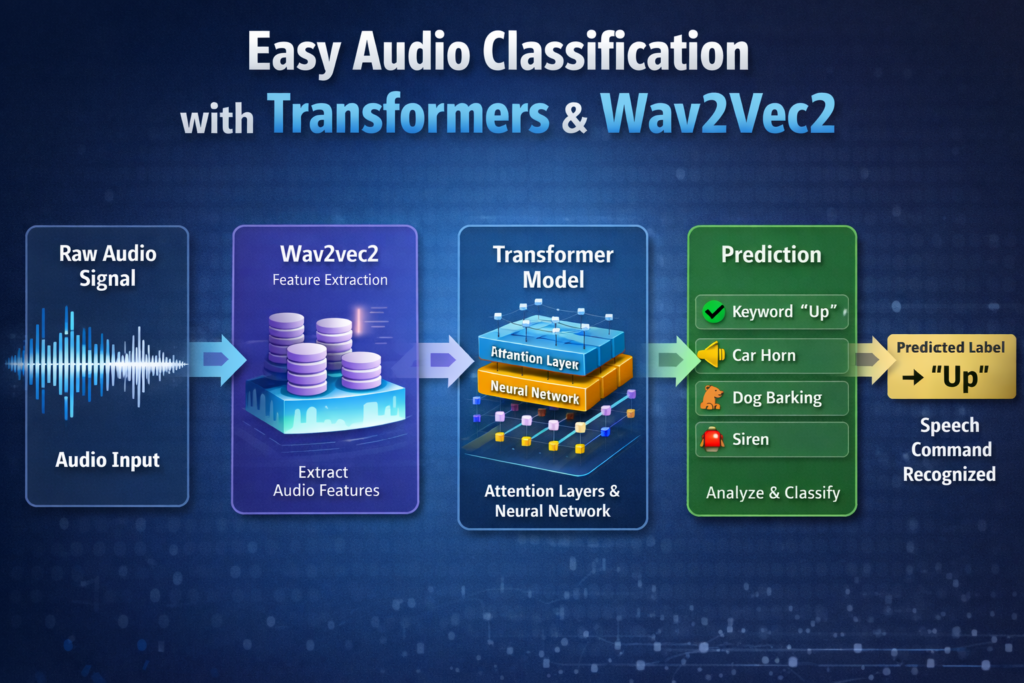
Easy Audio Classification with Transformers & Wav2Vec2 / VIT, Image Classification, Pytorch Contents hide 1 Introduction 2 Audio Classification with Transformers: A Practical Overview 2.1 Our tutorial – more info 3 Let’s Talk About What the Code Actually Does 3.1 Master Computer Vision 3.2 More info 4 Setting Up the Environment for Audio Classification with Transformers 5 Getting the Dataset and Model from Hugging Face 6 Loading and Exploring the Speech Commands Dataset 7 Preprocessing Audio Data for the Transformer Model 8 Training the Wav2Vec2 Transformer Model 9 Testing the Model with Audio Files 10 Running Real-Time Audio Classification from the Microphone 11 Controlling the Keyboard Using Voice Commands 12 Using Voice Commands to Control a Pac-Man Style Game 13 FAQ — Audio Classification with Transformers 13.1 What is audio classification with transformers? 13.2 Why use Wav2Vec2 for this task? 13.3 Does this work in real time? 13.4 Do I need a GPU? 13.5 Can I use this code with my own dataset? 13.6 What sampling rate should my audio have? 13.7 How accurate is the model? 13.8 Can I trigger actions using predictions? 13.9 Is this suitable for production apps? 13.10 Can beginners follow this tutorial? 14 Conclusion 14.1 Connect : Last Updated on 22/04/2026 by Eran Feit Introduction Audio classification with transformers has become one of the most effective ways to understand and analyze sound using modern deep learning. Instead of relying on handcrafted audio features or traditional signal-processing pipelines, transformer-based models learn rich audio representations directly from raw waveforms. This approach allows models to capture both short-term acoustic patterns and longer contextual information in audio signals. In recent years, transformer architectures originally designed for natural language processing have been successfully adapted to audio tasks. Models such as Wav2Vec2 have shown that self-supervised pretraining on large amounts of unlabeled audio can dramatically improve performance on downstream tasks like speech recognition and audio classification. This shift has made high-quality audio modeling accessible even with relatively small labeled datasets. Audio classification with transformers is especially powerful because it works across many real-world use cases. From keyword spotting and speech command recognition to sound event detection and voice-controlled applications, transformer models can generalize well to noisy and diverse audio environments. This flexibility makes them suitable for both research and production-level systems. As audio-driven interfaces become more common, understanding how audio classification with transformers works is increasingly valuable. Whether the goal is to build intelligent voice assistants, interactive applications, or real-time control systems, transformer-based audio models provide a strong and future-proof foundation. More AI Tutorials You Might Enjoy How to Run BLIP-2 Image Analysis with Python Learn how to work with BLIP-2 to generate smart image descriptions using Python and Transformers. LLaVA Image Recognition in Python See how multimodal models combine vision and language for powerful image understanding. Subscription FormSend me tutorials Audio signal classification with transformers Audio Classification with Transformers: A Practical Overview Audio classification with transformers focuses on teaching a neural network to assign meaningful labels to short audio clips. The target is not only to recognize what is being said, but also to understand the acoustic structure of the sound itself. Transformers excel at this task because they model temporal relationships across an entire audio sequence, rather than processing it frame by frame in isolation. At a high level, transformer-based audio classification systems convert raw audio into numerical representations that preserve timing and frequency information. These representations are then passed through multiple attention layers that learn which parts of the audio are most important for predicting a class. This allows the model to focus on relevant sound patterns, such as spoken words, phonemes, or distinctive acoustic cues. One of the main goals of audio classification with transformers is to create models that are robust and adaptable. By leveraging pretraining on large audio corpora, transformer models can transfer knowledge to new tasks with minimal additional data. This makes them well-suited for scenarios where collecting labeled audio is expensive or time-consuming. From a practical perspective, audio classification with transformers enables real-time and interactive applications. Once trained, these models can be used to classify live microphone input, trigger actions based on spoken commands, or control external systems. This combination of accuracy, flexibility, and real-time capability makes transformer-based audio classification a powerful tool for modern audio-centric applications. Easy audio classification process diagram Our tutorial – more info In this tutorial, we take a practical, hands-on journey into audio classification with transformers, showing step-by-step how to build a full working pipeline in Python. Instead of staying at a theoretical level, the focus here is on real code you can run, modify, and extend for your own projects. The workflow starts from installing the right environment and libraries, continues through loading and preparing an audio dataset, and then moves on to training a transformer-based model to recognize spoken words. The code is based on the powerful Wav2Vec2 transformer model, which is designed to work directly with raw audio waveforms. You’ll see how the dataset is loaded, how audio is preprocessed into a format the model can understand, and how the labels are mapped so the model can learn to predict the correct class. Each part of the pipeline is built in a way that is clear and readable, so you can follow the logic as the program progresses. Once the model is trained, the tutorial goes beyond offline testing. You’ll learn how to load your trained checkpoint and run predictions on real audio files, visualizing and playing them while the model classifies the sound. The tutorial also demonstrates how to connect the model to a microphone, allowing real-time recognition of spoken commands. Finally, the code extends into interactive applications, where recognized speech commands can trigger keyboard actions or even control a simple game. This shows how audio classification with transformers can move from pure machine learning into real-world, creative, and fun usage scenarios. Let’s Talk About What the Code Actually Does The code is designed to guide you through building a full audio classification pipeline from start to finish. It begins with environment setup, ensuring Python, PyTorch, and the Hugging Face tools are properly installed. This creates a stable foundation so the rest of the tutorial runs smoothly. From there, the dataset containing labeled speech commands is loaded, and the audio samples are prepared for model training using a feature extractor tailored for Wav2Vec2. The next major part of the code focuses on training the model. A pretrained transformer is loaded and adapted for classification by defining the number of labels and mapping the label-to-ID structure. Training arguments such as learning rate, batch size, epochs, and evaluation strategy are configured to fine-tune the model on the speech commands dataset. During training, accuracy is monitored to ensure progress and help select the best model checkpoint. Once the model is trained, the code introduces testing and inference. Audio files are read, played, displayed, and passed through the trained model to generate predictions. The output class is decoded back into a human-readable label so you can see exactly what the model thinks the sound represents. This builds a clear connection between audio input and model output. The final goal of the code is to enable real-time, interactive audio classification. By capturing live microphone input, the program detects spoken words and converts them into meaningful actions, like pressing keyboard arrows or controlling a game. This illustrates how transformers can bridge the gap between AI models and real-world user interaction, making machine-learning-powered voice interfaces accessible and practical. Link for the video tutorial : https://youtu.be/m-CeJB1wcEI Link for the code : https://eranfeit.lemonsqueezy.com/checkout/buy/5e48d19c-ce1b-4970-8c29-1545ae345f48 or here : https://ko-fi.com/s/38bb1f5fed Link for Medium users : https://medium.com/vision-transformers-tutorials/easy-audio-classification-with-transformers-wav2vec2-347d22c8bc71 TRY IT NOW Master Computer Vision Follow my latest tutorials and AI insights on my Personal Blog. Beginner Complete CV Bootcamp Foundation using PyTorch & TensorFlow. Get Started → Interactive Deep Learning with PyTorch Hands-on practice in an interactive environment. Start Learning → Advanced Modern CV: GPT & OpenCV4 Vision GPT and production-ready models. Go Advanced → More info Audio classification with transformers is one of the most exciting and practical ways to bring machine learning into real-world audio applications. In this tutorial-style post, we’ll walk through a complete working pipeline built in Python using the Wav2Vec2 transformer model. The goal is to make the concepts clear, the code approachable, and the final results fun and interactive. We will start from the very beginning, including installing the right libraries and preparing a clean Conda environment. Then we’ll load the Speech Commands dataset, preprocess the audio, and fine-tune a pretrained Wav2Vec2 model for audio classification. You’ll see exactly how each command fits into the big picture. Once the model is trained, we’ll move into live inference. You’ll learn how to classify audio files, hear the sound being tested, and even run the model in real time using your microphone. From there, we’ll connect the predictions to keyboard controls and demonstrate how voice commands can control a Pac-Man style game. By the end, you’ll have a full understanding of how audio classification with transformers works in practice — from dataset to deployment — and you’ll have a working codebase you can adapt to your own projects. Setting Up the Environment for Audio Classification with Transformers Before writing any code, it’s important to build a clean and predictable environment. A dedicated Conda environment keeps all your audio classification with transformers dependencies isolated from other projects, so library upgrades or experiments won’t accidentally break older work. In this setup, we choose Python 3.11, which is well supported by modern deep learning tools like PyTorch and Transformers. The next step is installing PyTorch with CUDA support so that training can use your GPU effectively. Matching the CUDA version between your drivers and your PyTorch installation is crucial for stable performance, which is why you first verify the CUDA version with a simple command. Once PyTorch, TorchVision, and Torchaudio are installed, the core deep learning engine is ready. On top of that, several specialized libraries handle audio processing, metrics, plotting, and real-time input. Librosa helps load and manipulate audio signals, Evaluate provides convenient metrics, and SoundDevice gives you the ability to play back sounds directly from Python. Additional utilities like Sympy, IPython, and Matplotlib improve your development experience and visualization capabilities during audio classification with transformers. Finally, the environment includes tools for controlling the operating system and keyboard. Pynput lets you simulate key presses, while PyGetWindow and PyAutoGUI allow you to focus windows and automate interactions. These pieces become essential later when voice commands are mapped to keyboard actions and used to control a running game or application. ### Create a new Conda environment called audio-transformer conda create -n audio-transformer python=3.11 ### Activate the new environment conda activate audio-transformer ### Check your CUDA version to match PyTorch installation nvcc --version ### Install PyTorch 2.5.0 with CUDA 12.4 support conda install pytorch==2.5.0 torchvision==0.20.0 torchaudio==2.5.0 pytorch-cuda=12.4 -c pytorch -c nvidia ### Install the Sympy library pip install sympy==1.13.1 ### Install the Transformers library pip install transformers==4.46.1 ### Upgrade Transformers from GitHub if you encounter a specific error pip install --upgrade git+https://github.com/huggingface/transformers.git ### Install the version of Transformers that includes PyTorch extras pip install transformers[torch]==4.46.1 ### Install the datasets library pip install datasets==3.1.0 ### Install Librosa for audio processing pip install librosa==0.10.2 ### Install Evaluate for model metrics pip install evaluate==0.4.3 ### Install IPython pip install ipython==8.30.0 ### Install Sounddevice for playing audio pip install sounddevice==0.5.1 ### Install Matplotlib for visualization pip install matplotlib==3.9.3 ### Install Pynput to control keyboard input pip install pynput==1.7.7 ### Install PyGetWindow to work with open windows pip install PyGetWindow==0.0.9 ### Install PyAutoGUI for automation tasks pip install PyAutoGUI==0.9.54 ### Create a new Conda environment called audio-transformer conda create -n audio-transformer python=3.11 ### Activate the new environment conda activate audio-transformer ### Check your CUDA version to match PyTorch installation nvcc --version ### Install PyTorch 2.5.0 with CUDA 12.4 support conda install pytorch==2.5.0 torchvision==0.20.0 torchaudio==2.5.0 pytorch-cuda=12.4 -c pytorch -c nvidia ### Install the Sympy library pip install sympy==1.13.1 ### Install the Transformers library pip install transformers==4.46.1 ### Upgrade Transformers from GitHub if you encounter a specific error pip install --upgrade git+https://github.com/huggingface/transformers.git ### Install the version of Transformers that includes PyTorch extras pip install transformers[torch]==4.46.1 ### Install the datasets library pip install datasets==3.1.0 ### Install Librosa for audio processing pip install librosa==0.10.2 ### Install Evaluate for model metrics pip install evaluate==0.4.3 ### Install IPython pip install ipython==8.30.0 ### Install Sounddevice for playing audio pip install sounddevice==0.5.1 ### Install Matplotlib for visualization pip install matplotlib==3.9.3 ### Install Pynput to control keyboard input pip install pynput==1.7.7 ### Install PyGetWindow to work with open windows pip install PyGetWindow==0.0.9 ### Install PyAutoGUI for automation tasks pip install PyAutoGUI==0.9.54 Getting the Dataset and Model from Hugging Face Before any training or inference can happen, the model needs two core resources: a labeled dataset and a pretrained transformer checkpoint. In this project, the dataset provides short spoken commands, while the model gives us a strong starting point for understanding raw audio. Together they form the backbone of your audio classification with transformers pipeline. The dataset used here is Google’s Speech Commands collection hosted on the Hugging Face Hub. It contains thousands of short audio clips of people saying words like “up”, “down”, “left”, and “right”. These labeled examples are perfect for teaching a model to recognize simple voice commands that can later control applications, triggers, or even games. For the model, we rely on the wav2vec2-base checkpoint from Facebook AI, also available on Hugging Face. This model has already been trained on huge amounts of unlabeled speech, learning rich representations of audio signals. When you fine-tune it on the Speech Commands dataset, you’re essentially teaching a very experienced listener to focus on the specific words you care about. When you run the code, the first access to the dataset or model will automatically download the necessary files and cache them locally. Future runs will load them from disk, so you don’t need to download everything again unless you clear your cache or switch machines. Here are the links : Dataset : https://huggingface.co/datasets/google/speech_commands Model : https://huggingface.co/facebook/wav2vec2-base Dataset : https://huggingface.co/datasets/google/speech_commands Model : https://huggingface.co/facebook/wav2vec2-base Deep Learning Tutorials on EranFeit.net How to Use Vision Transformer for Image Classification A complete guide to training Vision Transformer models for image-based tasks. Vision Transformer Image Classification PyTorch Tutorial Walk step-by-step through a full ViT implementation in PyTorch. Loading and Exploring the Speech Commands Dataset With the environment ready and resources defined, the next step is to load the Speech Commands dataset into your script. The goal here is to understand the structure of the data, inspect labels, and listen to a few examples so the task feels concrete. This is an essential habit when working on any audio classification with transformers project: always explore your data before training. The code uses the datasets library to download and cache both the training and validation splits. It also sets a custom timeout to avoid issues with slower connections. Once the data is loaded, you print basic metadata about the dataset, including the number of samples and the available label classes. This helps verify that everything was pulled correctly. Next, you create dictionaries that map labels to numeric IDs and back again. These mappings will later be passed to the model so that predictions can be decoded into human-readable words. To build an intuitive sense of the problem, you also play a few audio clips using SoundDevice and print their labels. Hearing the samples and seeing their shapes makes it easier to reason about model behavior later on. By the end of this section, you know what each example looks like, what labels exist, and how to access individual audio arrays. This foundation will make the preprocessing and training steps much more meaningful because you’ll have a clear mental picture of what the model is trying to learn. ### Import the dataset loader from datasets import load_dataset ### Import the evaluation library import evaluate ### Import aiohttp for timeout support import aiohttp ### Define the pretrained model checkpoint model_checkpoint = "facebook/wav2vec2-base" ### Define the batch size batch_size = 32 ### Load the train and validation splits of the dataset train, validation = load_dataset("speech_commands" , "v0.02", split=["train" , "validation"], trust_remote_code=True, storage_options={'client_kwargs': {'timeout':aiohttp.ClientTimeout(total=3600)}}) ### Print the training dataset print(train) ### Show the label structure print(train.features["label"]) ### Extract label names labels = train.features["label"].names ### Print the labels print(labels) ### Load accuracy as our metric metric = evaluate.load("accuracy") ### Print a separator print("============================================================") ### Create label to id mapping label2id = {label: labels.index(label) for label in labels} ### Create id to label mapping id2label = {str(id): label for label , id in label2id.items()} ### Print both mappings print(label2id) print(id2label) ### Import sounddevice to play samples import sounddevice as sd ### Select a sample sample_audio = train[0]["audio"] ### Play the sample sd.play(sample_audio["array"], samplerate=sample_audio["sampling_rate"]) ### Wait until it finishes sd.wait() ### Import random for random samples import random ### Loop through 5 random samples for _ in range(5): rand_idx = random.randint(0, len(train) -1 ) example = train[rand_idx] audio = example["audio"] ### Play each example sd.play(audio["array"], samplerate=audio["sampling_rate"]) sd.wait() ### Print label and shape print(f'Label: {id2label[str(example["label"])]}') print(f'Shape: {audio["array"].shape}, sampling rate: {audio["sampling_rate"]}') print() ### Import the dataset loader from datasets import load_dataset ### Import the evaluation library import evaluate ### Import aiohttp for timeout support import aiohttp ### Define the pretrained model checkpoint model_checkpoint = "facebook/wav2vec2-base" ### Define the batch size batch_size = 32 ### Load the train and validation splits of the dataset train, validation = load_dataset("speech_commands" , "v0.02", split=["train" , "validation"], trust_remote_code=True, storage_options={'client_kwargs': {'timeout':aiohttp.ClientTimeout(total=3600)}}) ### Print the training dataset print(train) ### Show the label structure print(train.features["label"]) ### Extract label names labels = train.features["label"].names ### Print the labels print(labels) ### Load accuracy as our metric metric = evaluate.load("accuracy") ### Print a separator print("============================================================") ### Create label to id mapping label2id = {label: labels.index(label) for label in labels} ### Create id to label mapping id2label = {str(id): label for label , id in label2id.items()} ### Print both mappings print(label2id) print(id2label) ### Import sounddevice to play samples import sounddevice as sd ### Select a sample sample_audio = train[0]["audio"] ### Play the sample sd.play(sample_audio["array"], samplerate=sample_audio["sampling_rate"]) ### Wait until it finishes sd.wait() ### Import random for random samples import random ### Loop through 5 random samples for _ in range(5): rand_idx = random.randint(0, len(train) -1 ) example = train[rand_idx] audio = example["audio"] ### Play each example sd.play(audio["array"], samplerate=audio["sampling_rate"]) sd.wait() ### Print label and shape print(f'Label: {id2label[str(example["label"])]}') print(f'Shape: {audio["array"].shape}, sampling rate: {audio["sampling_rate"]}') print() Preprocessing Audio Data for the Transformer Model Raw audio arrays from the dataset have variable lengths and may not match the sampling rate expected by the model. To make audio classification with transformers work smoothly, you need a consistent input format. This section standardizes the audio, converts it into model-ready features, and prepares encoded datasets that can be passed directly to the trainer. The Wav2Vec2 feature extractor handles much of this complexity for you. It resamples audio to the correct rate, normalizes amplitudes, and creates fixed-length sequences that the model can process efficiently. By choosing a maximum duration of one second, you align the preprocessing with the nature of the Speech Commands dataset, where clips are short and concise. The preprocessing function processes batches of examples and returns dictionaries containing input values keyed in the way the transformer expects. You then use the map method from the datasets library to apply this function over the entire train and validation splits, removing raw audio and file columns that are no longer needed. This builds encoded_train and encoded_validation datasets optimized for training. To verify that everything is working, you print both the first few raw examples and the output of the preprocessing function on a small subset. This sanity check ensures that your audio classification with transformers pipeline is feeding the model clean, consistent inputs instead of mismatched or incomplete data. ### Import required modules again from datasets import load_dataset import evaluate import aiohttp ### Define the Hugging Face model checkpoint model_checkpoint = "facebook/wav2vec2-base" ### Set batch size batch_size = 32 ### Load dataset again train, validation = load_dataset("speech_commands" , "v0.02", split=["train" , "validation"], trust_remote_code=True, storage_options={'client_kwargs': {'timeout':aiohttp.ClientTimeout(total=3600)}}) ### Print dataset print(train) ### Check label structure print(train.features["label"]) ### Extract names labels = train.features["label"].names ### Print labels print(labels) ### Load accuracy metric metric = evaluate.load("accuracy") ### Print separator print("============================================================") ### Make label dictionaries label2id = {label: labels.index(label) for label in labels} id2label = {str(id): label for label , id in label2id.items()} ### Print mappings print(label2id) print(id2label) ### Import the feature extractor from transformers import AutoFeatureExtractor ### Load pretrained extractor feature_extractor = AutoFeatureExtractor.from_pretrained(model_checkpoint) ### Set max duration max_duration = 1 ### Define preprocessing function def preprocess_function(examples) : audio_arrays = [x["array"] for x in examples["audio"]] inputs = feature_extractor( audio_arrays, sampling_rate = feature_extractor.sampling_rate, max_length = int(feature_extractor.sampling_rate * max_duration), truncation = True, ) return inputs ### Test on first elements first_file_elements = train[:5] ### Print separator print("====================================================================") ### Print first elements print("First 5 elements :") print(first_file_elements) ### Print preprocessing output print("====================================================================") print("Preprocess function for 5 elements :") tmp = preprocess_function(train[:5]) print(tmp) ### Map preprocessing to dataset encoded_train = train.map(preprocess_function, remove_columns=["audio", "file"], batched=True) ### Do the same for validation encoded_validation = validation.map(preprocess_function, remove_columns=["audio", "file"], batched=True) ### Import required modules again from datasets import load_dataset import evaluate import aiohttp ### Define the Hugging Face model checkpoint model_checkpoint = "facebook/wav2vec2-base" ### Set batch size batch_size = 32 ### Load dataset again train, validation = load_dataset("speech_commands" , "v0.02", split=["train" , "validation"], trust_remote_code=True, storage_options={'client_kwargs': {'timeout':aiohttp.ClientTimeout(total=3600)}}) ### Print dataset print(train) ### Check label structure print(train.features["label"]) ### Extract names labels = train.features["label"].names ### Print labels print(labels) ### Load accuracy metric metric = evaluate.load("accuracy") ### Print separator print("============================================================") ### Make label dictionaries label2id = {label: labels.index(label) for label in labels} id2label = {str(id): label for label , id in label2id.items()} ### Print mappings print(label2id) print(id2label) ### Import the feature extractor from transformers import AutoFeatureExtractor ### Load pretrained extractor feature_extractor = AutoFeatureExtractor.from_pretrained(model_checkpoint) ### Set max duration max_duration = 1 ### Define preprocessing function def preprocess_function(examples) : audio_arrays = [x["array"] for x in examples["audio"]] inputs = feature_extractor( audio_arrays, sampling_rate = feature_extractor.sampling_rate, max_length = int(feature_extractor.sampling_rate * max_duration), truncation = True, ) return inputs ### Test on first elements first_file_elements = train[:5] ### Print separator print("====================================================================") ### Print first elements print("First 5 elements :") print(first_file_elements) ### Print preprocessing output print("====================================================================") print("Preprocess function for 5 elements :") tmp = preprocess_function(train[:5]) print(tmp) ### Map preprocessing to dataset encoded_train = train.map(preprocess_function, remove_columns=["audio", "file"], batched=True) ### Do the same for validation encoded_validation = validation.map(preprocess_function, remove_columns=["audio", "file"], batched=True) Training the Wav2Vec2 Transformer Model Once the data is encoded, you are ready to fine-tune the transformer. This section configures the Wav2Vec2-based classifier, defines training arguments, and launches the training loop. It is the core of the audio classification with transformers workflow because this is where the model actually learns to associate audio patterns with labels. You begin by determining the number of labels and passing label mappings into the model constructor. This ensures that the classifier head on top of Wav2Vec2 has the correct output size and that predictions can be decoded back into words. Naming the model in a descriptive way helps keep track of different experiments and checkpoints on disk. TrainingArguments define how the learning process behaves: learning rate, batch sizes, gradient accumulation, number of epochs, and logging settings. By evaluating and saving at each epoch while tracking accuracy, you make sure that the best performing model is preserved automatically. This reduces the risk of overfitting and simplifies model selection. The Trainer object wraps everything together, connecting the model, data, tokenizer, and metric computation. Calling trainer.train() then takes care of the full training loop, including shuffling, batching, gradient updates, and periodic evaluation. When this step completes, you have a fine-tuned audio classification with transformers model stored on disk and ready for inference. ### Import model and trainer tools from transformers import AutoModelForAudioClassification , Trainer, TrainingArguments ### Count labels num_labels = train.features["label"].num_classes ### Print label info print(num_labels) print(train.features["label"]) ### Load pretrained classifier model = AutoModelForAudioClassification.from_pretrained( model_checkpoint, num_labels=num_labels, label2id=label2id, id2label= id2label, ) ### Extract model name model_name = model_checkpoint.split("/")[-1] ### Print it print("Model name :" + model_name) ### Append suffix model_name = f"{model_name}-speech-commands" ### Print updated name print("Model name :" + model_name) ### Import OS import os ### Define save path model_save_path = "d:/temp/models/" + model_name ### Create directory os.makedirs(model_save_path, exist_ok=True) ### Confirm path print("model_save_path") print(model_save_path) ### Configure training args = TrainingArguments( output_dir=model_save_path, eval_strategy="epoch", save_strategy="epoch", learning_rate=1e-5, per_device_train_batch_size=batch_size, gradient_accumulation_steps=4, per_device_eval_batch_size=batch_size, num_train_epochs=60, warmup_ratio=0.1 , logging_steps=10, load_best_model_at_end=True, metric_for_best_model="accuracy", ) ### Import numpy import numpy as np ### Define accuracy computation def compute_matrix(eval_pred): predictions = np.argmax(eval_pred.predictions, axis=1) return metric.compute(predictions=predictions, references=eval_pred.label_ids) ### Build trainer trainer = Trainer( model, args, train_dataset=encoded_train, eval_dataset=encoded_validation, tokenizer = feature_extractor, compute_metrics=compute_matrix ) ### Start training trainer.train() ### Import model and trainer tools from transformers import AutoModelForAudioClassification , Trainer, TrainingArguments ### Count labels num_labels = train.features["label"].num_classes ### Print label info print(num_labels) print(train.features["label"]) ### Load pretrained classifier model = AutoModelForAudioClassification.from_pretrained( model_checkpoint, num_labels=num_labels, label2id=label2id, id2label= id2label, ) ### Extract model name model_name = model_checkpoint.split("/")[-1] ### Print it print("Model name :" + model_name) ### Append suffix model_name = f"{model_name}-speech-commands" ### Print updated name print("Model name :" + model_name) ### Import OS import os ### Define save path model_save_path = "d:/temp/models/" + model_name ### Create directory os.makedirs(model_save_path, exist_ok=True) ### Confirm path print("model_save_path") print(model_save_path) ### Configure training args = TrainingArguments( output_dir=model_save_path, eval_strategy="epoch", save_strategy="epoch", learning_rate=1e-5, per_device_train_batch_size=batch_size, gradient_accumulation_steps=4, per_device_eval_batch_size=batch_size, num_train_epochs=60, warmup_ratio=0.1 , logging_steps=10, load_best_model_at_end=True, metric_for_best_model="accuracy", ) ### Import numpy import numpy as np ### Define accuracy computation def compute_matrix(eval_pred): predictions = np.argmax(eval_pred.predictions, axis=1) return metric.compute(predictions=predictions, references=eval_pred.label_ids) ### Build trainer trainer = Trainer( model, args, train_dataset=encoded_train, eval_dataset=encoded_validation, tokenizer = feature_extractor, compute_metrics=compute_matrix ) ### Start training trainer.train() Testing the Model with Audio Files After training, it’s time to see how well the model performs on actual audio clips. This section shows how to load a single file, play it back, visualize the waveform, and then run a forward pass through the trained transformer. This helps you connect the abstract training process with a concrete listening experience. The code uses Librosa to load the waveform and Matplotlib to plot it. SoundDevice plays the audio so you can hear exactly what the model is about to classify. You then load the fine-tuned checkpoint from disk, along with its feature extractor, and set the model to evaluation mode to disable gradient calculations. Before sending the audio through the model, you verify that the sampling rate matches what the feature extractor expects. This is a common source of bugs in audio classification with transformers, so the explicit check is helpful. The audio is then converted into the input tensor format and passed into the model to obtain logits. Finally, you compute the argmax of the logits and map the predicted index back to a label string. Printing this prediction closes the loop: you see the waveform, hear the sound, and read the model’s guess. It’s a satisfying checkpoint that confirms your training pipeline is working as intended. “Happy” sound : “Up” sound : “Stop” sound : ### Import display tools import librosa.display import matplotlib.pyplot as plt import sounddevice as sd import soundfile as sf ### Define audio filename #filename = "Visual-Language-Models-Tutorials/Audio Classification with Transformers/happy16k.wav" #filename = "Visual-Language-Models-Tutorials/Audio Classification with Transformers/stop16k.wav" filename = "Visual-Language-Models-Tutorials/Audio Classification with Transformers/up16k.wav" ### Load audio audio , sr = librosa.load(filename) ### Play sound print("Play the audio file") sd.play(audio, samplerate=sr) ### Wait until finished status = sd.wait() ### Plot waveform plt.figure(figsize=(14, 5)) librosa.display.waveshow(audio, sr=sr) plt.show() ### Choose model checkpoint local_model_path = "D:/Temp/Models/wav2vec2-base-speech-commands/checkpoint-39780" ### Import torch import torch ### Import model loader from transformers import AutoFeatureExtractor, AutoModelForAudioClassification print("Load the model") ### Load feature extractor feature_extractor = AutoFeatureExtractor.from_pretrained(local_model_path) ### Load trained model model = AutoModelForAudioClassification.from_pretrained(local_model_path) ### Set model to evaluation model.eval() ### Load label mappings label2id = model.config.label2id print(label2id) id2label = model.config.id2label print(id2label) ### Load WAV file print(f"Load audio file : {filename}") audio_array , sampling_rate = sf.read(filename) ### Validate sampling rate if sampling_rate != feature_extractor.sampling_rate : raise ValueError( f"Sampling rate of the audio file is {sampling_rate} Hz does not match the model's expected sampling rate " f"({feature_extractor.sampling_rate} Hz). Please resample the audio file." ) ### Preprocess audio for model print("Preprocess the audio file for the model") inputs = feature_extractor( audio_array, sampling_rate=feature_extractor.sampling_rate, max_length=feature_extractor.sampling_rate * 1, truncation=True, return_tensors="pt", ) ### Run inference print("Perform inference") with torch.no_grad(): logits = model(**inputs).logits predicted_class_idx = torch.argmax(logits , axis=-1).item() print("Predicted class index :") print(predicted_class_idx) ### Decode label predicted_label = model.config.id2label[predicted_class_idx] ### Print prediction print(f"Predicted label : {predicted_label}") ### Import display tools import librosa.display import matplotlib.pyplot as plt import sounddevice as sd import soundfile as sf ### Define audio filename #filename = "Visual-Language-Models-Tutorials/Audio Classification with Transformers/happy16k.wav" #filename = "Visual-Language-Models-Tutorials/Audio Classification with Transformers/stop16k.wav" filename = "Visual-Language-Models-Tutorials/Audio Classification with Transformers/up16k.wav" ### Load audio audio , sr = librosa.load(filename) ### Play sound print("Play the audio file") sd.play(audio, samplerate=sr) ### Wait until finished status = sd.wait() ### Plot waveform plt.figure(figsize=(14, 5)) librosa.display.waveshow(audio, sr=sr) plt.show() ### Choose model checkpoint local_model_path = "D:/Temp/Models/wav2vec2-base-speech-commands/checkpoint-39780" ### Import torch import torch ### Import model loader from transformers import AutoFeatureExtractor, AutoModelForAudioClassification print("Load the model") ### Load feature extractor feature_extractor = AutoFeatureExtractor.from_pretrained(local_model_path) ### Load trained model model = AutoModelForAudioClassification.from_pretrained(local_model_path) ### Set model to evaluation model.eval() ### Load label mappings label2id = model.config.label2id print(label2id) id2label = model.config.id2label print(id2label) ### Load WAV file print(f"Load audio file : {filename}") audio_array , sampling_rate = sf.read(filename) ### Validate sampling rate if sampling_rate != feature_extractor.sampling_rate : raise ValueError( f"Sampling rate of the audio file is {sampling_rate} Hz does not match the model's expected sampling rate " f"({feature_extractor.sampling_rate} Hz). Please resample the audio file." ) ### Preprocess audio for model print("Preprocess the audio file for the model") inputs = feature_extractor( audio_array, sampling_rate=feature_extractor.sampling_rate, max_length=feature_extractor.sampling_rate * 1, truncation=True, return_tensors="pt", ) ### Run inference print("Perform inference") with torch.no_grad(): logits = model(**inputs).logits predicted_class_idx = torch.argmax(logits , axis=-1).item() print("Predicted class index :") print(predicted_class_idx) ### Decode label predicted_label = model.config.id2label[predicted_class_idx] ### Print prediction print(f"Predicted label : {predicted_label}") Running Real-Time Audio Classification from the Microphone Speech and neural network interaction Batch testing on audio files is useful, but many applications require live interaction. This section transforms your audio classification with transformers model into a real-time listener that reacts to sound from the microphone. It’s a big step toward interactive voice interfaces and audio-driven control systems. The AudioClassifier class encapsulates model loading, audio buffering, and prediction logic. It listens to short audio segments, checks their amplitude to detect speech, and stores them in a buffer while sound is present. When the signal becomes quiet again, it treats the collected samples as one utterance and sends them to the model. To stabilize predictions, the code enforces a fixed input length by trimming or padding the audio. It also uses softmax probabilities to measure confidence and only prints labels when the score is high enough. This helps avoid noisy predictions when there is background sound or ambiguous speech. The start_listening method opens a continuous audio stream and keeps the process alive in a simple loop. As long as the script is running, the microphone stays active and recognized words are printed to the console. This live behavior is where audio classification with transformers starts to feel like a real application rather than just an offline experiment. ### Import required packages import numpy as np import sounddevice as sd import soundfile as sf import torch from transformers import AutoFeatureExtractor, AutoModelForAudioClassification import librosa import queue import threading import time import torch.nn.functional as F ### Define AudioClassifier class AudioClassifier: def __init__(self, model_path): # Load model and feature extractor print("Initializing model...") self.feature_extractor = AutoFeatureExtractor.from_pretrained(model_path) self.model = AutoModelForAudioClassification.from_pretrained(model_path) self.model.eval() # Audio recording parameters self.sample_rate = 16000 # 16kHz self.block_duration = 1.0 # 1 second blocks self.threshold = 0.05 # Lowered threshold for more sensitivity self.silence_duration = 1.0 # Silence duration to consider end of utterance # Queues and flags self.audio_queue = queue.Queue() self.is_recording = False self.current_buffer = [] def predict_audio(self, audio_array): """Predict the label for a given audio array""" # Preprocess the audio required_length = self.sample_rate # 1 second = 16,000 samples if len(audio_array) > required_length: audio_array = audio_array[:required_length] # Trim to 1 second elif len(audio_array) < required_length: # Pad with zeros if shorter than 1 second padding = np.zeros(required_length - len(audio_array), dtype=audio_array.dtype) audio_array = np.concatenate([audio_array, padding]) #print("Start predict") inputs = self.feature_extractor( audio_array, sampling_rate=self.sample_rate, max_length=int(self.sample_rate * 1), truncation=True, return_tensors="pt" ) # Perform inference with torch.no_grad(): logits = self.model(**inputs).logits probabilities = F.softmax(logits, dim=-1) # Convert logits to probabilities predicted_id = torch.argmax(probabilities, axis=-1).item() confidence = probabilities[0, predicted_id].item() # Extract confidence for the predicted label # Check if confidence is above the threshold if confidence >= 0.8: predicted_label = self.model.config.id2label[predicted_id] print(f"Predicted label: {predicted_label}, Confidence: {confidence:.2f} (Good prediction)") return predicted_label else: #print(f"Confidence: {confidence:.2f} (Prediction not good enough)") return None def audio_capture_callback(self, indata, frames, time, status): """Callback for audio input stream""" if status: print(f"Audio input stream error: {status}") return # Check if sound is above threshold amplitude = np.abs(indata).mean() # Debug print #print(f"Amplitude: {amplitude}") if amplitude > self.threshold: #print("Speech detected!") self.current_buffer.extend(indata.flatten()) self.is_recording = True elif self.is_recording: # If recording and now silent, process the audio if len(self.current_buffer) > 0: # Convert to numpy array audio_data = np.array(self.current_buffer) # Save and predict self.process_utterance(audio_data) # Reset self.current_buffer = [] self.is_recording = False def process_utterance(self, audio_data): """Process and save an utterance""" # Ensure 16kHz if len(audio_data) > 0: # Generate a unique filename timestamp = time.strftime("%Y%m%d-%H%M%S") filename = f"utterance_{timestamp}.wav" # Save the audio file sf.write(filename, audio_data, self.sample_rate) # Predict try: label = self.predict_audio(audio_data) #print(f"Predicted word: {label}") except Exception as e: print(f"Prediction error: {e}") def start_listening(self): """Start listening to microphone input""" print("Starting microphone listening...") print("Speak now. Words will be recorded and classified.") # List available input devices print("Available input devices:") print(sd.query_devices()) try: with sd.InputStream( samplerate=self.sample_rate, channels=1, # Mono dtype='float32', callback=self.audio_capture_callback, device=None # Let system choose default input device ): # Keep the stream open while True: sd.sleep(1000) # Sleep for 1 second except Exception as e: print(f"Error in audio stream: {e}") def main(): # Path to your trained model model_path = "d:/temp/models/wav2vec2-base-speech-commands/checkpoint-39780" # Create and start the audio classifier classifier = AudioClassifier(model_path) classifier.start_listening() if __name__ == "__main__": main() ### Import required packages import numpy as np import sounddevice as sd import soundfile as sf import torch from transformers import AutoFeatureExtractor, AutoModelForAudioClassification import librosa import queue import threading import time import torch.nn.functional as F ### Define AudioClassifier class AudioClassifier: def __init__(self, model_path): # Load model and feature extractor print("Initializing model...") self.feature_extractor = AutoFeatureExtractor.from_pretrained(model_path) self.model = AutoModelForAudioClassification.from_pretrained(model_path) self.model.eval() # Audio recording parameters self.sample_rate = 16000 # 16kHz self.block_duration = 1.0 # 1 second blocks self.threshold = 0.05 # Lowered threshold for more sensitivity self.silence_duration = 1.0 # Silence duration to consider end of utterance # Queues and flags self.audio_queue = queue.Queue() self.is_recording = False self.current_buffer = [] def predict_audio(self, audio_array): """Predict the label for a given audio array""" # Preprocess the audio required_length = self.sample_rate # 1 second = 16,000 samples if len(audio_array) > required_length: audio_array = audio_array[:required_length] # Trim to 1 second elif len(audio_array) < required_length: # Pad with zeros if shorter than 1 second padding = np.zeros(required_length - len(audio_array), dtype=audio_array.dtype) audio_array = np.concatenate([audio_array, padding]) #print("Start predict") inputs = self.feature_extractor( audio_array, sampling_rate=self.sample_rate, max_length=int(self.sample_rate * 1), truncation=True, return_tensors="pt" ) # Perform inference with torch.no_grad(): logits = self.model(**inputs).logits probabilities = F.softmax(logits, dim=-1) # Convert logits to probabilities predicted_id = torch.argmax(probabilities, axis=-1).item() confidence = probabilities[0, predicted_id].item() # Extract confidence for the predicted label # Check if confidence is above the threshold if confidence >= 0.8: predicted_label = self.model.config.id2label[predicted_id] print(f"Predicted label: {predicted_label}, Confidence: {confidence:.2f} (Good prediction)") return predicted_label else: #print(f"Confidence: {confidence:.2f} (Prediction not good enough)") return None def audio_capture_callback(self, indata, frames, time, status): """Callback for audio input stream""" if status: print(f"Audio input stream error: {status}") return # Check if sound is above threshold amplitude = np.abs(indata).mean() # Debug print #print(f"Amplitude: {amplitude}") if amplitude > self.threshold: #print("Speech detected!") self.current_buffer.extend(indata.flatten()) self.is_recording = True elif self.is_recording: # If recording and now silent, process the audio if len(self.current_buffer) > 0: # Convert to numpy array audio_data = np.array(self.current_buffer) # Save and predict self.process_utterance(audio_data) # Reset self.current_buffer = [] self.is_recording = False def process_utterance(self, audio_data): """Process and save an utterance""" # Ensure 16kHz if len(audio_data) > 0: # Generate a unique filename timestamp = time.strftime("%Y%m%d-%H%M%S") filename = f"utterance_{timestamp}.wav" # Save the audio file sf.write(filename, audio_data, self.sample_rate) # Predict try: label = self.predict_audio(audio_data) #print(f"Predicted word: {label}") except Exception as e: print(f"Prediction error: {e}") def start_listening(self): """Start listening to microphone input""" print("Starting microphone listening...") print("Speak now. Words will be recorded and classified.") # List available input devices print("Available input devices:") print(sd.query_devices()) try: with sd.InputStream( samplerate=self.sample_rate, channels=1, # Mono dtype='float32', callback=self.audio_capture_callback, device=None # Let system choose default input device ): # Keep the stream open while True: sd.sleep(1000) # Sleep for 1 second except Exception as e: print(f"Error in audio stream: {e}") def main(): # Path to your trained model model_path = "d:/temp/models/wav2vec2-base-speech-commands/checkpoint-39780" # Create and start the audio classifier classifier = AudioClassifier(model_path) classifier.start_listening() if __name__ == "__main__": main() Explore More Practical AI Projects YOLOv5 Image Classification Complete Tutorial Discover how YOLOv5 can be used not only for detection but also for high-performance image classification. Controlling the Keyboard Using Voice Commands Recognizing spoken words is useful, but things get even more interesting when you connect predictions to actions. This section extends the real-time classifier by translating labels such as “left” or “right” into keyboard presses. With only a few extra lines of code, audio classification with transformers turns into a voice-controlled interface. The updated AudioClassifier now owns a keyboard controller from the Pynput library. A helper method simulates short key presses by pressing and then releasing a chosen key after a brief delay. This ensures that target applications interpret the action as a normal user input. During the prediction step, the model still returns labels and confidence values, but now the process_utterance method checks for specific command words. When it hears “left”, it triggers the left arrow key; when it hears “up”, it triggers the up arrow, and so on. This direct mapping makes the behavior easy to customize for different projects or languages. The rest of the streaming logic remains similar to the previous section, continuously listening to the microphone and breaking audio into utterances. The result is a hands-free way to send directional commands to any window that accepts keyboard input, all powered by audio classification with transformers. ### Import additional modules import numpy as np import sounddevice as sd import soundfile as sf import torch from transformers import AutoFeatureExtractor, AutoModelForAudioClassification import librosa import queue import threading import time import torch.nn.functional as F from pynput.keyboard import Controller, Key ### Define class with keyboard support class AudioClassifier: def __init__(self, model_path): # Load model and feature extractor print("Initializing model...") self.feature_extractor = AutoFeatureExtractor.from_pretrained(model_path) self.model = AutoModelForAudioClassification.from_pretrained(model_path) self.model.eval() # Audio recording parameters self.sample_rate = 16000 # 16kHz self.block_duration = 1.0 # 1 second blocks self.threshold = 0.05 # Lowered threshold for more sensitivity self.silence_duration = 1.0 # Silence duration to consider end of utterance # Queues and flags self.audio_queue = queue.Queue() self.is_recording = False self.current_buffer = [] # Keyboard controller self.keyboard = Controller() def simulate_key_press(self, key): """Simulate a short key press.""" self.keyboard.press(key) time.sleep(0.1) # Hold the key for a short time self.keyboard.release(key) def predict_audio(self, audio_array): """Predict the label for a given audio array.""" # Preprocess the audio required_length = self.sample_rate # 1 second = 16,000 samples if len(audio_array) > required_length: audio_array = audio_array[:required_length] # Trim to 1 second elif len(audio_array) < required_length: # Pad with zeros if shorter than 1 second padding = np.zeros(required_length - len(audio_array), dtype=audio_array.dtype) audio_array = np.concatenate([audio_array, padding]) inputs = self.feature_extractor( audio_array, sampling_rate=self.sample_rate, max_length=int(self.sample_rate * 1), truncation=True, return_tensors="pt" ) # Perform inference with torch.no_grad(): logits = self.model(**inputs).logits probabilities = F.softmax(logits, dim=-1) # Convert logits to probabilities predicted_id = torch.argmax(probabilities, axis=-1).item() confidence = probabilities[0, predicted_id].item() # Extract confidence for the predicted label if confidence >= 0.8: predicted_label = self.model.config.id2label[predicted_id] print(f"Predicted label: {predicted_label}, Confidence: {confidence:.2f} (Good prediction)") return predicted_label else: return None def audio_capture_callback(self, indata, frames, time, status): """Callback for audio input stream.""" if status: print(f"Audio input stream error: {status}") return amplitude = np.abs(indata).mean() if amplitude > self.threshold: self.current_buffer.extend(indata.flatten()) self.is_recording = True elif self.is_recording: if len(self.current_buffer) > 0: audio_data = np.array(self.current_buffer) self.process_utterance(audio_data) self.current_buffer = [] self.is_recording = False def process_utterance(self, audio_data): """Process and save an utterance.""" if len(audio_data) > 0: timestamp = time.strftime("%Y%m%d-%H%M%S") filename = f"utterance_{timestamp}.wav" sf.write(filename, audio_data, self.sample_rate) try: label = self.predict_audio(audio_data) if label == "left": self.simulate_key_press(Key.left) elif label == "right": self.simulate_key_press(Key.right) elif label == "up": self.simulate_key_press(Key.up) elif label == "down": self.simulate_key_press(Key.down) except Exception as e: print(f"Prediction error: {e}") def start_listening(self): """Start listening to microphone input.""" print("Starting microphone listening...") print("Speak now. Words will be recorded and classified.") try: with sd.InputStream( samplerate=self.sample_rate, channels=1, dtype='float32', callback=self.audio_capture_callback, device=None ): while True: sd.sleep(1000) except Exception as e: print(f"Error in audio stream: {e}") def main(): model_path = "d:/temp/models/wav2vec2-base-speech-commands/checkpoint-39780" classifier = AudioClassifier(model_path) classifier.start_listening() if __name__ == "__main__": main() ### Import additional modules import numpy as np import sounddevice as sd import soundfile as sf import torch from transformers import AutoFeatureExtractor, AutoModelForAudioClassification import librosa import queue import threading import time import torch.nn.functional as F from pynput.keyboard import Controller, Key ### Define class with keyboard support class AudioClassifier: def __init__(self, model_path): # Load model and feature extractor print("Initializing model...") self.feature_extractor = AutoFeatureExtractor.from_pretrained(model_path) self.model = AutoModelForAudioClassification.from_pretrained(model_path) self.model.eval() # Audio recording parameters self.sample_rate = 16000 # 16kHz self.block_duration = 1.0 # 1 second blocks self.threshold = 0.05 # Lowered threshold for more sensitivity self.silence_duration = 1.0 # Silence duration to consider end of utterance # Queues and flags self.audio_queue = queue.Queue() self.is_recording = False self.current_buffer = [] # Keyboard controller self.keyboard = Controller() def simulate_key_press(self, key): """Simulate a short key press.""" self.keyboard.press(key) time.sleep(0.1) # Hold the key for a short time self.keyboard.release(key) def predict_audio(self, audio_array): """Predict the label for a given audio array.""" # Preprocess the audio required_length = self.sample_rate # 1 second = 16,000 samples if len(audio_array) > required_length: audio_array = audio_array[:required_length] # Trim to 1 second elif len(audio_array) < required_length: # Pad with zeros if shorter than 1 second padding = np.zeros(required_length - len(audio_array), dtype=audio_array.dtype) audio_array = np.concatenate([audio_array, padding]) inputs = self.feature_extractor( audio_array, sampling_rate=self.sample_rate, max_length=int(self.sample_rate * 1), truncation=True, return_tensors="pt" ) # Perform inference with torch.no_grad(): logits = self.model(**inputs).logits probabilities = F.softmax(logits, dim=-1) # Convert logits to probabilities predicted_id = torch.argmax(probabilities, axis=-1).item() confidence = probabilities[0, predicted_id].item() # Extract confidence for the predicted label if confidence >= 0.8: predicted_label = self.model.config.id2label[predicted_id] print(f"Predicted label: {predicted_label}, Confidence: {confidence:.2f} (Good prediction)") return predicted_label else: return None def audio_capture_callback(self, indata, frames, time, status): """Callback for audio input stream.""" if status: print(f"Audio input stream error: {status}") return amplitude = np.abs(indata).mean() if amplitude > self.threshold: self.current_buffer.extend(indata.flatten()) self.is_recording = True elif self.is_recording: if len(self.current_buffer) > 0: audio_data = np.array(self.current_buffer) self.process_utterance(audio_data) self.current_buffer = [] self.is_recording = False def process_utterance(self, audio_data): """Process and save an utterance.""" if len(audio_data) > 0: timestamp = time.strftime("%Y%m%d-%H%M%S") filename = f"utterance_{timestamp}.wav" sf.write(filename, audio_data, self.sample_rate) try: label = self.predict_audio(audio_data) if label == "left": self.simulate_key_press(Key.left) elif label == "right": self.simulate_key_press(Key.right) elif label == "up": self.simulate_key_press(Key.up) elif label == "down": self.simulate_key_press(Key.down) except Exception as e: print(f"Prediction error: {e}") def start_listening(self): """Start listening to microphone input.""" print("Starting microphone listening...") print("Speak now. Words will be recorded and classified.") try: with sd.InputStream( samplerate=self.sample_rate, channels=1, dtype='float32', callback=self.audio_capture_callback, device=None ): while True: sd.sleep(1000) except Exception as e: print(f"Error in audio stream: {e}") def main(): model_path = "d:/temp/models/wav2vec2-base-speech-commands/checkpoint-39780" classifier = AudioClassifier(model_path) classifier.start_listening() if __name__ == "__main__": main() Using Voice Commands to Control a Pac-Man Style Game Voice recognition play Pac Man The final step is to focus your voice-controlled keyboard on a specific game window, turning the whole setup into a playful demo. This section uses PyGetWindow and PyAutoGUI to bring a chosen window to the front and ensure it receives the key presses triggered by your audio classification with transformers model. The AudioClassifier class still handles audio streaming and prediction, but now includes a focus_on_window method. It searches for windows whose title contains a target string, activates the first match, and performs a small click inside it so that the operating system routes keyboard events correctly. This is particularly useful when running emulators or classic games in separate windows. The prediction and process_utterance logic is similar to the previous section: recognized labels like “up” and “down” are mapped to arrow keys. The main function initializes the classifier, focuses the Pac-Man window using a known title pattern, and then starts listening. Once everything is running, you can control the game using your voice alone. This combination of transformer-based audio modeling, real-time inference, and OS-level automation demonstrates how flexible and creative audio classification with transformers can be. What starts as a speech commands dataset and a pretrained model ends up as an interactive, voice-driven gaming experience. ### Import required modules import numpy as np import sounddevice as sd import soundfile as sf import torch from transformers import AutoFeatureExtractor, AutoModelForAudioClassification import librosa import queue import threading import time import torch.nn.functional as F from pynput.keyboard import Controller, Key import pygetwindow as gw import pyautogui ### Define classifier class class AudioClassifier: def __init__(self, model_path): # Load model and feature extractor print("Initializing model...") self.feature_extractor = AutoFeatureExtractor.from_pretrained(model_path) self.model = AutoModelForAudioClassification.from_pretrained(model_path) self.model.eval() # Audio recording parameters self.sample_rate = 16000 # 16kHz self.block_duration = 1.0 # 1 second blocks self.threshold = 0.05 # Lowered threshold for more sensitivity self.silence_duration = 1.0 # Silence duration to consider end of utterance # Queues and flags self.audio_queue = queue.Queue() self.is_recording = False self.current_buffer = [] # Keyboard controller self.keyboard = Controller() def focus_on_window(self, window_title): """Focus on a window with the given title.""" windows = gw.getWindowsWithTitle(window_title) if windows: window = windows[0] print(f"Focusing on window: {window.title}") window.activate() pyautogui.click(window.left + 10, window.top + 10) # Ensure the window is focused else: print(f"Window with title '{window_title}' not found.") def simulate_key_press(self, key): """Simulate a short key press.""" self.keyboard.press(key) time.sleep(0.1) # Hold the key for a short time self.keyboard.release(key) def predict_audio(self, audio_array): """Predict the label for a given audio array.""" # Preprocess the audio required_length = self.sample_rate # 1 second = 16,000 samples if len(audio_array) > required_length: audio_array = audio_array[:required_length] # Trim to 1 second elif len(audio_array) < required_length: # Pad with zeros if shorter than 1 second padding = np.zeros(required_length - len(audio_array), dtype=audio_array.dtype) audio_array = np.concatenate([audio_array, padding]) inputs = self.feature_extractor( audio_array, sampling_rate=self.sample_rate, max_length=int(self.sample_rate * 1), truncation=True, return_tensors="pt" ) # Perform inference with torch.no_grad(): logits = self.model(**inputs).logits probabilities = F.softmax(logits, dim=-1) # Convert logits to probabilities predicted_id = torch.argmax(probabilities, axis=-1).item() confidence = probabilities[0, predicted_id].item() # Extract confidence for the predicted label if confidence >= 0.8: predicted_label = self.model.config.id2label[predicted_id] print(f"Predicted label: {predicted_label}, Confidence: {confidence:.2f} (Good prediction)") return predicted_label else: return None def audio_capture_callback(self, indata, frames, time, status): """Callback for audio input stream.""" if status: print(f"Audio input stream error: {status}") return amplitude = np.abs(indata).mean() if amplitude > self.threshold: self.current_buffer.extend(indata.flatten()) self.is_recording = True elif self.is_recording: if len(self.current_buffer) > 0: audio_data = np.array(self.current_buffer) self.process_utterance(audio_data) self.current_buffer = [] self.is_recording = False def process_utterance(self, audio_data): """Process and save an utterance.""" if len(audio_data) > 0: timestamp = time.strftime("%Y%m%d-%H%M%S") filename = f"utterance_{timestamp}.wav" sf.write(filename, audio_data, self.sample_rate) try: label = self.predict_audio(audio_data) if label == "left": self.simulate_key_press(Key.left) elif label == "right": self.simulate_key_press(Key.right) elif label == "up": self.simulate_key_press(Key.up) elif label == "down": self.simulate_key_press(Key.down) except Exception as e: print(f"Prediction error: {e}") def start_listening(self): """Start listening to microphone input.""" print("Starting microphone listening...") print("Speak now. Words will be recorded and classified.") try: with sd.InputStream( samplerate=self.sample_rate, channels=1, dtype='float32', callback=self.audio_capture_callback, device=None ): while True: sd.sleep(1000) except Exception as e: print(f"Error in audio stream: {e}") def main(): model_path = "d:/temp/models/wav2vec2-base-speech-commands/checkpoint-39780" classifier = AudioClassifier(model_path) # Focus on the desired window WindowName = 'Stella 6.5.2: "Pac-Man (1982) (Atari)' #WindowName = 'test.txt - Notepad' classifier.focus_on_window(WindowName) # Start listening to audio classifier.start_listening() if __name__ == "__main__": main() ### Import required modules import numpy as np import sounddevice as sd import soundfile as sf import torch from transformers import AutoFeatureExtractor, AutoModelForAudioClassification import librosa import queue import threading import time import torch.nn.functional as F from pynput.keyboard import Controller, Key import pygetwindow as gw import pyautogui ### Define classifier class class AudioClassifier: def __init__(self, model_path): # Load model and feature extractor print("Initializing model...") self.feature_extractor = AutoFeatureExtractor.from_pretrained(model_path) self.model = AutoModelForAudioClassification.from_pretrained(model_path) self.model.eval() # Audio recording parameters self.sample_rate = 16000 # 16kHz self.block_duration = 1.0 # 1 second blocks self.threshold = 0.05 # Lowered threshold for more sensitivity self.silence_duration = 1.0 # Silence duration to consider end of utterance # Queues and flags self.audio_queue = queue.Queue() self.is_recording = False self.current_buffer = [] # Keyboard controller self.keyboard = Controller() def focus_on_window(self, window_title): """Focus on a window with the given title.""" windows = gw.getWindowsWithTitle(window_title) if windows: window = windows[0] print(f"Focusing on window: {window.title}") window.activate() pyautogui.click(window.left + 10, window.top + 10) # Ensure the window is focused else: print(f"Window with title '{window_title}' not found.") def simulate_key_press(self, key): """Simulate a short key press.""" self.keyboard.press(key) time.sleep(0.1) # Hold the key for a short time self.keyboard.release(key) def predict_audio(self, audio_array): """Predict the label for a given audio array.""" # Preprocess the audio required_length = self.sample_rate # 1 second = 16,000 samples if len(audio_array) > required_length: audio_array = audio_array[:required_length] # Trim to 1 second elif len(audio_array) < required_length: # Pad with zeros if shorter than 1 second padding = np.zeros(required_length - len(audio_array), dtype=audio_array.dtype) audio_array = np.concatenate([audio_array, padding]) inputs = self.feature_extractor( audio_array, sampling_rate=self.sample_rate, max_length=int(self.sample_rate * 1), truncation=True, return_tensors="pt" ) # Perform inference with torch.no_grad(): logits = self.model(**inputs).logits probabilities = F.softmax(logits, dim=-1) # Convert logits to probabilities predicted_id = torch.argmax(probabilities, axis=-1).item() confidence = probabilities[0, predicted_id].item() # Extract confidence for the predicted label if confidence >= 0.8: predicted_label = self.model.config.id2label[predicted_id] print(f"Predicted label: {predicted_label}, Confidence: {confidence:.2f} (Good prediction)") return predicted_label else: return None def audio_capture_callback(self, indata, frames, time, status): """Callback for audio input stream.""" if status: print(f"Audio input stream error: {status}") return amplitude = np.abs(indata).mean() if amplitude > self.threshold: self.current_buffer.extend(indata.flatten()) self.is_recording = True elif self.is_recording: if len(self.current_buffer) > 0: audio_data = np.array(self.current_buffer) self.process_utterance(audio_data) self.current_buffer = [] self.is_recording = False def process_utterance(self, audio_data): """Process and save an utterance.""" if len(audio_data) > 0: timestamp = time.strftime("%Y%m%d-%H%M%S") filename = f"utterance_{timestamp}.wav" sf.write(filename, audio_data, self.sample_rate) try: label = self.predict_audio(audio_data) if label == "left": self.simulate_key_press(Key.left) elif label == "right": self.simulate_key_press(Key.right) elif label == "up": self.simulate_key_press(Key.up) elif label == "down": self.simulate_key_press(Key.down) except Exception as e: print(f"Prediction error: {e}") def start_listening(self): """Start listening to microphone input.""" print("Starting microphone listening...") print("Speak now. Words will be recorded and classified.") try: with sd.InputStream( samplerate=self.sample_rate, channels=1, dtype='float32', callback=self.audio_capture_callback, device=None ): while True: sd.sleep(1000) except Exception as e: print(f"Error in audio stream: {e}") def main(): model_path = "d:/temp/models/wav2vec2-base-speech-commands/checkpoint-39780" classifier = AudioClassifier(model_path) # Focus on the desired window WindowName = 'Stella 6.5.2: "Pac-Man (1982) (Atari)' #WindowName = 'test.txt - Notepad' classifier.focus_on_window(WindowName) # Start listening to audio classifier.start_listening() if __name__ == "__main__": main() FAQ — Audio Classification with Transformers What is audio classification with transformers? It is the process of teaching transformer models to recognize and label audio clips such as spoken words or environmental sounds. Why use Wav2Vec2 for this task? Wav2Vec2 is pretrained on huge audio datasets, giving it strong performance even with smaller labeled datasets. Does this work in real time? Yes, the microphone example demonstrates real-time prediction with low latency. Do I need a GPU? A GPU is recommended for training, though CPU inference is still possible. Can I use this code with my own dataset? Yes, you can adapt the dataset loader and labels to train on your own audio data. What sampling rate should my audio have? 16kHz is preferred because it matches the Wav2Vec2 model expectations. How accurate is the model? Accuracy depends on training time, dataset quality, and hyperparameters, but Wav2Vec2 typically performs very well. Can I trigger actions using predictions? Yes, predictions can be mapped to keyboard actions, UI triggers, or automation flows. Is this suitable for production apps? It is an excellent starting point, but production systems require more engineering and optimization. Can beginners follow this tutorial? Yes, the code is written clearly and explained step-by-step to make it accessible. Conclusion Audio classification with transformers opens the door to powerful and creative applications that go far beyond traditional speech recognition. In this post, we walked through a full tutorial workflow using Wav2Vec2 — from installing the environment, loading the Speech Commands dataset, and preprocessing audio, to fine-tuning a transformer model for classification. We then extended the project into real-time interaction by connecting the trained model to a live microphone stream. This allowed the system to recognize spoken words instantly, providing immediate feedback. To make things even more engaging, we mapped predictions to keyboard actions and demonstrated how voice commands can be used to control a Pac-Man style game. This combination of deep learning and real-world interactivity makes audio classification with transformers both educational and fun. You now have a solid, working foundation that you can customize for your own datasets, creative projects, accessibility tools, or intelligent voice-driven interfaces. If you continue experimenting with this codebase, you will quickly discover how flexible and powerful transformer-based audio models can be. The path from research to real-world use has never been more accessible — and you now have everything you need to walk it confidently. Connect : ☕ Buy me a coffee — https://ko-fi.com/eranfeit 🖥️ Email : feitgemel@gmail.com 🌐 https://eranfeit.net 🤝 Fiverr : https://www.fiverr.com/s/mB3Pbb Enjoy, Eran








 Skip to content