Last Updated on 28/06/2026 by Eran Feit
Building a robust model for automated visual recognition requires more than just stacking layers; it requires an understanding of how features are extracted from complex shapes. In this CNN image classification with TensorFlow: 30 musical instruments tutorial , we solve the specific challenge of classifying high-variance acoustic and electronic instruments. You will learn how to transition from raw image data to a trained Keras model capable of distinguishing between 30 unique classes. This guide provides the technical logic and architectural insights necessary to move beyond “hello world” examples into functional computer vision applications.
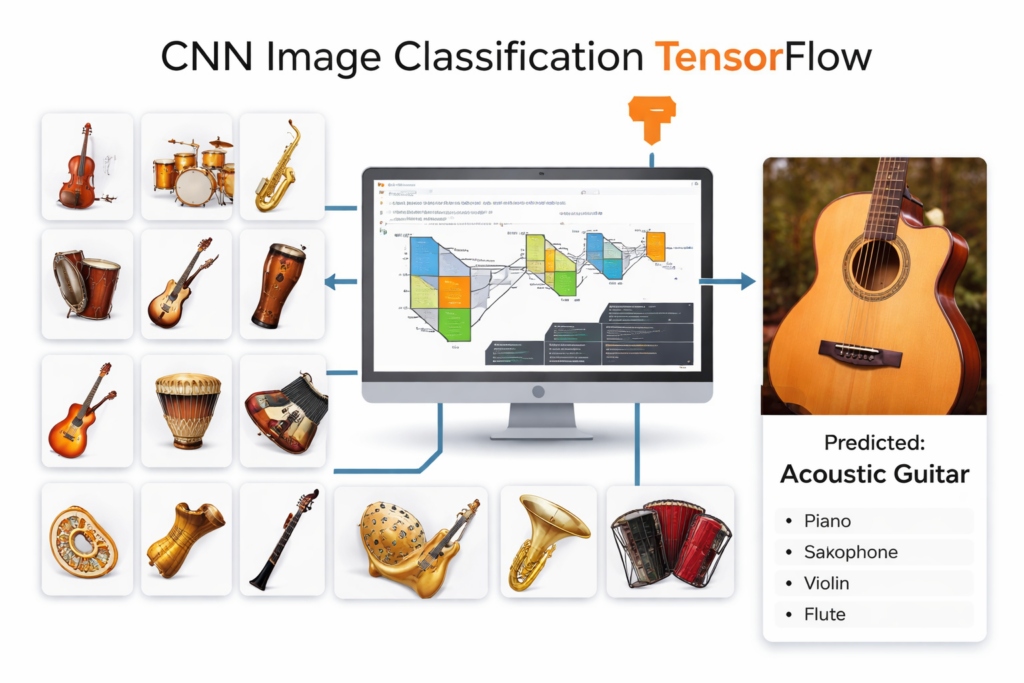
This article is about building a cnn image classification tensorflow project that can recognize 30 different musical instruments from images, end-to-end. You’ll go from a folder-based dataset to a trained model that can predict the instrument in a new photo, all using a clean, practical workflow.
If you’re learning computer vision, it’s easy to get stuck between theory and real results. A hands-on CNN project like this helps you understand what actually matters in practice: how images become tensors, how a model learns patterns, and how to spot the difference between “training looks good” and “the model truly generalizes.”
You’ll also learn how to train smarter, not just longer. Instead of blindly running epochs, you’ll apply early stopping and model checkpoints so you keep the best-performing version of your network and reduce the risk of overfitting as the dataset and classes grow.
By the end, you’ll have a repeatable pipeline you can reuse for other multi-class problems: load images efficiently, normalize data, train a CNN with TensorFlow, test on random samples, and evaluate performance using a confusion matrix and classification report—all while staying focused on the core goal: accurate instrument classification.
How Do You Build an Automated Computer Vision System to Recognize 30 Different Musical Instruments Using Deep Learning? The automation of auditory asset classification through visual representation has emerged as a cornerstone of modern multi-modal AI systems. When managing large-scale archives of musical media or building interactive augmented reality applications, manual tagging becomes an operational bottleneck. To solve this, developers rely on Convolutional Neural Networks (CNNs), which mimic human visual processing by extracting hierarchical patterns from pixel data. This comprehensive CNN image classification with TensorFlow: 30 musical instruments tutorial provides the blueprints to build, train, and deploy an end-to-end deep learning workflow capable of identifying 30 distinct categories of musical hardware with exceptional precision.
Leveraging modern frameworks like TensorFlow and Keras, computer vision engineers can build highly robust models from scratch or optimize pre-existing architectures for specialized domain data. The core challenge when scaling classification to 30 unique classes lies in handling fine-grained structural similarities—such as distinguishing between an acoustic guitar, a classical guitar, and a ukulele. By establishing an optimized preprocessing pipeline, incorporating regularized layer architectures, and deploying computational safety nets like early stopping, this tutorial bridges the gap between basic academic classification exercises and complex production-level machine learning pipelines.
Whether you are an aspiring data scientist looking to expand your portfolio or a senior AI engineer refining your computer vision stack, understanding these underlying training dynamics is essential. By treating data ingestion, structural architecture design, and hyperparameter optimization as an interconnected loop, you can extract maximum accuracy out of your image datasets. Let us dive into the concrete implementation steps required to execute this CNN image classification with TensorFlow: 30 musical instruments tutorial successfully.
How Do You Prepare and Optimize an Image Dataset for Multi-Class TensorFlow Training? Building an enterprise-grade image classifier begins with a clean, performant, and scalable data pipeline. When dealing with a 30-class dataset of musical instruments, holding thousands of uncompressed images in system RAM causes out-of-memory (OOM) errors. TensorFlow resolves this through the tf.data API and the image_dataset_from_directory utility. This utility creates an optimized generator pipeline that streams image tensors asynchronously from the disk. To prevent GPU starvation, we must implement caching and memory prefetching (tf.data.AUTOTUNE). Caching holds the transformed image tensors in memory after the first epoch, while prefetching overlaps the data preprocessing step with model execution, ensuring that the GPU never waits for the next training batch.
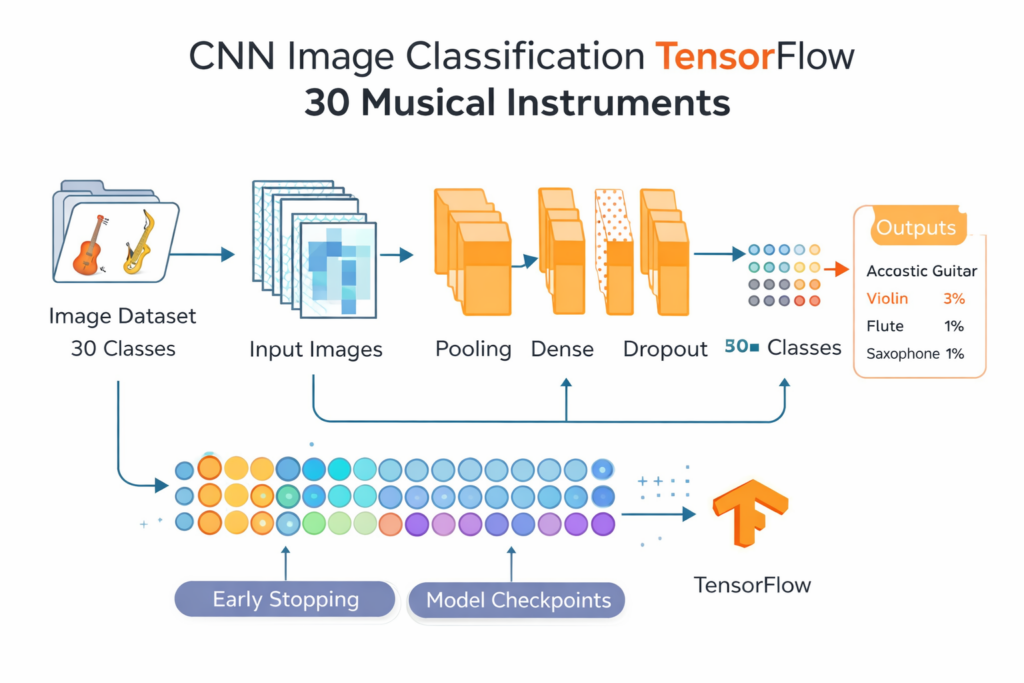
CNN image classification tensorflow that actually feels practical A cnn image classification tensorflow model is a great way to learn how deep learning “sees” an image and turns it into a category label. In this project, the target is clear and measurable: classify 30 musical instrument classes using a CNN built with convolutional layers, pooling, dense layers, and dropout. Instead of treating the model like a black box, you can connect each architectural choice to the job it performs—extracting visual features, compressing information, and making a final multi-class decision.
At a high level, the CNN learns by repeatedly comparing its predictions to the true labels and adjusting its internal weights to reduce error. Convolution layers act like trainable filters that discover useful patterns—edges, textures, shapes, and eventually more instrument-specific cues like strings, keys, mouthpieces, or body silhouettes. Pooling layers reduce spatial size so the network becomes faster and more robust to small shifts in the image. Dense layers then combine the extracted features into a final decision using a softmax output for 30 classes.
The “practical” part comes from treating the pipeline as a full system, not just a model definition. Your dataset is loaded in a scalable way, images are normalized consistently, and training is protected with early stopping and checkpoints so you don’t waste time or keep a worse model by accident. Finally, evaluation goes beyond a single accuracy number: a confusion matrix shows which instruments are confused with each other , and the classification report highlights precision and recall per class—exactly the kind of feedback you need to improve results in a real multi-class project.
cnn image classification tensorflow CNN image classification with TensorFlow: 30 musical instruments tutorial This tutorial walks through a complete, code-first pipeline for training a Convolutional Neural Network (CNN) with TensorFlow to classify 30 musical instrument classes from images. The focus is not just on defining layers, but on creating a reliable workflow: loading a structured dataset, preprocessing images, training with safeguards against overfitting, and evaluating performance with meaningful metrics.
At its core, the code demonstrates how to transform raw image folders into a high-performance training pipeline using image_dataset_from_directory, normalization, caching, and prefetching. These steps ensure that the GPU or CPU stays fed with data efficiently, reducing bottlenecks and making training smoother. By structuring the dataset into train, validation, and test directories, the pipeline mirrors real-world machine learning workflows used in production.
The CNN architecture itself is designed to balance performance and generalization. Convolutional layers progressively extract visual features such as edges, shapes, and textures that distinguish instruments like guitars, violins, and saxophones. Pooling layers reduce spatial complexity, while dense layers interpret the extracted features to produce a final prediction across 30 classes. Dropout layers add regularization, helping the model avoid memorizing the training data.
Training is guided by practical safeguards that make the code suitable for real projects. Early stopping halts training when validation performance stops improving, preventing wasted computation and overfitting. Model checkpoints ensure that the best-performing version of the network is saved automatically. After training, the evaluation phase goes beyond accuracy by generating a confusion matrix and classification report, revealing which instruments are commonly misclassified and providing actionable insight for further improvements.
Link to the video tutorial here
Download to the code for the tutorial here or here
Master Computer Vision
Follow my latest tutorials and AI insights on my
Personal Blog .
Beginner Complete CV Bootcamp
Foundation using PyTorch & TensorFlow.
Get Started → Interactive Deep Learning with PyTorch
Hands-on practice in an interactive environment.
Start Learning → Advanced Modern CV: GPT & OpenCV4
Vision GPT and production-ready models.
Go Advanced →
CNN image classification Leveraging Deep Learning for Musical Instrument Recognition When you build a cnn image classification tensorflow project, you’re not just training a model.
In this tutorial, the goal is clear: classify 30 musical instrument classes from images using a custom CNN in TensorFlow.
By the end, you’ll have an end-to-end pipeline you can reuse for any multi-class image classification problem.
Want the exact dataset so your results match mine? If you want to reproduce the same training flow and compare your results to mine, I can share the dataset structure and what I used in this tutorial.
🖥️ Email: feitgemel@gmail.com
Setting Up the TensorFlow and Keras Environment for Computer Vision Training a cnn image classification tensorflow model is much smoother when your environment is clean from the start.
If you’re using a GPU, matching TensorFlow with the right CUDA support matters.
Once this is done, everything else in the tutorial becomes easier to trust.
Quick takeaway:
### Create a dedicated Conda environment for this project. conda create - n TASM python = 3.11 ### Activate the environment so installs go into the right place. conda activate TASM ### Check your CUDA compiler version if you plan to use a GPU. nvcc -- version ### Install TensorFlow with CUDA support if you are training on GPU. pip install tensorflow [ and-cuda ] == 2.17 . 1 ### Install TensorFlow CPU version if you are training without GPU. pip install tensorflow == 2.17 . 1 ### Install NumPy for array operations used across the pipeline. pip install numpy == 1.26 . 4 ### Install Matplotlib for plotting training curves and image previews. pip install matplotlib == 3.10 . 0 ### Install Pandas for structured data handling if needed. pip install pandas == 2.2 . 3 ### Install scikit-learn for classification reports and confusion matrices. pip install scikit - learn == 1.6 . 0 ### Install seaborn for a readable confusion matrix heatmap. pip install seaborn == 0.13 . 2 ### Install OpenCV for loading and preprocessing test images. pip install opencv - python == 4.10 . 0.84 Summary:
Image Preprocessing and Data Pipeline Construction Before building layers, it’s smart to confirm the dataset is readable and shaped correctly.
You’ll set paths for training and validation folders and define the image size your CNN will expect.
This is also where the workflow starts to feel like a real cnn image classification tensorflow project.
Quick takeaway:
### Import NumPy for numerical operations and array handling. import numpy as np ### Import Pandas for optional dataset inspection or analysis. import pandas as pd ### Import Matplotlib for displaying images and plotting training curves. import matplotlib.pyplot as plt ### Import utilities to load images and convert them into NumPy arrays. from keras.utils import img_to_array , load_img ### Import callbacks that help stop training early and save the best model. from keras.callbacks import EarlyStopping , ModelCheckpoint ### Import Adam optimizer for stable CNN training. from tensorflow.keras.optimizers import Adam ### Import TensorFlow for dataset loading and model training. import tensorflow as tf ### Import Sequential API for building a layer-by-layer CNN. from tensorflow.keras.models import Sequential ### Import core CNN layers for feature extraction and classification. from tensorflow.keras.layers import Dense , Flatten , Conv2D , MaxPooling2D , Dropout ### Define the training folder path that contains 30 class subfolders. train_path = ' /mnt/d/Data-Sets-Image-Classification/30 Musical Instruments/train/ ' ### Define the validation folder path that contains 30 class subfolders. valid_path = ' /mnt/d/Data-Sets-Image-Classification/30 Musical Instruments/valid/ ' ### Set batch size to control how many images are processed per step. BATCH_SIZE = 8 ### Set the target image size used when loading images from disk. IMG_SIZE = ( 128 , 128 ) ### Define the full input dimension expected by the CNN model. IMG_DIM = ( 128 , 128 , 3 ) ### Set a high epoch count and let callbacks decide when to stop. EPOCHS = 200 ### Load one sample image so you can visually verify the dataset. img = load_img ( train_path + ' acordian/010.jpg ' ) ### Display the image to confirm it is readable and correctly located. plt.imshow ( img ) ### Convert the loaded image into a NumPy array tensor. img = img_to_array ( img ) ### Print the image array shape to confirm the tensor dimensions. print ( img.shape ) ### Render the image window so you can confirm everything looks correct. plt.show () Summary:
Turn folders into a fast TensorFlow input pipeline This section builds the real engine behind your training loop.image_dataset_from_directory to create batched datasets directly from your folder structure.cnn image classification tensorflow pipelines.
You’ll load training and validation sets separately, shuffle them, and label each image based on its parent folder name.[0, 1] range, which makes optimization more stable.
These performance steps matter more than people expect.
Quick takeaway:
### Load the training dataset from directory folders and auto-generate labels. train_dataset = tf.keras.utils.image_dataset_from_directory ( train_path , image_size = IMG_SIZE , batch_size = BATCH_SIZE , shuffle = True , label_mode = ' int ' ) ### Load the validation dataset from directory folders and auto-generate labels. valid_dataset = tf.keras.utils.image_dataset_from_directory ( valid_path , image_size = IMG_SIZE , batch_size = BATCH_SIZE , shuffle = True , label_mode = ' int ' ) ### Normalize images to the range [0, 1] to stabilize learning. def normalize ( image , label ) : return tf.cast ( image , tf.float32 ) / 255.0 , label ### Apply normalization mapping to the training dataset. train_dataset = train_dataset.map ( normalize ) ### Apply normalization mapping to the validation dataset. valid_dataset = valid_dataset.map ( normalize ) ### Use AUTOTUNE to let TensorFlow optimize pipeline performance automatically. AUTOTUNE = tf.data.AUTOTUNE ### Cache and prefetch the training dataset to reduce I/O bottlenecks. train_dataset = train_dataset.cache () .prefetch ( buffer_size = AUTOTUNE ) ### Cache and prefetch the validation dataset to reduce I/O bottlenecks. valid_dataset = valid_dataset.cache () .prefetch ( buffer_size = AUTOTUNE ) Summary:
Designing a Convolutional Neural Network Architecture for Multi-Class Problems Now you define the actual classifier.cnn image classification tensorflow baseline.
You stack Conv2D layers to learn increasingly rich features.
Dropout is included to reduce overfitting, which is common when you have many classes and limited images per class.
Technical Logic: Unlike standard feed-forward neural networks, a Convolutional Neural Network (CNN) is designed to preserve the spatial hierarchy of an image. By using filters to scan the input pixels, the model learns to identify low-level features like the strings of a guitar or the bell of a trumpet, eventually combining them into high-level concepts. In this architecture, we utilize multiple ‘Conv2D’ layers to ensure the model captures these intricate textures across the 30 different instrument classes.
Quick takeaway:
What is the Ideal CNN Architecture for Classifying 30 Complex Object Classes? An effective CNN architecture for classifying 30 distinct categories requires a careful balance of depth, capacity, and regularization. A sequential design starting with a Rescaling layer normalizes pixel values from [0, 255] to [0, 1], ensuring stable weight updates during backpropagation. This is followed by alternating blocks of 2D Convolutional (Conv2D) layers and Max Pooling (MaxPooling2D) layers. The early layers use fewer filters (e.g., 32) to capture low-level spatial features like edges and textures. As we go deeper, the spatial dimensions shrink while the filter depth expands (e.g., to 64 and 128) to extract complex semantic concepts like fretboards, keys, and brass bells. We transition from 2D matrices to flat vectors using GlobalAveragePooling2D rather than a standard Flatten layer to significantly reduce parameters and prevent overfitting, a core methodology of our CNN image classification with TensorFlow: 30 musical instruments tutorial . The network finishes with a Dense softmax layer matching our 30 output categories.
### Define a function so you can recreate the model cleanly if needed. def get_cnn_model () : ### Create a Sequential model for a simple layer-by-layer CNN build. model = Sequential () ### Add the first convolution layer to learn basic edges and textures. model.add ( Conv2D ( 32 , kernel_size = 3 , padding = ' same ' , activation = ' relu ' , input_shape = IMG_DIM )) ### Downsample feature maps to reduce computation and improve robustness. model.add ( MaxPooling2D (( 3 , 3 ))) ### Add a deeper convolution layer to learn more complex patterns. model.add ( Conv2D ( 64 , kernel_size = 3 , padding = ' same ' , activation = ' relu ' )) ### Downsample again to compress spatial information. model.add ( MaxPooling2D (( 3 , 3 ))) ### Add an even deeper convolution layer for richer feature extraction. model.add ( Conv2D ( 128 , kernel_size = 3 , padding = ' same ' , activation = ' relu ' )) ### Flatten feature maps into a 1D vector for the dense classifier head. model.add ( Flatten ()) ### Add a dense layer to combine features into higher-level signals. model.add ( Dense ( 256 , activation = ' relu ' )) ### Dropout helps prevent memorization and improves generalization. model.add ( Dropout ( 0.5 )) ### Add another dense layer to refine representation before output. model.add ( Dense ( 128 , activation = ' relu ' )) ### Apply dropout again to reduce overfitting risk. model.add ( Dropout ( 0.5 )) ### Output 30 class probabilities using softmax. model.add ( Dense ( 30 , activation = ' softmax ' )) ### Compile the model with Adam optimizer and multi-class loss. model.compile ( optimizer = Adam ( learning_rate = 0.001 ) , loss = ' sparse_categorical_crossentropy ' , metrics = [ ' accuracy ' ]) ### Return the compiled model so it can be trained outside the function. return model ### Build the CNN model instance. model = get_cnn_model () ### Print a readable summary so you can confirm layer shapes and parameters. print ( model.summary ()) Summary:
Optimizing Model Performance: Training and Validation Strategy This part is where your model becomes “real.”capturing the best-performing model .
ModelCheckpoint watches validation loss and writes the best weights to disk.
After training, you also save the final model and plot accuracy and loss curves.
Pro-Tip: When dealing with 30 distinct categories, selecting the right loss function is critical. We use categorical_crossentropy because it measures the performance of a classification model whose output is a probability value between 0 and 1. To prevent the model from “overfitting”—where it memorizes the training data but fails on new images—ensure your training script includes a validation split to monitor how the model generalizes to instruments it hasn’t seen before.
Quick takeaway:
How Do You Compile and Train the Network for Maximum Convergence and Generalization? Compiling the model involves pairing it with an appropriate optimizer, loss function, and tracking metrics. Since this CNN image classification with TensorFlow: 30 musical instruments tutorial manages 30 distinct classes encoded via categorical vectors, we apply CategoricalCrossentropy. We select the Adam optimizer due to its adaptive learning rate capabilities, which accelerate early convergence. To prevent overfitting and wasting computational resources over long training runs, we use Keras callbacks.EarlyStopping callback monitors validation loss, terminating training when improvement stalls, while ReduceLROnPlateau dynamically drops the learning rate when validation loss plates, allowing the model to find deeper local minima.
### Define a file path where the best model checkpoint will be saved. check_point_path = " /mnt/d/models/Best-CNN-Model-30-Musical-Instruments.keras " ### Save the best model during training based on validation loss. checkpoint_callback = ModelCheckpoint ( filepath = check_point_path , monitor = ' val_loss ' , save_best_only = True , verbose = 1 ) ### Stop training if validation loss does not improve for a while. erly_stopping_callback = EarlyStopping ( monitor = ' val_loss ' , patience = 40 , verbose = 1 ) ### Train the CNN on the training dataset and validate on the validation dataset. history = model.fit ( train_dataset , validation_data = valid_dataset , epochs = EPOCHS , callbacks = [ checkpoint _ callback, erly _ stopping _ callback ] ) ### Save the final trained model after training completes. model.save ( ' /mnt/d/models/Final-CNN-Model-30-Musical-Instruments.keras ' ) ### Extract training accuracy history for plotting. acc = history.history [ ' accuracy ' ] ### Extract validation accuracy history for plotting. val_acc = history.history [ ' val_accuracy ' ] ### Extract training loss history for plotting. loss = history.history [ ' loss ' ] ### Extract validation loss history for plotting. val_loss = history.history [ ' val_loss ' ] ### Create a numeric range for plotting epochs. epochs_range = range ( len ( acc )) ### Start a new figure to visualize performance curves. plt.figure ( figsize = ( 12 , 6 )) ### Plot training and validation accuracy on the left panel. plt.subplot ( 1 , 2 , 1 ) plt.plot ( epochs_range , acc , label = ' Training Accuracy ' ) plt.plot ( epochs_range , val_acc , label = ' Validation Accuracy ' ) plt.legend ( loc = ' lower right ' ) plt.title ( ' Training and Validation Accuracy ' ) ### Plot training and validation loss on the right panel. plt.subplot ( 1 , 2 , 2 ) plt.plot ( epochs_range , loss , label = ' Training Loss ' ) plt.plot ( epochs_range , val_loss , label = ' Validation Loss ' ) plt.legend ( loc = ' upper right ' ) plt.title ( ' Training and Validation Loss ' ) ### Display the plots so you can inspect learning behavior. plt.show () Summary:
Expert Insight: If you notice a wide gap between your training accuracy and validation accuracy, your model is likely over-complex for the dataset. To improve these results, consider implementing Data Augmentation (rotating or flipping images) or adding Dropout layers . These techniques force the network to learn more robust features rather than relying on specific pixel locations, which is essential when identifying instruments in various real-world lighting conditions and angles.
Evaluating Model Accuracy and Feature Extraction Performance This section shifts from training mode to “does it actually work?” mode.
OpenCV is used to read images quickly, convert to RGB, resize, and normalize.
This is the kind of quick test you’ll do repeatedly when improving a cnn image classification tensorflow project.
Quick takeaway:
How Do You Evaluate the Model and Run Inference on Custom Test Data? The true verification of a computer vision engine is its performance on completely unseen, out-of-distribution real-world images. Once training scales down via our validation callbacks, the model must be saved and subjected to mathematical validation using classification reports and confusion matrices. For deployment, we build a dedicated inference function that mirrors our initial preprocessing pipeline: loading an individual file, resizing it to (224, 224), expanding dimensions to match the expected batch dimension (1, 224, 224, 3), and normalizing the pixel array. Passing this tensor to the model yields a probability distribution across the 30 instruments, where the highest index maps back to our human-readable class text.
### Import OS utilities for path handling. import os ### Import random for selecting random classes and images. import random ### Import NumPy for array preprocessing. import numpy as np ### Import TensorFlow for loading the saved Keras model. import tensorflow as tf ### Import OpenCV for reading and resizing test images. import cv2 ### Import Matplotlib for displaying the predicted image. import matplotlib.pyplot as plt ### Import evaluation metrics for later reporting. from sklearn.metrics import classification_report , confusion_matrix ### Import seaborn for the confusion matrix heatmap. import seaborn as sns ### Define the test dataset path with 30 class subfolders. test_path = ' /mnt/d/Data-Sets-Image-Classification/30 Musical Instruments/test/ ' ### Define the path to the best saved model checkpoint. model_path = " /mnt/d/models/Best-CNN-Model-30-Musical-Instruments.keras " ### Set the image size so preprocessing matches training. IMG_SIZE = ( 128 , 128 ) ### Collect class names from folder names in the test directory. class_names = sorted ( os.listdir ( test_path )) ### Print class names so you can confirm the discovered label set. print ( class_names ) ### Load the trained model from disk. model = tf.keras.models.load_model ( model_path ) ### Confirm the model is loaded and ready to run inference. print ( " Model loaded successfully. " ) ### Predict a random image from the test folder to get a quick sanity check. def predict_random_image () : ### Select a random class folder from the available classes. random_class = random.choice ( class_names ) class_folder = os.path.join ( test_path , random_class ) ### Select a random image file from the chosen class folder. random_image = random.choice ( os.listdir ( class_folder )) image_path = os.path.join ( class_folder , random_image ) ### Load the image from disk using OpenCV. image = cv2.imread ( image_path ) ### Convert BGR to RGB so Matplotlib shows correct colors. image_rgb = cv2.cvtColor ( image , cv2.COLOR_BGR2RGB ) ### Resize image to model input size. image_resized = cv2.resize ( image_rgb , IMG_SIZE ) ### Normalize and add batch dimension so the model can predict. input_array = np.expand_dims ( image_resized / 255.0 , axis = 0 ) # Normalize and add batch dimension ### Run prediction and get class probabilities. predictions = model.predict ( input_array ) ### Convert probabilities into the index of the strongest class. predicted_class_index = np.argmax ( predictions ) ### Map predicted index back to a human-readable class name. predicted_class = class_names [ predicted _ class _ index ] ### Display the original image with predicted and true labels. plt.figure ( figsize = ( 6 , 6 )) plt.imshow ( image_rgb ) plt.title ( f " Predicted: {predicted_class}\nTrue Class: {random_class} " , fontsize = 14 ) plt.axis ( ' off ' ) plt.show () ### Run the prediction function to test a random image quickly. predict_random_image () Summary:
Prove performance with a confusion matrix and classification report Accuracy alone can hide problems, especially with 30 classes.
The evaluation loop is straightforward.confusion_matrix builds the grid and seaborn visualizes it in a readable way.
Finally, the classification report gives precision, recall, and F1-score per class.cnn image classification tensorflow project becomes actionable.
Quick takeaway:
### Separate this section so it is clear where evaluation begins. # ----------------------------------------------------------------- # Task 2 : Predict all images in the test folder and display a confusion matrix ### Evaluate the model across the entire test dataset for reliable metrics. def evaluate_model () : ### Store true integer labels for every test image. true_labels = [] ### Store predicted integer labels for every test image. predicted_labels = [] ### Loop over each class folder and keep class_index aligned with class_names order. for class_index , class_name in enumerate ( class_names ) : class_folder = os.path.join ( test_path , class_name ) for image_name in os.listdir ( class_folder ) : image_path = os.path.join ( class_folder , image_name ) ### Load image from disk using OpenCV. image = cv2.imread ( image_path ) ### Convert to RGB so preprocessing matches display format. image_rgb = cv2.cvtColor ( image , cv2.COLOR_BGR2RGB ) ### Resize image to match model input. image_resized = cv2.resize ( image_rgb , IMG_SIZE ) ### Normalize and add batch dimension for inference. input_array = np.expand_dims ( image_resized / 255.0 , axis = 0 ) # Normalize and add batch dimension ### Predict class probabilities for the current image. predictions = model.predict ( input_array ) ### Convert probabilities into the strongest class index. predicted_class_index = np.argmax ( predictions ) ### Append the known true label index for this folder. true_labels.append ( class_index ) ### Append the predicted label index from the model output. predicted_labels.append ( predicted_class_index ) ### Compute the confusion matrix from true vs predicted labels. cm = confusion_matrix ( true_labels , predicted_labels ) ### Plot the confusion matrix so class confusions are visually obvious. plt.figure ( figsize = ( 12 , 8 )) sns.heatmap ( cm , annot = True , fmt = ' d ' , xticklabels = class_names , yticklabels = class_names ) plt.xlabel ( ' Predicted Label ' ) plt.ylabel ( ' True Label ' ) plt.title ( ' Confusion Matrix ' ) plt.show () ### Print a detailed classification report with per-class metrics. report = classification_report ( true_labels , predicted_labels , target_names = class_names ) print ( " Classification Report:\n " , report ) print ( f " Evaluated class: {class_name} " ) ### Run full evaluation across the entire test directory. evaluate_model () Summary:
FAQ What does “cnn image classification tensorflow” mean in this tutorial? It means training a CNN in TensorFlow to map images to labels. In this project, the labels are 30 musical instrument classes.
Why use image_dataset_from_directory? It builds a labeled dataset directly from folder names and supports batching and resizing. It also integrates cleanly with tf.data performance steps.
Why normalize images to [0, 1]? Normalization helps training stay stable and improves optimizer behavior. It also makes results more consistent across machines.
What do cache() and prefetch() do? They speed up training by reducing disk I/O and preparing batches ahead of time. This often improves throughput without changing the model.
Why use sparse_categorical_crossentropy? Your labels are integer class IDs, not one-hot vectors. Sparse loss matches that format and keeps the pipeline simple.
Why is dropout used twice in the CNN? Dropout reduces overfitting by discouraging reliance on a small set of neurons. With 30 classes, this can improve generalization.
What does early stopping protect you from? It stops training when validation loss stops improving. This saves time and reduces the risk of overfitting.
Why save the best model checkpoint? The best validation point can happen before the final epoch. Checkpoints preserve the best-performing weights automatically.
Why use a confusion matrix for 30 classes? It shows which instruments are confused with each other. This helps you decide where to add data or improve preprocessing.
What is the quickest upgrade path if accuracy is low? Increase dataset variety and consider augmentation first. If you want a bigger jump, use transfer learning with a pretrained backbone.
Final Insights and Next Steps in AI Image Classification A solid cnn image classification tensorflow tutorial should leave you with more than a trained model.
The biggest win here is clarity.
Most importantly, this pipeline scales.
Connect : ☕ Buy me a coffee — https://ko-fi.com/eranfeit
🖥️ Email : feitgemel@gmail.com
🌐 https://eranfeit.net
🤝 Fiverr : https://www.fiverr.com/s/mB3Pbb
Enjoy,
Eran
 Skip to content