Last Updated on 23/04/2026 by Eran Feit
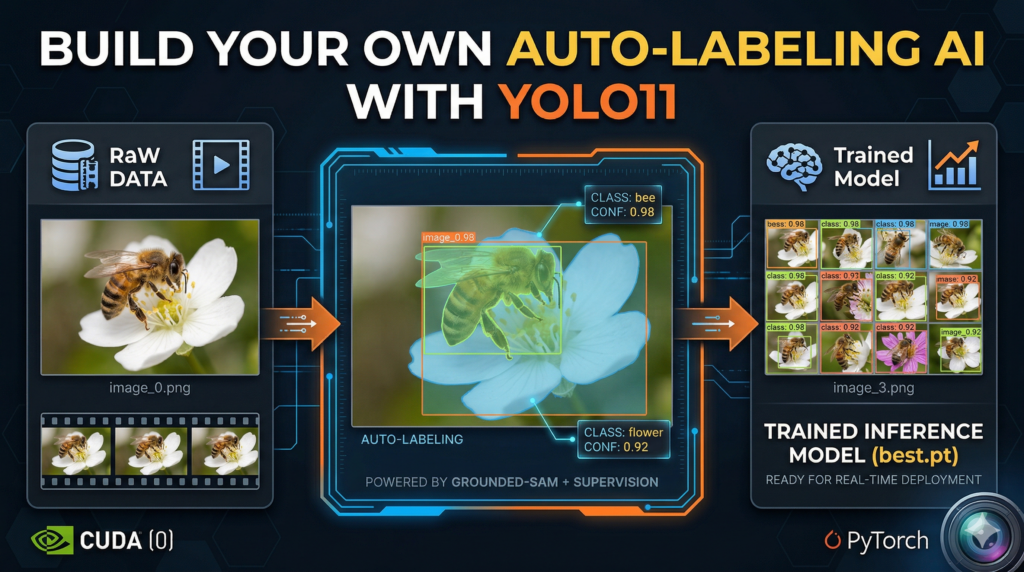
Building a high-performance computer vision pipeline in 2026 shouldn’t feel like a manual labor job from the last decade. This article is a comprehensive deep dive into bypassing the traditional “data bottleneck” by leveraging a sophisticated, code-driven workflow. We are exploring how to bridge the gap between raw video footage and a production-ready YOLO11 model by using automated data annotation . By integrating Grounded-SAM and Autodistill, we create a “teacher-student” dynamic where AI identifies objects like bees and flowers and labels them with surgical precision, effectively turning weeks of manual work into a few minutes of execution.
The primary hurdle in modern AI development isn’t the availability of neural networks; it’s the grueling process of generating high-quality training data. Most developers lose hundreds of hours to the “box-drawing” phase, which is often the graveyard of ambitious projects. Mastering automated data annotation allows you to reclaim that time, focusing instead on model optimization and real-world deployment. This workflow provides a massive competitive advantage, enabling you to iterate faster and train on much larger, more diverse datasets than would ever be possible through human labeling alone.
We achieve this result by breaking the process into a clear, modular technical stack designed for efficiency. First, we utilize Supervision to extract high-quality frames from raw video footage, ensuring our training samples are diverse and clear. Then, we deploy Grounded-SAM as the heavy-duty engine for automated data annotation , generating high-fidelity masks and bounding boxes based on simple text prompts. Finally, we feed this machine-labeled dataset into YOLO11, running a specialized training loop that distills the “knowledge” of the large foundation model into a fast, deployable detector.
Whether you are a researcher tracking biodiversity, a student building a portfolio project, or a developer tasked with a specialized industrial application, the techniques shared here represent the modern standard for AI development. Transitioning to automated data annotation isn’t just a convenience; it’s a fundamental shift in how we build computer vision models. By the end of this guide, you will have a fully functional detection model and a repeatable, “zero-effort” pipeline that you can apply to any object detection challenge you encounter in the future.
So, what’s the deal with automated data annotation anyway? At its core, the primary target of this technology is the “human-in-the-loop” bottleneck that has slowed down AI progress for years. In the earlier days of deep learning, every single pixel and bounding box had to be verified and drawn by a human eye. Automated data annotation flips the script by using “Foundation Models”—massive AI models that already possess a deep understanding of the world—to teach smaller, more specialized models. Instead of you manually telling the computer where a bee is, you use a model like Grounded-SAM that already understands the concept of a “bee” to do the heavy lifting for you across thousands of images simultaneously.
The high-level magic happens through a process often referred to as model distillation. Large foundation models are incredibly smart but are often too slow or computationally expensive for real-time applications like tracking insects in a field. By using these heavy-duty models for automated data annotation , we can generate labels for an entire dataset in the time it would take a person to label just a handful of frames. This creates a high-quality “ground truth” dataset that captures the intelligence of a giant AI and packs it into a lean, lightning-fast architecture like YOLO11, giving you the best of both worlds: extreme accuracy and edge-ready speed.
What makes this approach particularly powerful in the current landscape of 2026 is the sheer surgical precision of the labels. We aren’t just talking about loose, sloppy boxes; we are generating semantic masks that understand the intricate boundaries of complex, organic objects. Modern automated data annotation tools can now handle difficult conditions like occlusion, motion blur, and varied lighting that used to render automation scripts useless. By setting up a robust ontology—a simple list of what you want the AI to find—you create a self-sustaining loop where the data labels itself and prepares itself for training with minimal human intervention.
Automated data annotation This tutorial is designed to take you from a folder of raw, unlabeled video files to a fully functional, high-precision detection system without you ever having to draw a single bounding box. By leaning on the provided Python scripts, we are effectively building a bridge between massive foundational models and lean, edge-ready architectures. The code isn’t just a set of instructions; it’s an automated factory that processes video, generates high-fidelity labels, organizes a dataset, and executes a rigorous training loop. This approach ensures that your time is spent on high-level strategy and model evaluation rather than the tedious manual labor that usually stalls computer vision projects.
How This Script Actually Turns Your Videos into a Smart YOLO11 Model Wait, can I use this code for objects other than bees and flowers? Absolutely. The beauty of this script lies in the CaptionOntology section. By simply changing the text prompts—for example, changing “a bee” to “a forklift” or “a flower” to “a safety helmet”—Grounded-SAM will automatically adjust its focus. The logic remains identical regardless of the subject matter, making this a universal template for automated data annotation across any niche industry or research field.
The first phase of the code focuses on the “Data Extraction” layer, where we utilize the Supervision library to handle the heavy lifting of video processing. Instead of manually taking screenshots, the script uses a generator to systematically pull frames at a specific stride, ensuring we capture a diverse range of motion and angles from your bee footage. This step is crucial because the quality of your automated data annotation depends entirely on the clarity and variety of these initial images. By saving these as high-resolution PNGs, we provide the AI “teacher” with the best possible canvas to begin its work.
Once the frames are ready, the code transitions into the “Intelligence” layer using Grounded-SAM and Autodistill. This is where the automated data annotation truly happens. The script initializes a base model that uses natural language to “understand” what a bee looks like. It then iterates through your entire image directory, creating precise masks and labels for every instance it finds. This process generates a standardized YOLO-format dataset, complete with the necessary data.yaml configuration file, which acts as the roadmap for the upcoming training phase.
Verification is the next critical step in the code’s logic. We don’t just trust the AI blindly; the script includes a dedicated visualization block that shuffles your newly labeled data and plots a grid of annotated images. This allows you to see exactly what the “teacher” model saw—checking the tightness of the bounding boxes and the accuracy of the segmentation masks. This feedback loop is essential in automated data annotation because it ensures that any noise or false positives are identified before you commit hours to the training process.
Finally, the code initiates the “Distillation” phase, where the intelligence from the large Grounded-SAM model is transferred into the lightweight YOLO11 architecture. The script runs a 300-epoch training loop, optimized with specific hyperparameters like batch size and image resolution, to ensure the resulting model is both accurate and fast enough for real-time use. The final block of code then takes this “best.pt” weight file and runs it back against unseen test footage, completing the cycle from raw pixels to a self-aware detection system that can identify bees in the wild with incredible speed.
Link to the video tutorial here .
Download the code for the tutorial here or here .
Master Computer Vision
Follow my latest tutorials and AI insights on my
Personal Blog .
Beginner Complete CV Bootcamp
Foundation using PyTorch & TensorFlow.
Get Started → Interactive Deep Learning with PyTorch
Hands-on practice in an interactive environment.
Start Learning → Advanced Modern CV: GPT & OpenCV4
Vision GPT and production-ready models.
Go Advanced →
AI image labeling How to Use Automated Data Annotation for YOLO11 Building a high-performance computer vision pipeline in 2026 shouldn’t feel like a manual labor job from the last decade. This article is a comprehensive deep dive into bypassing the traditional “data bottleneck” by leveraging a sophisticated, code-driven workflow. We are exploring how to bridge the gap between raw video footage and a production-ready YOLO11 model by using automated data annotation . By integrating Grounded-SAM and Autodistill, we create a “teacher-student” dynamic where AI identifies objects like bees and flowers and labels them with surgical precision, effectively turning weeks of manual work into a few minutes of execution.
The primary hurdle in modern AI development isn’t the availability of neural networks; it’s the grueling process of generating high-quality training data. Most developers lose hundreds of hours to the “box-drawing” phase, which is often the graveyard of ambitious projects. Mastering automated data annotation allows you to reclaim that time, focusing instead on model optimization and real-world deployment. This workflow provides a massive competitive advantage, enabling you to iterate faster and train on much larger, more diverse datasets than would ever be possible through human labeling alone.
We achieve this result by breaking the process into a clear, modular technical stack designed for efficiency. First, we utilize Supervision to extract high-quality frames from raw video footage, ensuring our training samples are diverse and clear. Then, we deploy Grounded-SAM as the heavy-duty engine for automated data annotation , generating high-fidelity masks and bounding boxes based on simple text prompts. Finally, we feed this machine-labeled dataset into YOLO11, running a specialized training loop that distills the “knowledge” of the large foundation model into a fast, deployable detector.
Whether you are a researcher tracking biodiversity, a student building a portfolio project, or a developer tasked with a specialized industrial application, the techniques shared here represent the modern standard for AI development. Transitioning to automated data annotation isn’t just a convenience; it’s a fundamental shift in how we build computer vision models. By the end of this guide, you will have a fully functional detection model and a repeatable, “zero-effort” pipeline that you can apply to any object detection challenge you encounter in the future.
Setting Up Your Automated AI Workspace Setting up your environment is the first and most critical step in building a professional-grade computer vision pipeline. By creating a dedicated Conda environment, you ensure that specific versions of PyTorch and CUDA 12.8 don’t conflict with other projects on your machine. This isolation is what allows the automated data annotation logic to run smoothly without unexpected library crashes.
This part of the code handles the installation of all heavy-duty dependencies including the Ultralytics YOLO11 engine and the Autodistill ecosystem. We are utilizing PyTorch 2.9.1, which is optimized for the latest GPU architectures available in 2026. Getting these foundational blocks right means you won’t have to worry about compatibility issues when the AI starts its intensive labeling work.
The installation script also brings in Supervision and OpenCV, which we will use for handling video streams and visualizing the final results. By using specific version pins like ultralytics==8.3.50, we guarantee that the “zero-effort” workflow described in this tutorial remains stable. Once these commands finish, your system will be a fully tuned engine ready to transform raw video into intelligent detection models.
Why do I need a specific Conda environment for this? A Conda environment acts as a sandbox that keeps your project’s libraries separate from your global system settings. Since automated data annotation requires complex dependencies like CUDA and specialized AI frameworks, using a sandbox prevents “dependency hell” where updating one library breaks another.
# Create conda enviroment ### Create a new virtual environment named GroundedSam with Python 3.11 conda create -- name GroundedSam python = 3.11 ### Activate the newly created environment conda activate GroundedSam ### Check the installed NVIDIA Compiler version nvcc -- version # Cuda 12.8 -> Pytorch 2.9.1 ### Install PyTorch and related vision/audio libraries specifically for CUDA 12.8 pip install torch == 2.9 . 1 torchvision == 0.24 . 1 torchaudio == 2.9 . 1 -- index - url https : // download . pytorch . org / whl / cu128 # install YoloV11 ### Install the Ultralytics library for YOLO11 training and inference pip install ultralytics == 8.3 . 50 # install more libraries : ### Install Autodistill core for the distillation process pip install autodistill == 0.1 . 29 ### Install the Grounded-SAM plugin for Autodistill pip install autodistill - grounded - sam == 0.1 . 0 ### Install the YOLO11 plugin for Autodistill pip install autodistill - yolov11 == 0.1 . 4 ### Install scikit-learn for data splitting and evaluation pip install scikit - learn == 1.6 . 1 ### Install Roboflow for dataset management support pip install roboflow == 1.1 . 50 ### Install Hugging Face Transformers for model weight management pip install Transformers == 4.29 . 2 ### Install the headless version of OpenCV for image processing pip install opencv - python == 4.11 . 0 . 86
Want the original video files to follow along? If you want to reproduce the same training flow and achieve the exact same detection results, I can share the raw training and test video files used in this tutorial. Send me an email and mention “Bee Detection YOLO11 Video Files” so I know what you’re requesting.
🖥️ Email: feitgemel@gmail.com
Turning Raw Video into High-Quality Training Images Bees This section of the code is where we bridge the gap between real-world footage and machine-readable data. By using the Supervision library, we can systematically scan through your video files and extract frames at a controlled interval. This ensures we aren’t just saving thousands of identical images, but rather a diverse set of samples that capture the movement of bees and flowers.
The script uses a FRAME_STRIDE of 5, meaning it saves every 5th frame to your local storage. This is a standard strategy in automated data annotation because it reduces the redundancy in your training set while still providing enough variety for the model to learn effectively. The ImageSink function makes this process clean by automatically naming and organizing the files as they are pulled from the video stream.
By the end of this step, you will have a directory filled with high-quality PNG images ready for the AI “teacher” to analyze. This phase is the “fuel” for our detection engine. Without a clean set of images extracted with the right logic, the final YOLO11 model would struggle to generalize in real-world conditions.
What is a FRAME_STRIDE and why should I use it? A FRAME_STRIDE determines how many frames the code skips before saving an image from the video. Using a stride prevents your dataset from being bloated with nearly identical images, which speeds up the automated data annotation process and prevents the model from over-fitting on specific video segments.
### Import the OS library to handle file paths and directories import os ### Define the path where your raw video files are stored VIDEO_DIR_PATH = " Best-Object-Detection-models/Yolo-V11/GroundedSAM-Auto-Annotation - Bees/Videos/Train videos " ### Define the target path for the extracted images IMAGE_DIR_PATH = " D:/Data-Sets-Object-Detection/Bees/images " ### Set the stride to save every 5th frame FRAME_STRIDE = 5 ### Import supervision for video processing and tqdm for progress bars import supervision as sv from tqdm import tqdm ### List all video files with mov or mp4 extensions in the source directory video_paths = sv . list_files_with_extensions ( directory = VIDEO_DIR_PATH , extensions = [ " mov " , " mp4 " ] ) ### Print the list of found video paths print ( video_paths ) ### Iterate through each video path found for video_path in tqdm ( video_paths ) : ### Get the filename without the extension video_name = video_path . stem ### Create a naming pattern for the saved images image_name_pattern = video_name + " - { :05d } .png " ### Use ImageSink to save frames extracted from the video generator with sv . ImageSink ( target_dir_path = IMAGE_DIR_PATH , image_name_pattern = image_name_pattern ) as sink : for image in sv . get_video_frames_generator ( source_path = str ( video_path ), stride = FRAME_STRIDE ) : sink . save_image ( image = image ) ### Confirm completion of frame extraction print ( " Done " ) # Check the extracted images folder ### List all successfully saved image files image_paths = sv . list_files_with_extensions ( directory = IMAGE_DIR_PATH , extensions = [ " png " , " jpg " , " jpeg " ] ) ### Print the total number of images extracted print ( " Image Count : " , len ( image_paths ))
Teaching the AI What to Look For via Ontology This part of the code is where we define the “brain” of our automated data annotation system. By creating a CaptionOntology, we are essentially giving the AI a set of natural language instructions. Instead of hard-coding coordinates, we tell the model: “When you see a bee, label it as ‘bee’, and when you see a flower, label it as ‘flower’.”
The base model we use is Grounded-SAM, which is a powerful “foundation model” that has been pre-trained on millions of images. It understands the visual concept of thousands of objects out of the box. By mapping our text prompts to class names, we allow the AI to perform “zero-shot” detection on our custom bee images without any prior training.
The base_model.label() command is the magic button that triggers the entire annotation pipeline. It scans your image directory, analyzes every pixel against your ontology, and generates a fully structured dataset. This output includes the training and validation folders, as well as the essential data.yaml file that YOLO11 requires to start learning.
What is an Ontology in the context of computer vision? An Ontology is a mapping dictionary that translates human language descriptions into machine-readable class labels. In automated data annotation , it allows you to define exactly what you want the AI to find (e.g., “a bee”) and how it should name that category in your final dataset (e.g., “bee”).
### Import CaptionOntology to define our object mapping from autodistill . detection import CaptionOntology # Define the Ontology ### Map natural language descriptions to dataset class names ontology = CaptionOntology ({ " a bee " : " bee " , " a flower " : " flower " }) # init the Base model ### Set the paths for the input images and the target dataset output IMAGE_DIR_PATH = " D:/Data-Sets-Object-Detection/Bees/images " DATASET_DIR_PATH = " D:/Data-Sets-Object-Detection/Bees/dataset " ### Import GroundedSAM to use as the teacher model for auto-labeling from autodistill_grounded_sam import GroundedSAM ### Initialize the model with the defined ontology base_model = GroundedSAM ( ontology = ontology ) ### Run the labeling process on the image folder to generate the dataset dataset = base_model . label ( input_folder = IMAGE_DIR_PATH , output_folder = DATASET_DIR_PATH , extension = ' .png ' ) Letting Grounded-SAM Do the Heavy Lifting The actual logic of automated data annotation comes alive in this section as we visualize the results of the AI’s work. Grounded-SAM doesn’t just draw boxes; it understands the semantic shape of the objects. This level of “surgical precision” is what allows us to train high-quality models from scratch without human intervention.
The script uses a specialized plotting tool from Supervision to show a grid of images with their new annotations. We apply three different types of annotators: masks, boxes, and labels. This allows you to verify that the AI is correctly identifying the fuzzy edges of a bee’s wings and the distinct petals of a flower.
By shuffling the dataset and selecting a random sample, we get an unbiased view of the annotation quality. If the masks look clean and the labels are in the right places, it’s a green light to move to the training phase. This automated verification step is the safety net that ensures your automated data annotation pipeline is producing high-quality “ground truth” data.
Can I trust the masks generated by Grounded-SAM? Yes, Grounded-SAM is widely considered one of the most accurate zero-shot segmentation models available. However, checking a random sample with the visualization code is always recommended to ensure your ontology descriptions are clear enough for the AI to understand the specific environment of your footage.
### Import supervision for dataset visualization import supervision as sv ### Import Path for handling file system structures from pathlib import Path import random ### Set paths to the training images and labels generated by the AI ANNOTATIONS_DIRECTORY_PATH = " D:/Data-Sets-Object-Detection/Bees/dataset/train/labels " IMAGES_DIRECTORY_PATH = " D:/Data-Sets-Object-Detection/Bees/dataset/train/images " DATA_YAML_PATH = " D:/Data-Sets-Object-Detection/Bees/dataset/data.yaml " # Display images ### Load the generated dataset into memory for inspection dataset = sv . DetectionDataset . from_yolo ( images_directory_path = IMAGES_DIRECTORY_PATH , annotations_directory_path = ANNOTATIONS_DIRECTORY_PATH , data_yaml_path = DATA_YAML_PATH ) ### Print the size of the annotated dataset print ( len ( dataset )) ### Define visual parameters for the inspection grid SAMPLE_SIZE = 16 SAMPLE_GRID_SIZE = ( 4 , 4 ) SAMPLE_PLOT_SIZE = ( 16 , 10 ) ### Initialize different annotators to visualize boxes, masks, and text mask_annotator = sv . MaskAnnotator () box_annotator = sv . BoxAnnotator () label_annotator = sv . LabelAnnotator () # Shuffle dataset and select random images ### Create a list of indices and shuffle them for a random sample dataset_indices = list ( range ( len ( dataset ))) random . shuffle ( dataset_indices ) ### Prepare lists to hold the annotated images and titles images = [] images_names = [] ### Loop through the random sample to apply annotations for i in dataset_indices [: SAMPLE_SIZE ] : image_path , image , annotation = dataset [ i ] annotated_image = image . copy () ### Apply the segmentation mask to the image annotated_image = mask_annotator . annotate ( scene = annotated_image , detections = annotation ) ### Apply the bounding box to the image annotated_image = box_annotator . annotate ( scene = annotated_image , detections = annotation ) ### Apply the text label to the image annotated_image = label_annotator . annotate ( scene = annotated_image , detections = annotation ) ### Add the result to our lists for plotting images_names . append ( Path ( image_path ). name ) images . append ( annotated_image ) ### Plot the 4x4 grid of images to verify auto-labeling accuracy sv . plot_images_grid ( images = images , titles = images_names , grid_size = SAMPLE_GRID_SIZE , size = SAMPLE_PLOT_SIZE )
Powering Up the YOLO11 Engine Auto-labeling images Training the YOLO11 model is where all our hard work with automated data annotation pays off. In this section, we take the lean and efficient YOLO11 architecture and feed it the high-quality labels generated by Grounded-SAM. This process is called “distillation,” where a fast model learns from a more complex, slower model.
The training script is configured to run for 300 epochs, giving the model ample time to recognize the intricate patterns of bees and flowers in different environments. We set a batch_size of 32 to maximize the performance of your GPU, and we point the script directly to the data.yaml file created in the previous steps. The patience parameter of 40 ensures that the training will stop early if the model stops improving, saving you time and energy.
By the end of this process, the code will save the “best.pt” weights file in your project directory. This file is the “soul” of your new AI. It contains everything the model has learned about bee detection and is ready to be used for real-time inference on brand-new, unseen footage.
What are epochs and why are we running 300 of them? An epoch is one full pass of the entire dataset through the neural network. Running 300 epochs allows the YOLO11 model to refine its understanding and minimize errors through thousands of tiny adjustments. This high number ensures the model reaches its peak accuracy, making the automated data annotation efforts worthwhile.
### Import the YOLO class from the ultralytics library from ultralytics import YOLO ### Define the main training function def main (): # load the model ### Load a pre-trained small YOLO11 model as a starting point model = YOLO ( " yolo11s.pt " ) # load the data.yaml file ### Set the path to the configuration file generated during auto-labeling config_file_path = " D:/Data-Sets-Object-Detection/Bees/dataset/data.yaml " # Specify the output directory for storing the result ### Define the project folder and experiment name for the training run project = " d:/temp/model/Bees-model " experiment = " Bees-small " ### Set the batch size for GPU processing batch_size = 32 # Reduce it to 16 if you have memory issues # Train the model ### Execute the training loop with specific hyperparameters results = model . train ( data = config_file_path , epochs = 300 , project = project , name = experiment , batch = batch_size , device = 0 , patience = 40 , imgsz = 640 , verbose = True , val = True ) ### Ensure the main function runs only when the script is executed directly if __name__ == " __main__ " : main () Seeing the Final Model in Action The final section of our journey is the real-world test. We take our trained YOLO11 model and run it against a test video that the AI has never seen before. This is the ultimate proof that the automated data annotation workflow successfully taught the model to recognize bees in the wild.
The code uses OpenCV to open the input video and setup a VideoWriter for saving the annotated output. As each frame passes through the model, we use the results[0].plot() function to draw the bounding boxes and labels in real-time. To make it even more interactive, we use Matplotlib’s FuncAnimation to display the detection live on your screen while it processes.
This part of the script is highly practical for anyone needing to generate a demo or verify their model’s performance in varied lighting or motion. The result is a new video file saved to your disk, showing your custom AI detecting bees and flowers with surgical precision. It’s the final “Aha!” moment where you see your “zero-effort” pipeline come to life.
How do I save the final annotated video? The code automatically handles this by using the cv2.VideoWriter object. It takes the annotated frames generated by the YOLO model and encodes them into a new MP4 file. This allows you to share your results easily or use them in further research and presentations.
### Import necessary libraries for video processing and visualization import cv2 import os import matplotlib . pyplot as plt from matplotlib . animation import FuncAnimation from ultralytics import YOLO # Weights path ### Define the path to the best trained weights file WEIGHTS_PATH = " d:/temp/model/Bees-model/Bees-small/weights/best.pt " # Load the model ### Initialize the YOLO model with your custom trained weights model = YOLO ( WEIGHTS_PATH ) # Define Path to video file ### Set the path to the unseen test video INPUT_VIDEO_PATH = " Best-Object-Detection-models/Yolo-V11/GroundedSAM-Auto-Annotation - Bees/Videos/Test videos/test_video.mp4 " # Extract folder and file name from the input video path ### Setup the output path for the processed video input_folder = os . path . dirname ( INPUT_VIDEO_PATH ) input_filename = os . path . basename ( INPUT_VIDEO_PATH ) output_video_path = os . path . join ( input_folder , f "annotated_ { input_filename } " ) # Open the input video file ### Use OpenCV to capture the video stream cap = cv2 . VideoCapture ( INPUT_VIDEO_PATH ) # Get the video properties ### Retrieve resolution and frame rate for the output file frame_width = int ( cap . get ( cv2 . CAP_PROP_FRAME_WIDTH )) frame_height = int ( cap . get ( cv2 . CAP_PROP_FRAME_HEIGHT )) fps = cap . get ( cv2 . CAP_PROP_FPS ) fourcc = cv2 . VideoWriter_fourcc ( * " mp4v " ) # Create the output video writer ### Initialize the writer to save the results to disk out = cv2 . VideoWriter ( output_video_path , fourcc , fps , ( frame_width , frame_height )) # Init matplotlib figure for display the frames ### Setup the display window for real-time viewing fig , ax = plt . subplots ( figsize = ( 12 , 8 )) frame_display = None # Function to update frames in Matplotlib ### Define the frame-by-frame inference loop def update_frame ( _ ): global frame_display # Read the next frame success , frame = cap . read () if not success : return # Run the Yolo inference on the frame ### Perform detection using the custom model results = model ( frame ) # Visualize the results ### Draw the boxes and labels on the frame annotated_frame = results [ 0 ]. plot () # Write the annotated frame to the output video ### Save the frame to the new video file out . write ( annotated_frame ) # Convert frame from BGR to RGB for Matplotlib ### Fix color channels for correct display annotated_frame = cv2 . cvtColor ( annotated_frame , cv2 . COLOR_BGR2RGB ) # Display the annotated frame ### Update the plot display if frame_display is None : frame_display = ax . imshow ( annotated_frame ) else : frame_display . set_data ( annotated_frame ) # Configure the Matplotlib plot ### Remove axes for a clean visual look plt . axis ( " off " ) ### Create the animation to play the processed video ani = FuncAnimation ( fig , update_frame , interval = 100 // fps ) # Display the animation plt . show () # Release the video capture and writer ### Clean up resources and finalize the video file cap . release () out . release () ### Print the location of the final result print ( f "Output video saved to : { output_video_path } " )
The result : Summary of the Zero-Effort Pipeline In this tutorial, we have successfully built a complete computer vision factory. By starting with a robust environment and using automated data annotation , we transformed raw video of bees and flowers into a high-precision YOLO11 model. This workflow eliminates the most painful part of AI development—manual labeling—and replaces it with a scalable, code-driven process that leverages foundational models to teach specialized ones.
FAQ What is automated data annotation? It is a workflow where a foundation model like Grounded-SAM uses text prompts to automatically label your dataset, saving hundreds of hours of manual labor.
Does this code work for any object? Yes, by modifying the CaptionOntology mapping, you can instruct the AI to detect and label anything from industrial parts to rare wildlife.
Why use YOLO11? YOLO11 provides the best balance of speed and accuracy for real-time edge applications, making it the perfect target for model distillation.
Is a GPU required? While not strictly mandatory for every step, an NVIDIA GPU is essential for efficient auto-labeling and model training sessions.
What is an ontology? An ontology is a dictionary that maps your text descriptions to the specific class labels you want in your final detection model.
How accurate is Grounded-SAM? Grounded-SAM is a state-of-the-art model that provides near-human precision, especially for segmentation tasks and complex organic objects.
Can I label videos directly? Our pipeline extracts frames from videos first, as this allows for more precise image-by-image analysis and better dataset organization.
What is Frame Stride? Frame stride refers to the interval at which images are saved from a video, which helps reduce data redundancy and training time.
How do I test my model? You can use the provided inference script to run your trained weights against unseen test footage and visualize the detections live.
Is this suitable for beginners? Yes, because the code automates the most difficult tasks, it allows beginners to focus on the results rather than manual data entry.
Detailed Conclusion The transition from manual image labeling to a fully automated data annotation pipeline is a transformative moment for any computer vision professional. In this post, we’ve demonstrated that the “bottleneck” of high-quality training data can be solved with code, leveraging the power of Grounded-SAM to teach a faster, more efficient YOLO11 model. This “teacher-student” architecture isn’t just about saving time; it’s about increasing the scale and accuracy of what one person can achieve in the field of AI.
As we look further into 2026, these automated workflows will become the standard. The ability to quickly iterate through new ideas, swap ontologies, and train models on thousands of images in a single afternoon gives you a massive advantage in the fast-paced world of deep learning. I encourage you to take this template, adapt it to your unique challenges—whether that’s detecting rare species or industrial anomalies—and experience the power of “zero-effort” AI development for yourself.
Connect : ☕ Buy me a coffee — https://ko-fi.com/eranfeit
🖥️ Email : feitgemel@gmail.com
🌐 https://eranfeit.net
🤝 Fiverr : https://www.fiverr.com/s/mB3Pbb
Enjoy,
Eran
 Skip to content