Last Updated on 22/04/2026 by Eran Feit
Object tracking has evolved from a complex experimental challenge into a mandatory requirement for modern vision-based applications. This guide provides a comprehensive roadmap for building a high-performance detection and tracking pipeline, focusing on the seamless integration of state-of-the-art models and robust tracking algorithms. We explore the transition from simple frame-by-frame detection to persistent identity management, ensuring that every object in your video stream is recognized and followed with precision.
As computer vision becomes more integrated into industries like aerospace, logistics, and security, the need for stable and reproducible code is paramount. This article bridges the gap between raw detection and actionable intelligence by providing a clear, production-ready implementation. You will gain a deep understanding of how to maintain tracking consistency even in challenging environments where objects may overlap or move at high speeds, transforming a standard detection script into a professional analytical tool.
To achieve these results, we will utilize the YOLOv11 ByteTrack Python ecosystem, leveraging the latest advancements in hardware acceleration and library optimization. We will walk through the specific environment configuration needed for PyTorch 2.9.1 and CUDA 12.8, followed by a modular code breakdown that shows you exactly how to pass detections into a tracking logic. This hands-on approach ensures you aren’t just copy-pasting code, but actually mastering the mechanics of modern motion analysis.
By the end of this tutorial, you will have a functional, high-speed tracking system capable of handling complex scenarios like monitoring aircraft during takeoff or tracking multiple targets in a crowded scene. You will learn to use the Supervision library to handle the heavy lifting of annotation and detection management, allowing you to focus on the higher-level logic of your AI application. This setup is designed to be scalable, providing a foundation that you can easily adapt for your own unique datasets and deployment requirements.
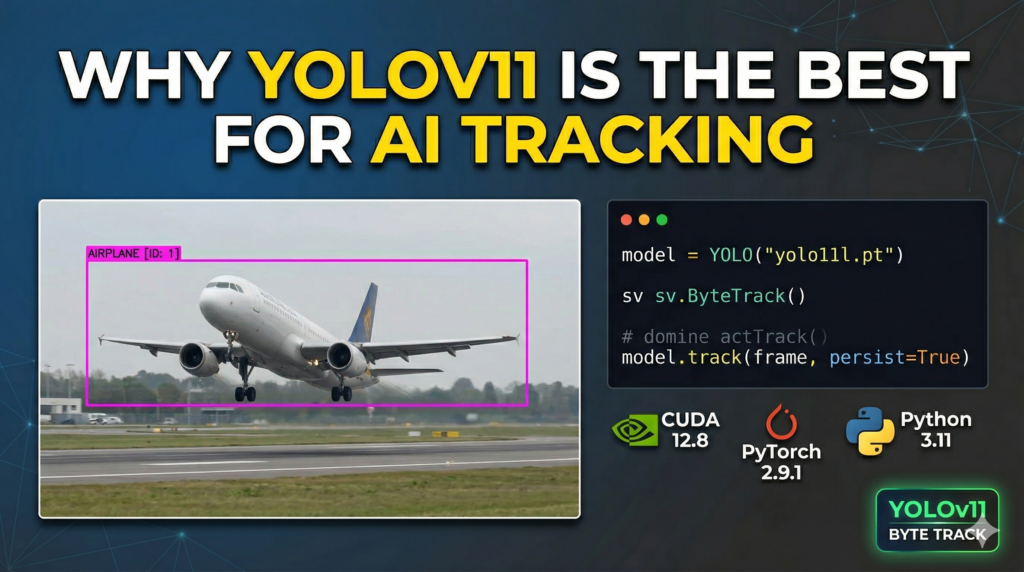
Why YOLOv11 and ByteTrack are the Perfect Match for Your Projects Implementing YOLOv11 ByteTrack Python workflows is currently the gold standard for developers who require a balance between extreme inference speed and tracking reliability. While YOLOv11 handles the “what” and “where” by identifying objects in individual frames, ByteTrack solves the “who” by maintaining a memory of those objects over time. This combination is particularly effective because ByteTrack doesn’t just rely on high-confidence detections; it utilizes a clever association method that looks at low-confidence boxes to recover objects that might be partially obscured or blurred by motion, which is a common pain point in real-time video processing.
The target for this implementation is the professional developer or researcher who needs to move beyond basic tutorials and into the realm of real-world deployment. In scenarios like traffic monitoring or industrial automation, losing a “track” for even a single second can lead to data loss or system errors. By using this specific stack, you are leveraging an algorithm that uses motion prediction to bridge the gaps where a detector might temporarily fail. This ensures that an airplane, for example, retains the same ID from the moment it starts taxiing until it leaves the frame, regardless of changes in scale or orientation.
At a high level, this setup represents the peak of efficiency for the 2026 AI landscape. By running the latest YOLO architecture alongside a refined Python-based tracking wrapper, you reduce the computational overhead that usually plagues multi-object tracking systems. The integration with the Supervision library further simplifies the process, providing a clean API to manage detections and draw professional-grade overlays. This allows you to build sophisticated visual monitoring tools that are both mathematically sound and visually clear, making it easier to demonstrate value to stakeholders or integrate the output into larger data-driven platforms.
Real-Time Object Tracking Python Building a professional vision system starts with a solid codebase that balances performance with clarity. This implementation isn’t just a basic script; it’s a modular pipeline designed to handle high-resolution video streams while maintaining temporal consistency. By leveraging the latest version of the YOLO architecture alongside the ByteTrack algorithm, you’re creating a system that doesn’t just “see” objects—it understands their trajectory over time. This approach is essential for any developer looking to deploy reliable AI in the field, where flickering detections or lost identities are not an option.
As computer vision becomes more integrated into industries like aerospace, logistics, and security, the need for stable and reproducible code is paramount. This article bridges the gap between raw detection and actionable intelligence by providing a clear, production-ready implementation. You will gain a deep understanding of how to maintain tracking consistency even in challenging environments where objects may overlap or move at high speeds, transforming a standard detection script into a professional analytical tool.
To achieve these results, we will utilize the YOLOv11 ByteTrack Python ecosystem, leveraging the latest advancements in hardware acceleration and library optimization. We will walk through the specific environment configuration needed for PyTorch 2.9.1 and CUDA 12.8, followed by a modular code breakdown that shows you exactly how to pass detections into a tracking logic. This hands-on approach ensures you aren’t just copy-pasting code, but actually mastering the mechanics of modern motion analysis.
By the end of this tutorial, you will have a functional, high-speed tracking system capable of handling complex scenarios like monitoring aircraft during takeoff or tracking multiple targets in a crowded scene. You will learn to use the Supervision library to handle the heavy lifting of annotation and detection management, allowing you to focus on the higher-level logic of your AI application. This setup is designed to be scalable, providing a foundation that you can easily adapt for your own unique datasets and deployment requirements.
Building Your First Real-Time Tracking Pipeline in Python Can the YOLOv11 model just detect objects every frame without a tracker? Answer: While YOLOv11 is incredibly fast at detecting objects in a single frame, it has no “memory” of what happened in the previous frame. Without a tracker like ByteTrack, an airplane detected in frame 1 is seen as a completely different entity in frame 2. Adding the ByteTrack logic ensures that the same unique ID is assigned to that specific airplane throughout its entire journey across the screen, turning a series of isolated snapshots into a continuous, data-rich story.
The core of this implementation relies on a precisely tuned environment. We start by configuring a Conda environment specifically for YOLOv11 ByteTrack Python development, ensuring that PyTorch 2.9.1 and CUDA 12.8 work in harmony to squeeze every bit of performance out of your GPU. This foundation is critical because real-time tracking is a computationally heavy task; having the right drivers and library versions means you can achieve lightning-fast inference speeds without the dreaded “dependency hell” that often plagues AI projects.
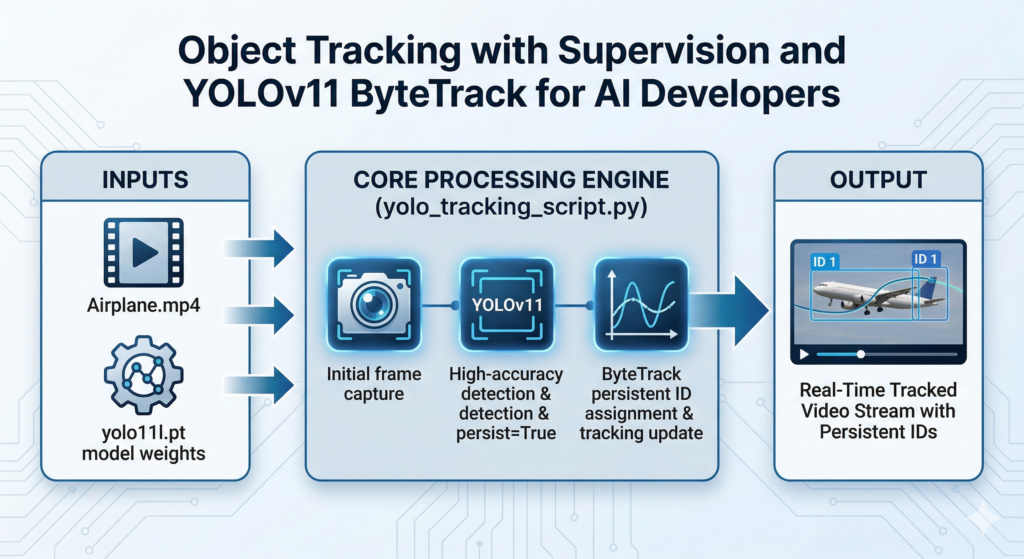
The script itself utilizes the Ultralytics API to load the YOLOv11 large model, which serves as our primary detector. Instead of using a standard inference call, we implement the model.track() method with the persist=True flag. This is the first step in establishing a persistent identity for our targets. By feeding these detections into the Supervision library’s Detections object, we create a standardized format that is easy to manipulate and pass into our secondary tracking layer.
The real magic happens when we initialize the ByteTrack tracker through the Supervision library. This component acts as the “brain” of the operation, taking the raw bounding boxes from YOLO and applying a Kalman filter to predict where objects will move in the next frame. Even if an airplane is momentarily obscured or the lighting conditions change drastically, the tracker uses motion patterns to bridge the gap. This ensures that the tracker IDs remain stable and consistent, which is the most important metric for any professional-grade tracking system.
Finally, the pipeline concludes with a high-performance visualization loop using OpenCV. We don’t just show a raw video; we use the BoxAnnotator and LabelAnnotator to draw clear, colorful overlays that display the persistent IDs in real-time. The code is structured to be “live,” meaning it processes the video frame by frame and displays the results immediately on your screen. This immediate feedback loop is invaluable for debugging and refining your tracking parameters, allowing you to see exactly how the algorithm is behaving in dynamic environments.
Link to the tutorial here .
Download the code for the tutorial here or here .
Link for Medium users here .
Master Computer Vision
Follow my latest tutorials and AI insights on my
Personal Blog .
Beginner Complete CV Bootcamp
Foundation using PyTorch & TensorFlow.
Get Started → Interactive Deep Learning with PyTorch
Hands-on practice in an interactive environment.
Start Learning → Advanced Modern CV: GPT & OpenCV4
Vision GPT and production-ready models.
Go Advanced → YOLOv11 ByteTrack Python Object Tracking with Supervision and YOLOv11 ByteTrack for AI Developers Object tracking has evolved from a complex experimental challenge into a mandatory requirement for modern vision-based applications. This guide provides a comprehensive roadmap for building a high-performance detection and tracking pipeline, focusing on the seamless integration of state-of-the-art models and robust tracking algorithms. We explore the transition from simple frame-by-frame detection to persistent identity management, ensuring that every object in your video stream is recognized and followed with precision.
As computer vision becomes more integrated into industries like aerospace, logistics, and security, the need for stable and reproducible code is paramount. This article bridges the gap between raw detection and actionable intelligence by providing a clear, production-ready implementation. You will gain a deep understanding of how to maintain tracking consistency even in challenging environments where objects may overlap or move at high speeds, transforming a standard detection script into a professional analytical tool.
To achieve these results, we will utilize the YOLOv11 ByteTrack Python ecosystem, leveraging the latest advancements in hardware acceleration and library optimization. We will walk through the specific environment configuration needed for PyTorch 2.9.1 and CUDA 12.8, followed by a modular code breakdown that shows you exactly how to pass detections into a tracking logic. This hands-on approach ensures you aren’t just copy-pasting code, but actually mastering the mechanics of modern motion analysis.
By the end of this tutorial, you will have a functional, high-speed tracking system capable of handling complex scenarios like monitoring aircraft during takeoff or tracking multiple targets in a crowded scene. You will learn to use the Supervision library to handle the heavy lifting of annotation and detection management, allowing you to focus on the higher-level logic of your AI application. This setup is designed to be scalable, providing a foundation that you can easily adapt for your own unique datasets and deployment requirements.
Setting the Foundation for High-Performance Tracking
To build a professional computer vision application, you must start with a clean and isolated development environment. Using Conda allows us to manage complex dependencies like PyTorch 2.9.1 and CUDA 12.8 without interfering with other system-level Python installations. This part of the process focuses on initializing the core components, including the YOLOv11 model weights and the ByteTrack algorithm, which are the primary engines driving our tracking logic.
The initialization phase is where we define our video source and set up the necessary annotators from the Supervision library. By preparing these tools early, we ensure that our main processing loop remains efficient and readable. The YOLOv11 ByteTrack Python implementation thrives on this structured approach, where each library is given a specific role: Ultralytics for detection, ByteTrack for temporal memory, and Supervision for high-quality visual feedback.
We are specifically targeting the “large” variant of YOLOv11 to ensure high accuracy during the detection phase. This choice is crucial because a tracker is only as good as the detections it receives. By loading the yolo11l.pt weights and setting up a robust cv2.VideoCapture object, we create a stable pipeline ready to ingest high-definition footage and convert raw pixels into meaningful, tracked objects.
Preparing Your Environment for YOLOv11 and CUDA 12.8 A clean start is the most important step in any professional AI project. By creating a dedicated Conda environment, you ensure that your computer vision dependencies don’t clash with other software on your system. This tutorial specifically utilizes Python 3.11 and PyTorch 2.9.1 to ensure we are using the most stable and performant tools available for developers in 2026.
Harnessing the power of your GPU is what makes real-time tracking possible. We are specifically targeting CUDA 12.8, which provides the low-level optimization needed for the YOLOv11 architecture to run at exceptionally high frame rates. Checking your local CUDA compiler version is a vital sanity check that ensures your hardware drivers are ready to communicate with the deep learning libraries we are about to install.
Finally, we bring in the “supporting cast” of libraries that handle everything from video processing to advanced mathematical tracking. While Ultralytics gives us the object detection “brain,” libraries like Supervision and Lapx manage the complex logic of following those objects across time. By pinning these specific library versions, you guarantee that your code will function exactly as demonstrated without any unexpected breaking changes.
Why is it necessary to use a specific index-url for the PyTorch installation? Answer: The standard PyTorch installation from the main Python repository might not include the specific CUDA 12.8 binaries required for high-end GPU acceleration. Using the official PyTorch download URL ensures that the version of Torch you receive is perfectly compiled with the exact hardware drivers needed for lightning-fast tracking and inference.
Want the exact test video so your results match mine? If you want to reproduce the exact same tracking results shown in this guide, I can share the link to the high-quality test video used in this tutorial. Send me an email and mention “YOLOv11 Airplane Tracking Video” so I know what you’re requesting.
🖥️ Email: feitgemel@gmail.com
### Create a new conda environment named YoloV11-Torch291 using Python version 3.11. conda create -- name YoloV11 - Torch291 python = 3.11 ### Activate the virtual environment to begin installing project-specific dependencies. conda activate YoloV11 - Torch291 ### Verify the CUDA compiler version on your system to confirm hardware compatibility. nvcc -- version ### Install PyTorch 2.9.1 along with its vision and audio components optimized for CUDA 12.8. pip install torch == 2.9 . 1 torchvision == 0.24 . 1 torchaudio == 2.9 . 1 -- index - url https : // download . pytorch . org / whl / cu128 ### Install the specific version of Ultralytics to access the YOLOv11 model architecture. pip install ultralytics == 8.4 . 33 ### Install OpenCV to enable video file reading and real-time frame visualization. pip install opencv - python == 4.10 . 0 . 84 ### Install the Supervision library to handle detections and tracking annotations effortlessly. pip install supervision == 0.27 . 0 . post2 ### Install the Lapx library which provides the mathematical engines for ByteTrack associations. pip install lapx == 0.9 . 4 Summary of the Environment Setup :This first segment establishes the “brain” and the “eyes” of our application, preparing the environment for the intensive processing that follows in the core loop.
By completing these steps, you have built a robust foundation that is fully optimized for GPU-accelerated computer vision. Your environment is now equipped with the latest versions of PyTorch and CUDA, as well as the specialized tracking and annotation tools required for high-performance object detection.
Does the choice of CUDA version impact the speed of YOLOv11 ByteTrack Python tracking? Answer: Yes, utilizing CUDA 12.8 with PyTorch 2.9.1 allows the YOLOv11 model to take full advantage of the latest GPU kernels and memory optimizations. This significantly reduces the latency between frames, ensuring that the ByteTrack algorithm has the most current data to make its motion predictions.
### Import the OpenCV library for video handling import cv2 ### Import the Supervision library for advanced computer vision utilities import supervision as sv ### Import the YOLO class from the Ultralytics library from ultralytics import YOLO ### Load the YOLOv11 large model weights for high-accuracy detection model = YOLO ( " yolo11l.pt " ) ### Define the local path to the video file containing the target objects video_path = " Best-Object-Detection-models/Yolo-V11/How-to-track-objects-Airplan-Take-off/Airplane.mp4 " ### Initialize the video capture object to read the airplane footage cap = cv2 . VideoCapture ( video_path ) ### Create a box annotator to draw bounding boxes with a thickness of 2 box_annotator = sv . BoxAnnotator ( thickness = 2 ) ### Create a label annotator to display the tracking IDs on the screen label_annotator = sv . LabelAnnotator () ### Initialize the ByteTrack algorithm to handle object persistence tracker = sv . ByteTrack () This first segment establishes the “brain” and the “eyes” of our application, preparing the environment for the intensive processing that follows in the core loop.
Integrating Detection and Temporal Tracking Logic The heart of our script is the processing loop where we bridge the gap between static detections and dynamic tracking. In each iteration, the YOLOv11 model performs inference on a single frame to locate objects, but it is the persist=True flag that signals the system to begin maintaining identity. This step is where we convert raw model outputs into the standardized Supervision Detections format, making the data accessible for our tracking engine.
By passing these detections into the tracker.update_with_detections method, we activate the ByteTrack logic. ByteTrack is unique because it doesn’t just discard low-confidence detections; it uses them to account for occlusions or blurred motion. This ensures that the YOLOv11 ByteTrack Python pipeline remains “sticky,” meaning it won’t easily lose track of an airplane even if it momentarily disappears behind a cloud or structural element.
The beauty of this integration lies in its simplicity and efficiency. We aren’t manually calculating intersection-over-union (IoU) scores or managing Kalman filters from scratch. Instead, we are orchestrating high-level tools that have been battle-tested for real-time performance. This allows us to focus on the high-level logic of our application while the underlying libraries handle the heavy mathematical lifting.
Why is the “persist” flag necessary when calling the model track method? Answer: The persist=True flag tells the Ultralytics YOLOv11 engine that we intend to keep track of objects across multiple frames. Without this flag, the model would treat every frame as an independent image, potentially re-assigning labels and breaking the continuity required for the ByteTrack algorithm to function correctly.
### Start the loop to process the video frame by frame as long as the file is open while cap . isOpened (): ### Read the next frame from the video stream and check for success success , frame = cap . read () ### Exit the loop if the video has ended or if there is a read error if not success : break ### Run the YOLOv11 tracking inference on the current frame with persistence enabled results = model . track ( frame , persist =True , show =False )[ 0 ] ### Convert the raw Ultralytics results into the standardized Supervision format detections = sv . Detections . from_ultralytics ( results ) ### Update the ByteTrack engine with the new detections to maintain persistent IDs detections = tracker . update_with_detections ( detections ) This core processing segment is what transforms a simple detector into a robust tracking system, ensuring every target is followed with mathematical precision.
Object Tracking with Supervision Visualizing Persistent Identities and Performance Cleanup The final stage of our tutorial focuses on turning abstract data into a visual story that is easy for humans to interpret. By generating labels based on the persistent tracker_id, we give each airplane a unique name that stays with it throughout the video. This is not just for aesthetics; in professional monitoring, being able to distinguish between “Airplane 1” and “Airplane 2” is the difference between a successful system and a failing one.
Using the BoxAnnotator and LabelAnnotator ensures that our output is clean and professional. We annotate a copy of the frame to preserve the original image data, allowing us to overlay bounding boxes and ID tags without destructive editing. The YOLOv11 ByteTrack Python pipeline culminates in a live window display, providing immediate visual confirmation that our tracking logic is working as expected.
Once the video concludes, it is vital to perform a proper cleanup of our resources. Releasing the video capture object and destroying the OpenCV windows prevents memory leaks and ensures that your system remains responsive for subsequent tasks. This final step completes our professional-grade pipeline, leaving you with a clean, functional script ready for integration into larger AI projects.
How do we handle frames where no objects are currently being tracked? Answer: The code uses a conditional list comprehension to check if detections.tracker_id is present. If no objects are found, it defaults to an empty string label, preventing the script from crashing and ensuring the visualization continues smoothly until the next object enters the frame.
### Create a list of labels containing the unique tracker ID for each detected object labels = [ f " { tracker_id } " for tracker_id in detections . tracker_id ] if detections . tracker_id is not None else [ "" ] ### Apply the bounding box annotations to a copy of the current video frame annotate_frame = box_annotator . annotate ( scene = frame . copy (), detections = detections ) ### Apply the text labels with persistent IDs to the already annotated frame annotate_frame = label_annotator . annotate ( scene = annotate_frame , detections = detections , labels = labels ) ### Display the final tracked and annotated frame in a graphical window cv2 . imshow ( " Yolo tracking " , annotate_frame ) ### Wait for 1 millisecond and check if the 'q' key is pressed to exit the loop if cv2 . waitKey ( 1 ) & 0x FF == ord ( " q " ): break ### Release the video capture resource to free up system memory cap . release () ### Close all OpenCV graphical windows created during the execution cv2 . destroyAllWindows () By completing this final step, you have moved from raw pixels to a fully annotated, tracked, and professional computer vision output.
Summary of the YOLOv11 Tracking Pipeline This tutorial has demonstrated how to build a state-of-the-art object tracking system using YOLOv11 ByteTrack Python . We covered environment setup, core detection integration, and persistent visualization techniques. By following this modular approach, you now have a scalable foundation for any real-time video analysis project.
FAQ What is ByteTrack and why use it with YOLOv11? ByteTrack is a tracking-by-detection algorithm that maintains object IDs by associating almost every detection box, including low-score ones, ensuring robust identity persistence with YOLOv11’s high speed.
Can I run this code on a CPU? While it runs on a CPU, performance will be significantly slower; an NVIDIA GPU with CUDA support is highly recommended for real-time tracking.
Why do I need the Supervision library for this tutorial? Supervision provides a standardized way to handle detections and annotations, allowing you to pass YOLO results into trackers like ByteTrack with very few lines of code.
What does the “persist=True” flag actually do? This flag enables the model’s internal memory of features from previous frames, which is essential for the tracker to assign consistent IDs to moving objects.
How do I handle tracking multiple different classes? The code tracks all classes by default, but you can use Supervision’s filtering methods to isolate specific classes like cars or people before tracking.
Is YOLOv11 faster than previous versions for tracking? Yes, YOLOv11 offers an improved architecture that delivers better accuracy at higher speeds, making it ideal for real-time tracking applications.
What happens if an object leaves the frame? The ID may be reassigned if the object is gone for too long, but you can increase the lost track timeout settings in ByteTrack to improve re-identification.
Can this pipeline be used for live webcam feeds? Yes, simply set the video_path in the capture object to 0 to switch from a recorded file to a live camera stream.
What is the benefit of using PyTorch 2.9.1 and CUDA 12.8? These versions offer the latest hardware optimizations for 2026, ensuring your pipeline is fast, efficient, and compatible with modern GPUs.
Why are my tracking IDs flickering? Flickering usually results from low detection confidence; try using a larger YOLOv11 model variant or tuning the tracker’s internal buffer parameters.
Conclusion: Mastering the Future of Visual Tracking In this tutorial, we have successfully bridged the gap between basic object detection and professional-grade temporal tracking. By combining the raw power of YOLOv11 with the intelligent association logic of ByteTrack , you have built a system that maintains object identities through complex motion and occlusions. This capability is the cornerstone of modern AI applications, from autonomous navigation to advanced security surveillance.
We also emphasized the importance of a clean environment and modern libraries like Supervision , which drastically simplify the developer experience. By using PyTorch 2.9.1 and CUDA 12.8, you are not just running a script; you are leveraging the most efficient hardware acceleration available in 2026. This technical foundation ensures that your applications remain performant as video resolutions and model complexities continue to grow.
The modular nature of the code provided allows you to adapt this pipeline for a variety of use cases. Whether you are tracking airplanes at an airport or monitoring foot traffic in a retail space, the principles remain the same. I encourage you to experiment with different YOLOv11 model sizes and track parameters to find the perfect balance for your specific hardware and performance goals.
Connect ☕ Buy me a coffee — https://ko-fi.com/eranfeit
🖥️ Email : feitgemel@gmail.com
🌐 https://eranfeit.net
🤝 Fiverr : https://www.fiverr.com/s/mB3Pbb
Enjoy,
Eran
 Skip to content