Last Updated on 24/06/2026 by Eran Feit
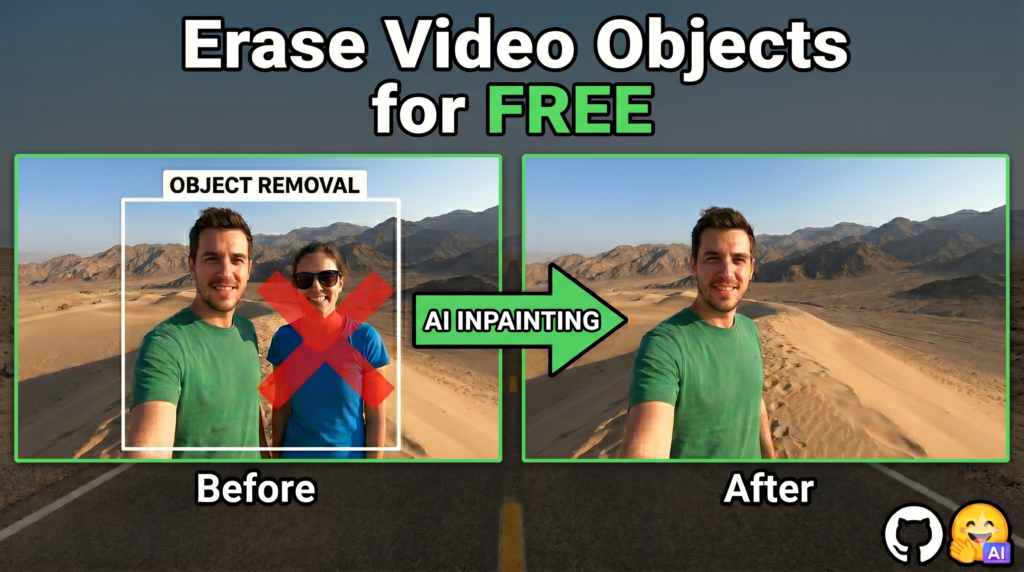
If you want to remove object from video ai models and open-source tools have finally advanced to a point where you can achieve professional, production-grade results entirely on your own desktop. Traditionally, fixing ruined footage required either a steep learning curve in complex editing suites or a recurring monthly subscription to cloud-based AI platforms. This article provides a complete, technical walkthrough to completely bypass those paywalls using DiffuEraser, a state-of-the-art, open-source Python tool. You will discover how to host your own video inpainting application directly on your local hardware for zero cost.
By shifting away from cloud platforms, this guide addresses critical pain points for indie filmmakers, developers, and AI hobbyists: data privacy, high subscription costs, and processing bottlenecks. Instead of uploading sensitive raw footage to external servers, you will learn to utilize your own GPU to clean up video clips locally. This approach ensures your creative assets remain entirely secure while granting you granular, unrestricted control over the generation parameters, mask dilations, and final rendering resolutions.
We accomplish this through a structured, highly practical deployment guide that breaks down the entire command-line setup. You will be guided through initializing your Linux Subsystem environment, managing required Python dependencies via Conda packages, downloading specific pre-trained weights from Hugging Face, and executing the main inference pipeline. Every segment of the script is explained, ensuring you understand exactly how the parameters affect the final outcome without needing a prior degree in machine learning.
Ultimately, reading this guide transforms your post-production workflow by putting enterprise-level video cleanup tools entirely in your hands. By the end of this tutorial, you will have a fully functioning ecosystem running on your machine capable of erasing complex visual artifacts smoothly across hundreds of frames. This not only saves you significant software expenses over time but also expands your foundational skills in deploying local deep learning architectures.
Why is it so hard to remove object from video AI models, and how does DiffuEraser solve it? When you attempt to remove object from video AI pipelines frequently struggle because video is not just a collection of static, individual images stacked together. In standard photo editing, an algorithm only needs to analyze the surrounding pixels to patch a hole convincingly. Videos, however, introduce the complex element of time. If an AI fills a masked area slightly differently in frame twelve than it did in frame eleven, the video will suffer from aggressive flickering, warping, or blurry patches known as visual artifacts. Maintaining seamless continuity across time is what separates professional tools from amateur attempts.
To solve this, advanced architectures combine spatial understanding with strict temporal consistency. Older open-source models often relied solely on optical flow tracking, which maps how pixels move from one frame to the next. While helpful, optical flow easily breaks down when objects pass behind one another or when the camera pans rapidly. Modern video inpainting utilizes diffusion networks alongside dedicated attention mechanisms. These models do not just look at neighboring pixels; they analyze the entire video sequence globally, learning what the background should look like even when it is temporarily blocked from view by a moving person or a massive watermark.
DiffuEraser achieves its superior quality by building on top of dual-branch framework principles. It uses a primary denoising network to generate crisp background details, paired with an auxiliary structural branch that keeps the edges sharp and clean. To eliminate temporal artifacts entirely, the system embeds temporal attention layers directly into its architecture, forcing the network to double-check its work against previous and future frames before outputting a pixel. The result is a highly stable, mathematically balanced blending process that patches masked areas flawlessly, giving creators an elite desktop solution that rivals heavy industry alternatives.
remove object from video ai Setting Up DiffuEraser: Running the Complete Video Inpainting Script Locally When you want to remove object from video AI frameworks frequently require complex cloud infrastructures or restrictive web interfaces that charge by the minute. The target of this specific Python tutorial is to break down those barriers by showing you exactly how to execute the open-source run_diffueraser.py script entirely on your local machine. By using local hardware, you eliminate external server processing queues and data privacy concerns. This step-by-step implementation guide provides a transparent blueprint to initialize a robust Linux environment on Windows, manage conflicting dependencies, and run inference without subscription paywalls.
At a high level, the primary objective of this code is to orchestrate multiple advanced deep learning components into a single, cohesive video processing pipeline. Instead of relying on a single neural network, the initialization script loads a foundational Stable Diffusion v1-5 model, a specialized structural branch known as BrushNet, and a prior tracking model named ProPainter. The code is designed to ingest a standard MP4 video alongside a matching grayscale mask video, which tells the AI exactly which pixels need to be erased and reconstructed.
As the script executes, it processes the video sequence globally rather than frame-by-frame. The core algorithm uses an auxiliary network to extract features from the unmasked areas, ensuring that the background texture, lighting conditions, and perspective elements are preserved. Simultaneously, embedded temporal attention layers force the network to check structural continuity across adjacent frames. This complex multi-model interaction guarantees that when a person or watermark is removed, the newly generated background remains perfectly static and visually consistent as the video plays.
Ultimately, mastering this local deployment script gives you full programmatic autonomy over your video editing workflows. The underlying code exposes several critical parameters, such as mask dilation iterations and maximum image resolutions, allowing you to fine-tune the balance between processing speed and visual fidelity. By understanding how to configure this environment and adjust the execution flags, you transition from a casual AI user to a self-sufficient creator capable of deploying state-of-the-art computer vision models at scale.
How does the code handle temporal continuity without creating blurry patches? The script achieves flawless temporal consistency by integrating specialized temporal attention layers directly into the primary denoising UNet architecture. Instead of treating every frame as an isolated image, the code forces the network to calculate cross-frame relationships, effectively expanding its temporal receptive field. Additionally, after the diffusion model generates the missing background data, the script utilizes a blurred mask blending process. This mathematical smoothing technique seamlessly welds the edges of the newly generated pixels to the original, untouched video frames, eliminating sharp artifacts, warping, and aggressive flickering.
Link to the tutorial here
Download the code / instruction files for the tutorial here or here
Link for Medium users here
Master Computer Vision
Follow my latest tutorials and AI insights on my
Personal Blog .
Beginner Complete CV Bootcamp
Foundation using PyTorch & TensorFlow.
Get Started → Interactive Deep Learning with PyTorch
Hands-on practice in an interactive environment.
Start Learning → Advanced Modern CV: GPT & OpenCV4
Vision GPT and production-ready models.
Go Advanced →
video inpainting ai free Mastering Video Infrastructure Setup via Linux Terminal Interactions Deploying modern machine learning tools locally requires establishing a bulletproof runtime environment that isolates systemic software dependencies. When you aim to remove object from video ai architectures demand strict package alignment to bridge low-level graphics card runtime utilities with deep learning calculation nodes. This structural baseline segment guides you through repository cloning mechanisms, terminal subsystem calls, and virtual software environment creations. By compiling these foundations inside a single, reproducible sandbox shell, you shield your primary configuration registry from version errors while preparing your hardware to run memory-intensive operations smoothly.
Creating this specific execution perimeter ensures that downstream pipeline segments access the correct compilers, library bindings, and language binaries. Instead of relying on system-wide configurations that easily break during updates, this script segments package allocation securely using dedicated environment managers on a secure Linux foundation. This meticulous containment phase protects your infrastructure from unexpected driver errors and forms the bedrock of an efficient, self-hosted deployment.
# Open Powershell and run wsl for Linux ### Execute the Windows Subsystem for Linux binary to spin up your local Ubuntu environment terminal wsl # Clone repo: ### Navigate to your target deployment directory before fetching the open-source architecture assets cd tutorials ### Clone the remote repository down to your local machine storage tree git clone https : // github . com / lixiaowen - xw / DiffuEraser . git ### Shift your active terminal working directory context inside the newly cloned repository folder root cd DiffuEraser # create new anaconda env ### Instruct Conda to spin up an isolated virtual environment explicitly pinned to the required Python interpreter runtime conda create - n diffueraser python = 3.9 . 19 ### Shift your active shell execution matrix into the isolated domain of your fresh environment conda activate diffueraser # install python dependencies ### Invoke the package manager binary to install the comprehensive list of core deep learning framework prerequisites pip install - r requirements . txt Why do we explicitly decouple our setup inside a dedicated conda virtual environment? The underlying machine learning framework demands a precise combination of legacy Python runtimes alongside strictly pinned package binaries that easily clash with modern system-wide applications. By initializing an isolated virtual environment, the system creates an independent directory tree where prerequisites reside away from global operating variables. This proactive containment guarantees that the core execution engine accesses correct compiler bindings and mathematical matrices, effectively neutralizing fatal package errors before they manifest during runtime execution.
Orchestrating Pre-trained Multimodal Weights Allocation via Storage Registries Running high-fidelity visual inpainting models locally shifts the computing focus toward handling large deep learning parameters on disk. To remove object from video ai pipelines must draw inference from structural networks, generative diffusion layers, and optical motion adapters simultaneously. This configuration segment manages your local file hierarchy, calling command-line down-loaders to source explicit model weights straight from Hugging Face and GitHub repository releases. Structuring these assets correctly across your directory layout allows your scripts to load files directly into graphics memory without searching paths manually.
This asset curation stage builds your model framework, mapping specialized sub-components like BrushNet branches alongside foundational models to prevent missing file exceptions later on. Because these pre-trained configurations span gigabytes of neural data, the code targets precise structural folders to save storage while preserving high-resolution tensor matching. Aligning this layout precisely on disk ensures the core code seamlessly connects each tracking layer to the main processing nodes.
# 1. diffuEraser : Download our pretrained models from Hugging Face : https://huggingface.co/lixiaowen/diffuEraser ### Fetch the specialized brushnet network weights from the remote repository to map object structural masks huggingface - cli download lixiaowen / diffuEraser -- local - dir weights / diffuEraser -- include " brushnet/* " # unet_main ### Download the central generative structural unet files to handle foundational image content restorations huggingface - cli download lixiaowen / diffuEraser -- local - dir weights / diffuEraser -- include " unet_main/* " # 2. stable-diffusion-v1-5 : Download pretrained weight : https://huggingface.co/stable-diffusion-v1-5/stable-diffusion-v1-5 ### Direct the down-loader utility to grab the entire base stable diffusion model tree for latent space representations huggingface - cli download stable - diffusion - v1 - 5 / stable - diffusion - v1 - 5 -- local - dir weights / stable - diffusion - v1 - 5 # 3. PCM_Weights Download : https://huggingface.co/wangfuyun/PCM_Weights ### Secure the high-speed consistency weights to accelerate inference iteration steps during the localized pipeline run huggingface - cli download wangfuyun / PCM_Weights -- local - dir weights / PCM_Weights -- include " sd15/* " # 4. propainter Download : https://github.com/sczhou/ProPainter/releases/tag/v0.1.0 ### Construct the storage path directory recursively to receive your optical tracking model dependencies mkdir - p weights / propainter ### Use the network retrieval tool to pull down the foundational optical mapping tensor weights from the release page wget https : // github . com / sczhou / ProPainter / releases / download / v0 . 1 . 0 / ProPainter . pth - O weights / propainter / ProPainter . pth ### Download the corresponding dense tracking engine assets to calculate multi-frame motion vector fields accurately wget https : // github . com / sczhou / ProPainter / releases / download / v0 . 1 . 0 / raft - things . pth - O weights / propainter / raft - things . pth ### Retrieve the recurrent flow completion layers to smooth vector predictions when tracking elements pass behind objects wget https : // github . com / sczhou / ProPainter / releases / download / v0 . 1 . 0 / recurrent_flow_completion . pth - O weights / propainter / recurrent_flow_completion . pth # 5. sd-vae-ft-mse Download : https://huggingface.co/stabilityai/sd-vae-ft-mse ### Download the fine-tuned auto-encoder weights to manage flawless latent space pixel reconstructions without color shifts huggingface - cli download stabilityai / sd - vae - ft - mse -- local - dir weights / sd - vae - ft - mse What roles do the recurrent flow and raft models play within our weight directory structure? The raft-things.pth model calculates dense, pixel-level optical flow fields that trace movement across frames, tracking how pixels migrate over time. Meanwhile, the recurrent_flow_completion.pth model predicts and restores background trajectories when objects block the view, ensuring smooth tracking. Together, they pass structural details to the main diffusion layers, allowing the pipeline to reconstruct occluded regions while maintaining sharp edges across long video runs.
Executing the Main Video Inpainting Script via Configurable Execution Parameters The final step in our workflow maps execution variables to your local hardware configurations, launching the main processing script. When you execute code to remove object from video ai parsing modules accept detailed flags that control VRAM usage, mask expansions, and reference track boundaries. This runtime segment targets the primary execution parameters, balancing your processing speed against structural output limits. Tweaking these settings lets you tailor your generation runs to your specific graphics card capabilities, unlocking stable workflows across variable clip sizes.
Adjusting settings like mask dilations and maximum dimensions lets you control how the network blends boundaries and manages memory footprint. The code scales input files down to safer processing limits, running dense spatial transformations without triggering out-of-memory errors on mid-range hardware. Once execution finishes, the pipeline writes the final inpainted output directly to your local file path, completing the open-source pipeline.
Here are the input params : (‘–input_video’, type=str, default=”examples/example3/video.mp4″, help=’Path to the input video’)
(‘–input_mask’, type=str, default=”examples/example3/mask.mp4″ , help=’Path to the input mask’)
(‘–video_length’, type=int, default=10, help=’The maximum length of output video’)
(‘–mask_dilation_iter’, type=int, default=8, help=’Adjust it to change the degree of mask expansion’)
(‘–max_img_size’, type=int, default=960, help=’The maximum length of output width and height’)
(‘–save_path’, type=str, default=”results” , help=’Path to the output’)
(‘–ref_stride’, type=int, default=10, help=’Propainter params’)
(‘–neighbor_length’, type=int, default=10, help=’Propainter params’)
(‘–subvideo_length’, type=int, default=50, help=’Propainter params’)
(‘–base_model_path’, type=str, default=”weights/stable-diffusion-v1-5″ , help=’Path to sd1.5 base model’)
(‘–vae_path’, type=str, default=”weights/sd-vae-ft-mse” , help=’Path to vae’)
(‘–diffueraser_path’, type=str, default=”weights/diffuEraser” , help=’Path to DiffuEraser’)
(‘–propainter_model_dir’, type=str, default=”weights/propainter” , help=’Path to priori model’)
cd DiffuEraser ### Fire up the primary generation script to pass all your runtime configurations directly into active VRAM python run_diffueraser . py # The results will be saved in the results folder !!!! ## input params How does adjusting the mask_dilation_iter parameter eliminate edge boundary halos? The --mask_dilation_iter parameter tells the system how many pixels to expand the black-and-white tracking mask boundaries outward before running diffusion. Setting this value too low leaves a sharp edge halo around the erased region, as the model cannot smoothly blend the generated area with the original pixels. Expanding this boundary dynamically gives the blending layers enough room to soften edge transitions, resulting in clean, unwarped backgrounds.
In summary, running this open-source pipeline successfully relies on coordinating your environment setups, tracking weights, and script execution options. By hosting these powerful diffusion networks on your local machine, you gain absolute control over editing quality while avoiding expensive subscription models.
FAQ : What are the minimum hardware requirements to run DiffuEraser locally? You need an NVIDIA graphics card with at least 12GB of VRAM to process standard 640×360 videos safely. Processing higher resolutions like 720p or 1080p requires advanced cards with 24GB to 32GB of dedicated VRAM to prevent out-of-memory issues.
Why does the script only accept MP4 video files instead of loose image frames? The core tracking engines and temporal attention mechanisms analyze optical flow sequentially across a unified video container. Feeding loose frames breaks the tracking pipeline, though you can bundle loose frames into a valid MP4 container using FFmpeg before running inference.
How do I fix out-of-memory (OOM) errors during the processing phase? You can mitigate memory limits by dropping the `–max_img_size` value to 640 or decreasing the `–subvideo_length` flag down to 20. This forces the engine to split the video into smaller spatial chunks, saving graphics memory.
What should I do if the tracking mask video does not align with my source clip? Ensure both your source clip and mask files share the exact same frame rate and length metrics on your timeline. Any differences in frame alignment will cause the tracking coordinates to slip, leading to messy edge artifacts.
Can I use Stable Diffusion v2.1 weights instead of the default v1-5 models? No, the structural layers and BrushNet configurations are hard-coded to match the shape and layer counts of the Stable Diffusion v1-5 setup. Swapping in alternative base versions will throw matrix mismatch errors during initialization.
How does the mask dilation option improve my final video output? This option expands your mask boundaries outward by a set number of pixels before starting the inpainting process. This extra padding gives the blending layers enough room to feather edge boundaries cleanly into the background.
Where can I find the final output file once execution completes? The output is saved directly into the folder defined by your `–save_path` flag, which defaults to `results/`. You can find your cleaned, inpainted MP4 video file inside that directory named after your input source.
Is it possible to run this code pipeline inside a standard Windows terminal? While certain utilities can run natively, setting up the framework through the Windows Subsystem for Linux (WSL) provides a much more stable environment. WSL handles complex dependency compilation and library paths with fewer errors than native CMD shells.
Why does the very first video generation run take so much longer to start up? During your initial execution run, the system must parse your directory models and compile custom CUDA kernels to optimize your graphics card hardware. Subsequent generation runs will bypass this compilation step and launch instantly.
Can this system handle moving camera shots, or does it require stationary angles? The integrated ProPainter tracking models calculate optical flow across multiple frames, allowing the system to handle dynamic panning and moving camera angles. The algorithm tracks background shifts accurately even when objects temporarily block your views.
Technical Conclusion and Executive Workflow Synthesis Configuring an advanced local script to remove object from video AI selections moves you past the boundaries of cloud-based subscription models and hands you complete control over your rendering pipelines. Throughout this tutorial, we established a robust Linux workspace container, configured virtual Conda registries, managed multi-gigabyte deep learning weights on disk, and executed our automated inpainting script with fine-grained control flags. This approach ensures your visual assets stay secure on local drives while utilizing your graphics hardware to track motion and fill background pixels flawlessly.
By understanding how variables like mask borders and clip segments interact with your available VRAM, you can safely scale your local workflows up to handling complex high-definition assets without memory limits. The open-source DiffuEraser code proves that combining auxiliary guidance branches with multi-frame tracking models delivers sharp, clean results without annoying edge halos or flickering patches. Deploying these neural networks locally provides developers, video editors, and AI hobbyists with a powerful, zero-cost production toolkit that expands their hands-on skills in deep learning deployment.
Connect : ☕ Buy me a coffee — https://ko-fi.com/eranfeit
🖥️ Email : feitgemel@gmail.com
🌐 https://eranfeit.net
🤝 Fiverr : https://www.fiverr.com/s/mB3Pbb
Enjoy,
Eran
 Skip to content