 Skip to content
Last Updated on 03/03/2026 by Eran Feit
Why Fine-tuning Vision Transformer (ViT) Is Better Than Training From Scratch
To achieve state-of-the-art results in modern image classification, learning how to fine-tune Vision Transformer on custom dataset is a critical skill for any AI developer. While pre-trained models are powerful, specializing them for your specific data is what drives real-world performance. In this tutorial, we will walk through the exact steps to adapt the ViT architecture using your own images, ensuring high accuracy and efficient training
Instead of training a model from scratch, fine tune vision transformer techniques let you reuse knowledge learned from massive datasets like ImageNet. By adapting a pre-trained ViT model to your own data, you dramatically reduce training time while achieving higher accuracy and more stable convergence. This approach is ideal when your dataset is limited or highly domain-specific.
Modern frameworks such as PyTorch and Hugging Face Transformers have made fine tuning Vision Transformers more accessible than ever. With built-in image processors, Trainer APIs, and evaluation tools, it’s now possible to build a full training pipeline with clean, readable code while keeping everything scalable and reproducible.
This tutorial focuses on the practical side of fine tune vision transformer pipelines. It walks through loading a custom dataset, applying the correct preprocessing, training the model efficiently, and evaluating real predictions. The emphasis is on clarity, correctness, and real-world usability rather than abstract theory.

Fine Tune Vision Transformer on Your Own Dataset
Fine tune vision transformer models is all about adapting a powerful pre-trained architecture to solve a very specific classification task. Vision Transformers break images into fixed-size patches and process them as sequences, allowing the model to learn relationships between distant regions in an image. When fine tuning, this learned representation is refined rather than rebuilt, making the training process both faster and more effective.
The main target of fine tune vision transformer workflows is to align a general-purpose visual representation with the unique characteristics of your dataset. Whether the task involves vehicles, medical images, industrial components, or natural scenes, fine tuning adjusts the model’s attention patterns to focus on features that matter most for your classification labels.
At a high level, the process starts with preparing your dataset in a structured format and applying the same preprocessing used during the original ViT training. Images are resized, normalized, and converted into patch embeddings using a dedicated image processor. This ensures that your data matches the model’s expected input distribution, which is critical for stable training.
Training then focuses on updating the classification head and selectively refining internal transformer layers. With carefully chosen hyperparameters, evaluation steps, and early stopping, fine tune vision transformer pipelines can reach strong accuracy without overfitting. The end result is a model that generalizes well and produces reliable predictions on unseen images from your own dataset.
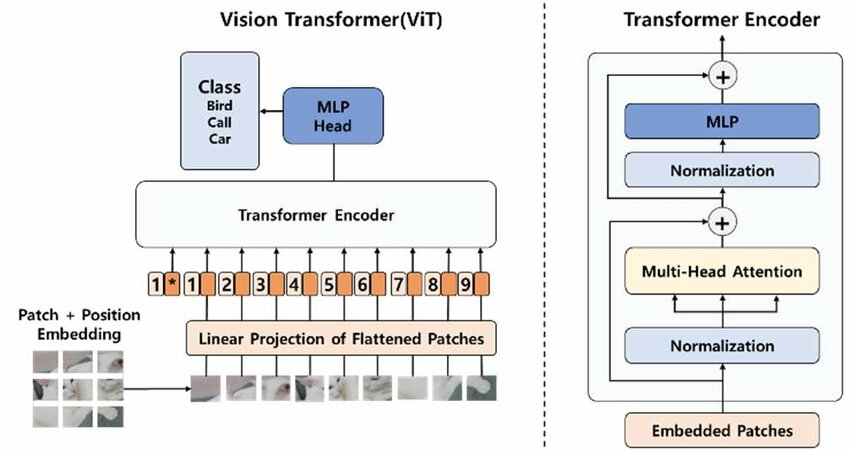
Vision Transformer (ViT) Architecture Explained
The Vision Transformer (ViT) architecture adapts the transformer model, originally designed for natural language processing, to work directly with images. Instead of using convolutional layers to extract local features, ViT treats an image as a sequence of visual tokens and processes it using self-attention. This fundamental shift allows the model to capture global relationships across the entire image from the very first layer.
At the core of the ViT architecture is the idea of splitting an image into fixed-size patches. Each image is divided into small square patches, for example 16×16 pixels. These patches are flattened and projected into embedding vectors, similar to how words are converted into embeddings in NLP. Each patch embedding represents a portion of the image and becomes a token in a sequence.
Once patch embeddings are created, a special classification token is added to the sequence. This token does not represent any specific image region but instead learns to aggregate information from all patches. During training, the model learns to encode the overall image representation into this token, which is later used for classification.
Because transformers have no built-in notion of order, positional embeddings are added to each patch embedding. These embeddings encode the spatial position of each patch in the original image, allowing the model to understand layout and structure. Without positional information, the model would treat patches as an unordered set, losing critical spatial context.
Self-Attention and Transformer Encoder Blocks
After patch and positional embeddings are prepared, the sequence is passed through multiple transformer encoder blocks. Each block consists of two main components: multi-head self-attention and a feed-forward neural network. Self-attention allows each patch to interact with every other patch, enabling the model to learn long-range dependencies across the image.
In self-attention, the model computes relationships between all patches simultaneously. This means that a patch representing a wheel can directly attend to a patch representing a car body, even if they are far apart in the image. This global receptive field is one of the key strengths of the Vision Transformer compared to traditional convolutional networks.
Multi-head attention further enhances this capability by allowing the model to learn multiple types of relationships at the same time. Each attention head can focus on different visual patterns such as edges, textures, shapes, or object parts. The outputs of these heads are combined and refined through feed-forward layers.
Residual connections and normalization layers are applied throughout the architecture to stabilize training and enable deeper models. These components help preserve information across layers and allow gradients to flow effectively during backpropagation.
Why ViT Works Well for Fine Tuning
One of the main advantages of the Vision Transformer architecture is how well it supports fine tuning. When trained on large-scale datasets, ViT learns highly general visual representations that can be adapted to new tasks with relatively small datasets. Fine tuning adjusts these learned representations to focus on features that are most relevant for the target classification problem.
During fine tuning, the pre-trained transformer layers already understand general visual structure, while the classification head is adapted to new labels. This results in faster convergence, better generalization, and reduced overfitting compared to training a model from scratch.
Because the architecture is modular and consistent across tasks, ViT integrates smoothly with modern training pipelines. Image processors handle patch creation and normalization, while transformer encoders remain unchanged. This makes Vision Transformers especially powerful for custom datasets where flexibility and scalability are important.
Link to the video description : https://youtu.be/EKFC-0yEN08
Link to the code : https://eranfeit.lemonsqueezy.com/checkout/buy/509de24e-9361-4465-a7a9-e51a09d1dd8e or here : https://ko-fi.com/s/e37ef6db80
Link to the post for Medium users : https://medium.com/vision-transformers-tutorials/fine-tune-vision-transformer-on-your-own-dataset-d48ce15824d2
You can follow my blog here : https://eranfeit.net/blog/
Want to get started with Computer Vision or take your skills to the next level ?
Great Interactive Course : “Deep Learning for Images with PyTorch” here : https://datacamp.pxf.io/zxWxnm
If you’re just beginning, I recommend this step-by-step course designed to introduce you to the foundations of Computer Vision – Complete Computer Vision Bootcamp With PyTorch & TensorFlow
If you’re already experienced and looking for more advanced techniques, check out this deep-dive course – Modern Computer Vision GPT, PyTorch, Keras, OpenCV4
About the tutorial :
This tutorial is built around a complete, hands-on implementation of how to fine tune vision transformer models using PyTorch and the Hugging Face Transformers library. Rather than focusing on theory alone, the goal here is to walk through a practical training pipeline that you can reuse and adapt for your own image classification projects. Every part of the code is designed to be readable, modular, and aligned with real-world workflows.
The code demonstrates how to take a pre-trained Vision Transformer model and adapt it to a custom multi-class image dataset. It covers the full lifecycle of a training project, starting from environment setup and dataset loading, through model training with evaluation, and finishing with inference and visual inspection of predictions. This makes the tutorial especially useful for developers who want a complete example rather than isolated code snippets.
A key focus of this tutorial is showing how modern tooling simplifies what used to be a complex process. By combining PyTorch datasets, Hugging Face image processors, and the Trainer API, the code removes much of the boilerplate while keeping full control over training behavior. This allows you to focus on understanding how fine tuning works instead of fighting infrastructure.
Throughout the tutorial, the emphasis is on clarity and correctness. The code is structured so that each step has a clear purpose, making it easier to debug, extend, or optimize later. Whether you are experimenting locally or preparing a production-ready training pipeline, this approach scales well.
Walking Through the Vision Transformer Fine-Tuning Code
This section focuses on what the code is designed to achieve and how the different components work together to fine tune vision transformer models effectively. At a high level, the target of the code is to adapt a pre-trained ViT model so it can accurately classify images from a dataset it has never seen before. Instead of relearning visual features from scratch, the model refines existing representations to match new labels.
The first major objective of the code is data preparation. Images are loaded from a structured directory layout and processed using a Vision Transformer image processor. This step ensures that every image is resized, normalized, and converted into patch-based tensors that match the model’s expected input format. Correct preprocessing is critical, as it directly impacts training stability and final accuracy.
The next target of the code is training and evaluation. The model is configured with the correct number of output classes, and training arguments are carefully chosen to balance performance and efficiency. Evaluation is performed at regular intervals, and early stopping is used to prevent overfitting. This setup reflects a realistic training scenario where model quality matters more than simply running for a fixed number of epochs.
Finally, the code is designed to validate results in a practical way. After training, the model is tested on unseen images, and predictions are visualized alongside their true labels. This step closes the loop by confirming that the fine tuned vision transformer is not only performing well numerically but also making sensible predictions when applied to real data.
Overall, the target of this code is to provide a clear, end-to-end example of how fine tune vision transformer models for custom image classification tasks. It demonstrates how individual components—data loading, preprocessing, training, evaluation, and inference—come together into a single, coherent workflow that you can confidently reuse and expand.
Fine Tune Vision Transformer on Your Own Dataset
Fine tune vision transformer workflows make it possible to adapt powerful pre-trained vision models to your own image classification problems with minimal effort and strong results. This tutorial focuses on a practical, end-to-end implementation using PyTorch and Hugging Face Transformers, showing how to train, evaluate, and test a Vision Transformer on a custom dataset.
The goal of this post is to help you understand not just what to run, but why each part of the code exists and how all components work together. By the end, you will have a reusable training pipeline that you can adapt to many different image classification tasks.
Installation and Environment Setup
Before fine tuning a Vision Transformer, it’s important to prepare a clean and compatible Python environment. This project relies on PyTorch with CUDA support, Hugging Face Transformers, and several supporting libraries for image processing, evaluation, and visualization. A properly configured environment ensures stable training and avoids common runtime issues.
The setup below creates a dedicated Conda environment, installs the correct PyTorch version with GPU acceleration, and adds all required dependencies. This approach keeps your system clean and makes the project easy to reproduce on another machine.
### Create a new Conda environment with Python 3.11. conda create -n VIT python=3.11 ### Activate the Conda environment. conda activate VIT ### Verify your CUDA version. nvcc --version ### Install PyTorch with CUDA 12.4 support. conda install pytorch==2.5.0 torchvision==0.20.0 torchaudio==2.5.0 pytorch-cuda=12.4 -c pytorch -c nvidia ### Install symbolic math library required by PyTorch internals. pip install sympy==1.13.1 ### Install Hugging Face Transformers. pip install transformers==4.46.2 ### Install Transformers with PyTorch support. pip install transformers[torch]==4.46.2 ### Upgrade Transformers if you encounter zero-length input errors. pip install --upgrade git+https://github.com/huggingface/transformers.git ### Install OpenCV for image handling. pip install opencv-python==4.10.0.84 ### Install scikit-learn for utilities. pip install scikit-learn ### Install evaluation utilities. pip install evaluate ### Install Matplotlib for visualization. pip install matplotlib==3.9.3 Preparing Your Custom Image Dataset for ViT Training
This tutorial uses a multi-class image dataset designed for vehicle classification. The dataset contains images organized into separate folders for training, validation, and testing, making it ideal for fine tuning Vision Transformer models with PyTorch and Hugging Face.
The dataset structure aligns perfectly with the ImageFolder format, allowing images to be loaded automatically along with their class labels. Each class is stored in its own directory, which simplifies dataset management and makes it easy to extend with additional categories later.
Want the exact dataset so your results match mine?
If you want to reproduce the same training flow and compare your results to mine, I can share the dataset structure and what I used in this tutorial. Send me an email and mention the name of the tutorial / dataset , so I know what you’re requesting.
After downloading and extracting the dataset, organize it into the following directory structure so it matches the code used in this tutorial:
dataset_root/ ├── train/ │ ├── car/ │ ├── bike/ │ ├── helicopter/ │ └── ... ├── validation/ │ ├── car/ │ ├── bike/ │ ├── helicopter/ │ └── ... └── test/ ├── car/ ├── bike/ ├── helicopter/ └── ... This structure allows the training pipeline to automatically detect class labels and apply consistent preprocessing across all splits.
Installation Summary
At this point, your environment is fully prepared for fine tuning a Vision Transformer. You have a dedicated Conda environment, GPU-accelerated PyTorch, the latest Hugging Face Transformers, and all supporting libraries installed.
With the dataset downloaded and organized correctly, you can now move confidently into loading the data, configuring the Vision Transformer, and starting the fine-tuning process. This setup ensures the rest of the tutorial runs smoothly and produces reliable, reproducible results.
Setting Up Your Python Environment for Hugging Face and PyTorch
This part focuses on importing all required libraries and setting up the foundations for the training pipeline. These imports cover data loading, image processing, model training, evaluation, and visualization.
### Import operating system utilities. import os ### Import OpenCV for image handling if needed. import cv2 ### Import NumPy for numerical operations. import numpy as np ### Import random utilities for sampling images. import random ### Import PyTorch core library. import torch ### Import DataLoader for batching data. from torch.utils.data import DataLoader ### Import ImageFolder to load datasets from folders. from torchvision.datasets import ImageFolder ### Import basic image transformations. from torchvision.transforms import Compose, Resize, ToTensor ### Import Vision Transformer and training utilities from Hugging Face. from transformers import ViTFeatureExtractor, ViTForImageClassification, TrainingArguments, Trainer ### Import evaluation library for metrics. import evaluate ### Import PIL for image loading. from PIL import Image ### Import Matplotlib for visualization. import matplotlib.pyplot as plt ### Import the ViT image processor. from transformers import ViTImageProcessor ### Import early stopping callback. from transformers import EarlyStoppingCallback Efficiently Loading Custom Datasets into the ViT Image Processor
This section defines dataset paths and prepares the image preprocessing pipeline required by the Vision Transformer. The image processor ensures that all images are resized and normalized consistently with the pre-trained model.
### Define the base path to the dataset. path_to_data = "D:/Data-Sets-Image-Classification/5 vehichles for classification" ### Define training, validation, and test directories. train_dir = os.path.join(path_to_data,"train") val_dir = os.path.join(path_to_data,"validation") test_dir = os.path.join(path_to_data,"test") ### Define output directory for training artifacts. data_dir = "d:/temp/5 vehichles" ### Define the pre-trained Vision Transformer model ID. model_id = "google/vit-base-patch16-224-in21k" ### Load the image processor for the Vision Transformer. image_processor = ViTImageProcessor.from_pretrained(model_id) ### Define a custom transform function using the image processor. def transform(image): inputs = image_processor(image , return_tensors="pt") return inputs["pixel_values"].squeeze(0) ### Load training, validation, and test datasets. train_dataset = ImageFolder(train_dir, transform=transform) val_dataset = ImageFolder(val_dir, transform=transform) test_dataset = ImageFolder(test_dir, transform=transform) ### Print dataset information. print(train_dataset) Preparing batching and evaluation logic
This part defines how batches are created and how accuracy is computed during training and evaluation. These functions integrate directly with the Hugging Face Trainer.
### Define a custom collate function for batching. def collate_fn(batch): images , labels = zip(*batch) return{ "pixel_values": torch.stack(images), "labels": torch.tensor(labels) } ### Load accuracy metric. metric = evaluate.load("accuracy") ### Define metric computation logic. def compute_metrics(p): predictions = np.argmax(p.predictions , axis=1) references = p.label_ids return metric.compute(predictions=predictions, references=references) Implementing the Vision Transformer Fine-tuning Pipeline
This section initializes the Vision Transformer model, defines training arguments, enables early stopping, and runs the training loop. The goal here is to fine tune vision transformer layers efficiently while avoiding overfitting.
### Get number of output classes. num_classes = len(train_dataset.classes) ### Load the pre-trained ViT model for image classification. model = ViTForImageClassification.from_pretrained( model_id, num_labels=num_classes ) ### Select GPU if available. device = torch.device("cuda" if torch.cuda.is_available() else "cpu") model.to(device) ### Define training arguments. training_args = TrainingArguments( output_dir= data_dir + "/vit_custom", per_device_train_batch_size=16, per_device_eval_batch_size=16, eval_strategy="steps", num_train_epochs=200, save_steps=100, eval_steps=100, logging_steps=10, learning_rate=2e-4, save_total_limit=2, remove_unused_columns=False, push_to_hub=False, load_best_model_at_end=True ) ### Define early stopping callback. early_stopping_callbak = EarlyStoppingCallback( early_stopping_patience=10, early_stopping_threshold=0.0 ) ### Initialize the Trainer. trainer = Trainer( model=model, args=training_args, data_collator=collate_fn, compute_metrics=compute_metrics, train_dataset=train_dataset, eval_dataset=val_dataset, processing_class=image_processor, callbacks=[early_stopping_callbak], ) ### Train the model. train_results = trainer.train() ### Save the trained model and metrics. trainer.save_model() trainer.log_metrics("train" , train_results.metrics) trainer.save_metrics("train" , train_results.metrics) trainer.save_state() ### Evaluate the model on the test dataset. metrics = trainer.evaluate(test_dataset) trainer.log_metrics("eval", metrics) trainer.save_metrics("eval", metrics) Evaluating Performance and Testing Your Fine-tuned Model
This final code section loads the saved model, runs inference on random test images, and visualizes predictions alongside ground truth labels.
### Define path to the trained model. model_dir = "D:\Temp/5 vehichles/vit_custom" ### Define test dataset directory. path_to_data = "D:/Data-Sets-Image-Classification/5 vehichles for classification" test_dir = os.path.join(path_to_data,"test") ### Load the trained model. model = ViTForImageClassification.from_pretrained(model_dir) model.eval() ### Move model to the correct device. device = torch.device("cuda" if torch.cuda.is_available() else "cpu") model.to(device) ### Load the image processor. image_processor = ViTImageProcessor.from_pretrained("google/vit-base-patch16-224-in21k") ### Load class names. test_dataset = ImageFolder(test_dir) class_names = test_dataset.classes ### Collect all test images. all_images = [ (os.path.join(root, file), os.path.basename(root)) for root , _, files in os.walk(test_dir) for file in files if file.endswith(('.png', '.jpg', '.jpeg')) ] ### Randomly sample images for visualization. random_image_paths = random.sample(all_images, 6) ### Create a figure for displaying predictions. fig , axes = plt.subplots(2, 3, figsize=(15,10)) axes = axes.flatten() ### Run inference and visualize results. for idx , (image_path , true_label) in enumerate(random_image_paths): sample_image = Image.open(image_path).convert("RGB") processed_sample = image_processor(sample_image, return_tensors="pt").to(device) with torch.no_grad(): outputs = model(**processed_sample) predicted_class = torch.argmax(outputs.logits, dim=1).item() predicted_label = class_names[predicted_class] axes[idx].imshow(sample_image) axes[idx].axis('off') axes[idx].set_title(f"True: {true_label}\nPred: {predicted_label}", fontsize=12) ### Adjust layout and display results. plt.tight_layout() plt.show() FAQ
What does it mean to fine tune vision transformer models?
Fine tuning adapts a pre-trained Vision Transformer to a new dataset by updating its weights for a specific task.
Why use a pre-trained ViT model?
Pre-trained models reduce training time and improve accuracy on smaller datasets.
Summary and Best Practices for Custom ViT Models
Fine-tuning a Vision Transformer allows you to take a model trained on millions of images and specialize it for your unique data with minimal computational cost. By following the steps in this tutorial, you have implemented a robust pipeline for modern image classification. To further improve your accuracy, I recommend experimenting with different learning rate schedulers or applying advanced data augmentation techniques like RandAugment. If you have questions about the implementation, feel free to reach out
This tutorial demonstrated a complete workflow, from dataset loading and preprocessing to training, evaluation, and inference. With this structure in place, you can confidently extend the pipeline to new datasets, experiment with different ViT variants, and optimize performance for real-world applications.
Connect
☕ Buy me a coffee — https://ko-fi.com/eranfeit
🖥️ Email : feitgemel@gmail.com
🤝 Fiverr : https://www.fiverr.com/s/mB3Pbb
Enjoy,
Eran