 Skip to content
Last Updated on 18/02/2026 by Eran Feit
malaria cell classification CNN is a practical way to learn how convolutional neural networks recognize patterns in microscope cell images. In this tutorial, you’ll build a complete pipeline in TensorFlow and Keras: preprocessing infected vs uninfected cell images, training a compact CNN, saving the best checkpoint, and running inference on a brand-new test image.
This tutorial provides a step-by-step easy guide on how to implement and train a CNN model for Malaria cell classification using TensorFlow and Keras.
🔍 What You’ll Learn 🔍:
Data Preparation — In this part, you’ll download the dataset and prepare the data for training. This involves tasks like preparing the data , splitting into training and testing sets, and data augmentation if necessary.
CNN Model Building and Training — In part two, you’ll focus on building a Convolutional Neural Network (CNN) model for the binary classification of malaria cells. This includes model customization, defining layers, and training the model using the prepared data.
Model Testing and Prediction — The final part involves testing the trained model using a fresh image that it has never seen before. You’ll load the saved model and use it to make predictions on this new image to determine whether it’s infected or not.
Check out our tutorial here : https://youtu.be/WlPuW3GGpQo?si=xMGGR-Sj91u3w2dn
Link for the full code : https://eranfeit.lemonsqueezy.com/buy/db8ee0bf-9bc3-4486-b856-70669d9f527d or https://ko-fi.com/s/98d022c834
You can find more tutorials, and join my newsletter here : https://eranfeit.net/

Here is the code for Convolutional neural network – Malaria Cells Classification :
Want the exact dataset so your results match mine?
If you want to reproduce the same training flow and compare your results to mine, I can share the dataset structure and what I used in this tutorial.
Send me an email and mention “30 Musical Instruments CNN dataset” so I know what you’re requesting.
🖥️ Email: feitgemel@gmail.com
Part 1 : Malaria Cell Image Preprocessing and Dataset Preparation :
This first script is doing the unsexy but critical work: turning a folder of raw PNG files into a clean, consistent dataset your CNN can actually learn from. You define a fixed input_shape = (124, 124) and then loop through two directories (Parasitized and Uninfected) using glob to collect every image path. Each file is loaded with cv2.imread() and resized with cv2.resize(..., interpolation=cv2.INTER_AREA) so every sample has the exact same width/height—that’s a must for feeding images into a neural network.
Next comes labeling. Your script builds two Python lists: allImages for the resized images and allLables for the class labels. The logic is simple and effective: if an image came from ParasitedPath you append label 0, otherwise (Uninfected) you append label 1. This “folder name → label” approach is one of the most common patterns in computer vision pipelines because it scales easily when you later automate training runs or switch datasets.
Finally, you convert both lists into NumPy arrays (np.array) and print the shapes so you can verify that the number of images matches the number of labels. Then you save everything as .npy files using np.save(). This is a smart move because it separates preprocessing from training—meaning you don’t have to resize thousands of images every time you tweak your model. If the dataset is large, this step alone can save you minutes (or hours) on repeated experiments.
# Import necessary libraries import numpy as np # For handling numerical data and arrays import pandas as pd # (Not used in the script but generally used for data handling) import cv2 # OpenCV for image processing import glob # For handling file paths and reading multiple images # Lists to store processed images and their corresponding labels allImages = [] allLables = [] # Define the target shape for resizing images input_shape = (124, 124) # Define the paths to the dataset (Parasitized and Uninfected cell images) ParasitedPath = "E:/Data-sets/Malaria Cell Classification/cell_images/Parasitized" UninfectedPath = "E:/Data-sets/Malaria Cell Classification/cell_images/Uninfected" # List containing both paths paths = [ParasitedPath, UninfectedPath] # Loop through both directories for path in paths: path2 = path + "/*.png" # Define the file search pattern (all PNG images) # Loop through all image files in the current directory for file in glob.glob(path2): print(file) # Print the file path (for debugging or tracking progress) # Load the image using OpenCV img = cv2.imread(file) # If the image is successfully loaded, process it if img is not None: # Resize the image to the specified input shape resized = cv2.resize(img, input_shape, interpolation=cv2.INTER_AREA) # Add the resized image to the list allImages.append(resized) # Assign labels: 0 for parasitized, 1 for uninfected if path == ParasitedPath: allLables.append(0) else: # If from the uninfected directory allLables.append(1) # Convert the lists to NumPy arrays for efficient storage and processing allImagesNP = np.array(allImages) print(allImagesNP.shape) # Print the shape of the processed image dataset allLablesNP = np.array(allLables) print(allLablesNP.shape) # Print the shape of the labels array # Save the processed images and labels as .npy files for future use print("Save the data") np.save("e:/temp/Malaria-images.npy", allImagesNP) np.save("e:/temp/Malaria-lables.npy", allLablesNP) print("Finish save the data ....")Link for the full code : https://ko-fi.com/s/98d022c834
Part 2 : Malaria cell classification CNN training workflow
This part begins by loading the preprocessed .npy arrays you saved earlier: one for the images and one for the labels. You print their shapes to confirm the dataset integrity, then preview a sample image (allImages[0]) and its label (allLables[0]) using OpenCV. That quick visual sanity check is underrated—before training anything, you want to make sure images look correct, labels align, and your pipeline didn’t accidentally mix classes or load corrupted files.
After that, you normalize the images with allImages / 255.0 so pixel values move from 0–255 into the 0–1 range. This helps the optimizer train more smoothly. Then you split the dataset using train_test_split with test_size=0.3, which gives you a 70/30 train/test split. Printing the shapes after splitting is a great practice because it confirms your model will receive inputs in the expected format: (num_samples, 124, 124, 3) for images and (num_samples,) for labels.
The CNN itself is built using Sequential() with two convolution blocks: one with 16 filters, then one with 32 filters, each followed by MaxPooling2D to reduce spatial size while keeping important features. You flatten the feature maps and use a big dense layer (Dense(1024)) before a final Dense(1, activation="sigmoid") which is exactly what you want for binary classification. The model is compiled with binary_crossentropy and accuracy, and you use ModelCheckpoint to automatically save the best model based on validation accuracy. That means even if later epochs overfit, you still keep the best-performing weights as Malaria_binary.h5.
# Import necessary libraries import numpy as np # For numerical operations import cv2 # For image processing # Load the saved dataset (preprocessed images and labels) allImages = np.load("e:/temp/Malaria-images.npy") allLables = np.load("e:/temp/Malaria-lables.npy") # Print the shapes of the loaded datasets to verify dimensions print(allImages.shape) # Shape of the images dataset print(allLables.shape) # Shape of the labels dataset # Define the expected input shape for the model input_shape = (124, 124, 3) # Image dimensions with 3 color channels (RGB) shape = (124, 124) # 2D shape for image display # Display the first image in the dataset img = allImages[0] # Extract the first image label = allLables[0] # Get its corresponding label print(label) # Print the label (0 = parasitized, 1 = uninfected) # Show the image using OpenCV cv2.imshow("img", img) cv2.waitKey(0) # Wait for a key press cv2.destroyAllWindows() # Close the image window # Normalize image pixel values to be between 0 and 1 for better training performance allImagesForModel = allImages / 255.0 # Split the dataset into training and testing sets (70% training, 30% testing) from sklearn.model_selection import train_test_split print("Splitting data into training and testing sets...") X_train, X_test, y_train, y_test = train_test_split(allImagesForModel, allLables, test_size=0.3, random_state=42) # Print shapes of the train and test datasets print("X_train, X_test, y_train, y_test ----->>> shapes:") print(X_train.shape) print(X_test.shape) print(y_train.shape) print(y_test.shape) # Import necessary Keras libraries to define and train the CNN model from keras.models import Sequential from keras.layers import Dense, Conv2D, MaxPooling2D, Flatten from keras.callbacks import ModelCheckpoint # Define a Convolutional Neural Network (CNN) model model = Sequential() # First convolutional layer with 16 filters, kernel size (3x3), and ReLU activation model.add(Conv2D(input_shape=input_shape, filters=16, kernel_size=(3,3), padding="same", activation="relu")) model.add(Conv2D(filters=16, kernel_size=(3,3), padding="same", activation="relu")) model.add(MaxPooling2D(pool_size=(2,2), strides=(2,2))) # Max pooling to reduce spatial dimensions # Second convolutional block with 32 filters model.add(Conv2D(filters=32, kernel_size=(3,3), padding="same", activation="relu")) model.add(Conv2D(filters=32, kernel_size=(3,3), padding="same", activation="relu")) model.add(MaxPooling2D(pool_size=(2,2), strides=(2,2))) # Max pooling again # Flatten the feature maps into a 1D vector for the dense layers model.add(Flatten()) # Fully connected dense layers model.add(Dense(1024, activation="relu")) # Hidden layer with 1024 neurons model.add(Dense(1, activation="sigmoid")) # Output layer (sigmoid activation for binary classification) # Compile the model with Adam optimizer and binary cross-entropy loss (for binary classification) model.compile(optimizer='adam', loss='binary_crossentropy', metrics=['accuracy']) # Print the model summary to see the architecture print(model.summary()) # Define batch size and number of epochs for training batch = 32 epochs = 10 # Calculate steps per epoch for training and validation stepsPerEpoch = np.ceil(len(X_train) / batch) validationSteps = np.ceil(len(X_test) / batch) # Define the path to save the best model based on validation accuracy best_model_file = "e:/temp/Malaria_binary.h5" # Create a ModelCheckpoint callback to save the best model during training best_model = ModelCheckpoint(best_model_file, monitor="val_accuracy", verbose=1, save_best_only=True) # Train the model history = model.fit( X_train, y_train, batch_size=batch, epochs=epochs, verbose=1, validation_data=(X_test, y_test), validation_steps=validationSteps, steps_per_epoch=stepsPerEpoch, shuffle=True, # Shuffle training data to improve generalization callbacks=[best_model] # Save the best model during training )At this stage, the malaria cell classification CNN learns visual features such as texture and color differences between infected and uninfected cells. Because we normalize pixel values and keep a consistent input size, the CNN can focus on meaningful patterns instead of scale or lighting noise.
Link for the full code : https://ko-fi.com/s/98d022c834
Part3 : Loading a Trained Model and run inference on a test image
This final part shows the “real use” moment: taking a saved model and running it on a brand-new image. You load the .h5 file using tf.keras.models.load_model(), define your input size (124, 124) again, and set readable class names in categories = ["infected", "uninfected"]. Keeping these labels in a list is a simple trick that makes your inference code clean and easy to extend later.
The key piece here is your prepareImage() function. It resizes the test image to match the CNN’s expected input size, then uses np.expand_dims(..., axis=0) to add the batch dimension—because TensorFlow models expect input shaped like (batch, height, width, channels). You also normalize inside the function (imgResult / 255.0), which is important because the model was trained on normalized images. If you forget this step during inference, predictions usually become unreliable.
Then you run model.predict() and convert the output into a binary decision using a threshold of 0.5. That’s the standard approach for sigmoid outputs: above 0.5 becomes class 1, otherwise class 0. Finally, you overlay the predicted label on the image with cv2.putText() and show it using OpenCV. For a tutorial, this is perfect because it gives the reader an immediate, visual “proof” that the pipeline works end-to-end—from model file → preprocessing → prediction → on-screen result. (As always: this is for educational ML practice, not medical diagnosis.)
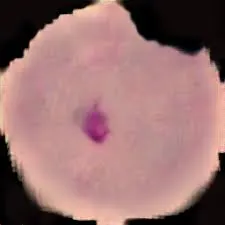
# Import necessary libraries import tensorflow as tf # Deep learning framework import os # File system operations import cv2 # OpenCV for image processing import numpy as np # Numerical computations # Load the trained model from the saved file best_model_file = "e:/temp/Malaria_binary.h5" model = tf.keras.models.load_model(best_model_file) # Print model summary to check the architecture print(model.summary()) # Define input image size input_shape = (124, 124) # Define class labels categories = ["infected", "uninfected"] # Function to preprocess an image before feeding it into the model def prepareImage(img): # Resize the image to match the input size expected by the model resized = cv2.resize(img, input_shape, interpolation=cv2.INTER_AREA) # Expand dimensions to match the input shape expected by TensorFlow (batch size, height, width, channels) imgResult = np.expand_dims(resized, axis=0) # Normalize pixel values to the range [0,1] imgResult = imgResult / 255.0 return imgResult # Load a test image from the specified path testImagePath = "TensorFlowProjects/Malaria Cell Classification/testInfected.jpg" img = cv2.imread(testImagePath) # Read the image using OpenCV # Prepare the image for prediction imgForModel = prepareImage(img) # Run prediction using the trained model result = model.predict(imgForModel, verbose=1) print(result) # Print raw prediction output # Convert the prediction into a binary classification (0 = infected, 1 = uninfected) if result > 0.5: result = 1 else: result = 0 # Print the final classification result print(result) # Assign the corresponding category label text = categories[result] # Reload the image to display the classification result img = cv2.imread(testImagePath) # Define font for text overlay font = cv2.FONT_HERSHEY_COMPLEX # Overlay the predicted label on the image cv2.putText(img, text, (0, 20), font, 1, (0, 255, 255), 2) # Yellow text # Display the image with classification result cv2.imshow("img", img) cv2.waitKey(0) # Wait for a key press before closing the image windowLink for the full code : https://ko-fi.com/s/98d022c834
Conclusion
This malaria cell classification CNN workflow demonstrates an end-to-end image classification project: preprocess → train → save → predict. Once your baseline CNN works, you can improve results using augmentation, better evaluation metrics, and transfer learning.
In this tutorial, you built a complete end-to-end pipeline for malaria cell image classification using a Convolutional Neural Network (CNN) with TensorFlow and Keras. You started by doing the most important groundwork: loading images from the two classes, resizing them into a consistent shape, assigning labels, and saving everything as NumPy arrays so you can reuse the dataset instantly in future runs without reprocessing the folders each time.
After that, you trained a compact CNN that learns visual patterns directly from the cell images. By normalizing pixel values, splitting the dataset into training and testing sets, and saving the best model automatically with ModelCheckpoint, you created a workflow that’s not just “working once”, but also supports real experimentation—tuning layers, changing filters, and comparing results while always keeping the best-performing checkpoint.
Finally, you proved the model is usable in practice by loading the saved .h5 file and running inference on a new test image, then overlaying the predicted class on the image itself. From here, the natural next steps are to add stronger evaluation (confusion matrix, precision/recall), try data augmentation to improve generalization, and experiment with transfer learning for higher accuracy. And most importantly: this project is a solid educational example of medical-style image classification—but it’s not a medical diagnostic tool, and any real healthcare use would require clinical validation and strict regulatory standards.
Connect :
☕ Buy me a coffee — https://ko-fi.com/eranfeit
🖥️ Email : feitgemel@gmail.com
🤝 Fiverr : https://www.fiverr.com/s/mB3Pbb
Planning a trip and want ideas you can copy fast?
Here are three detailed guides from our travels:
• 5-Day Ireland Itinerary: Cliffs, Castles, Pubs & Wild Atlantic Views
https://eranfeit.net/unforgettable-trip-to-ireland-full-itinerary/
• My Kraków Travel Guide: Best Places to Eat, Stay & Explore
https://eranfeit.net/my-krakow-travel-guide-best-places-to-eat-stay-explore/
• Northern Greece: Athens, Meteora, Tzoumerka, Ioannina & Nafpaktos (7 Days)
https://eranfeit.net/my-amazing-trip-to-greece/
Each guide includes maps, practical tips, and family-friendly stops—so you can plan in minutes, not hours.
Enjoy,
Eran