 Skip to content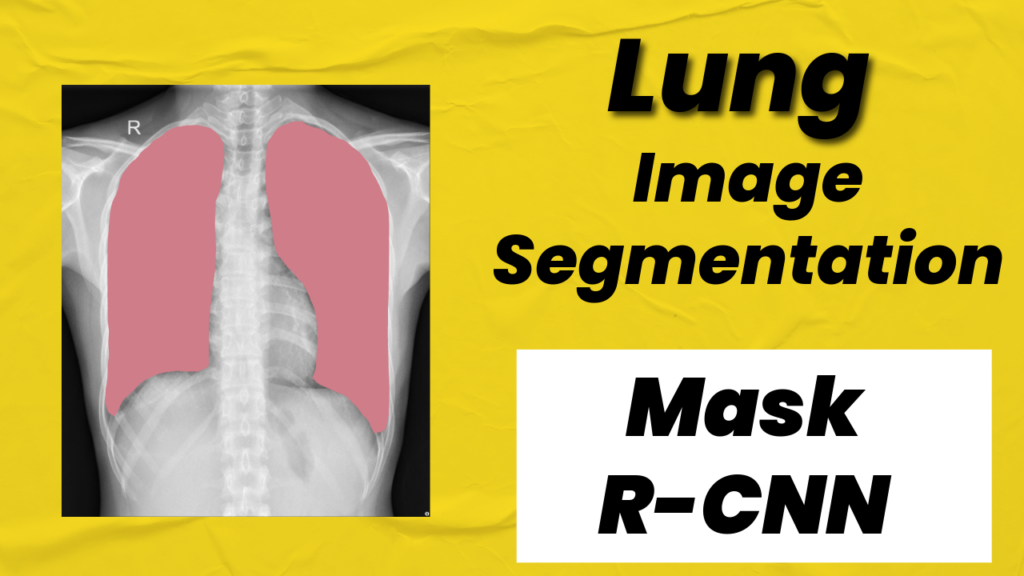
Last Updated on 01/02/2026 by Eran Feit
Introduction
Lung segmentation is one of the most important tasks in medical image analysis, especially when working with chest X-rays and CT scans.
By accurately isolating lung regions from the rest of the image, it becomes much easier to analyze structure, detect abnormalities, and build reliable downstream models for diagnosis and monitoring.
In recent years, deep learning has transformed lung segmentation from a manual, time-consuming process into an automated and highly precise workflow.
Mask R-CNN plays a central role in this shift.
Originally designed for instance segmentation in natural images, Mask R-CNN has proven to be extremely effective for medical imaging tasks that require pixel-level accuracy.
Its ability to combine object detection and segmentation in a single model makes it well-suited for separating lung regions while preserving clear boundaries and fine details.
When lung segmentation is approached with Mask R-CNN, the problem is reframed from simple pixel classification to structured object understanding.
Instead of predicting masks in isolation, the model learns where the lungs are, how large they are, and how their shapes vary across patients and scans.
This structured understanding is especially valuable in medical contexts, where anatomical consistency and robustness matter as much as raw accuracy.
As datasets grow larger and models become more accessible through frameworks like PyTorch, lung segmentation with Mask R-CNN is no longer limited to research labs.
Developers, researchers, and medical imaging practitioners can now train custom models on their own datasets and adapt them to specific imaging modalities or clinical needs.
Understanding Lung Segmentation with Mask R-CNN
Lung segmentation focuses on identifying and isolating lung regions from medical images so that only the relevant anatomy remains for analysis.
This step is foundational in many medical imaging pipelines because it removes background noise and irrelevant structures, allowing models to focus entirely on lung tissue.
Accurate lung segmentation improves both the reliability and interpretability of any model built on top of it.
Mask R-CNN approaches lung segmentation by treating the lungs as distinct objects rather than just collections of pixels.
At a high level, the model first locates candidate lung regions using a region proposal mechanism, then refines those regions with precise bounding boxes and segmentation masks.
This two-stage process allows the model to balance global context with local detail, which is critical for medical images that often contain subtle boundaries.
The target of lung segmentation with Mask R-CNN is not just to achieve visually clean masks, but to produce anatomically meaningful results.
Well-trained models learn consistent lung shapes across different scans while remaining flexible enough to handle variations in size, orientation, and imaging conditions.
This makes the approach robust across different patients and datasets, even when image quality or contrast varies.
From a high-level perspective, Mask R-CNN enables lung segmentation pipelines that are both powerful and extensible.
Once the lungs are accurately segmented, the same framework can be extended to additional tasks such as disease localization, severity estimation, or longitudinal comparison across scans.
This makes lung segmentation with Mask R-CNN a strong foundation for building advanced medical imaging systems that go beyond simple visualization and toward real clinical impact.
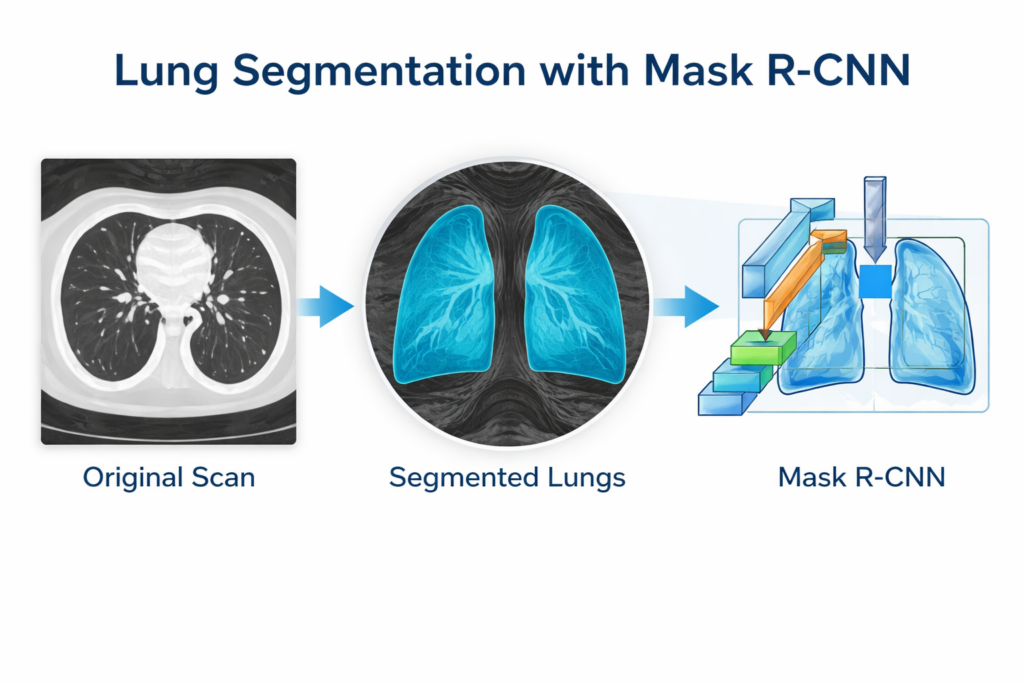
What this Mask R-CNN Lung Segmentation Pipeline Will Help You Build
This tutorial is designed to take you from raw medical images and binary masks to a working Mask R-CNN model that can predict lung masks on new scans.
Instead of focusing on isolated snippets, the code is written as a complete end-to-end pipeline: dataset preparation, training with transfer learning, and inference with visual results.
The goal is to make lung segmentation feel approachable and reproducible, even if you’re training your first medical segmentation model in PyTorch.
The first target of the code is to turn your dataset into something Mask R-CNN can actually learn from.
That means converting each scan into a tensor, converting each mask into per-object boolean masks, and generating bounding boxes from the mask pixels.
Mask R-CNN expects a very specific training format—images plus a structured target dictionary—so this stage is all about shaping medical segmentation data into that exact format.
The second target is to fine-tune a pretrained Mask R-CNN model rather than training from scratch.
The code loads the ResNet-50 FPN backbone with pretrained weights, then replaces the classification and mask heads so the model learns your lung classes.
This approach gives you a much stronger starting point and usually converges faster, especially when the dataset is not massive.
The training loop is built to be practical, not theoretical.
It tracks average loss per epoch, saves both the best model and the last model, and includes early stopping to prevent wasting time when learning stalls.
That gives you a realistic workflow you can run on your own machine, adjust over time, and reuse for other segmentation datasets later.
Finally, the code is set up to validate the whole pipeline with inference on random test images.
It loads the saved weights, runs predictions, filters masks by confidence score, draws the masks in a clear visual way, saves the output images, and displays before/after comparisons.
By the end, you don’t just “train a model”—you get a complete lung segmentation system that you can test, iterate on, and eventually package for real-world use.
Link to the video tutorial here .
Code for the tutorial here : or here
Best AI Photo Tools (Backgrounds, Objects, Headshots)


My Blog
Link for Medium users here .
Want to get started with Computer Vision or take your skills to the next level ?
Great Interactive Course : “Deep Learning for Images with PyTorch” here
If you’re just beginning, I recommend this step-by-step course designed to introduce you to the foundations of Computer Vision – Complete Computer Vision Bootcamp With PyTorch & TensorFlow
If you’re already experienced and looking for more advanced techniques, check out this deep-dive course – Modern Computer Vision GPT, PyTorch, Keras, OpenCV4
How to Train Mask R-CNN on Lung Segmentation Data
Lung segmentation is one of those tasks that looks simple at first glance.
You want a clean mask of the lungs, but medical images come with noise, low contrast, and huge variation between patients.
That is exactly why a strong instance segmentation model like Mask R-CNN can be such a practical choice.
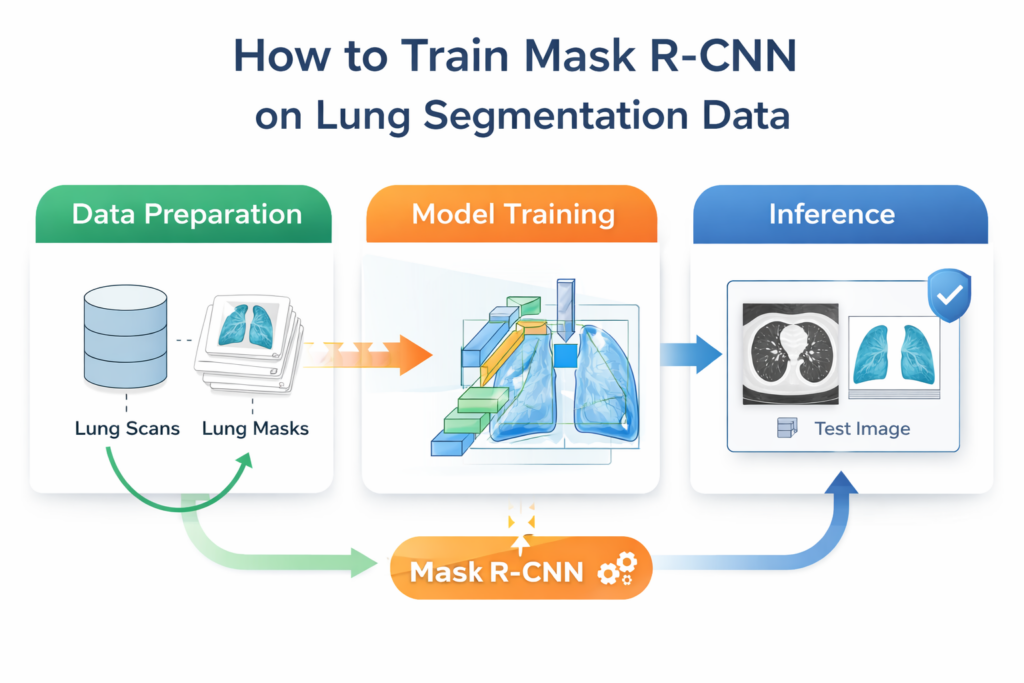
In this tutorial, you build a complete training pipeline that takes you from raw images and masks to a trained model that predicts lung regions on new scans.
Instead of focusing on theory only, the code is structured as a real project with a data preparation step, a training step, and an inference step.
By the end, you will have saved model weights and visual results you can inspect right away.
The main goal of the code is to make Mask R-CNN work with a medical segmentation dataset in the format it expects.
That means creating bounding boxes from masks, building the target dictionary correctly, and using transfer learning to fine-tune a pretrained backbone.
Once those pieces are in place, the training loop becomes predictable and reusable for other segmentation projects too.
Setting up a clean environment for Mask R-CNN training
A stable environment saves you from the most annoying bugs later.
This section creates an isolated conda environment, checks CUDA, and installs PyTorch and torchvision with matching CUDA support.
The goal here is reproducibility.
When you pin versions, your training results and troubleshooting steps stay consistent across machines and future reruns.
### Create a fresh conda environment with Python 3.12 for this project. conda create --name Pytorch251 python=3.12 ### Activate the environment so all installs stay isolated inside it. conda activate Pytorch251 ### Check your CUDA compiler version to confirm GPU toolchain details. nvcc --version ### Install PyTorch, TorchVision, and TorchAudio with CUDA 12.4 support for GPU training. # Cuda 12.4 conda install pytorch==2.5.1 torchvision==0.20.1 torchaudio==2.5.1 pytorch-cuda=12.4 -c pytorch -c nvidia ### Install OpenCV for image loading and saving during inference visualization. # install pip install opencv-python==4.10.0.84 Short summary.
You now have a dedicated environment that matches your training and inference requirements.
Turning lung masks into Mask R-CNN training targets
Mask R-CNN does not train on an image and a single mask only.
It expects a structured target that includes masks, labels, bounding boxes, and a few helper fields.
This part of the code prepares that structure from your dataset.
The main idea is to load each image and mask pair, convert them to tensors, and compute bounding boxes directly from mask pixels.
The main goal of the code is to make Mask R-CNN work with a medical segmentation dataset in the format it expects.
That means creating bounding boxes from masks, building the target dictionary correctly, and using transfer learning to fine-tune a pretrained backbone.
Once those pieces are in place, the training loop becomes predictable and reusable for other segmentation projects too.
If you want to follow along with the exact same dataset I used, you’re welcome to email me and I’ll send you the dataset link.
Just include a short note that you want the “Lung Segmentation Mask R-CNN dataset,” and I’ll reply with access details.
Email me at feitgemel@gmail.com.
### Add a dataset access note so readers know how to get the files. # Link to the dataset : Send me an email for the link: feitgemel@gmail.com ### Document the purpose of this script as the data preparation step. # Part 1: Data Preparation (save PyTorch-ready dataset info) ### Explain that this script prepares a dataset for Mask R-CNN lung segmentation training. # Prepare the dataset for training a Mask R-CNN model on lung image segmentation. ### Name the file so it is easy to keep the pipeline organized. # prepare_data.py ### Import OS utilities for building file paths safely. import os ### Import pandas for reading the CSV file that lists images and masks. import pandas as pd ### Import PyTorch for tensors and saving the prepared dataset. import torch ### Import NumPy for converting masks into arrays efficiently. import numpy as np ### Import PIL Image for loading and resizing images and masks. from PIL import Image ### Import tqdm for a clean progress bar over the dataset. from tqdm import tqdm ### Import TorchVision functional transforms for converting images to tensors. import torchvision.transforms.functional as TF ### Define a function that reads a CSV and converts the dataset into Mask R-CNN format. def prepare_dataset(csv_path, base_dir, output_path, resize=(512, 512)): ### Load the CSV that contains relative paths to images and masks. df = pd.read_csv(csv_path) ### Create a list that will store (image_tensor, target_dict) pairs. dataset = [] ### Iterate through each row and build one training sample at a time. for _, row in tqdm(df.iterrows(), total=len(df)): ### Build the full image path using the base directory and CSV value. image_path = os.path.join(base_dir, row['images']) ### Build the full mask path using the base directory and CSV value. mask_path = os.path.join(base_dir, row['masks']) ### Load the image, convert to RGB, and resize to a fixed training size. image = Image.open(image_path).convert("RGB").resize(resize) ### Load the mask, keep it single-channel, and resize with nearest neighbor to preserve labels. mask = Image.open(mask_path).convert("L").resize(resize, resample=Image.NEAREST) ### Convert the image to a float tensor shaped [3, H, W] in the range [0, 1]. image_tensor = TF.to_tensor(image) # shape: [3, H, W], float32 ### Convert the mask image into a PyTorch tensor shaped [H, W] with integer values. mask_tensor = torch.from_numpy(np.array(mask)) # shape: [H, W], int64 ### Extract unique object IDs from the mask so we can build per-instance masks. obj_ids = torch.unique(mask_tensor) ### Remove background ID 0 so only foreground objects remain. obj_ids = obj_ids[obj_ids != 0] # skip background ### Skip samples with empty masks so training stays stable. if len(obj_ids) == 0: continue # skip empty masks ### Convert the mask tensor into boolean instance masks shaped [N, H, W]. masks = mask_tensor.unsqueeze(0) == obj_ids[:, None, None] # [N, H, W] ### Create a list that will hold bounding boxes for each instance mask. boxes = [] ### Loop over each instance mask to compute its bounding box. for m in masks: ### Find all pixel coordinates where the mask is True. pos = (m.nonzero(as_tuple=True)) ### Compute the leftmost x coordinate for the bounding box. xmin = pos[1].min().item() ### Compute the rightmost x coordinate for the bounding box. xmax = pos[1].max().item() ### Compute the top y coordinate for the bounding box. ymin = pos[0].min().item() ### Compute the bottom y coordinate for the bounding box. ymax = pos[0].max().item() ### Append the bounding box in [xmin, ymin, xmax, ymax] format. boxes.append([xmin, ymin, xmax, ymax]) ### Build the target dictionary exactly as TorchVision detection models expect. target = { ### Store bounding boxes as float32 tensors. 'boxes': torch.tensor(boxes, dtype=torch.float32), ### Use label 1 for foreground since this is a single-class segmentation task. 'labels': torch.ones((len(boxes),), dtype=torch.int64), ### Store masks as uint8 for compatibility and efficiency. 'masks': masks.type(torch.uint8), ### Assign a unique image ID for bookkeeping and evaluation. 'image_id': torch.tensor([len(dataset)]), ### Compute mask areas so the model has useful metadata. 'area': (masks.sum(dim=(1, 2))).float(), ### Mark all instances as not crowd for standard training behavior. 'iscrowd': torch.zeros((len(boxes),), dtype=torch.int64), } ### Append the sample as a tuple of image tensor and target dict. dataset.append((image_tensor, target)) ### Save the prepared dataset list as a .pt file for fast loading later. torch.save(dataset, output_path) ### Print confirmation so you know exactly where the file was saved. print(f"Saved dataset to: {output_path}") Short summary.
This script converts lung masks into the exact boxes and mask tensors Mask R-CNN expects during training.
Saving a PyTorch-ready dataset file for fast training
This part wires the preparation function to your local folder structure.
It defines the dataset root path and produces a single .pt file that loads quickly during training.
The main target is speed and simplicity during experimentation.
Once the .pt file exists, you can rerun training without re-processing the images every time.
### Define the dataset base directory so CSV paths resolve correctly. # Paths base_dir = "D:/Data-Sets-Object-Segmentation/Lung Image Segmentation Dataset" ### Call the dataset preparation using the train split CSV and save a PyTorch-ready file. prepare_dataset(os.path.join(base_dir, "train.csv"), base_dir, "d:/temp/train_data.pt", resize=(512, 512)) Short summary.
You now have a cached training dataset file that the training script can load instantly.
Building a Mask R-CNN model that matches your lung segmentation task
Here you load a pretrained Mask R-CNN and replace its heads to match your number of classes.
Because you have background plus lungs, the script uses num_classes=2.
This is transfer learning in a very practical form.
You keep the strong ResNet-50 FPN backbone, and you only adapt the parts that define class logits and mask prediction.
### Name the training script so the workflow is easy to follow. # Step2-Train-MaskRCNN.py ### Import OS for folder creation and saving model checkpoints. import os ### Import PyTorch for model execution, tensors, and saving weights. import torch ### Import DataLoader to batch and shuffle the dataset during training. from torch.utils.data import DataLoader ### Import Mask R-CNN model builder and pretrained weights enum from TorchVision. from torchvision.models.detection import maskrcnn_resnet50_fpn, MaskRCNN_ResNet50_FPN_Weights ### Import the box predictor so we can replace the classification head. from torchvision.models.detection.faster_rcnn import FastRCNNPredictor ### Import the mask predictor so we can replace the mask head for our classes. from torchvision.models.detection.mask_rcnn import MaskRCNNPredictor ### Import tqdm for a clean training progress bar. from tqdm import tqdm ### Select GPU if available, otherwise fall back to CPU. # --- Device setup --- device = torch.device("cuda" if torch.cuda.is_available() else "cpu") ### Load the prepared dataset file in a safer way. # --- Load training data safely --- train_data = torch.load("d:/temp/train_data.pt", weights_only=True) ### Build a DataLoader with a custom collate function for detection targets. train_loader = DataLoader( ### Provide the dataset list of (image, target) tuples. train_data, ### Use a small batch size to fit GPU memory in segmentation training. batch_size=2, ### Shuffle to improve generalization during training. shuffle=True, ### Keep detection-style batching by zipping images and targets separately. collate_fn=lambda x: tuple(zip(*x)) ) ### Define where to store model checkpoints. # --- Model output folder --- model_dir = "d:/temp/models/lungs" ### Create the folder if it does not exist. os.makedirs(model_dir, exist_ok=True) ### Create a function that builds Mask R-CNN and replaces heads for your class count. # --- Build the Mask R-CNN model --- def get_model(num_classes): ### Select default pretrained weights for a strong starting point. weights = MaskRCNN_ResNet50_FPN_Weights.DEFAULT ### Load the pretrained model with those weights. model = maskrcnn_resnet50_fpn(weights=weights) ### Read the number of input features for the classifier head. # Replace classifier in_features = model.roi_heads.box_predictor.cls_score.in_features ### Replace the box predictor to output your custom class count. model.roi_heads.box_predictor = FastRCNNPredictor(in_features, num_classes) ### Read the number of input channels for the mask head. # Replace mask head in_features_mask = model.roi_heads.mask_predictor.conv5_mask.in_channels ### Define the hidden layer size used in the new mask head. hidden_layer = 256 ### Replace the mask predictor to output your custom class count. model.roi_heads.mask_predictor = MaskRCNNPredictor(in_features_mask, hidden_layer, num_classes) ### Return the customized model ready for training. return model ### Build a model with background plus lung class. model = get_model(num_classes=2) ### Move the model to the selected device. model.to(device) ### Collect trainable parameters so the optimizer only updates what it should. # --- Optimizer --- params = [p for p in model.parameters() if p.requires_grad] ### Use Adam for stable optimization with a small learning rate. optimizer = torch.optim.Adam(params, lr=0.0005) ### Set training duration and early stopping behavior. # --- Training settings --- num_epochs = 50 ### Define patience to stop if loss does not improve for many epochs. patience = 10 ### Track the best loss seen so far for checkpointing. best_loss = float("inf") ### Count epochs without improvement for early stopping. epochs_without_improvement = 0 Short summary.
You now have a pretrained Mask R-CNN customized for lung segmentation, plus a DataLoader and optimizer ready to train.
Training the model with checkpointing and early stopping
This training loop is built to be practical and repeatable.
It logs per-epoch average loss, saves both the best and last model, and stops early when improvement stalls.
The goal is to protect your time and your compute.
Saving the best model ensures you keep the strongest checkpoint even if later epochs overfit or fluctuate.
### Start the main training loop over epochs. # --- Training loop --- for epoch in range(num_epochs): ### Print a readable epoch header. print(f"\n📘 Epoch {epoch + 1}/{num_epochs}") ### Switch model to train mode so layers behave correctly. model.train() ### Reset epoch loss accumulator. epoch_loss = 0.0 ### Create a tqdm progress bar over training batches. progress_bar = tqdm(train_loader, desc="Training", leave=False) ### Iterate over each batch of images and targets. for images, targets in progress_bar: ### Move image tensors to the training device. images = [img.to(device) for img in images] ### Move every tensor inside each target dict to the training device. targets = [{k: v.to(device) for k, v in t.items()} for t in targets] ### Forward pass that returns a dictionary of loss components. loss_dict = model(images, targets) ### Sum all loss components into a single scalar loss. total_loss = sum(loss for loss in loss_dict.values()) ### Clear old gradients before backpropagation. optimizer.zero_grad() ### Backpropagate through the total loss. total_loss.backward() ### Update model weights. optimizer.step() ### Accumulate loss for epoch averaging. epoch_loss += total_loss.item() ### Show current batch loss in the progress bar. progress_bar.set_postfix(loss=total_loss.item()) ### Compute the average loss for this epoch. avg_loss = epoch_loss / len(train_loader) ### Print the epoch summary loss in a friendly format. print(f"🔹 Epoch {epoch+1:02d} | Avg Loss: {avg_loss:.4f}") ### Define where to save the best and last checkpoints. # --- Save best model --- best_model_path = os.path.join(model_dir, "maskrcnn_best.pth") last_model_path = os.path.join(model_dir, "maskrcnn_last.pth") ### Save best model if this epoch improved the loss. if avg_loss < best_loss: ### Update best loss value. best_loss = avg_loss ### Reset no-improvement counter. epochs_without_improvement = 0 ### Save the state dict for the best model. torch.save(model.state_dict(), best_model_path) ### Print a clear confirmation message. print("✅ Best model saved.") else: ### Increment no-improvement counter. epochs_without_improvement += 1 ### Print how many epochs have not improved. print(f"⚠️ No improvement for {epochs_without_improvement} epoch(s).") ### Always save the last model so you keep the latest weights too. # Always save last model torch.save(model.state_dict(), last_model_path) ### Stop training early if patience has been exceeded. # --- Early stopping --- if epochs_without_improvement >= patience: ### Print an early stopping message for clarity. print(f"\n⏹ Early stopping triggered after {epoch+1} epochs.") ### Exit the epoch loop. break ### Print final completion message after training ends. print("\n🎉 Training complete.") Short summary.
You trained Mask R-CNN for lung segmentation and saved both best and last checkpoints for reliable inference later.
Testing your lung segmentation model on random images
Inference is where the whole pipeline becomes real.
This script loads your saved weights, samples random test images, predicts masks, and overlays them on the originals.
The goal is fast visual validation.
If the masks line up with lung regions consistently, you know your dataset formatting, training loop, and model setup are working together correctly.
### Name the inference script so it matches the pipeline steps clearly. # Step3-Infer-Random-Test-Images.py ### Import OS utilities for file paths and output folder creation. import os ### Import random so we can sample test images for quick evaluation. import random ### Import PyTorch for model loading and inference. import torch ### Import NumPy for mask processing and random colors. import numpy as np ### Import OpenCV for reading and saving images. import cv2 ### Import pandas for loading the test CSV file listing images. import pandas as pd ### Import matplotlib for displaying the before and after images in a grid. import matplotlib.pyplot as plt ### Import Mask R-CNN builder and weights enum to rebuild the model structure. from torchvision.models.detection import maskrcnn_resnet50_fpn, MaskRCNN_ResNet50_FPN_Weights ### Import predictors so the rebuilt model matches your training heads. from torchvision.models.detection.faster_rcnn import FastRCNNPredictor ### Import mask predictor so output masks match your class setup. from torchvision.models.detection.mask_rcnn import MaskRCNNPredictor ### Import TorchVision functional transforms to convert images into tensors. from torchvision.transforms import functional as TF ### Define the path to your best saved model checkpoint. # --- Paths --- model_path = "d:/temp/models/lungs/maskrcnn_best.pth" ### Define the dataset base directory for loading test images. base_dir = "D:/Data-Sets-Object-Segmentation/Lung Image Segmentation Dataset" ### Define the CSV that contains the list of test images. csv_path = os.path.join(base_dir, "test.csv") # your image list CSV ### Choose GPU if available, otherwise CPU for inference. # --- Device --- device = torch.device("cuda" if torch.cuda.is_available() else "cpu") ### Rebuild the same model architecture used during training. # --- Load model --- def get_model(num_classes): ### Select pretrained weights so the base architecture is initialized consistently. weights = MaskRCNN_ResNet50_FPN_Weights.DEFAULT ### Build the model with those weights. model = maskrcnn_resnet50_fpn(weights=weights) ### Replace the box predictor to match your class count. in_features = model.roi_heads.box_predictor.cls_score.in_features model.roi_heads.box_predictor = FastRCNNPredictor(in_features, num_classes) ### Replace the mask predictor to match your class count. in_features_mask = model.roi_heads.mask_predictor.conv5_mask.in_channels hidden_layer = 256 model.roi_heads.mask_predictor = MaskRCNNPredictor(in_features_mask, hidden_layer, num_classes) ### Return the rebuilt model. return model ### Build the model with background plus lung class. model = get_model(num_classes=2) ### Load trained weights from disk and map them to the active device. model.load_state_dict(torch.load(model_path, map_location=device, weights_only=True)) ### Move the model to the device for inference. model.to(device) ### Switch the model to eval mode for correct inference behavior. model.eval() ### Load the CSV and convert the image list column into a Python list. # --- Read test image list from CSV --- df = pd.read_csv(csv_path) image_paths = df["images"].tolist() random_images = random.sample(image_paths, 3) ### Create containers for original images and mask-overlay outputs. # --- Run inference --- originals = [] masked_results = [] ### Create output directory if it doesn't exist. output_dir = "d:/temp/inference_results" os.makedirs(output_dir, exist_ok=True) ### Loop over each randomly chosen image path. for rel_path in random_images: ### Build the full path to the image file. img_path = os.path.join(base_dir, rel_path) ### Read the image using OpenCV in BGR format. image_bgr = cv2.imread(img_path) ### Convert the image to RGB for correct visualization. image_rgb = cv2.cvtColor(image_bgr, cv2.COLOR_BGR2RGB) ### Convert the RGB image to a Torch tensor and move it to the device. image_tensor = TF.to_tensor(image_rgb).to(device) ### Disable gradient tracking to speed up inference. with torch.no_grad(): output = model([image_tensor])[0] ### Create a copy of the image so we can draw mask overlays. # Draw predicted masks masked_image = image_rgb.copy() ### Loop over predicted masks and draw only confident ones. for i in range(len(output["masks"])): if output["scores"][i] > 0.5: ### Convert mask tensor into a binary NumPy array for indexing. mask = output["masks"][i, 0].mul(255).byte().cpu().numpy() ### Generate a random RGB color for this mask overlay. color = np.random.randint(0, 255, (1, 3), dtype=np.uint8).tolist()[0] ### Apply the color where the mask is active. masked_image[mask > 128] = color ### Save original and masked image to lists for final plotting. originals.append(image_rgb) masked_results.append(masked_image) ### Save the final image with masks drawn on it. output_filename = os.path.splitext(os.path.basename(rel_path))[0] + "_predicted.png" output_path = os.path.join(output_dir, output_filename) ### Convert from RGB to BGR before saving with OpenCV. cv2.imwrite(output_path, cv2.cvtColor(masked_image, cv2.COLOR_RGB2BGR)) print(f"🖼 Saved: {output_path}") ### Create a 2x3 grid to display originals on top and predictions on bottom. # --- Display all 6 images in 2 rows --- fig, axes = plt.subplots(2, 3, figsize=(15, 10)) for i in range(3): axes[0, i].imshow(originals[i]) axes[0, i].set_title(f"Original: {os.path.basename(random_images[i])}") axes[0, i].axis('off') axes[1, i].imshow(masked_results[i]) axes[1, i].set_title("Predicted Mask") axes[1, i].axis('off') plt.tight_layout() plt.show() Short summary.
You loaded your best checkpoint, predicted lung masks on random test images, saved results to disk, and displayed clear before and after comparisons.
FAQ
What is lung segmentation used for?
It creates a mask that isolates the lungs from the rest of the image. This makes later analysis and modeling more focused and consistent.
What does Mask R-CNN output during inference?
It outputs bounding boxes, class labels, confidence scores, and pixel masks. This is useful when you want both localization and segmentation.
Why do I need bounding boxes if I already have masks?
TorchVision Mask R-CNN training requires boxes and masks together. Boxes guide the model’s region proposals before mask refinement.
Why is my model predicting many small masks?
This often happens when the score threshold is too low or the training masks contain noise. Increasing the threshold and cleaning masks usually helps.
What is the most common dataset formatting mistake?
Wrong dtypes or wrong shapes in the target dictionary are the top issues. Boxes must be float32 and masks should be uint8 or boolean-like.
How do I confirm my masks are aligned with images?
Visualize one sample by overlaying the mask on the image after resizing. If edges drift, your resize logic or paths likely need fixing.
Why does training feel slow even on GPU?
Mask R-CNN is heavier than many segmentation models because it includes region proposals and multiple heads. Smaller batch sizes and resized images help.
Should I train longer if loss keeps dropping slowly?
Yes, but watch validation behavior if you add it later. If improvement is tiny and inconsistent, lowering the learning rate can be more effective than adding epochs.
What is a good first debugging step if training crashes?
Print one target dictionary and verify keys, shapes, and dtypes. Most Mask R-CNN issues come from malformed targets rather than the model code.
How can I make inference outputs easier to interpret?
Use a consistent color per class and add an outline or transparency. Also save side-by-side originals and predictions so quality checks take seconds.
Conclusion
This tutorial builds a complete Mask R-CNN pipeline for lung segmentation that you can actually run and reuse.
You start by creating a stable environment, then convert raw images and masks into the exact training format TorchVision expects.
That data step is the foundation that prevents most Mask R-CNN training errors.
From there, you fine-tune a pretrained Mask R-CNN with a ResNet-50 FPN backbone.
You replace the classification and mask heads so the model learns your lung segmentation task instead of the original COCO classes.
This transfer learning setup gives you a strong starting point and makes training much more practical on real hardware.
The training loop is designed to be useful in real projects.
It logs loss clearly, saves both best and last checkpoints, and stops early when progress stalls.
That combination helps you iterate faster without losing your strongest model state.
Finally, the inference script closes the loop by producing visual results.
You load your best checkpoint, predict masks on random test images, save outputs, and view before and after comparisons.
That is the moment the pipeline becomes trustworthy, because you can validate the masks with your own eyes and quickly decide what to improve next.
Connect :
☕ Buy me a coffee — https://ko-fi.com/eranfeit
🖥️ Email : feitgemel@gmail.com
🤝 Fiverr : https://www.fiverr.com/s/mB3Pbb
Enjoy,
Eran