 Skip to content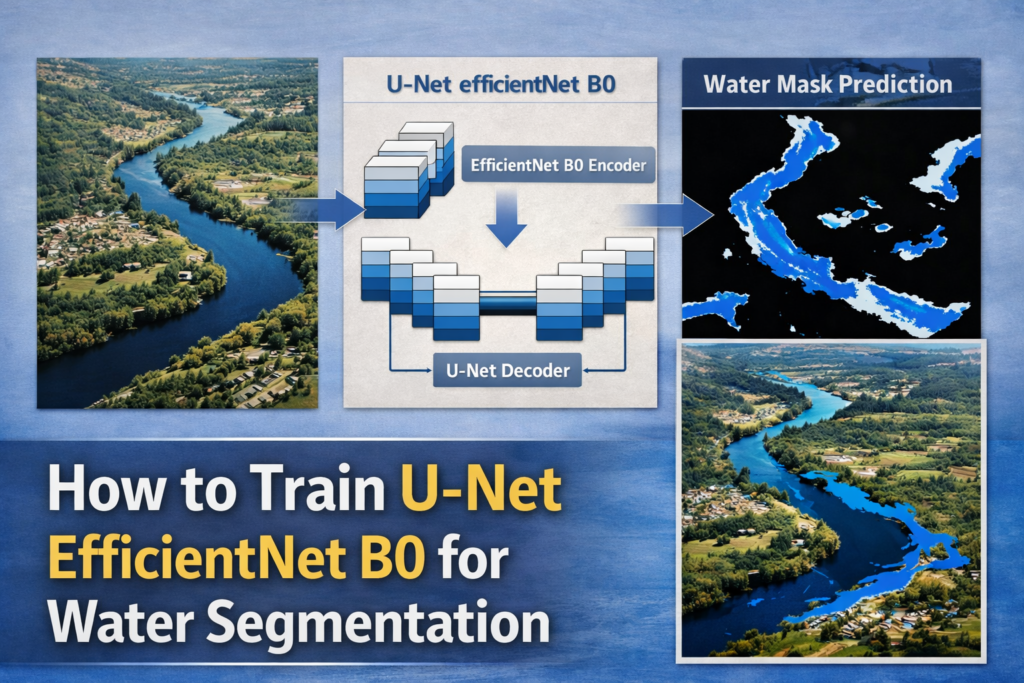
Last Updated on 03/03/2026 by Eran Feit
Introduction
Training modern image segmentation models has become more accessible thanks to powerful pretrained backbones and flexible deep learning frameworks.
One of the most effective combinations today is How to Train U-Net EfficientNet B0 for Water Segmentation, which merges a proven segmentation architecture with a lightweight yet expressive encoder.
This approach is especially well-suited for satellite imagery, where capturing fine spatial details and large contextual patterns is critical.
By leveraging EfficientNet B0 inside a U-Net structure, it is possible to achieve high accuracy while keeping the model efficient and practical to train.
Water segmentation is a common but challenging task in remote sensing and environmental analysis.
Satellite images often contain varying lighting conditions, reflections, shadows, and complex backgrounds that make water boundaries difficult to detect.
A robust segmentation model must learn both low-level textures and high-level semantic features to distinguish water bodies from land, vegetation, or urban areas.
This is exactly where the U-Net and EfficientNet B0 pairing shines.
The U-Net architecture is known for its symmetric encoder-decoder design and skip connections that preserve spatial resolution.
EfficientNet B0, on the other hand, provides a carefully scaled convolutional backbone that extracts rich features without unnecessary computational cost.
When combined, these two models form a strong foundation for pixel-level classification tasks such as water segmentation.
This setup balances performance, speed, and training stability, making it suitable for both experimentation and real-world applications.
In this tutorial, the focus is on understanding the full workflow behind How to Train U-Net EfficientNet B0 for Water Segmentation.
From preparing the dataset and applying augmentation to training the model and running inference, each stage plays a crucial role in the final results.
The goal is not only to train a working model, but to build a clear mental model of how and why each step contributes to accurate segmentation.
This understanding makes it easier to adapt the same approach to other segmentation problems beyond water bodies.
How to Train U-Net EfficientNet B0 for Water Segmentation
Training a U-Net with an EfficientNet B0 encoder starts with a clear target: accurately separating water pixels from the background at the image level.
The model is designed to output a binary mask where each pixel represents either water or non-water.
This pixel-wise prediction allows precise outlining of rivers, lakes, and other water bodies in satellite imagery.
Such granularity is essential for applications like environmental monitoring, flood detection, and land-use analysis.
At a high level, the training process relies on combining pretrained knowledge with task-specific learning.
EfficientNet B0 acts as the encoder, extracting hierarchical features from input images that have already been shaped by large-scale visual datasets.
The U-Net decoder then progressively upsamples these features while integrating skip connections to recover spatial detail.
This structure helps the model maintain sharp boundaries in the predicted segmentation masks.
Data preparation plays a central role in achieving strong results.
Images and masks must be resized, normalized, and aligned so the network learns consistent patterns.
Augmentation techniques such as flipping and rotation expand the effective size of the dataset and improve generalization.
These steps ensure the model does not simply memorize the training data, but learns robust representations of water features.
The final objective of training is to produce a model that generalizes well to unseen satellite images.
Loss functions, optimization strategies, and validation monitoring guide the learning process toward stable convergence.
Once trained, the model can be used to generate water masks for new images with a simple inference pipeline.
This makes the U-Net EfficientNet B0 approach a practical and scalable solution for real-world water segmentation tasks.

Training a U-Net EfficientNet B0 Model Step by Step in Python
This tutorial is designed to walk through the full code pipeline required to train a U-Net EfficientNet B0 model for water segmentation using Python and TensorFlow.
The goal of the code is to take raw satellite images, prepare them correctly, and train a deep learning model that can predict pixel-level water masks.
Each part of the code builds on the previous one, forming a complete and reproducible training workflow rather than isolated snippets.
By the end of the process, the code produces a trained segmentation model that can be reused on new images.
The first target of the code is data preparation.
Satellite images and their corresponding masks are loaded, resized, normalized, and converted into numerical arrays suitable for deep learning.
Binary masks are created so the model learns a clear distinction between water and background pixels.
Data augmentation is applied directly in the pipeline to increase variability and help the model generalize better during training.
The next focus of the code is model construction.
A U-Net architecture is assembled using EfficientNet B0 as the encoder to extract meaningful visual features.
The decoder reconstructs spatial details while preserving contextual information through skip connections.
This design allows the model to learn both fine-grained boundaries and large-scale water structures from the images.
Training logic is another central target of the code.
The model is compiled with an optimizer and loss function suitable for binary segmentation tasks.
Callbacks such as learning rate scheduling and early stopping control the training process and prevent overfitting.
Throughout training, validation data is used to monitor performance and guide the model toward stable convergence.
Finally, the code demonstrates how to test the trained model on unseen images.
A single satellite image is passed through the network, producing a predicted water mask.
Thresholding converts the output into a clear binary segmentation result that is easy to visualize and interpret.
This final step confirms that the entire pipeline works end to end, from raw data to meaningful segmentation output.
Link to the video tutorial here .
You can download the code here or here
Best AI Photo Tools (Backgrounds, Objects, Headshots)
 Phot-AI packs more than 30 AI powered tools into one place
  Pixelcut uses AI to help you create professional photos
  PhotoGPT AI acts as your personal photographer
 My Blog
Link for Medium users here
Want to get started with Computer Vision or take your skills to the next level ?
Great Interactive Course : “Deep Learning for Images with PyTorch” here
If you’re just beginning, I recommend this step-by-step course designed to introduce you to the foundations of Computer Vision – Complete Computer Vision Bootcamp With PyTorch & TensorFlow
If you’re already experienced and looking for more advanced techniques, check out this deep-dive course – Modern Computer Vision GPT, PyTorch, Keras, OpenCV4

How to Train U-Net EfficientNet B0 for Water Segmentation
Training a segmentation model that can reliably separate water from land in satellite images is one of the most practical computer vision projects you can build.
In this tutorial, you will learn How to Train U-Net EfficientNet B0 for Water Segmentation using a clean, end-to-end Python pipeline.
The key idea is simple.
EfficientNet B0 acts as a strong feature extractor, and U-Net turns those features into a precise pixel-level mask.
The code you are about to run is designed to be reproducible.
You will set up the environment, download the dataset, preprocess images and masks, apply augmentation, train the model, and finally test inference on a new image.
Each stage is important, because segmentation is not only about the model architecture.
It is also about feeding the network consistent inputs, stable masks, and a training loop that does not overfit.
Setting up a clean environment for U-Net and EfficientNet B0
A stable environment is the fastest way to avoid painful debugging later.
This project uses TensorFlow, OpenCV, scikit-learn, Matplotlib, and imgaug, so version mismatches can easily break your workflow.
The goal here is to isolate everything in a dedicated Conda environment so your installs stay consistent across runs.
If you plan to train on a GPU, make sure your CUDA setup matches the TensorFlow build you install.
If you plan to train on CPU, the process is simpler, but training will be slower.
Either way, once this step is done, you will have a working Python setup that is ready for segmentation.
### Create Conda enviroment with Python 3.11. conda create -n U-Net python=3.11 ### Activate the environment so all installs happen inside it. conda activate U-Net ### Verify CUDA compiler version on your machine. nvcc --version ### Install TensorFlow with CUDA support on WSL2 for GPU users. pip install tensorflow[and-cuda]==2.17.1 ### Install TensorFlow CPU build for Windows users. pip install tensorflow==2.17.1 ### Install OpenCV for image loading and resizing. pip install opencv-python==4.10.0.84 ### Install scikit-learn for train/validation splitting. pip install scikit-learn==1.6.0 ### Install Matplotlib for visualizations. pip install matplotlib==3.10.0 ### Install imgaug for data augmentation. pip install imgaug==0.4.0 Short summary.
Your environment is now ready for EfficientNet B0 and U-Net training.
Next, you will download the dataset and prepare the folder paths.
Downloading the Water Bodies dataset and preparing your folders
This tutorial is built around a simple binary segmentation dataset.
Each image has a matching mask file with the same filename, where water pixels are marked as white and background pixels are black.
That structure makes it ideal for learning the full workflow without complex labeling formats.
The target is to keep your dataset paths clean and predictable.
The code expects separate folders for Images and Masks.
Once your folder structure matches the code, you can load samples, validate masks, and move into augmentation and training.
Want the exact dataset so your results match mine?
If you want to reproduce the same training flow and compare your results to mine, I can share the dataset structure and what I used in this tutorial. Send me an email and mention the name of the tutorial / dataset , so I know what you’re requesting.
### Place the dataset into a local folder. Example path used in this tutorial: /mnt/d/Data-Sets-Object-Segmentation/Water Bodies Dataset ### Make sure the dataset includes these folders: Images Masks ### Make sure the filenames match between Images and Masks. Example: Images/water_body_7.jpg Masks/water_body_7.jpg Short summary.
You now have a clean dataset layout that matches the pipeline.
Next, you will load a sample image and mask to visually confirm everything is aligned.
Loading your first satellite image and checking the mask
Before training anything, you want to confirm that images and masks actually match.
This step loads one sample, converts the image to RGB, reads the mask in grayscale, and displays them side by side.
It helps you verify that your paths work and your masks look correct.
The important detail is how the mask represents classes.
In this dataset, 0 is background and 255 is water.
Later in the pipeline, you will convert those values into 0 and 1 to match a binary segmentation training objective.
### Import OpenCV for image and mask loading. import cv2 ### Import NumPy for array operations. import numpy as np ### Import OS for file path handling. import os ### Import Matplotlib for visualization. import matplotlib.pyplot as plt ### Import tqdm for progress bars during loading. from tqdm import tqdm ### Pixel value = 0 -> Background # Pixel value = 0 -> Background ### Pixel Value = 255 -> Water # Pixel Value = 255 -> Water ### Define target resize height for the model input. Height = 128 ### Define target resize width for the model input. Width = 128 ### Create a list that will store all processed training images. allImages = [] ### Create a list that will store all processed training masks. MaskImages = [] ### Create a list that will store validation images if needed later. AllValidImages = [] ### Create a list that will store validation masks if needed later. MaskValidImages = [] ### Set the dataset root path used by this tutorial. path = "/mnt/d/Data-Sets-Object-Segmentation/Water Bodies Dataset" ### Build the images folder path. imagesPath = path + "/Images" ### Build the masks folder path. masksPath = path + "/Masks" ### Read one sample image from disk in color mode. img = cv2.imread(imagesPath + "/water_body_7.jpg", cv2.IMREAD_COLOR) ### Convert BGR to RGB for correct Matplotlib display. img = cv2.cvtColor(img, cv2.COLOR_BGR2RGB) ### Read the matching sample mask in grayscale. mask = cv2.imread(masksPath + "/water_body_7.jpg", cv2.IMREAD_GRAYSCALE) ### Create a figure and set subplot. plt.figure(figsize=(10, 5)) ### Display the original image. plt.subplot(1, 2, 1) ### Render the RGB image. plt.imshow(img) ### Add a title for the original image. plt.title('Original Image') ### Hide axes for cleaner visualization. plt.axis('off') ### Display the mask. plt.subplot(1, 2, 2) ### Render the grayscale mask. plt.imshow(mask, cmap='gray') ### Add a title for the mask. plt.title('Mask') ### Hide axes for cleaner visualization. plt.axis('off') ### Adjust layout so plots do not overlap. plt.tight_layout() ### Show the plot window. plt.show() Short summary.
You confirmed that your dataset paths work and masks align with images.
Next, you will convert mask values into a binary format and preview augmentation behavior.
Converting the mask to binary and previewing augmentation
Binary segmentation works best when your mask values are clean and consistent.
This code resizes a mask to a small 16×16 sample just to print and inspect values quickly.
Then it converts any non-zero pixel into 1, which matches the idea of water versus background.
Augmentation is the next big upgrade for generalization.
Satellite images can vary by orientation, viewpoint, and scene layout, so flips and rotations are a practical baseline.
This section shows how imgaug transforms the image so you can visually confirm that augmentation is working.
### Create a visual debug version of the mask by resizing it to 16x16. mask16 = cv2.resize(mask, (16,16)) ### Print raw mask values before binarization. print(mask16) ### 0 is the background and 255 is the object (white object) # 0 is the background and 255 is the object (white object) ### We prefer that the values will be 0 and 1 # We prefer that the values will be 0 and 1 ### Convert all non-zero pixels to 1. mask16[mask16 > 0 ] = 1 ### Print a separator for readability. print("+++++++++++++++++++++++++++++++++++++++++++++++++++++++++++") ### Print binarized mask values. print(mask16) ### Print the shape of the debug mask. print(mask16.shape) ### Augmentation # Augmentation ### crete a sample of the augmentation # crete a sample of the augmentation ### Import imgaug base module. import imgaug as ia ### Import imgaug augmenters. import imgaug.augmenters as iaa ### Create a horizontal flip augmenter. hflip = iaa.Fliplr(p=1.0) ### Apply horizontal flip to the sample image. hflipImg = hflip.augment_image(img) ### Create a vertical flip augmenter. vflip = iaa.Flipud(p=1.0) ### Apply vertical flip to the sample image. vflipImg = vflip.augment_image(img) ### Create a rotation augmenter with a range of degrees. rot1 = iaa.Affine(rotate=(-50,20)) ### Apply rotation to the sample image. rot1Img = rot1.augment_image(img) ### Display all augmented images # Display all augmented images ### Create a larger figure for side-by-side augmentation preview. plt.figure(figsize=(15, 5)) ### Original image # Original image ### Create subplot for the original image. plt.subplot(1, 4, 1) ### Render the original image. plt.imshow(img) ### Add title for the original image. plt.title('Original Image') ### Hide axis for cleaner display. plt.axis('off') ### Horizontal flip # Horizontal flip ### Create subplot for horizontal flip. plt.subplot(1, 4, 2) ### Render the flipped image. plt.imshow(hflipImg) ### Add title for horizontal flip. plt.title('Horizontal Flip') ### Hide axis for cleaner display. plt.axis('off') ### Vertical flip # Vertical flip ### Create subplot for vertical flip. plt.subplot(1, 4, 3) ### Render the vertical flip image. plt.imshow(vflipImg) ### Add title for vertical flip. plt.title('Vertical Flip') ### Hide axis for cleaner display. plt.axis('off') ### Rotation # Rotation ### Create subplot for rotation. plt.subplot(1, 4, 4) ### Render the rotated image. plt.imshow(rot1Img) ### Add title for rotation. plt.title('Rotation') ### Hide axis for cleaner display. plt.axis('off') ### Show the plot # Show the plot ### Adjust layout so plots do not overlap. plt.tight_layout() ### Show the augmentation preview. plt.show() Short summary.
Your masks are now conceptually ready for binary segmentation.
You also confirmed augmentation transforms look correct before applying them at scale.
Building the full training arrays and saving them to disk
This section is where the dataset becomes training-ready.
The code loops through all image files, loads the matching mask file, resizes both, normalizes images, and binarizes masks.
Then it applies augmentation to both images and masks in the same way, keeping them aligned.
Saving the output as NumPy arrays is a practical speed trick.
Loading thousands of JPEG files repeatedly can slow training preparation.
Once arrays are saved, the training script can load them instantly and focus on model learning.
### Load the train images and masks # Load the train images and masks ### Print a starting message for clarity. print( "Start loading the images and masks") ### Build full images path using os.path.join. images_path = os.path.join(path, "Images") ### Build full masks path using os.path.join. masks_path = os.path.join(path, "Masks") ### list all files in the folder # list all files in the folder ### Collect all image filenames from the images folder. images_file_list = [f for f in os.listdir(images_path) if os.path.isfile(os.path.join(images_path, f))] ### Collect all mask filenames from the masks folder. masks_file_list = [f for f in os.listdir(masks_path) if os.path.isfile(os.path.join(masks_path, f))] ### Print how many images were found. print("Number of images: ", len(images_file_list)) ### Loop through every image file and process it. for file in tqdm(images_file_list, desc="Proccessing images"): ### Build full path for the image file. filePathForImage = images_path + "/" + file ### Build full path for the mask file. filePathForMask = masks_path + "/" + file ### Create the numpy data for the image # Create the numpy data for the image ### Read the image in color mode. img = cv2.imread(filePathForImage, cv2.IMREAD_COLOR) ### Convert BGR to RGB for consistent ordering. img = cv2.cvtColor(img, cv2.COLOR_BGR2RGB) ### Resize the image to the model input size. img = cv2.resize(img, (Height, Width)) ### Normalize pixel values to the 0-1 range. img = img / 255.0 ### Convert to float32 for TensorFlow efficiency. img = img.astype(np.float32) ### Append the processed image to the training list. allImages.append(img) ### Create the numpy data for the mask # Create the numpy data for the mask ### Read the mask as grayscale. mask = cv2.imread(filePathForMask, cv2.IMREAD_GRAYSCALE) ### Resize the mask to match the image shape. mask = cv2.resize(mask, (Height, Width)) ### Convert all non-zero pixels to 1 for binary segmentation. mask[mask > 0 ] = 1 ### Append the processed mask to the mask list. MaskImages.append(mask) ### Augmentation # Augmentation ### Create a horizontal flip augmenter. hflip = iaa.Fliplr(p=1.0) ### Apply horizontal flip to the image. hflipImg = hflip.augment_image(img) ### Apply horizontal flip to the mask. hflipMask = hflip.augment_image(mask) ### Append augmented image. allImages.append(hflipImg) ### Append augmented mask. MaskImages.append(hflipMask) ### Create a vertical flip augmenter. vflip = iaa.Flipud(p=1.0) ### Apply vertical flip to the image. vflipImg = vflip.augment_image(img) ### Apply vertical flip to the mask. vflipMask = vflip.augment_image(mask) ### Append augmented image. allImages.append(vflipImg) ### Append augmented mask. MaskImages.append(vflipMask) ### Create a rotation augmenter. rot1 = iaa.Affine(rotate=(-50,20)) ### Apply rotation to the image. rot1Img = rot1.augment_image(img) ### Apply rotation to the mask. rot1Mask = rot1.augment_image(mask) ### Append augmented image. allImages.append(rot1Img) ### Append augmented mask. MaskImages.append(rot1Mask) ### Print dataset size after augmentation. print("Number of images after augmentation: ", len(allImages)) ### Print masks count after augmentation. print("Number of masks after augmentation: ", len(MaskImages)) ### Print a separator line. print("------------------------------------------------------") ### Print conversion message. print("Start convert all the lists to numpy arrays") ### Convert images list into a NumPy array. allImagesNP = np.array(allImages) ### Convert masks list into a NumPy array. MaskImagesNP = np.array(MaskImages) ### Convert masks dtype to int. MaskImagesNP = MaskImagesNP.astype(int) ### Print a separator line. print("------------------------------------------------------") ### Print images array shape. print("Shape of allImagesNP: ", allImagesNP.shape) ### Print masks array shape. print("Shape of MaskImagesNP: ", MaskImagesNP.shape) ### Print masks dtype. print("Shape of MaskImagesNP: ", MaskImagesNP.dtype) ### Print saving message. print("Save the numpy arrays to disk") ### Save images array to disk. np.save('/mnt/d/temp/Water Bodies-Images.npy', allImagesNP) ### Save masks array to disk. np.save('/mnt/d/temp/Water Bodies-Masks.npy', MaskImagesNP) ### Print completion message. print("Finished saving the numpy arrays to disk") Short summary.
You created a larger training set using augmentation and saved it as NumPy arrays.
Next, you will load these arrays, split train and validation, and train the U-Net EfficientNet B0 model.
Loading arrays, splitting data, and preparing training
This part is where training becomes efficient and repeatable.
Instead of reprocessing images from disk every time, the code loads your saved NumPy arrays in seconds.
Then it splits the dataset into training and validation sets, so you can measure generalization during training.
A reliable split is critical for segmentation.
Without validation monitoring, it is easy to overfit and mistakenly believe the model is improving.
This stage builds the foundation for a stable training loop with clear metrics and reproducible results.
### Import NumPy for loading saved arrays. import numpy as np ### Import train_test_split for dataset splitting. from sklearn.model_selection import train_test_split ### Import OpenCV in case you want extra preprocessing later. import cv2 ### load the numpy arrays from the disk # load the numpy arrays from the disk ### Print load message. print("Load the numpy arrays from the disk") ### Load images array from disk. allImages = np.load('/mnt/d/temp/Water Bodies-Images.npy') ### Load masks array from disk. MaskImages = np.load('/mnt/d/temp/Water Bodies-Masks.npy') ### Print images shape for verification. print(allImages.shape) ### Print masks shape for verification. print(MaskImages.shape) ### Print completion message. print("Finished loading the numpy arrays from the disk") ### Print separator. print("------------------------------------------------------") ### Split the data into training and validation sets # Split the data into training and validation sets ### Perform an 80/20 split for train and validation. allImageNP , allValidateImageNP , MaskImageNP , MaskValidateImageNP = train_test_split(allImages, MaskImages, test_size=0.2, random_state=42) ### Print train shapes. print("Train data shape: ", allImageNP.shape, MaskImageNP.shape) ### Print validation shapes. print("Validation data shape: ", allValidateImageNP.shape, MaskValidateImageNP.shape) ### Print separator. print("------------------------------------------------------") ### Define training input height. Height = 128 ### Define training input width. Width = 128 Short summary.
Your training data is loaded and split into train and validation.
Next, you will build the U-Net EfficientNet B0 model and run the full training loop.
Building the EfficientNet B0 U-Net model in TensorFlow
This is the core architecture behind the tutorial.
EfficientNet B0 works as the encoder, meaning it extracts increasingly rich features as the image is downsampled.
U-Net then builds a decoder that upsamples those features back to the original resolution.
Skip connections are the magic that keeps segmentation crisp.
They connect earlier feature maps from the encoder into the decoder so the model preserves spatial detail.
This is especially useful for water segmentation, where edges and boundaries matter.
### Import TensorFlow for model building and training. import tensorflow as tf ### Import the EfficientNetB0 U-Net builder function from the local file. from EfficientNetB0_Unet import build_effienet_unet ### Import common Keras callbacks for training stability. from keras.callbacks import ModelCheckpoint, EarlyStopping, ReduceLROnPlateau ### Define the input shape expected by the model. shape = (Height, Width, 3) ### Define learning rate for Adam optimizer. lr = 1e-4 ### Define batch size for training. batch_size = 4 # Increae the value if you have more GPU memory ### Define number of training epochs. epochs = 200 ### Build the model using the EfficientNetB0 U-Net architecture. model = build_effienet_unet(shape) ### Print a model summary for inspection. print(model.summary()) ### Create Adam optimizer with the chosen learning rate. opt = tf.keras.optimizers.Adam(learning_rate=lr) ### Compile the model with binary cross entropy for binary segmentation. model.compile(optimizer=opt, loss='binary_crossentropy', metrics=['accuracy']) ### Calculate steps per epoch based on dataset size and batch size. stepsPerEpoch = int(np.ceil(len(allImageNP) / batch_size)) ### Calculate validation steps similarly. validationSteps = int(np.ceil(len(allValidateImageNP) / batch_size)) ### Set file path for saving the best model. best_model_file = "/mnt/d/temp/models/efficientnetb0_unet_Water_bodies.keras" ### Define callbacks for best model saving, learning rate reduction, and early stopping. callbacks = [ ModelCheckpoint(best_model_file, verbose=1, save_best_only=True), ReduceLROnPlateau(monitor='val_loss', factor=0.1, patience=3, min_lr=1e-6), EarlyStopping(monitor='val_loss', patience=20, verbose=1) ] EfficientNetB0_Unet.py — the model architecture file
Save the following code as a file named EfficientNetB0_Unet.py in the same folder as your training script.
### Import core Keras layers used to build encoder-decoder blocks for U-Net. from tensorflow.keras.layers import Conv2D, BatchNormalization, Activation, MaxPooling2D, Conv2DTranspose, Concatenate, Input ### Import the Keras Model class to assemble the final network graph. from tensorflow.keras.models import Model ### Import EfficientNetB0 as the pretrained encoder backbone. from tensorflow.keras.applications import EfficientNetB0 ### Import TensorFlow for full backend support and model execution. import tensorflow as tf ### Define a standard convolution block used multiple times in the decoder. def conv_block(inputs, num_filters): ### Apply a 3x3 convolution to learn spatial patterns. x = Conv2D(num_filters, (3, 3), padding='same')(inputs) ### Normalize activations for more stable training. x = BatchNormalization()(x) ### Apply ReLU non-linearity. x = Activation('relu')(x) ### Apply a second 3x3 convolution to refine features. x = Conv2D(num_filters, (3, 3), padding='same')(inputs) ### Normalize again for stability. x = BatchNormalization()(x) ### Apply ReLU again. x = Activation('relu')(x) ### Return the processed feature map. return x ### Define a decoder block: upsample, concatenate skip connection, then refine with convs. def decoder_block(inputs, skip, num_filters): ### Upsample feature map by a factor of 2 using transposed convolution. x = Conv2DTranspose(num_filters, (2, 2), strides=(2, 2), padding='same')(inputs) ### Concatenate the upsampled map with the corresponding encoder skip feature. x = Concatenate()([x, skip]) ### Apply convolution block to refine the merged features. x = conv_block(x, num_filters) ### Return the decoder output feature map. return x ### Build the full U-Net model with EfficientNetB0 as the encoder. def build_effienet_unet(input_shape): ### Create the input layer with the specified image shape. inputs = Input(shape=input_shape) ### Load pretrained EfficientNetB0 encoder without the classification head. encoder = EfficientNetB0(include_top=False, weights='imagenet', input_tensor=inputs) ### Extract early feature maps for skip connections at different scales. s1 = encoder.get_layer('input_layer').output ## 256 ### Extract a deeper feature map used as a higher-level skip connection. s2 = encoder.get_layer('block2a_expand_activation').output ## 128 ### Extract another intermediate feature map for skip connection. s3 = encoder.get_layer('block3a_expand_activation').output ## 64 ### Extract a deeper skip connection feature map. s4 = encoder.get_layer('block4a_expand_activation').output ## 32 ### Define the bottleneck features at the deepest encoder stage. b1 = encoder.get_layer('block5a_expand_activation').output ## 16 ### Start decoder: upsample and merge with skip features from encoder. d1 = decoder_block(b1, s4, 512) ## 32 ### Continue decoder upsampling and merging. d2 = decoder_block(d1, s3, 256) ## 64 ### Continue decoder upsampling and merging. d3 = decoder_block(d2, s2, 128) ## 128 ### Final decoder stage returns to near-input resolution. d4 = decoder_block(d3, s1, 64) ## 256 ### Output layer produces a 1-channel mask with sigmoid for binary segmentation. outputs = Conv2D(1, (1, 1), activation='sigmoid')(d4) ### Create the final Keras model. model = Model(inputs , outputs , name = "EfficientNetB0_Unet") ### Return the built model instance. return model ### Main function to test the model if __name__ == "__main__": ### Define an example input shape for quick local testing. input_shape = (256, 256, 3) # Example input shape ### Build the model using the helper function. model = build_effienet_unet(input_shape) ### Print the model summary to confirm architecture builds correctly. model.summary() Short summary.
Your U-Net EfficientNet B0 model is built and ready to train.
Next, you will fit the model, track metrics, and visualize accuracy and loss curves.
Training the model and visualizing learning curves
This training loop is designed for practical stability.
It trains the model on your augmented dataset while monitoring validation loss.
When validation loss stops improving, ReduceLROnPlateau lowers the learning rate, and EarlyStopping prevents wasted epochs.
Visualization is not optional in segmentation workflows.
Charts help you spot overfitting, underfitting, unstable learning, or a learning rate that is too high.
This section plots accuracy and loss for both training and validation so you can evaluate progress quickly.
### Train the model using the prepared training and validation sets. history = model.fit(allImageNP, MaskImageNP, batch_size=batch_size, epochs=epochs, verbose=1, validation_data=(allValidateImageNP, MaskValidateImageNP), steps_per_epoch=stepsPerEpoch, validation_steps=validationSteps, callbacks=callbacks, shuffle=True ) ### Print training completion message. print("Finished training the model") ### Show the results #Show the results ### Import Matplotlib for plotting curves. import matplotlib.pyplot as plt ### Extract training accuracy from history. acc = history.history['accuracy'] ### Extract validation accuracy from history. val_acc = history.history['val_accuracy'] ### Extract training loss from history. loss = history.history['loss'] ### Extract validation loss from history. val_loss = history.history['val_loss'] ### Create epoch index range for plotting. epochs = range(len(acc)) ### Training and validation accuracy chart # Training and validation accuracy chart ### Plot training accuracy. plt.plot(epochs, acc, 'r', label='Training accuracy') ### Plot validation accuracy. plt.plot(epochs, val_acc, 'b', label='Validation accuracy') ### Set plot title. plt.title('Training and validation accuracy') ### Label x-axis. plt.xlabel('Epochs') ### Label y-axis. plt.ylabel('Accuracy') ### Add legend location. plt.legend(loc = 'lower right') ### Show accuracy plot. plt.show() ### Training and validation loss chart # Training and validation loss chart ### Plot training loss. plt.plot(epochs, loss, 'r', label='Training loss') ### Plot validation loss. plt.plot(epochs, val_loss, 'b', label='Validation loss') ### Set plot title. plt.title('Training and validation loss') ### Label x-axis. plt.xlabel('Epochs') ### Label y-axis. plt.ylabel('Loss') ### Add legend location. plt.legend(loc = 'upper right') ### Show loss plot. plt.show() ### Print message after plotting. print("Finished showing the results") Short summary.
You trained the model and saved the best checkpoint to disk.
Next, you will load the saved model and run inference on a test image to generate a predicted water mask.
Testing inference and saving a predicted water mask
Inference is where everything becomes real.
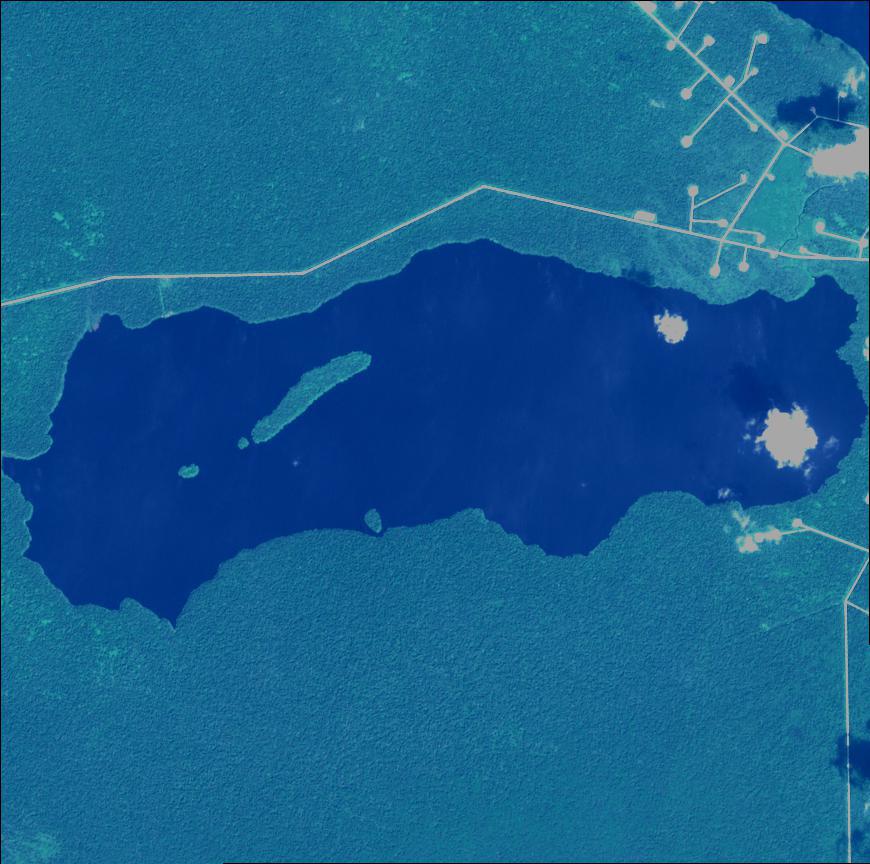
This script loads the saved model file, preprocesses a single test image, and runs prediction.
The result is a probability mask, which is then thresholded so values above 0.5 become white and values below become black.
The output is saved to disk and displayed with Matplotlib.
This makes it easy to validate that the model learned meaningful water shapes.
Once you can reliably run inference on one image, you can scale the same idea to folders, videos, or real-time pipelines.
Test Image :
### Import NumPy for preprocessing arrays. import numpy as np ### Import TensorFlow for loading the saved model. import tensorflow as tf ### Import OpenCV for reading and resizing images. import cv2 ### Import Matplotlib for visualization. import matplotlib.pyplot as plt ### load the model # load the model ### Define path to the saved best model. best_model_file = "/mnt/d/temp/models/efficientnetb0_unet_Water_bodies.keras" ### Load the model from disk. model = tf.keras.models.load_model(best_model_file) ### Print the model summary for verification. print(model.summary() ) ### --------------------------------------- # --------------------------------------- ### Define resize width for inference. Width = 128 ### Define resize height for inference. Height = 128 ### Show one image for test # Show one image for test ### Define test image path. path_test_image = "Best-Semantic-Segmentation-models/U-Net/Unet-Efficientnetb0 - Segment Satellite Images of Water Bodies/test_img.jpg" ### Read the test image in color mode. img = cv2.imread(path_test_image, cv2.IMREAD_COLOR) ### Convert BGR to RGB for correct display. img = cv2.cvtColor(img , cv2.COLOR_BGR2RGB) ### Resize the image to the model input size. img2 = cv2.resize(img , (Width , Height)) ### Normalize image values. img2 = img2 / 255.0 ### Expand batch dimension for model prediction. imgForModel = np.expand_dims(img2 , axis=0) ### Run model prediction. p = model.predict(imgForModel) ### Extract the predicted mask. resultMask = p[0] ### Print predicted mask shape. print(resultMask.shape) ### Since it is a binary segmentation , so any value above 0.5 means predict to 1, # Since it is a binary segmentation , so any value above 0.5 means predict to 1, ### and every value under 0.5 is predicted to 0 # and every value under 0.5 is predicted to 0 ### So , lets update the values of the predicted mask : under 0.5 to black , and above to white # So , lets update the values of the predicted mask : under 0.5 to black , and above to white ### Set values under or equal to 0.5 to 0. resultMask[resultMask <= 0.5] = 0 ### Set values above 0.5 to 255. resultMask[resultMask > 0.5 ] = 255 ### Define scale percentage for a smaller display. scale_precent = 25 ### Compute new width for display. width = int(img.shape[1] * scale_precent / 100) ### Compute new height for display. height = int(img.shape[0] * scale_precent / 100) ### Create resize dimension tuple. dim = (width, height) ### Resize the original image for display. img = cv2.resize(img , dim , interpolation= cv2.INTER_AREA) ### Resize the predicted mask for display. mask = cv2.resize(resultMask , dim , interpolation= cv2.INTER_AREA) ### Save the predicted mask image to disk. cv2.imwrite("/mnt/d/temp/water_predicted_mask.png", mask) ### Create a figure and set the subplots # Create a figure and set the subplots ### Create figure for side-by-side display. plt.figure(figsize=(10,5)) ### Display the first image # Display the first image ### Create subplot for original image. plt.subplot(1,2,1) ### Render the original image. plt.imshow(img) ### Add title for original image. plt.title("Origianl image") ### Hide axes. plt.axis('off') ### Display the second image # Display the second image ### Create subplot for mask. plt.subplot(1,2,2) ### Render the predicted mask. plt.imshow(mask , cmap='gray') ### Add title for mask. plt.title("Mask image") ### Hide axes. plt.axis('off') ### Adjust layout. plt.tight_layout() ### Show the final visualization. plt.show() FAQ
Why use EfficientNet B0 inside a U-Net for segmentation?
EfficientNet B0 is a strong encoder that extracts useful features with low compute. U-Net’s decoder and skip connections recover sharp spatial detail for masks.
Why convert mask values from 255 to 1?
Binary segmentation training is cleaner when masks are 0 and 1. It also makes thresholding and debugging much easier.
Why normalize images to the 0–1 range?
Normalization stabilizes gradients and helps training converge smoothly. It also fits common pretrained encoder expectations.
What is the biggest risk when augmenting masks?
The image and mask must be transformed in the exact same way. Misalignment teaches the model wrong pixel labels.
Why use ReduceLROnPlateau during training?
It lowers the learning rate when validation loss stops improving. This often unlocks better fine tuning without changing your code.
Why use EarlyStopping for segmentation training?
It prevents overfitting and saves time when validation loss no longer improves. It also reduces wasted epochs on unstable runs.
Why is batch size small in this tutorial?
Segmentation outputs full-resolution masks, which consumes VRAM quickly. A small batch size helps the model fit on more GPUs.
Why threshold the predicted mask at 0.5?
The sigmoid output is a probability between 0 and 1. A 0.5 threshold is a common default for turning probabilities into a binary mask.
Why can accuracy be misleading for segmentation?
Background pixels often dominate the image, so accuracy can look high even with poor masks. IoU or Dice are better later if you want stronger evaluation.
What is the fastest way to debug bad masks?
Visualize augmented image-mask pairs to confirm alignment. Then test inference on a training image to see if the model can learn a tiny subset.
Conclusion
You now have a complete, practical example of How to Train U-Net EfficientNet B0 for Water Segmentation from start to finish.
You set up a clean environment, downloaded a dataset with aligned images and masks, and validated your inputs visually before training.
That early verification step is one of the most important habits in segmentation work, because it prevents training on broken labels.
You also built a repeatable preprocessing pipeline.
Images were resized, normalized, and converted into NumPy arrays, and masks were binarized so the learning target stayed consistent.
Augmentation expanded the dataset and helped the model become more robust to viewpoint and orientation changes.
This is especially valuable for satellite imagery, where real-world scenes vary a lot.
On the modeling side, you combined EfficientNet B0 and U-Net into a strong encoder-decoder system.
EfficientNet B0 gives you compact but powerful features, and U-Net’s skip connections restore spatial detail so predicted masks remain sharp.
The training loop was protected with best-model saving, learning rate reduction, and early stopping.
This structure makes your results more stable and helps you converge without guessing.
Finally, you validated success with inference.
You loaded the saved model, predicted a mask for a new image, applied thresholding, saved the output to disk, and visualized the result.
From here, you can scale the same workflow to run over entire folders of satellite images or build a batch inference pipeline.
You also have a strong baseline that you can later upgrade with better metrics, higher resolution, and more advanced augmentations.
Connect :
☕ Buy me a coffee — https://ko-fi.com/eranfeit
🖥️ Email : feitgemel@gmail.com
🤝 Fiverr : https://www.fiverr.com/s/mB3Pbb
Enjoy,
Eran