 Skip to content
Last Updated on 23/12/2025 by Eran Feit
Introduction
Vision Transformer image classification is changing the way computer vision models understand images by treating them as sequences rather than grids of pixels.
Instead of relying on convolutional layers, this approach applies transformer architectures—originally designed for natural language processing—directly to visual data.
This shift enables models to capture long-range relationships across an image in a more flexible and scalable way.
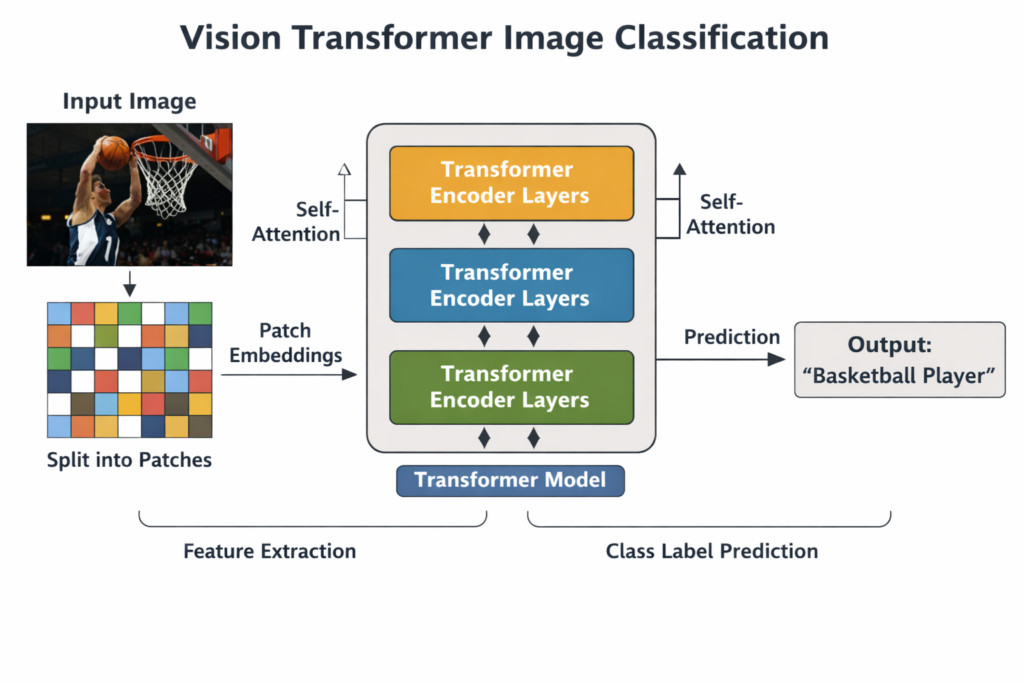
At a high level, Vision Transformer image classification works by splitting an image into fixed-size patches and converting each patch into a numerical embedding.
These embeddings are processed by transformer encoder layers that learn global context across the entire image.
The result is a model that can recognize complex patterns without relying on traditional convolution operations.
This approach has proven especially effective when trained on large datasets and paired with modern deep learning frameworks like PyTorch.
With the availability of pre-trained models, developers can now apply Vision Transformer image classification to real-world problems with minimal setup and strong performance.
As vision tasks continue to evolve, Vision Transformer image classification has become a practical and accessible solution for developers who want both accuracy and architectural simplicity.
It bridges the gap between state-of-the-art research and hands-on implementation in modern Python workflows.
Understanding Vision Transformer Image Classification in Practice

Vision Transformer image classification focuses on teaching a model to assign a meaningful label to an image by analyzing its global structure rather than local patterns alone.
Instead of scanning small regions with filters, the model observes the entire image context at every layer.
This allows it to understand relationships between distant objects, textures, and shapes more effectively.
The main target of Vision Transformer image classification is to produce a single, confident prediction that represents the dominant content of an image.
This makes it especially useful for tasks such as object recognition, scene understanding, and visual categorization.
By leveraging attention mechanisms, the model can prioritize the most informative regions of an image automatically.
At a high level, the process begins by dividing the image into patches, flattening them, and projecting them into a latent space.
These patch embeddings are then enriched with positional information so the model understands spatial relationships.
Transformer encoder layers refine these representations through self-attention and feed-forward networks.
The final stage of Vision Transformer image classification uses a classification head that maps the learned representation to a predefined set of labels.
This design makes the model both modular and adaptable, allowing developers to swap datasets, fine-tune models, or integrate them into larger computer vision pipelines.
The result is a clean and powerful framework for image classification that aligns well with modern deep learning practices.
A Hands-On Vision Transformer Image Classification Tutorial in Python
This tutorial-focused workflow shows how to apply Vision Transformer image classification using a clean, practical Python script.
The goal of the code is to take a single image, preprocess it correctly, run it through a pre-trained Vision Transformer model, and produce a readable classification result.
Instead of abstract theory, the emphasis here is on understanding how each part of the code contributes to a complete inference pipeline.
The code demonstrates a realistic end-to-end scenario that developers commonly face when working with modern computer vision models.
It starts with loading and preparing an image using OpenCV, continues with model and processor initialization from the Transformers library, and ends with displaying the predicted label visually on the image itself.
This approach helps bridge the gap between model theory and real application usage.
At a high level, the target of the code is inference rather than training.
It assumes that the Vision Transformer has already learned visual representations from large datasets and focuses on how to reuse that knowledge efficiently.
This makes the tutorial ideal for developers who want fast results without managing datasets or long training cycles.
By walking through a complete script, this tutorial helps clarify how Vision Transformer image classification fits into a typical Python computer vision workflow.
Each step is designed to be understandable, modular, and easy to adapt for different images or classification tasks.
The result is a practical foundation that can be expanded into larger projects or production-ready systems.
Link for the video tutorial : https://youtu.be/8k6oNjl2EgE
Code for the tutorial here : https://eranfeit.lemonsqueezy.com/buy/a1a0e3bf-edba-4de0-b622-dea4c281cd5a or here : https://ko-fi.com/s/ff8c7eeeb2
Link to the post for Medium users : https://medium.com/vision-transformers-tutorials/how-to-use-vision-transformer-for-image-classification-fe4d8a197f02
You can follow my blog here : https://eranfeit.net/blog/
Want to get started with Computer Vision or take your skills to the next level ?
Great Interactive Course : “Deep Learning for Images with PyTorch” here : https://datacamp.pxf.io/zxWxnm
If you’re just beginning, I recommend this step-by-step course designed to introduce you to the foundations of Computer Vision – Complete Computer Vision Bootcamp With PyTorch & TensorFlow
If you’re already experienced and looking for more advanced techniques, check out this deep-dive course – Modern Computer Vision GPT, PyTorch, Keras, OpenCV4
How to Use Vision Transformer for Image Classification
Vision Transformer image classification has become one of the most practical ways to apply transformer models to real computer vision problems.
Instead of relying only on convolution layers, Vision Transformers break an image into patches and learn global relationships using self-attention.
That makes them a great fit for modern Python workflows where you want strong results without building a full training pipeline.
In this tutorial, we will build a complete, working Vision Transformer image classification script.
You will set up a clean Conda environment, install the exact versions you need, run inference with a pre-trained ViT model from Hugging Face, and write the predicted label back onto the image using OpenCV.
The end result is a simple pipeline you can reuse for your own images and demos.
Setting up the environment and installing dependencies
Before running the code, the setup matters.
This installation script creates a clean Conda environment, installs a CUDA-compatible PyTorch build, and pins the key libraries used by the tutorial.
If your versions drift, you may run into strange runtime errors, so keeping this section consistent saves time.
### Create a new Conda environment named VIT with Python 3.11. conda create -n VIT python=3.11 ### Activate the environment so all installs go into the same isolated setup. conda activate VIT ### Check the CUDA version available on your machine. nvcc --version ### Install PyTorch 2.5.0 with CUDA 12.4 support using official channels. conda install pytorch==2.5.0 torchvision==0.20.0 torchaudio==2.5.0 pytorch-cuda=12.4 -c pytorch -c nvidia ### Install SymPy which may be required by parts of the PyTorch stack. pip install sympy==1.13.1 ### Install the Transformers library version used in this tutorial. pip install transformers==4.46.2 ### If you hit the input_ids length error, install the latest Transformers from GitHub. pip install --upgrade git+https://github.com/huggingface/transformers.git ### Install OpenCV for image loading, resizing, drawing labels, and displaying images. pip install opencv-python==4.10.0.84 Once this is done, your environment is ready to run Vision Transformer image classification exactly like the tutorial.
If you are using a different CUDA version than 12.4, keep PyTorch versions aligned with your system to avoid installation issues.
Loading and preparing the image for Vision Transformer classification
Before inference, the input image must be loaded and converted into the right shape and color format.
OpenCV loads images as BGR by default, but Vision Transformer preprocessing expects RGB.
This section also resizes the image to make it lighter to process and easier to display.
Test image :

### Import OpenCV to handle image loading and processing. import cv2 ### Define the path to the input image. img_path = "Visual-Language-Models-Tutorials/Simple Image classification using transformers/Basketball.jpg" ### Load the image from disk using OpenCV. img = cv2.imread(img_path) ### Set the scaling percentage to reduce the image size for faster processing. scale_percent = 20 ### Compute the new width using the scaling percentage. width = int(img.shape[1] * scale_percent / 100) ### Compute the new height using the scaling percentage. height = int(img.shape[0] * scale_percent / 100) ### Create a tuple of the new dimensions for OpenCV resize. dim = (width, height) ### Resize the image with area interpolation, which is good for downscaling. img = cv2.resize(img, dim, interpolation=cv2.INTER_AREA) ### Convert the image from BGR to RGB because the ViT processor expects RGB input. rgb_img = cv2.cvtColor(img, cv2.COLOR_BGR2RGB) Now the image is in the correct format for Vision Transformer image classification.
Loading the Vision Transformer model and running inference
Here we load a pre-trained Vision Transformer model and the matching image processor from Hugging Face.
The processor handles normalization and tensor formatting so the model receives the correct input structure.
Then we run the model forward pass to produce logits and map the best class index to a readable label.
### Import the Vision Transformer processor and image classification model. from transformers import ViTImageProcessor, ViTForImageClassification ### Load the processor for the pre-trained ViT checkpoint. image_processor = ViTImageProcessor.from_pretrained('google/vit-base-patch16-224') ### Load the pre-trained ViT image classification model. model = ViTForImageClassification.from_pretrained('google/vit-base-patch16-224') ### Convert the RGB image into model-ready tensors. inputs = image_processor(images=rgb_img, return_tensors="pt") ### Run inference by passing the tensors into the model. outputs = model(**inputs) ### Extract the raw output scores for each class. logits = outputs.logits ### Find the index of the class with the highest score. preidcted_class_idx = logits.argmax(-1).item() ### Print the predicted class index for debugging and learning. print(preidcted_class_idx) ### Convert the predicted index into a readable label string. predicted_label = model.config.id2label[preidcted_class_idx] ### Print the predicted label so you can see the result in the console. print(predicted_label) At this point, you have the predicted class label produced by Vision Transformer image classification.
Writing the predicted label on the image and saving the output
This part is where the tutorial becomes visually satisfying.
We overlay the predicted label directly on the image, save it to disk, and display it in a window.
This makes it easy to verify results quickly and reuse the output image in demos or blog posts.
### Choose a readable font for the label overlay. font = cv2.FONT_HERSHEY_SIMPLEX ### Set the font scale so the label is visible on the image. fontScale = 1 ### Choose a bright green color so the text stands out. fontColor = (0, 255, 0) ### Set the thickness of the text for better readability. thickness = 2 ### Draw the predicted label text on the image near the top-left region. cv2.putText(img, predicted_label, (50, 50), font, fontScale, fontColor, thickness, cv2.LINE_AA) ### Save the final labeled image to disk. cv2.imwrite('d:/temp/output.jpg', img) ### Display the image in an OpenCV window. cv2.imshow('image', img) ### Wait for a key press so the window does not close immediately. cv2.waitKey(0) ### Close all OpenCV windows cleanly. cv2.destroyAllWindows() This completes the full Vision Transformer image classification tutorial from installation to visible output.
Classification result :

FAQ
What does “Vision Transformer image classification” mean in simple terms?
It means using a transformer model to assign a label to an image by processing it as patches and predicting the most likely class.
Why do we convert the image from BGR to RGB?
OpenCV loads BGR by default, but the ViT processor expects RGB, so conversion helps avoid wrong-looking inputs and poor predictions.
Do I need to resize the image before inference?
Resizing is optional, but it can make testing faster and the display more convenient during local runs.
What is the role of ViTImageProcessor?
It normalizes the image and converts it into PyTorch tensors in the exact format the Vision Transformer model expects.
Can this code run without a GPU?
Yes, it runs on CPU. A GPU is optional and mainly improves inference speed.
How can I classify many images instead of one?
Loop over images and feed them as a batch to the image processor to speed up inference and scale the script.
Why might I get a Transformers input length error?
It can be caused by version mismatches. Installing the latest Transformers from GitHub often resolves the issue.
Where is the output saved?
The labeled image is saved with cv2.imwrite to the output path you defined, and you can change it to any folder.
What are logits in this script?
Logits are raw prediction scores for each class. The class with the highest logit becomes the predicted label.
Why use google/vit-base-patch16-224?
It is a popular pre-trained Vision Transformer checkpoint that works well for general image classification and is easy to reproduce.
Conclusion
Vision Transformer image classification is one of the simplest ways to bring transformer power into real computer vision projects.
In this post, you created a stable environment, installed compatible library versions, and ran a complete inference pipeline on a real image.
You also learned how preprocessing affects results, how logits translate into predicted labels, and how to visualize predictions directly on the output image.
From here, you can extend the same tutorial structure into batch prediction, webcam inference, fine-tuning on your own dataset, or even building an API.
Once you understand this flow, you can reuse it across many computer vision tasks with confidence and consistency.
Connect
☕ Buy me a coffee — https://ko-fi.com/eranfeit
🖥️ Email : feitgemel@gmail.com
🤝 Fiverr : https://www.fiverr.com/s/mB3Pbb
Enjoy,
Eran