 Skip to content
Last Updated on 03/03/2026 by Eran Feit
Introduction
In the rapidly evolving world of deep learning, the Vision Transformer PyTorch tutorial has become a vital resource for developers looking to move beyond traditional Convolutional Neural Networks (CNNs). Instead of scanning images with spatial filters, Vision Transformers (ViT) treat an image as a sequence of patches, enabling the model to learn global context and long-range dependencies more effectively. This guide provides a hands-on approach to building a ViT classifier from scratch, specifically designed for high-performance results on custom datasets.
Why Use Vision Transformers Over CNNs?
While CNNs are excellent for local feature extraction, they often miss the “big picture” in complex scenes. Vision Transformers use the Self-Attention mechanism to allow every patch of an image to communicate with every other patch. This is a game-changer for tasks like medical imaging or satellite analysis, where distant pixels often hold the key to accurate classification.
When working with real-world image data, flexibility is critical. Vision transformer image classification PyTorch enables developers to design models that are not limited to pre-trained ImageNet pipelines. By controlling every stage of the process, from patch embedding to transformer encoders and classification heads, it becomes possible to adapt the architecture to domain-specific datasets such as agriculture, medical imaging, or industrial inspection.
Another major advantage of vision transformers is their interpretability and scalability. Since images are broken into structured patches, the model learns relationships between regions rather than focusing only on local pixel neighborhoods. This makes the architecture especially suitable for datasets where visual patterns are spread across the entire image, rather than concentrated in a single object or corner.
This tutorial focuses on implementing vision transformer image classification PyTorch from the ground up. The goal is not only to train a working model, but also to deeply understand how images are transformed into patches, how attention operates across them, and how the final classification decision is produced using transformer-based reasoning.
Understanding Vision Transformers in Modern Computer Vision
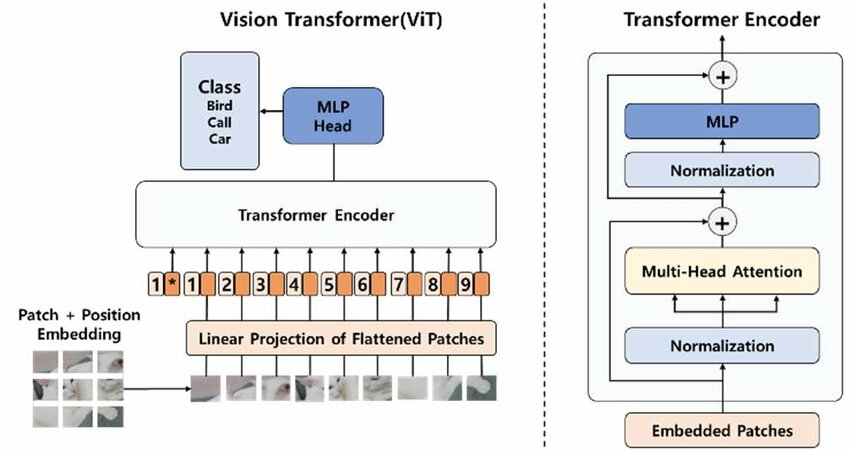
Vision Transformers represent a fundamental shift in how visual data is processed by deep learning models. Instead of relying on convolutional operations to extract local features, Vision Transformers treat an image as a sequence of visual tokens. Each token corresponds to a fixed-size image patch, allowing the model to analyze the entire image through attention mechanisms rather than spatial filters.
This architectural change enables the model to capture long-range dependencies across the image from the very first layers. Traditional convolutional neural networks gradually expand their receptive field as depth increases, whereas Vision Transformers can relate distant image regions immediately. This makes them particularly effective for tasks where global context is important, such as scene understanding, medical imaging, and fine-grained image classification.
From Image Pixels to Transformer Tokens
The core idea behind Vision Transformers is converting a 2D image into a 1D sequence that a transformer can process. The image is divided into non-overlapping patches of equal size, and each patch is flattened into a vector. These vectors are then projected into an embedding space using a learnable linear transformation, creating patch embeddings.
Because transformers do not inherently understand spatial structure, positional embeddings are added to each patch embedding. This step ensures the model retains information about where each patch came from in the original image. Without positional embeddings, the transformer would treat the image patches as an unordered set rather than a structured visual representation.
Self-Attention as the Core Learning Mechanism
Self-attention is the most important component of a Vision Transformer. It allows the model to dynamically weigh the importance of each patch relative to all other patches in the image. Through this mechanism, the model learns which regions contribute most to the final classification decision.
Multi-head self-attention further improves this process by allowing the model to focus on multiple relationships simultaneously. Each attention head can learn different visual patterns, such as texture, shape, color distribution, or spatial alignment. This parallel attention capability is a major reason Vision Transformers scale well with larger datasets and higher-resolution images.
Transformer Encoder Blocks and Residual Learning
Vision Transformers are built by stacking multiple transformer encoder blocks. Each block consists of a self-attention layer followed by a feed-forward neural network, with layer normalization and residual connections applied throughout. These residual connections stabilize training and help preserve information across deep architectures.
As the image representation flows through the encoder stack, the model progressively refines its understanding of the visual content. Early layers focus on low-level relationships between patches, while deeper layers capture higher-level semantic concepts. This hierarchical reasoning emerges naturally, even without convolutional layers.
Classification with a Learnable Class Token
To perform image classification, Vision Transformers introduce a special learnable token known as the class token. This token is prepended to the sequence of patch embeddings and serves as a global summary representation. After passing through all transformer layers, the output corresponding to this class token is used for prediction.
The classifier head typically consists of layer normalization followed by a fully connected layer. This design allows the model to aggregate information from all patches into a single embedding that represents the entire image. The final output corresponds to class probabilities for the classification task.
Understanding the Core Components of ViT Architecture
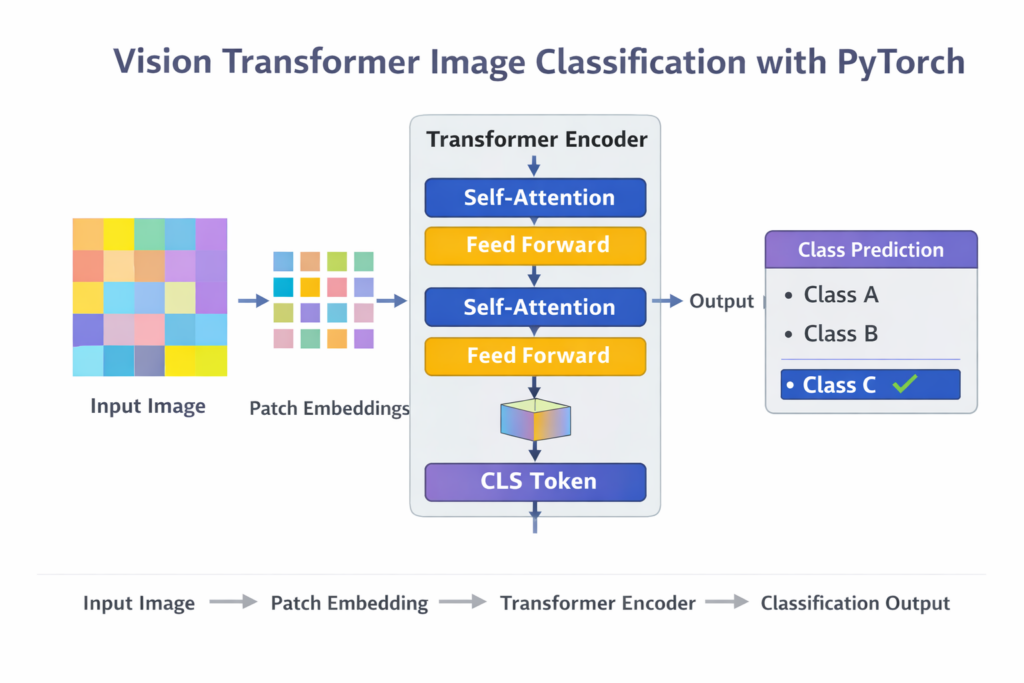
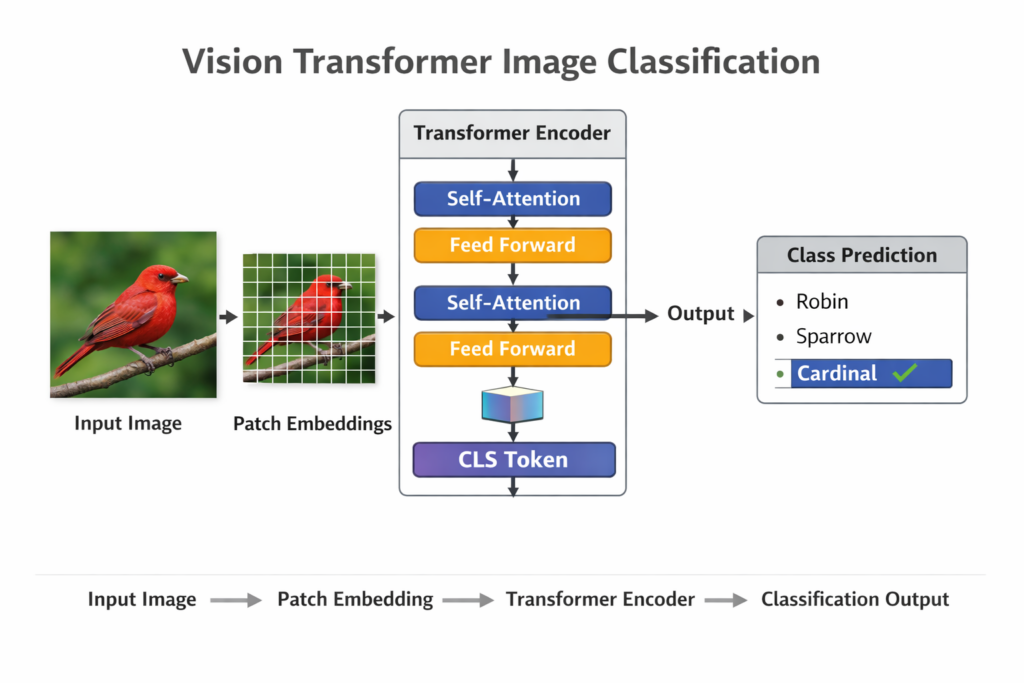
Building vision transformer image classification PyTorch models from scratch allows complete control over how images are processed and learned. Instead of treating images as grids for convolution, the Vision Transformer approach divides each image into fixed-size patches. Each patch is flattened and projected into an embedding space, forming a sequence that behaves similarly to words in a sentence for natural language models.
At a high level, the target of this approach is to replace convolutional feature extraction with attention-based learning. Multi-head self-attention layers enable the model to learn how different regions of an image relate to each other. This is particularly powerful for classification tasks where texture, shape, and spatial relationships matter more than isolated local features.
The architecture typically begins with a patch embedding layer, followed by learnable positional embeddings that preserve spatial information. These embeddings are passed through stacked transformer encoder blocks, each containing self-attention and feed-forward layers with residual connections. A special classification token aggregates the learned information and feeds it into a final linear layer for prediction.
Using PyTorch to implement vision transformer image classification provides both transparency and flexibility. Every component of the model can be customized, debugged, and visualized, making it ideal for educational purposes and production experimentation. This approach is especially useful when training on custom datasets, where understanding how the model learns is just as important as achieving high accuracy.
Implementation Workflow: From Raw Pixels to Predictions
This tutorial is designed as a hands-on, code-focused guide for building a complete image classification pipeline using a Vision Transformer in PyTorch. Instead of relying on high-level libraries or prebuilt ViT wrappers, the code walks through every core component step by step. The goal is to help you understand not only how to run a Vision Transformer, but how each part of the architecture is constructed and connected inside a real training workflow.
At a high level, the target of the code is to take a custom image dataset stored in folders, transform the images into patch-based representations, and train a transformer-based model to classify them into predefined classes. The implementation covers the full lifecycle of a deep learning project: dataset loading, preprocessing, model definition, training, evaluation, visualization of results, and final inference on unseen images. Each stage is implemented explicitly so nothing is hidden behind abstraction layers.
The core of the tutorial focuses on implementing the Vision Transformer architecture from scratch. The code defines custom PyTorch modules for patch embedding, multi-head self-attention, feed-forward networks, transformer encoder blocks, and the final classification head. By building these blocks manually, the tutorial shows how images are converted into sequences of embeddings, how attention operates across patches, and how a class token aggregates global information for prediction.
Another important objective of the code is to demonstrate how Vision Transformers can be applied to real-world custom datasets rather than benchmark-only examples. The training loop, optimizer configuration, loss function, and evaluation metrics are all set up to work with user-provided image folders. The final prediction step shows how to load trained weights and run inference on a single image, completing a practical end-to-end workflow that can be adapted to many image classification problems.
Link for the video tutorial : https://youtu.be/wr4vchc42Gw
Code for the tutorial here or here
Link to the post for Medium users here
You can follow my blog here : https://eranfeit.net/blog/
Want to get started with Computer Vision or take your skills to the next level ?
Great Interactive Course : “Deep Learning for Images with PyTorch” here : https://datacamp.pxf.io/zxWxnm
If you’re just beginning, I recommend this step-by-step course designed to introduce you to the foundations of Computer Vision – Complete Computer Vision Bootcamp With PyTorch & TensorFlow
If you’re already experienced and looking for more advanced techniques, check out this deep-dive course – Modern Computer Vision GPT, PyTorch, Keras, OpenCV4
Detailed PyTorch Implementation Step-by-Step
Vision Transformer image classification PyTorch is a powerful approach for building modern image classifiers on custom datasets.
Instead of relying on convolutional layers, this tutorial shows how to process images as sequences of patches and train a transformer-based model end to end.
The focus of this guide is practical and code-driven.
You will load a custom dataset, implement a Vision Transformer from scratch, train it, evaluate performance, and finally run inference on new images.
Each section explains the intent of the code while keeping everything transparent and customizable.
Preparing the Environment and Dataset for Vision Transformer Training
This section focuses on setting up a clean and reproducible environment for training a Vision Transformer on a custom image classification dataset.
The goal is to ensure that PyTorch, CUDA, and all required libraries are installed correctly before moving into model implementation.
A properly configured environment prevents runtime errors and guarantees consistent results across training and inference.
The dataset preparation step ensures that images are loaded correctly and mapped to class labels automatically.
This setup assumes a folder-based dataset structure, where each class is represented by its own directory.
This format works seamlessly with PyTorch’s ImageFolder dataset and DataLoader utilities.
### Create a new Conda environment with a compatible Python version. conda create -n VIT python=3.11 ### Activate the newly created environment. conda activate VIT ### Verify the installed CUDA version to ensure GPU compatibility. nvcc --version ### Install PyTorch with CUDA support for GPU acceleration. conda install pytorch==2.5.0 torchvision==0.20.0 torchaudio==2.5.0 pytorch-cuda=12.4 -c pytorch -c nvidia ### Install required Python libraries for transformers, evaluation, and visualization. pip install sympy==1.13.1 pip install transformers==4.46.2 pip install transformers[torch]==4.46.2 pip install opencv-python==4.10.0.84 pip install scikit-learn==1.6.1 pip install evaluate==0.4.3 pip install matplotlib==3.9.3 pip install torchinfo==1.8.0 Dataset Directory Structure
The dataset must be organized in a way that allows automatic label inference.
Each class should have its own folder inside the train, validation, and test directories.
This structure allows PyTorch to map folder names directly to class indices.
Guava Fruit Disease Dataset/ ├── train/ │ ├── Anthracnose/ │ ├── fruit_fly/ │ └── healthy_guava/ ├── val/ │ ├── Anthracnose/ │ ├── fruit_fly/ │ └── healthy_guava/ └── test/ ├── Anthracnose/ ├── fruit_fly/ └── healthy_guava/ Want the exact dataset so your results match mine?
If you want to reproduce the same training flow and compare your results to mine, I can share the dataset structure and what I used in this tutorial. Send me an email and mention the name of the tutorial / dataset , so I know what you’re requesting.
Setting Up the Environment and Data Loading Utilities
This first part prepares the execution environment and defines the utilities needed to load a custom image dataset for Vision Transformer training.
It focuses on importing required libraries, detecting the available hardware, defining dataset paths, and building a reusable DataLoader function.
The goal is to establish a clean and reliable data pipeline that will be reused throughout training and evaluation.
### Import PyTorch core library for tensor operations and model execution. import torch ### Import Matplotlib for visualizing images and plots. import matplotlib.pyplot as plt ### Import neural network modules for later model construction. from torch import nn ### Import torchvision transforms for image preprocessing. from torchvision import transforms ### Import OS utilities for filesystem handling. import os ### Import NumPy for numerical operations and tensor reshaping. import numpy as np ### Import torchvision datasets for folder-based image loading. from torchvision import datasets ### Import DataLoader for batching and shuffling data efficiently. from torch.utils.data import DataLoader ### Import model summary utility for inspecting model architecture later. from torchinfo import summary ### Select GPU if available, otherwise fall back to CPU. device = "cuda" if torch.cuda.is_available() else "cpu" ### Print the selected device to confirm execution context. print(device) ### Print the installed PyTorch version for environment verification. print("Torch version:", torch.__version__) ### Define the directory path for the training dataset. train_dir = 'D:/Data-Sets-Image-Classification/Guava Fruit Disease Dataset/train' ### Define the directory path for the validation dataset. valid_dir = 'D:/Data-Sets-Image-Classification/Guava Fruit Disease Dataset/val' ### Set the number of worker processes for data loading. NUM_WORKERS = 0 ### Define a helper function to create training and validation DataLoaders. def create_dataloaders ( train_dir: str, valid_dir: str, transform: transforms.Compose, batch_size: int, num_workers: int = NUM_WORKERS ): ### Load training images using folder names as class labels. train_data = datasets.ImageFolder(train_dir, transform=transform) ### Load validation images using the same preprocessing pipeline. valid_data = datasets.ImageFolder(valid_dir, transform=transform) ### Extract class names inferred from the training directory structure. class_names = train_data.classes ### Create the DataLoader for the training dataset with shuffling enabled. train_data_loader = DataLoader( train_data, batch_size=batch_size, shuffle=True, num_workers=num_workers, pin_memory=True) ### Create the DataLoader for the validation dataset without shuffling. valid_data_loader = DataLoader( valid_data, batch_size=batch_size, shuffle=False, num_workers=num_workers, pin_memory=True) ### Return both DataLoaders along with the detected class names. return train_data_loader, valid_data_loader, class_names Vision Transformer PyTorch Tutorial: Environment Summary
This section establishes the foundation for the entire training pipeline.
By validating the environment, dataset paths, and DataLoader creation, it ensures that images and labels will flow correctly into the model during training.
Preparing Image Transforms and Validating the Dataset
This second part focuses on defining image preprocessing, creating DataLoader instances, and validating the dataset visually.
It confirms that images are resized correctly, batches are formed as expected, and labels align with the dataset structure.
The section ends by displaying a sample image, which is a critical sanity check before training any deep learning model.
Applying the right augmentations is a critical step in this Vision Transformer PyTorch tutorial, as it ensures the ViT model learns robust features from the training data.
### Define the target image size expected by the Vision Transformer. IMG_SIZE = 224 ### Define the batch size used during training and validation. BATCH_SIZE = 32 ### Create a preprocessing pipeline to resize images and convert them to tensors. manual_transform = transforms.Compose([ transforms.Resize((IMG_SIZE, IMG_SIZE)), transforms.ToTensor() ]) ### Print the transform pipeline for verification. print(f"Manually created transform: {manual_transform}") ### Create training and validation DataLoaders using the helper function. train_data_loader, valid_data_loader, class_names = create_dataloaders( train_dir=train_dir, valid_dir=valid_dir, transform=manual_transform, batch_size=BATCH_SIZE, num_workers=NUM_WORKERS, ) ### Print DataLoader objects and detected class names for confirmation. print(train_data_loader, valid_data_loader, class_names) ### Calculate the total number of training images. num_train_images = len(train_data_loader.dataset) ### Calculate the total number of validation images. num_valid_images = len(valid_data_loader.dataset) ### Print the number of training images. print(f"Number of training images: {num_train_images}") ### Print the number of training batches. print("Number of training batches:", len(train_data_loader)) ### Print a visual separator in the console output. print("=====================================================================") ### Print the number of validation images. print(f"Number of validation images: {num_valid_images}") ### Print the number of validation batches. print("Number of validation batches:", len(valid_data_loader)) ### Retrieve the first batch of images and labels from the training DataLoader. image_batch , label_batch = next(iter(train_data_loader)) ### Select the first image and its corresponding label from the batch. image , label = image_batch[0], label_batch[0] ### Print a separator before displaying image details. print("=======================================================================") ### Print the shape of the image tensor to confirm expected dimensions. print(f"Image shape: {image.shape}") ### Convert the PyTorch image tensor to a NumPy array. image_np = image.numpy() ### Rearrange the image dimensions from channel-first to channel-last format. image_rearraged = np.transpose(image_np , (1 , 2, 0)) ### Set the plot title using the image class label. plt.title(class_names[label]) ### Display the image. plt.imshow(image_rearraged) ### Hide axis ticks for a cleaner visualization. plt.axis('off') ### Render the image to the screen. plt.show() Vision Transformer PyTorch Tutorial: Data Prep Summary
This section validates the preprocessing and loading steps visually and numerically.
By inspecting batch sizes, image shapes, and a sample image, it ensures the dataset is correctly prepared before moving on to model training.
Data Pipeline: Patch Embedding and Dataset Preparation
This code focuses on the most important idea behind a Vision Transformer.
Instead of feeding the whole image as one grid of pixels, the model first breaks the image into many small fixed-size patches.
Each patch acts like a “token”, similar to how words become tokens in NLP transformers.
After splitting, every patch is flattened and projected into an embedding vector, so the transformer can process the image as a sequence.
In this script, you also visualize the patch grid on top of a real image and display a few random patches.
That makes it easy to confirm that the patch size is correct and that the image is being divided exactly the way ViT expects.
By the end of this section, you validate that PatchEmbedding converts a single image into the classic ViT shape.
For a 224×224 image with 16×16 patches, the result becomes 196 patches, each represented by a 768-dimensional embedding.
This part prepares everything needed before building the Vision Transformer itself.
You import the required libraries, select GPU or CPU, define dataset paths, and build PyTorch DataLoaders.
You also apply image transforms so every image matches the Vision Transformer input size.
At the end, you validate the pipeline by printing dataset statistics and visualizing one sample image.
### Import PyTorch for tensors, model training, and GPU support. import torch ### Import Matplotlib for displaying sample images and visualizations. import matplotlib.pyplot as plt ### Import torchvision for additional dataset and transform utilities. import torchvision ### Import PyTorch neural network modules for building custom layers. from torch import nn ### Import torchvision transforms for resizing and preprocessing images. from torchvision import transforms ### Import OS utilities for filesystem handling and directory checks. import os ### Import NumPy for array operations and tensor dimension rearranging. import numpy as np ### Import torchvision datasets for folder-based image classification datasets. from torchvision import datasets ### Import DataLoader to batch and load dataset efficiently. from torch.utils.data import DataLoader ### Import summary tool to inspect model architecture later. from torchinfo import summary ### Select GPU if available, otherwise fall back to CPU. device = "cuda" if torch.cuda.is_available() else "cpu" ### Print the selected device so you know where computation will run. print(device) ### Print a label for the upcoming PyTorch version output. print("Torch version:") ### Print PyTorch version to verify environment consistency. print(torch.__version__) ### Define the training dataset directory path. train_dir = 'D:/Data-Sets-Image-Classification/Guava Fruit Disease Dataset/train' ### Define the validation dataset directory path. valid_dir = 'D:/Data-Sets-Image-Classification/Guava Fruit Disease Dataset/val' ### Optionally set NUM_WORKERS to the CPU count for faster loading. #NUM_WORKERS = os.cpu_count() ### Use 0 workers for compatibility and predictable behavior on Windows. NUM_WORKERS = 0 ### Print NUM_WORKERS to confirm DataLoader configuration. print("NUM_WORKERS:", NUM_WORKERS) ### Define a helper function to create DataLoaders and return class names. def create_dataloaders( train_dir: str, valid_dir: str, transform: transforms.Compose, batch_size: int, num_workers: int = NUM_WORKERS, ): ### Load training images from folders and apply transforms. train_data = datasets.ImageFolder(train_dir, transform=transform) ### Load validation images from folders and apply the same transforms. valid_data = datasets.ImageFolder(valid_dir, transform=transform) ### Extract class names inferred from the training folder structure. class_names = train_data.classes ### Create a shuffled training DataLoader for better generalization. train_dataloader = DataLoader( train_data, batch_size=batch_size, shuffle=True, num_workers=num_workers, pin_memory=True, ) ### Create a non-shuffled validation DataLoader for stable evaluation. valid_dataloader = DataLoader( valid_data, batch_size=batch_size, shuffle=False, num_workers=num_workers, pin_memory=True, ) ### Return both DataLoaders and the detected class names. return train_dataloader, valid_dataloader, class_names ### Define the input image size expected by a standard ViT setup. IMG_SIZE = 224 ### Create preprocessing transforms to resize images and convert them to tensors. manual_transforms = transforms.Compose([ transforms.Resize((IMG_SIZE, IMG_SIZE)), transforms.ToTensor(), ]) ### Print the transform pipeline to verify preprocessing steps. print(f"Manually created transforms: {manual_transforms}") ### Define the batch size for training and validation iteration. BATCH_SIZE = 32 ############################################################################# ### Comment block explaining the patching goal for ViT-based processing. # Devide the image to patches 16X16 ### Step note: convert an image into patches. #1- turn an image into patches ### Step note: flatten patch feature maps into one dimension. #2- flatten the patch feature maps into a single dimension ### Step note: target a flattened patch sequence representation. #3- Convert the output into Desried output (flattened 2D patches): (196, 768) -> N×(P2⋅C) #Current shape: (1, 768, 196) ### Mark the start of custom module definitions for the ViT pipeline. # 1. Create a class which subclasses nn.Module Summary:
You confirm that the dataset loads correctly, classes are detected automatically, batches are created properly, and images look correct before moving into patch-based processing.
Splitting Images Into Patches and Building the Vision Transformer Blocks
This part implements the core Vision Transformer components from scratch.
You define patch embedding to convert images into token sequences, then implement multi-head self-attention and MLP blocks.
After that, you assemble transformer encoder layers and build a full ViT model with class tokens and positional embeddings.
Finally, you visualize patch grids, display random patches, test the PatchEmbedding output shape, and print the embedding tensor for inspection.
As we continue this Vision Transformer PyTorch tutorial, you will see that patch creation is where the Transformer’s power really begins to shine compared to standard CNNs
### Define a PatchEmbedding module to convert an image into a sequence of patch embeddings. class PatchEmbedding(nn.Module): """Turns a 2D input image into a 1D sequence learnable embedding vector. Args: in_channels (int): Number of color channels for the input images. Defaults to 3. patch_size (int): Size of patches to convert input image into. Defaults to 16. embedding_dim (int): Size of embedding to turn image into. Defaults to 768. """ ### Initialize patch embedding components such as patch extractor and flatten layer. def __init__(self, in_channels:int=3, # color image patch_size:int=16, # the size of each patch ! 16X16 embedding_dim:int=768): # How many pixels : For each patch 16X16X3 = 768 embedding=pixels super().__init__() ### Use a Conv2d layer to extract non-overlapping patches like a sliding window. self.patcher = nn.Conv2d(in_channels=in_channels, out_channels=embedding_dim, kernel_size=patch_size, stride=patch_size, # We jump each time 16 (no over lapping) padding=0) ### Flatten patch feature maps to create a patch sequence representation. self.flatten = nn.Flatten(start_dim=2, # only flatten the feature map dimensions into a single vector end_dim=3) ### Forward pass converts input image tensor into [batch, num_patches, embedding_dim]. def forward(self, x): ### Check that image resolution is divisible by patch size. image_resolution = x.shape[-1] assert image_resolution % patch_size == 0, f"Input image size must be divisble by patch size, image shape: {image_resolution}, patch size: {patch_size}" ### Extract patches using Conv2d. x_patched = self.patcher(x) ### Flatten extracted patches into a patch sequence. x_flattened = self.flatten(x_patched) ### Permute output to match transformer input format. return x_flattened.permute(0, 2, 1) # adjust so the embedding is on the final dimension [batch_size, P^2•C, N] -> [batch_size, N, P^2•C] ### Define a multi-head self-attention block used inside transformer encoders. class MultiheadSelfAttentionBlock(nn.Module): """Creates a multi-head self-attention block ("MSA block" for short). """ ### Initialize layer norm and multi-head attention configuration. def __init__(self, embedding_dim:int=768, # Hidden size D from Table 1 for ViT-Base num_heads:int=12, # Heads from Table 1 for ViT-Base attn_dropout:float=0): # doesn't look like the paper uses any dropout in MSABlocks super().__init__() ### Apply LayerNorm before attention for more stable training. self.layer_norm = nn.LayerNorm(normalized_shape=embedding_dim) ### Use PyTorch MultiheadAttention to compute self-attention across patches. self.multihead_attn = nn.MultiheadAttention(embed_dim=embedding_dim, num_heads=num_heads, dropout=attn_dropout, batch_first=True) # does our batch dimension come first? ### Forward pass computes attention output for the patch embeddings. def forward(self, x): x = self.layer_norm(x) attn_output, _ = self.multihead_attn(query=x, # query embeddings key=x, # key embeddings value=x, # value embeddings need_weights=False) # do we need the weights or just the layer outputs? return attn_output ### Define an MLP block used after attention in each transformer encoder layer. class MLPBlock(nn.Module): """Creates a layer normalized multilayer perceptron block ("MLP block" for short).""" ### Initialize LayerNorm and the two-layer feed-forward network. def __init__(self, embedding_dim:int=768, # Hidden Size D from Table 1 for ViT-Base mlp_size:int=3072, # MLP size from Table 1 for ViT-Base dropout:float=0.1): # Dropout from Table 3 for ViT-Base super().__init__() ### Apply LayerNorm before the MLP for stable gradients. self.layer_norm = nn.LayerNorm(normalized_shape=embedding_dim) ### Build the feed-forward network used inside the transformer encoder. self.mlp = nn.Sequential( nn.Linear(in_features=embedding_dim, out_features=mlp_size), nn.GELU(), # "The MLP contains two layers with a GELU non-linearity (section 3.1)." nn.Dropout(p=dropout), nn.Linear(in_features=mlp_size, # needs to take same in_features as out_features of layer above out_features=embedding_dim), # take back to embedding_dim nn.Dropout(p=dropout) # "Dropout, when used, is applied after every dense layer.." ) ### Forward pass applies MLP transformation to each patch token. def forward(self, x): x = self.layer_norm(x) x = self.mlp(x) return x ### Combine attention and MLP into a single Transformer Encoder block with residual connections. class TransformerEncoderBlock(nn.Module): """Creates a Transformer Encoder block.""" ### Initialize attention and MLP sub-blocks for the transformer encoder. def __init__(self, embedding_dim:int=768, # Hidden size D from Table 1 for ViT-Base num_heads:int=12, # Heads from Table 1 for ViT-Base mlp_size:int=3072, # MLP size from Table 1 for ViT-Base mlp_dropout:float=0.1, # Amount of dropout for dense layers from Table 3 for ViT-Base attn_dropout:float=0): # Amount of dropout for attention layers super().__init__() ### Create the multi-head self-attention sub-layer. self.msa_block = MultiheadSelfAttentionBlock(embedding_dim=embedding_dim, num_heads=num_heads, attn_dropout=attn_dropout) ### Create the feed-forward MLP sub-layer. self.mlp_block = MLPBlock(embedding_dim=embedding_dim, mlp_size=mlp_size, dropout=mlp_dropout) ### Forward pass applies attention and MLP with residual connections. def forward(self, x): x = self.msa_block(x) + x x = self.mlp_block(x) + x return x ### Define the full Vision Transformer model that combines patch embedding, encoder blocks, and classifier head. class ViT(nn.Module): """Creates a Vision Transformer architecture with ViT-Base hyperparameters by default.""" ### Initialize ViT hyperparameters and create all learnable embeddings and layers. def __init__(self, img_size:int=224, # Training resolution from Table 3 in ViT paper in_channels:int=3, # Number of channels in input image patch_size:int=16, # Patch size num_transformer_layers:int=12, # Layers from Table 1 for ViT-Base embedding_dim:int=768, # Hidden size D from Table 1 for ViT-Base mlp_size:int=3072, # MLP size from Table 1 for ViT-Base num_heads:int=12, # Heads from Table 1 for ViT-Base attn_dropout:float=0, # Dropout for attention projection mlp_dropout:float=0.1, # Dropout for dense/MLP layers embedding_dropout:float=0.1, # Dropout for patch and position embeddings num_classes:int=1000): # Default for ImageNet but can customize this super().__init__() # don't forget the super().__init__()! ### Ensure the input image size can be evenly divided into patches. assert img_size % patch_size == 0, f"Image size must be divisible by patch size, image size: {img_size}, patch size: {patch_size}." ### Compute how many patches exist in the image. self.num_patches = (img_size * img_size) // patch_size**2 ### Create a learnable class token embedding. self.class_embedding = nn.Parameter(data=torch.randn(1, 1, embedding_dim), requires_grad=True) ### Create learnable positional embeddings for class token + patch tokens. self.position_embedding = nn.Parameter(data=torch.randn(1, self.num_patches+1, embedding_dim), requires_grad=True) ### Create dropout applied to embeddings before transformer blocks. self.embedding_dropout = nn.Dropout(p=embedding_dropout) ### Create patch embedding layer that converts images into patch token sequences. self.patch_embedding = PatchEmbedding(in_channels=in_channels, patch_size=patch_size, embedding_dim=embedding_dim) ### Stack transformer encoder blocks repeatedly to form the encoder. self.transformer_encoder = nn.Sequential(*[TransformerEncoderBlock(embedding_dim=embedding_dim, num_heads=num_heads, mlp_size=mlp_size, mlp_dropout=mlp_dropout) for _ in range(num_transformer_layers)]) ### Create the classification head to map embeddings to class logits. self.classifier = nn.Sequential( nn.LayerNorm(normalized_shape=embedding_dim), nn.Linear(in_features=embedding_dim, out_features=num_classes) ) ### Forward pass converts image -> patches -> transformer -> class prediction logits. def forward(self, x): ### Read the current batch size. batch_size = x.shape[0] ### Expand the learnable class token to match batch size. class_token = self.class_embedding.expand(batch_size, -1, -1) # "-1" means to infer the dimension (try this line on its own) ### Convert the image into patch embeddings. x = self.patch_embedding(x) ### Concatenate class token with patch embeddings. x = torch.cat((class_token, x), dim=1) ### Add positional embeddings to provide patch order information. x = self.position_embedding + x ### Apply embedding dropout. x = self.embedding_dropout(x) ### Pass the full sequence through transformer encoder blocks. x = self.transformer_encoder(x) ### Use the final class token output as the classifier input. x = self.classifier(x[:, 0]) # run on each sample in a batch at 0 index return x ### Create the DataLoaders and class list using the previously defined helper function. train_dataloader, valid_dataloader, class_names = create_dataloaders( train_dir=train_dir, valid_dir=valid_dir, transform=manual_transforms, batch_size=BATCH_SIZE, num_workers=NUM_WORKERS, # Adjust as needed ) ### Print DataLoaders and class names for confirmation. print(train_dataloader, valid_dataloader, class_names) ### Compute total number of images and batches in training set. num_train_images = len(train_dataloader.dataset) # Total images in the train dataset num_train_batches = len(train_dataloader) # Total batches in the train DataLoader print(f"Number of training images: {num_train_images}") print(f"Number of training batches: {num_train_batches}") print("==============================================") ### Compute total number of images and batches in validation set. num_valid_images = len(valid_dataloader.dataset) # Total images in the validation dataset num_valid_batches = len(valid_dataloader) # Total batches in the validation DataLoader print(f"Number of validation images: {num_valid_images}") print(f"Number of validation batches: {num_valid_batches}") ### Get the first batch from the training DataLoader for visualization. image_batch, label_batch = next(iter(train_dataloader)) ### Select the first image and label from the batch. image, label = image_batch[0], label_batch[0] print("==============================================") print(image.shape, label) ### Convert the image tensor to NumPy for Matplotlib display. image_np = image.numpy() ### Rearrange the tensor from [C, H, W] to [H, W, C] format. image_rearranged = np.transpose(image_np, (1, 2, 0)) ### Plot and display the sample image with its class name. plt.title(class_names[label]) plt.imshow(image_rearranged) plt.axis('off') plt.show() ### Define a function that overlays patch grid lines on an image to visualize patch splitting. def show_image_with_patches(image_tensor, patch_size=16): """ Displays an image with grid lines showing how it's divided into patches. Args: image_tensor: PyTorch tensor of shape [C, H, W] patch_size: Size of patches (default: 16) """ # Convert tensor to numpy image_np = image_tensor.numpy() # Rearrange the dimensions from [C, H, W] to [H, W, C] image_rearranged = np.transpose(image_np, (1, 2, 0)) # Create figure and axis fig, ax = plt.subplots(figsize=(10, 10)) # Display the image ax.imshow(image_rearranged) # Get image dimensions h, w = image_rearranged.shape[0], image_rearranged.shape[1] # Add grid lines to show patches # Vertical lines for i in range(0, w, patch_size): ax.axvline(x=i, color='yellow', linestyle='-', linewidth=1) # Horizontal lines for i in range(0, h, patch_size): ax.axhline(y=i, color='yellow', linestyle='-', linewidth=1) # Add title and remove axis labels ax.set_title(f"Image divided into {patch_size}x{patch_size} patches") ax.axis('off') # Calculate total number of patches num_patches = (h // patch_size) * (w // patch_size) plt.figtext(0.5, 0.01, f"Total patches: {num_patches}", ha="center", fontsize=12, bbox={"facecolor":"yellow", "alpha":0.5, "pad":5}) plt.tight_layout() plt.show() ### Define a function that extracts and displays random image patches. def show_image_patches(image_tensor, patch_size=16, num_patches_to_show=4): """ Extracts and displays individual patches from the image. Args: image_tensor: PyTorch tensor of shape [C, H, W] patch_size: Size of patches (default: 16) num_patches_to_show: Number of random patches to display """ # Convert tensor to numpy image_np = image_tensor.numpy() # Rearrange dimensions image_rearranged = np.transpose(image_np, (1, 2, 0)) # Get image dimensions h, w = image_rearranged.shape[0], image_rearranged.shape[1] # Calculate how many patches fit in each dimension patches_h = h // patch_size patches_w = w // patch_size # Create a figure to display patches fig, axs = plt.subplots(1, num_patches_to_show, figsize=(12, 3)) # Choose random patches to display np.random.seed(42) # For reproducibility for i in range(num_patches_to_show): # Select random patch coordinates patch_h = np.random.randint(0, patches_h) patch_w = np.random.randint(0, patches_w) # Extract the patch patch = image_rearranged[ patch_h * patch_size:(patch_h + 1) * patch_size, patch_w * patch_size:(patch_w + 1) * patch_size, : ] # Display the patch axs[i].imshow(patch) axs[i].set_title(f"Patch ({patch_h},{patch_w})") axs[i].axis('off') plt.tight_layout() plt.suptitle(f"Random {patch_size}x{patch_size} patches from the image", y=1.05) plt.show() ### Print a message before showing the patch grid visualization. print("\nVisualizing the image divided into patches:") patch_size = 16 ### Display the patch grid on top of the selected image. show_image_with_patches(image, patch_size=patch_size) ### Print a message before showing individual patch samples. print("\nDisplaying some individual patches:") ### Display random patches extracted from the selected image. show_image_patches(image, patch_size=patch_size, num_patches_to_show=4) ########################################################################## # PatchEmbedding layer ready # Let's test it on single image !!!! ####################################### ### Define a helper function to set random seeds for reproducible results. def set_seeds(seed: int=42): """Sets random sets for torch operations. Args: seed (int, optional): Random seed to set. Defaults to 42. """ # Set the seed for general torch operations torch.manual_seed(seed) # Set the seed for CUDA torch operations (ones that happen on the GPU) torch.cuda.manual_seed(seed) ### Set a fixed seed so patch selection and operations are repeatable. set_seeds() ### Create an instance of PatchEmbedding to test patch conversion on a single image. patchify = PatchEmbedding(in_channels=3, patch_size=16, embedding_dim=768) ### Print the input image shape after adding a batch dimension. print(f"Input image shape: {image.unsqueeze(0).shape}") ### Convert the selected image into patch embeddings. patch_embedded_image = patchify(image.unsqueeze(0)) # add an extra batch dimension on the 0th index, otherwise will error ### Print the output shape to confirm [1, 196, 768] format. print(f"Output patch embedding shape: {patch_embedded_image.shape}") # The result is [1 , 196 , 768] # -> 1 means batch # -> 196 means that this image was split to 196 patches # 768 -> is the number of pixes / embeding / pixesls in each patch ################################################## ### Print the full patch embedding tensor to inspect its values. print(patch_embedded_image) ### Print a final formatted description of the patch embedding output shape. print(f"Patch embedding shape: {patch_embedded_image.shape} -> [batch_size, number_of_patches, embedding_dimension]") Summary:
You turn a real image into patch tokens, build the transformer-based processing pipeline, and verify the patch embedding output matches the expected ViT format.
Splitting Images Into Patches and Training a Vision Transformer Classifier
This code is built around the key Vision Transformer idea: an image is not processed as a single pixel grid, but as a sequence of small patches.
The moment you split a 224×224 image into 16×16 patches, you transform the vision problem into something that looks like a transformer-friendly “token sequence”.
After patching, the code embeds each patch into a fixed-size vector, then feeds the patch sequence into stacked transformer encoder layers.
This is where self-attention learns relationships between patches, allowing the model to understand patterns like “spots + leaf texture” across different regions of the image.
Once the patch pipeline is ready, the script moves into a full training workflow.
It creates DataLoaders for your custom dataset, builds the ViT model, trains it with Adam and cross-entropy loss, saves the model weights, and plots loss/accuracy curves so you can see if learning is stable.
By the end, you have a complete patch-based ViT training pipeline.
You can take any new image, split it into patches internally through PatchEmbedding, and output a class prediction—exactly how Vision Transformer image classification works in practice.
Loading the Dataset and Setting Up DataLoaders
This first part prepares everything you need before any patching or transformer work can happen.
You import the core libraries, detect whether you can use CUDA, and define where your training and validation folders live.
Then you build a reusable create_dataloaders() function that loads images with ImageFolder and returns clean PyTorch DataLoaders.
Finally, you define the standard ViT image size (224×224), create a resize+tensor transform, and print it so you can verify the preprocessing pipeline.
### Import PyTorch for tensors, GPU support, and deep learning utilities. import torch ### Import Matplotlib for plotting images and training curves. import matplotlib.pyplot as plt ### Import neural network modules like layers and model building blocks. from torch import nn ### Import torchvision transforms for resizing and converting images to tensors. from torchvision import transforms ### Import os for filesystem path handling. import os ### Import NumPy for tensor-to-array conversion and array manipulation. import numpy as np ### Import torchvision datasets to load images from folders using ImageFolder. from torchvision import datasets ### Import DataLoader to batch and shuffle the dataset during training. from torch.utils.data import DataLoader ### Import summary to inspect the architecture and parameter counts of models. from torchinfo import summary ### Select GPU if available, otherwise fall back to CPU. device = "cuda" if torch.cuda.is_available() else "cpu" ### Print which device will be used for training and inference. print(device) ### Print the installed PyTorch version for debugging and reproducibility. print("Torch version:", torch.__version__) ### Define the folder path containing training images organized by class. train_dir = 'D:/Data-Sets-Image-Classification/Guava Fruit Disease Dataset/train' ### Define the folder path containing validation images organized by class. valid_dir = 'D:/Data-Sets-Image-Classification/Guava Fruit Disease Dataset/val' ### Set number of DataLoader workers (0 is safest on Windows for debugging). NUM_WORKERS = 0 ### Define a helper function to load ImageFolder datasets and wrap them in DataLoaders. def create_dataloaders ( train_dir: str, valid_dir: str, transform: transforms.Compose, batch_size: int, num_workers: int = NUM_WORKERS ): ### Load training images from folder structure using the provided transform. train_data = datasets.ImageFolder(train_dir, transform=transform) ### Load validation images from folder structure using the provided transform. valid_data = datasets.ImageFolder(valid_dir, transform=transform) ### Extract class names based on folder names in the training directory. class_names = train_data.classes ### Create the training DataLoader with shuffling enabled for better generalization. train_data_loader = DataLoader( train_data, batch_size=batch_size, shuffle=True, num_workers=num_workers, pin_memory=True) ### Create the validation DataLoader without shuffling to keep evaluation stable. valid_data_loader = DataLoader( valid_data, batch_size=batch_size, shuffle=False, num_workers=num_workers, pin_memory=True) ### Return both loaders plus the list of class names for training and inference. return train_data_loader, valid_data_loader, class_names ### Set the target image size expected by ViT models (224x224). IMG_SIZE = 224 ### Choose a batch size for training and validation. BATCH_SIZE = 32 ### Define a transform pipeline to resize images and convert them to tensors. manual_transform = transforms.Compose([ transforms.Resize((IMG_SIZE, IMG_SIZE)), transforms.ToTensor() ]) ### Print the transform pipeline so you can confirm preprocessing steps. print(f"Manually created transform: {manual_transform}") Summary:
You set up the input pipeline: paths → transforms → datasets → DataLoaders → class names.
This makes the rest of the project (patching, training, evaluation) consistent and repeatable.
Running the Data Pipeline and Visualizing a Sample Image
This second part is the “sanity check” section.
You actually run the DataLoader creation, print what you got back, and calculate how many images and batches exist in train and validation.
Then you grab one batch, extract the first image, convert it into NumPy format, and display it with its class label.
This step is super important because it confirms that the dataset is loading correctly, labels match folders, and images look normal before training.
### Create the train and validation DataLoaders and extract class names. train_data_loader, valid_data_loader, class_names = create_dataloaders( train_dir=train_dir, valid_dir=valid_dir, transform=manual_transform, batch_size=BATCH_SIZE, num_workers=NUM_WORKERS, ) ### Print the DataLoader objects and class names to confirm everything loaded correctly. print(train_data_loader, valid_data_loader, class_names) ### Count the number of images in the training dataset. num_train_images = len(train_data_loader.dataset) ### Count the number of images in the validation dataset. num_valid_images = len(valid_data_loader.dataset) ### Print training dataset statistics. print(f"Number of training images: {num_train_images}") ### Print how many training batches exist based on batch size. print("Number of training batches:", len(train_data_loader)) ### Print a separator for cleaner output. print("=====================================================================") ### Print validation dataset statistics. print(f"Number of validation images: {num_valid_images}") ### Print how many validation batches exist based on batch size. print("Number of validation batches:", len(valid_data_loader)) ### Pull the first batch from the training DataLoader. image_batch , label_batch = next(iter(train_data_loader)) ### Select the first image and label from the batch. image , label = image_batch[0], label_batch[0] ### Print a separator for readability. print("=======================================================================") ### Print the shape of the image tensor to confirm it matches [C, H, W]. print(f"Image shape: {image.shape}") ### Convert the image tensor into a NumPy array for Matplotlib visualization. image_np = image.numpy() ### Rearrange channels from (C, H, W) to (H, W, C) for correct display. image_rearraged = np.transpose(image_np , (1 , 2, 0)) ### Set the plot title using the class name corresponding to the label index. plt.title(class_names[label]) ### Display the image. plt.imshow(image_rearraged) ### Hide axis ticks and labels for a cleaner visualization. plt.axis('off') ### Render the plot window. plt.show() Summary:
You validate the pipeline end-to-end and visualize a real training sample.
If something is wrong here (paths, classes, transforms), you’ll catch it early instead of wasting time training a broken setup.

Testing the Vision Transformer on a New Image
This part is the “real check” step where you take your trained Vision Transformer and see if it can correctly classify an image it hasn’t seen before.
Instead of training or building layers, the goal here is simple: load the learned weights, run inference, and validate that the prediction makes sense.
You start by reading the class names from your test folder so the model’s output index maps to the correct label.
Then you rebuild the ViT architecture with num_classes=len(class_names) and load the saved .pth weights into it.
This is important because weights alone don’t store the architecture — you still need the same model definition to use them.
After that, you pick one image file, preprocess it to match what the model expects (resize to 224×224, convert to tensor, normalize), and add a batch dimension.
Finally, you run the forward pass, convert logits to probabilities with softmax, choose the predicted class with argmax, and plot the image with the predicted label and confidence so you can visually confirm the result.
The final stage of this Vision Transformer PyTorch tutorial is inference, where we take a completely new image and see how well our trained ViT architecture performs.
Building the ViT Blocks and Model Architecture
This first part defines the full Vision Transformer pipeline as reusable PyTorch modules.
It starts with PatchEmbedding, which performs the most important ViT trick: split the image into fixed-size patches and convert each patch into an embedding vector.
Then it defines the transformer building blocks: multi-head self-attention, an MLP feedforward block, and a transformer encoder block with residual connections.
Finally, it combines everything into a complete ViT class that adds class tokens, position embeddings, transformer layers, and a classifier head.
### Import PyTorch for tensor operations and model loading. import torch ### Import neural network building blocks like Conv2d, Linear, LayerNorm, etc. from torch import nn ### Import os for reading folders and building file paths. import os ### Define a module that splits an image into patches and converts patches into embeddings. class PatchEmbedding(nn.Module): """Turns a 2D input image into a 1D sequence learnable embedding vector. Args: in_channels (int): Number of color channels for the input images. Defaults to 3. patch_size (int): Size of patches to convert input image into. Defaults to 16. embedding_dim (int): Size of embedding to turn image into. Defaults to 768. """ ### Initialize patch embedding layers: a Conv2d patcher plus a flatten operation. def __init__(self, in_channels:int=3, # color image patch_size:int=16, # the size of each patch ! 16X16 embedding_dim:int=768): # How many pixels : For each patch 16X16X3 = 768 embedding=pixels super().__init__() ### Convert the image into non-overlapping patches using a convolution with stride=patch_size. self.patcher = nn.Conv2d(in_channels=in_channels, out_channels=embedding_dim, kernel_size=patch_size, stride=patch_size, # We jump each time 16 (no over lapping) padding=0) ### Flatten the patch feature maps into a sequence dimension. self.flatten = nn.Flatten(start_dim=2, # only flatten the feature map dimensions into a single vector end_dim=3) ### Forward pass: patch the image, flatten, then permute into [batch, num_patches, embedding_dim]. def forward(self, x): ### Check that the input resolution is divisible by the patch size. image_resolution = x.shape[-1] assert image_resolution % patch_size == 0, f"Input image size must be divisble by patch size, image shape: {image_resolution}, patch size: {patch_size}" ### Apply convolution-based patching. x_patched = self.patcher(x) ### Flatten spatial patch grid into a patch sequence. x_flattened = self.flatten(x_patched) ### Permute to match transformer expected shape. return x_flattened.permute(0, 2, 1) # adjust so the embedding is on the final dimension [batch_size, P^2•C, N] -> [batch_size, N, P^2•C] ### Define a Multi-Head Self-Attention block with LayerNorm for transformer inputs. class MultiheadSelfAttentionBlock(nn.Module): """Creates a multi-head self-attention block ("MSA block" for short). """ ### Initialize LayerNorm and MultiheadAttention layers. def __init__(self, embedding_dim:int=768, # Hidden size D from Table 1 for ViT-Base num_heads:int=12, # Heads from Table 1 for ViT-Base attn_dropout:float=0): # doesn't look like the paper uses any dropout in MSABlocks super().__init__() ### Normalize the embeddings before attention (pre-norm transformer). self.layer_norm = nn.LayerNorm(normalized_shape=embedding_dim) ### Apply self-attention across the patch sequence. self.multihead_attn = nn.MultiheadAttention(embed_dim=embedding_dim, num_heads=num_heads, dropout=attn_dropout, batch_first=True) # does our batch dimension come first? ### Forward pass: normalize then compute self-attention output. def forward(self, x): ### Apply LayerNorm to stabilize attention training. x = self.layer_norm(x) ### Compute attention using x as query, key, and value (self-attention). attn_output, _ = self.multihead_attn(query=x, # query embeddings key=x, # key embeddings value=x, # value embeddings need_weights=False) # do we need the weights or just the layer outputs? ### Return attention-transformed sequence. return attn_output ### Define a feedforward MLP block with GELU and Dropout for transformer layers. class MLPBlock(nn.Module): """Creates a layer normalized multilayer perceptron block ("MLP block" for short).""" ### Initialize LayerNorm and a 2-layer MLP with GELU + dropout. def __init__(self, embedding_dim:int=768, # Hidden Size D from Table 1 for ViT-Base mlp_size:int=3072, # MLP size from Table 1 for ViT-Base dropout:float=0.1): # Dropout from Table 3 for ViT-Base super().__init__() ### Normalize embeddings before applying the MLP. self.layer_norm = nn.LayerNorm(normalized_shape=embedding_dim) ### Feedforward network that expands then projects back to embedding_dim. self.mlp = nn.Sequential( nn.Linear(in_features=embedding_dim, out_features=mlp_size), nn.GELU(), # "The MLP contains two layers with a GELU non-linearity (section 3.1)." nn.Dropout(p=dropout), nn.Linear(in_features=mlp_size, # needs to take same in_features as out_features of layer above out_features=embedding_dim), # take back to embedding_dim nn.Dropout(p=dropout) # "Dropout, when used, is applied after every dense layer.." ) ### Forward pass: normalize then apply the MLP. def forward(self, x): ### Apply LayerNorm before the feedforward network. x = self.layer_norm(x) ### Apply the MLP transformation. x = self.mlp(x) ### Return the transformed sequence. return x ### Define one transformer encoder layer with attention + MLP and residual connections. class TransformerEncoderBlock(nn.Module): """Creates a Transformer Encoder block.""" ### Initialize attention and MLP blocks. def __init__(self, embedding_dim:int=768, # Hidden size D from Table 1 for ViT-Base num_heads:int=12, # Heads from Table 1 for ViT-Base mlp_size:int=3072, # MLP size from Table 1 for ViT-Base mlp_dropout:float=0.1, # Amount of dropout for dense layers from Table 3 for ViT-Base attn_dropout:float=0): # Amount of dropout for attention layers super().__init__() ### Create the self-attention block. self.msa_block = MultiheadSelfAttentionBlock(embedding_dim=embedding_dim, num_heads=num_heads, attn_dropout=attn_dropout) ### Create the feedforward MLP block. self.mlp_block = MLPBlock(embedding_dim=embedding_dim, mlp_size=mlp_size, dropout=mlp_dropout) ### Forward pass: apply attention + residual, then MLP + residual. def forward(self, x): ### Residual connection around attention. x = self.msa_block(x) + x ### Residual connection around MLP. x = self.mlp_block(x) + x ### Return the output sequence. return x ### Define the full Vision Transformer model for image classification. class ViT(nn.Module): """Creates a Vision Transformer architecture with ViT-Base hyperparameters by default.""" ### Initialize patch embedding, transformer encoder stack, and classification head. def __init__(self, img_size:int=224, # Training resolution from Table 3 in ViT paper in_channels:int=3, # Number of channels in input image patch_size:int=16, # Patch size num_transformer_layers:int=12, # Layers from Table 1 for ViT-Base embedding_dim:int=768, # Hidden size D from Table 1 for ViT-Base mlp_size:int=3072, # MLP size from Table 1 for ViT-Base num_heads:int=12, # Heads from Table 1 for ViT-Base attn_dropout:float=0, # Dropout for attention projection mlp_dropout:float=0.1, # Dropout for dense/MLP layers embedding_dropout:float=0.1, # Dropout for patch and position embeddings num_classes:int=1000): # Default for ImageNet but can customize this super().__init__() # don't forget the super().__init__()! ### Ensure image size is compatible with patch size. assert img_size % patch_size == 0, f"Image size must be divisible by patch size, image size: {img_size}, patch size: {patch_size}." ### Compute the number of patches produced by the patching step. self.num_patches = (img_size * img_size) // patch_size**2 ### Create a learnable [CLS] token embedding. self.class_embedding = nn.Parameter(data=torch.randn(1, 1, embedding_dim), requires_grad=True) ### Create learnable positional embeddings for patches + class token. self.position_embedding = nn.Parameter(data=torch.randn(1, self.num_patches+1, embedding_dim), requires_grad=True) ### Apply dropout after embeddings to reduce overfitting. self.embedding_dropout = nn.Dropout(p=embedding_dropout) ### Convert image to patch embeddings. self.patch_embedding = PatchEmbedding(in_channels=in_channels, patch_size=patch_size, embedding_dim=embedding_dim) ### Stack multiple transformer encoder blocks to form the backbone. self.transformer_encoder = nn.Sequential(*[TransformerEncoderBlock(embedding_dim=embedding_dim, num_heads=num_heads, mlp_size=mlp_size, mlp_dropout=mlp_dropout) for _ in range(num_transformer_layers)]) ### Final classification head that uses the class token output. self.classifier = nn.Sequential( nn.LayerNorm(normalized_shape=embedding_dim), nn.Linear(in_features=embedding_dim, out_features=num_classes) ) ### Forward pass: patch + class token + position embedding → transformer → classify. def forward(self, x): ### Extract batch size to expand the class token properly. batch_size = x.shape[0] ### Expand learnable class token to match the batch size. class_token = self.class_embedding.expand(batch_size, -1, -1) # "-1" means to infer the dimension (try this line on its own) ### Convert image into a sequence of patch embeddings. x = self.patch_embedding(x) ### Concatenate class token to the beginning of the patch sequence. x = torch.cat((class_token, x), dim=1) ### Add positional embeddings so the model can learn patch order information. x = self.position_embedding + x ### Apply dropout to embeddings before transformer layers. x = self.embedding_dropout(x) ### Pass embeddings through stacked transformer encoder blocks. x = self.transformer_encoder(x) ### Use the class token output as the representation for classification. x = self.classifier(x[:, 0]) # run on each sample in a batch at 0 index ### Return final logits for classification. return x Summary:
You implement the full ViT architecture from scratch: patches → embeddings → self-attention encoders → classification token output.
This is the core model you’ll later load with trained weights and use for prediction.
Loading Trained Weights and Predicting on a New Image
This second part is the practical inference workflow.
You define test_dir, extract class names from folder names, and build the ViT model with the correct number of classes.
Then you load the trained weights (.pth) into the model, switch to evaluation mode, and prepare a single image for prediction.
Finally, you preprocess the image (resize, normalize), run a forward pass, convert logits into probabilities, pick the predicted class, and visualize the result with confidence.
### Set the patch size to match the model training configuration. patch_size =16 ### Define the test dataset directory for inference. test_dir = 'D:/Data-Sets-Image-Classification/Guava Fruit Disease Dataset/test' ### Collect class names from folder names inside the test directory. class_names = [folder for folder in os.listdir(test_dir) if os.path.isdir(os.path.join(test_dir, folder))] ### Print the detected classes to confirm ordering and labels. print(class_names) ### Create a ViT model instance with the correct number of output classes. vit = ViT(num_classes=len(class_names)) ### Load the saved model weights into the ViT architecture. vit.load_state_dict(torch.load('d:/temp/Guava_vit_model_weights2.pth', weights_only=True) ) # Load the state dictionary ### Switch the model into evaluation mode to disable dropout and training-specific behavior. vit.eval() ### Choose a test image and define its true class for comparison. image_name = "15_unsharp_clahe_augmented_2.png" ### Store the true label string so you can compare prediction vs reality. TrueClass = "Anthracnose" ### Build the full path to the test image file. custom_image_path = os.path.join(test_dir,TrueClass, image_name) ### Import PIL for image loading. from PIL import Image ### Import Matplotlib for displaying and saving prediction results. import matplotlib.pyplot as plt ### Import torchvision transforms for preprocessing. from torchvision import transforms ### Set the expected input size for the ViT model. IMG_SIZE = 224 ### Select GPU if available, otherwise use CPU for inference. device = "cuda" if torch.cuda.is_available() else "cpu" ### Load the image from disk using PIL. img = Image.open(custom_image_path) ### Define preprocessing: resize, convert to tensor, normalize for model stability. image_transform = transforms.Compose( [ transforms.Resize((IMG_SIZE, IMG_SIZE)), transforms.ToTensor(), transforms.Normalize( mean=[0.485, 0.456, 0.406], std=[0.229, 0.224, 0.225] ), ] ) ### Move the model to the selected device (GPU/CPU). vit.to(device) ### Ensure the model stays in evaluation mode for deterministic inference. vit.eval() ### Transform the image and add a batch dimension so shape becomes [1, C, H, W]. transformed_image = image_transform(img).unsqueeze(dim=0) ### Run the model forward pass to get raw logits for each class. target_image_pred = vit(transformed_image.to(device)) ### Convert logits into probabilities using softmax. target_image_pred_probs = torch.softmax(target_image_pred, dim=1) ### Pick the class index with the highest probability. target_image_pred_label = torch.argmax(target_image_pred_probs, dim=1) ### Create a new figure for visualization. plt.figure() ### Display the original image. plt.imshow(img) ### Show true label, predicted label, and probability in the title. plt.title( f"True: {TrueClass} | Pred: {class_names[target_image_pred_label]} | Prob: {target_image_pred_probs.max():.3f}" ) ### Hide axes for a cleaner output image. plt.axis(False) ### Save the result image to disk for later use in your tutorial or report. plt.savefig("d:/temp/15_unsharp_clahe_augmented_2.png", bbox_inches="tight", dpi=300) # Adjust filename, dpi, and bbox as needed ### Display the plot. plt.show() Summary:
You take a trained ViT and run it like a real classifier: load weights → preprocess input → forward pass → softmax → argmax → show predicted label.
This is the final “deploy-style” step that proves your patch-based ViT can classify unseen images from your dataset.
Vision Transformer PyTorch Tutorial FAQ
What is a Vision Transformer (ViT) in image classification?
A Vision Transformer (ViT) classifies images by splitting them into small patches and processing them like a sequence, similar to how Transformers process words in NLP. It learns relationships between patches using self-attention.
How does patch embedding work in a ViT model?
Patch embedding cuts the image into fixed-size patches (for example 16×16) and projects each patch into a vector (embedding). These embeddings become the input “tokens” for the Transformer encoder.
Why is 224×224 commonly used for ViT image inputs?
224×224 is a common training resolution used in many pretrained vision models, including ViT variants. It also divides cleanly into 16×16 patches, producing a consistent number of tokens.
How many patches do you get with 224×224 images and 16×16 patches?
A 224×224 image split into 16×16 patches creates (224/16) × (224/16) = 14 × 14 = 196 patches. ViT then adds a class token, so the sequence length becomes 197.
What does the class token do in a Vision Transformer?
The class token is a learnable vector added to the patch sequence. After the Transformer encoder, the model uses the class token output as a summary representation for classification.
Why do ViT models use positional embeddings?
Self-attention does not inherently know patch order or location. Positional embeddings add spatial information so the model can learn where each patch came from in the image.
What normalization should I use when testing a ViT image classifier?
If you trained with normalized inputs, you must apply the same normalization during inference. A common choice is ImageNet mean/std, but the best option is to match whatever preprocessing you used in training.
How do I load ViT weights and run inference in PyTorch?
Recreate the same ViT architecture, load the state_dict weights, and set the model to eval mode. Then transform the image, add a batch dimension, send it to the same device, and run a forward pass.
Why do I need model.eval() and torch.no_grad() for prediction?
model.eval() disables training-only layers like dropout and uses running stats where relevant. torch.no_grad() reduces memory usage and speeds up inference by turning off gradient tracking.
What are common reasons ViT accuracy is low on a custom dataset?
Low accuracy often comes from too little data, weak augmentations, label noise, or mismatched preprocessing between training and inference. Fine-tuning a pretrained ViT and using consistent normalization usually improves results.
Conclusion
Vision Transformer image classification PyTorch offers a flexible and powerful way to build modern image classifiers on custom datasets.
By implementing each component from scratch, this tutorial provides a deep understanding of how transformers operate on visual data.
The approach demonstrated here is adaptable, scalable, and suitable for real-world applications.
With proper tuning and dataset preparation, Vision Transformers can outperform traditional CNN-based models while offering better interpretability and global reasoning.
Connect
☕ Buy me a coffee — https://ko-fi.com/eranfeit
🖥️ Email : feitgemel@gmail.com
🤝 Fiverr : https://www.fiverr.com/s/mB3Pbb
Enjoy,
Eran