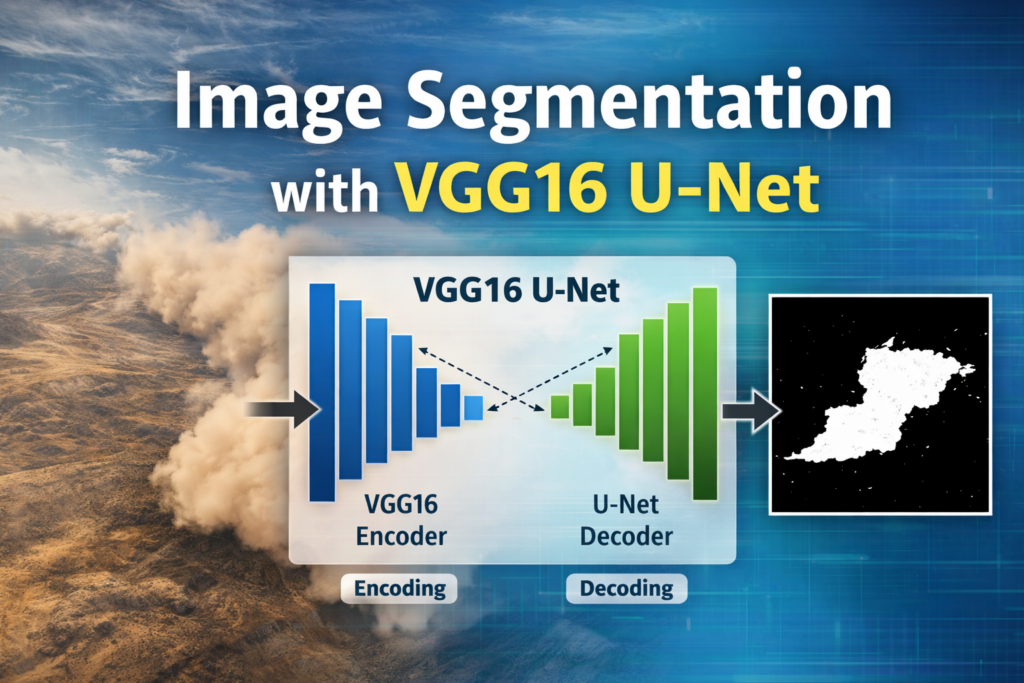
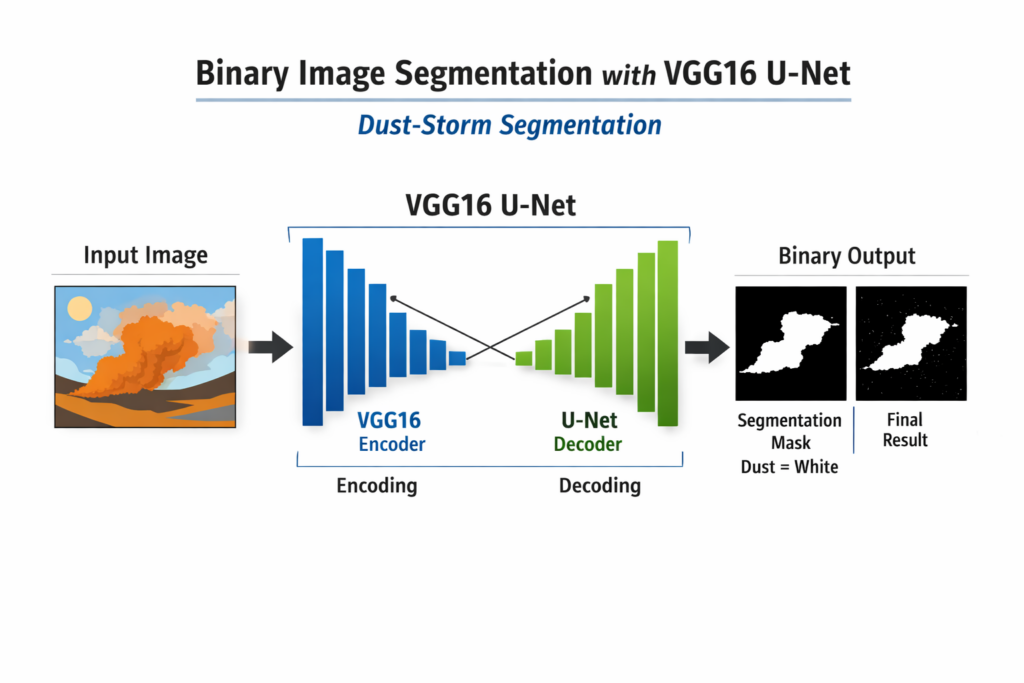
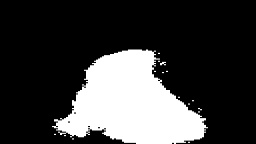
Binary Image Segmentation with VGG16 U-Net for Dust Storm Detection / Image Segmentation, TensorFlow tutorials Contents hide 1 The Role of Transfer Learning in Atmospheric Image Segmentation 2 Why U-Net and VGG-16 are a great match for dust-storm segmentation 3 Building a VGG16 U-Net pipeline for dust-storm segmentation 3.1 Master Computer Vision 4 Core Concepts: Binary Image Segmentation for Computer Vision 5 Setting up the project and installing the dependencies 6 Data Preparation: Preprocessing Satellite Imagery for Dust Storm Analysis 6.1 Want the exact dataset so your results match mine? 6.2 What you should get after downloading 6.3 Where to place the dataset on your machine 6.4 Path to use inside the code 7 Loading a sample image and understanding the mask values 8 Building the preprocessing pipeline with augmentation and saving NumPy files 9 Splitting the dataset into train and validation sets 10 Training the VGG16 U-Net model and visualizing the learning curves 11 Defining the VGG16 U-Net architecture and running inference on a test image 12 Testing the trained VGG16 U-Net on a single dust-storm image 13 FAQ 13.1 What is binary image segmentation in this project? 13.2 Why combine VGG16 with U-Net? 13.3 Why convert masks from 255 to 1? 13.4 What image size should I train with? 13.5 Why normalize images by dividing by 255? 13.6 What does the sigmoid output mean? 13.7 Why use flips and rotations as augmentation? 13.8 What does ModelCheckpoint save? 13.9 How can I spot overfitting? 13.10 Why threshold at 0.5 during inference? 14 Conclusion 14.1 Connect : Last Updated on 22/04/2026 by Eran Feit The Role of Transfer Learning in Atmospheric Image Segmentation Implementing binary image segmentation with VGG16 U-Net for dust storm detection is a critical challenge in environmental monitoring and remote sensing. Standard convolutional neural networks often struggle with the amorphous, low-contrast boundaries of dust clouds. However, by leveraging a pre-trained VGG16 backbone as an encoder within a U-Net framework, we can achieve high-precision pixel-wise classification even with limited training data. In this tutorial, you will solve the problem of identifying complex weather phenomena by building an end-to-end deep learning pipeline that transforms raw imagery into accurate, actionable segmentation masks. U-Net has become one of the most trusted deep learning architectures for image segmentation, because it doesn’t just recognize what’s in an image, it labels every pixel with a clear decision.Instead of predicting a single class for the whole image, U-Net produces a detailed mask that separates the target region from everything else.That pixel-level precision is exactly what you need in binary segmentation tasks, where the goal is a clean “storm vs background” output that you can measure, visualize, and refine.In this project, U-Net is the core model that turns raw satellite-like imagery into a meaningful, usable segmentation map. VGG-16 is a classic convolutional neural network that became popular for its simple, reliable block structure and strong feature extraction capabilities.Even though it was originally designed for image classification, the early and mid-level features it learns are extremely useful for segmentation as well.Those features capture edges, textures, and shapes—signals that matter when you want to detect dust-storm plumes that blend into terrain and sky.When VGG-16 is used as the encoder inside a U-Net, it gives the network a powerful “front half” that can learn meaningful representations faster and more consistently. Putting them together—U-Net + VGG-16—creates a practical, high-performance approach for Binary Image Segmentation with VGG16 U-Net.The encoder compresses the image into rich feature maps, while the decoder restores spatial detail and builds a full-resolution mask.Skip connections bridge the two sides so the model doesn’t lose fine boundaries while downsampling, which is critical when storm edges are soft and irregular.The result is a segmentation pipeline that can learn from labeled masks and produce clean binary outputs that highlight dust-storm regions clearly. This combination also fits real-world workflows well, because it supports efficient training, stable convergence, and straightforward inference.You can feed the model normalized images, train with binary cross-entropy, and evaluate progress using accuracy and loss curves over time.Once trained, the same U-Net VGG-16 model can predict a mask for a single image and convert probabilities into a crisp black-and-white result with a simple threshold.That makes it easy to move from experimentation to deployment, where you want fast, repeatable dust-storm segmentation predictions. Why U-Net and VGG-16 are a great match for dust-storm segmentation U-Net is designed around a simple idea: compress the image to learn “what matters,” then expand it back to full resolution so every pixel gets a label.This structure is ideal for segmentation because the output must preserve location and shape, not just category.For dust-storm segmentation, that means the network needs to understand both the global context of the scene and the subtle boundaries where storm plumes fade into the background.U-Net handles this by combining deep semantic understanding with fine-grained spatial detail, producing masks that are both meaningful and precise. VGG-16 plays the role of a strong encoder, extracting layered features that progressively represent edges, textures, and larger patterns.In storm imagery, these patterns aren’t always sharp, so the encoder needs to be robust enough to detect weak signals that still indicate a storm region.VGG-16’s repeated convolution blocks build stable feature hierarchies, which helps the overall model learn faster and generalize better.When paired with U-Net’s decoder, those features are transformed back into a dense prediction that matches the original image size. A key reason this pairing works so well is the skip-connection design in U-Net.Downsampling makes the model smarter but can blur or erase the fine details needed for crisp masks.Skip connections solve that by copying higher-resolution features from the encoder and combining them with the decoder’s upsampled features.For dust-storm segmentation, this helps the model keep track of soft edges and thin, wispy regions that are easy to lose in deeper layers. At a high level, the target is to train a U-Net VGG-16 model that can separate dust-storm plumes from terrain and background with a binary mask.That means your labels are simple—storm pixels are one value, background pixels are another—but the visual challenge is not simple at all.Storm regions vary in thickness, brightness, and texture, and they often overlap visually with clouds or sandy terrain.A U-Net with a VGG-16 encoder is a strong solution because it can learn those subtle cues and still return a clean, interpretable segmentation output. More U-Net segmentation tutorials U-Net Image Segmentation: How to Segment Persons in Images A practical U-Net walkthrough that reinforces masks, preprocessing, and binary outputs. U-Net Image Segmentation with TensorFlow/Keras (Oxford-IIIT Pets) A full TensorFlow U-Net pipeline that mirrors the same train and inference structure. How to Train U-Net EfficientNet-B0 for Water Segmentation Great companion if you want to compare different backbones for segmentation tasks. Subscription FormSend me tutorials VGG16 U-Net for dust storm segmentation Building a VGG16 U-Net pipeline for dust-storm segmentation This tutorial code is all about taking a real dust-storm dataset and turning it into a complete, working segmentation pipeline you can run end-to-end.The target is simple to describe but challenging in practice: given an input image, predict a binary mask where dust-storm pixels are separated from the background.That’s why the workflow focuses on both the data side and the model side, so training is stable and inference results are easy to interpret.By the end, you have a repeatable process that loads images and masks, trains a VGG16 U-Net, and produces clean black-and-white segmentation outputs. The first part of the code concentrates on preparing the dataset correctly, because segmentation depends heavily on pixel-accurate labels.Images are loaded, resized to a fixed resolution, normalized to floating-point values, and stored as NumPy arrays for fast training.Masks are loaded as grayscale, resized to match the images, and converted from 0/255 values into a clean binary format of 0 and 1.This makes the ground truth consistent with the model’s sigmoid output and keeps the training objective aligned with the final goal. To make the model more robust, the pipeline includes data augmentation that expands the training set without collecting new samples.Flips and rotations create realistic variations of the same dust patterns, helping the model handle storms that appear in different orientations and shapes.Because augmentation is applied to both images and masks, the model learns the same transformation on the input and the correct pixel labels.This step is especially useful when the dataset is limited, since segmentation models usually benefit from more diverse training examples. The training section then builds a VGG16 U-Net architecture and compiles it for binary segmentation.A VGG16 encoder extracts strong hierarchical features, while the U-Net decoder restores spatial details so the mask aligns with the original image layout.Training uses binary cross-entropy to match the binary mask target, along with callbacks that save the best model and reduce the learning rate if validation loss stalls.The accuracy and loss plots at the end give a quick, visual check that learning is progressing and that the model is not overfitting too early. Finally, the inference code shows how to load the saved model and run prediction on a single test image.The output is a probability map, which is then thresholded so anything above 0.5 becomes white and anything below becomes black.This produces a true binary mask that’s easy to visualize, save as an image, and compare against the original input.It’s the same practical workflow you’d use in a real project: train once, then run fast predictions on new images whenever you need dust-storm segmentation. Link to the video here You can download the code here or here TRY IT NOW Master Computer Vision Follow my latest tutorials and AI insights on my Personal Blog. Beginner Complete CV Bootcamp Foundation using PyTorch & TensorFlow. Get Started → Interactive Deep Learning with PyTorch Hands-on practice in an interactive environment. Start Learning → Advanced Modern CV: GPT & OpenCV4 Vision GPT and production-ready models. Go Advanced → Binary image segmentation process diagram Core Concepts: Binary Image Segmentation for Computer Vision Tip me and Download the code Dust storms are one of those real-world problems where a simple bounding box is not enough.You usually want a clean pixel-level mask that separates the storm plume from the terrain.That is exactly what binary segmentation gives you with a U-Net style architecture. In this tutorial, we build a VGG16 U-Net in TensorFlow and train it to segment dust storm regions.You will preprocess the dataset into NumPy arrays, train with callbacks, and then run inference on a test image.By the end, you will have a complete end-to-end pipeline you can reuse for other segmentation datasets. Setting up the project and installing the dependencies A clean environment is the easiest way to avoid TensorFlow version conflicts.Here we create a Conda environment and install TensorFlow with the right CUDA option for your setup. This project uses OpenCV for image loading, NumPy for data storage, and Matplotlib for quick visual checks.Once everything is installed, you download the dust storm dataset and you are ready to preprocess it. ### Create a dedicated Conda environment for the project. conda create -n U-Net python=3.11 ### Activate the environment so installs go into the right place. conda activate U-Net ### Verify CUDA is available if you plan to train on GPU. nvcc --version ### Install TensorFlow with CUDA support on WSL2 for best performance. pip install tensorflow[and-cuda]==2.17.1 ### Install the CPU-only TensorFlow build if you run on Windows without GPU. pip install tensorflow==2.17.1 ### Install the extra libraries used for preprocessing and visualization. pip install opencv-python==4.10.0.84 pip install scikit-learn==1.6.0 pip install matplotlib==3.10.0 ### Create a dedicated Conda environment for the project. conda create -n U-Net python=3.11 ### Activate the environment so installs go into the right place. conda activate U-Net ### Verify CUDA is available if you plan to train on GPU. nvcc --version ### Install TensorFlow with CUDA support on WSL2 for best performance. pip install tensorflow[and-cuda]==2.17.1 ### Install the CPU-only TensorFlow build if you run on Windows without GPU. pip install tensorflow==2.17.1 ### Install the extra libraries used for preprocessing and visualization. pip install opencv-python==4.10.0.84 pip install scikit-learn==1.6.0 pip install matplotlib==3.10.0 Data Preparation: Preprocessing Satellite Imagery for Dust Storm Analysis To train a U-Net model, you need paired image and mask files.In this tutorial, the dataset contains dust-storm images and matching annotation masks, where the mask highlights the storm region.Once you download it, you will point your code to the dataset folders and load the images from disk.After that, you will convert everything into NumPy arrays for fast training. Want the exact dataset so your results match mine? If you want to reproduce the same training flow and compare your results to mine, I can share the dataset structure and what I used in this tutorial. Send me an email and mention the name of the tutorial / dataset , so I know what you’re requesting. 🖥️ Email: feitgemel@gmail.com What you should get after downloading After extracting the dataset, you should see two main folders.One folder contains the input images, and the other folder contains the ground-truth masks.The images are standard color files, while the masks are grayscale PNG files with names that end in _GT.png.This naming pattern is important because the preprocessing code builds the mask filename from the image filename. Where to place the dataset on your machine For WSL2, a convenient option is storing the dataset on your Windows drive and accessing it through /mnt.That matches the path style used in the code and keeps the dataset easy to manage.You can place the dataset anywhere you want, as long as you update the path variable in the preprocessing script.The most important thing is that the images and annotations folders remain inside the dataset directory. Path to use inside the code In the preprocessing script, you set the dataset root folder like this.Make sure it matches the exact folder name on your machine after extraction.Then the code automatically builds the image and mask folders using that root path. ### Set the dataset root folder. path = "/mnt/d/Data-Sets-Object-Segmentation/ELAI Dust Storm Dataset from MODIS" ### Folder that contains the input images. imagespath = path + "/images" ### Folder that contains the annotation masks. maskPath = path + "/annotations" ### Set the dataset root folder. path = "/mnt/d/Data-Sets-Object-Segmentation/ELAI Dust Storm Dataset from MODIS" ### Folder that contains the input images. imagespath = path + "/images" ### Folder that contains the annotation masks. maskPath = path + "/annotations" Loading a sample image and understanding the mask values Before preprocessing the full dataset, it helps to inspect one image and its ground-truth mask.This lets you confirm the image loads correctly, the mask aligns, and the pixel values make sense. Because this is binary segmentation, we want masks to be only 0 and 1 during training.So we convert any non-zero pixel in the mask into 1, which makes the model target clean and consistent. ### Import OpenCV for reading images and masks. import cv2 ### Import NumPy for numeric operations and array storage. import numpy as np ### Import OS helpers for file handling. import os ### Import Matplotlib for visualization. #import pandas as pd import matplotlib.pyplot as plt ### Import tqdm to show a progress bar while loading files. from tqdm import tqdm ### Define the working image size to reduce memory usage. Height = 128 # Reduce if there are memory errors messages Width = 128 # Reduce if there are memory errors messages ### Create containers for training and validation images and masks. allImages = [] maskImages = [] allValidateImages = [] maskValidateImages = [] ### Define your dataset root path. path = "/mnt/d/Data-Sets-Object-Segmentation/ELAI Dust Storm Dataset from MODIS" ### Set the images folder path. imagespath = path + "/images" ### Set the annotations folder path. maskPath = path + "/annotations" # TrainFile = path+"segmentation/train.txt" # validateFIle = path+"segmentation/val.txt" # # train # df = pd.read_csv(TrainFile, sep=" ", header=None) # filesList = df[0].values # get the list out of the pandas varaiable #load one image and one mask ### Load one RGB image for a quick sanity check. img = cv2.imread(imagespath+"/13.jpg", cv2.IMREAD_COLOR) ### Convert BGR to RGB so Matplotlib shows correct colors. img = cv2.cvtColor(img ,cv2.COLOR_BGR2RGB) ### Load the matching mask in grayscale. mask = cv2.imread(maskPath+"/13_GT.png" , cv2.IMREAD_GRAYSCALE) # Create a figure and set the subplots plt.figure(figsize=(10, 5)) # Display the first image plt.subplot(1, 2, 1) plt.imshow(img) plt.title("Original Image") plt.axis('off') # Remove axis for better visualization # Display the second image plt.subplot(1, 2, 2) plt.imshow(mask, cmap='gray') plt.title("Mask Image") plt.axis('off') # Remove axis for better visualization # Show the images plt.tight_layout() plt.show() ### Resize the mask to a tiny size just to inspect unique values quickly. mask16 = cv2.resize(mask, (16, 16)) print(mask16) # 0 is the background and 255 is the Object (white object) #We prefer than the values will be 0 and 1 ### Convert any non-zero mask pixel into 1 for binary segmentation. mask16[mask16 > 0] = 1 print("++++++++++++++++++++++++++++++++++++++++++++++++++++++++++++++++++") print(mask16) print(mask16.shape) ### Import OpenCV for reading images and masks. import cv2 ### Import NumPy for numeric operations and array storage. import numpy as np ### Import OS helpers for file handling. import os ### Import Matplotlib for visualization. #import pandas as pd import matplotlib.pyplot as plt ### Import tqdm to show a progress bar while loading files. from tqdm import tqdm ### Define the working image size to reduce memory usage. Height = 128 # Reduce if there are memory errors messages Width = 128 # Reduce if there are memory errors messages ### Create containers for training and validation images and masks. allImages = [] maskImages = [] allValidateImages = [] maskValidateImages = [] ### Define your dataset root path. path = "/mnt/d/Data-Sets-Object-Segmentation/ELAI Dust Storm Dataset from MODIS" ### Set the images folder path. imagespath = path + "/images" ### Set the annotations folder path. maskPath = path + "/annotations" # TrainFile = path+"segmentation/train.txt" # validateFIle = path+"segmentation/val.txt" # # train # df = pd.read_csv(TrainFile, sep=" ", header=None) # filesList = df[0].values # get the list out of the pandas varaiable #load one image and one mask ### Load one RGB image for a quick sanity check. img = cv2.imread(imagespath+"/13.jpg", cv2.IMREAD_COLOR) ### Convert BGR to RGB so Matplotlib shows correct colors. img = cv2.cvtColor(img ,cv2.COLOR_BGR2RGB) ### Load the matching mask in grayscale. mask = cv2.imread(maskPath+"/13_GT.png" , cv2.IMREAD_GRAYSCALE) # Create a figure and set the subplots plt.figure(figsize=(10, 5)) # Display the first image plt.subplot(1, 2, 1) plt.imshow(img) plt.title("Original Image") plt.axis('off') # Remove axis for better visualization # Display the second image plt.subplot(1, 2, 2) plt.imshow(mask, cmap='gray') plt.title("Mask Image") plt.axis('off') # Remove axis for better visualization # Show the images plt.tight_layout() plt.show() ### Resize the mask to a tiny size just to inspect unique values quickly. mask16 = cv2.resize(mask, (16, 16)) print(mask16) # 0 is the background and 255 is the Object (white object) #We prefer than the values will be 0 and 1 ### Convert any non-zero mask pixel into 1 for binary segmentation. mask16[mask16 > 0] = 1 print("++++++++++++++++++++++++++++++++++++++++++++++++++++++++++++++++++") print(mask16) print(mask16.shape) Building the preprocessing pipeline with augmentation and saving NumPy files A segmentation model is only as good as the data pipeline feeding it.Here we load every image, resize it to a fixed shape, normalize pixel values, and convert masks to binary arrays. To improve generalization, we also add basic augmentation like flips and rotations.Finally, we save everything as .npy files so training becomes fast and repeatable. # ======================================================================================================== # A U G M E N T A T I O N # step2 - create sample of augmentation : ### Import imgaug for data augmentation. import imgaug as ia ### Import imgaug augmenters for flips and rotations. import imgaug.augmenters as iaa ### Create a horizontal flip augmenter. hflip= iaa.Fliplr(p=1.0) hflipImg = hflip.augment_image(img) ### Create a vertical flip augmenter. vflip= iaa.Flipud(p=1.0) vflipImg= vflip.augment_image(img) ### Create a rotation augmenter. rot1 = iaa.Affine(rotate=(-50,20)) rotImg = rot1.augment_image(img) # Display all images side-by-side plt.figure(figsize=(15, 5)) # Original Image plt.subplot(1, 4, 1) plt.imshow(img) plt.title("Original Image") plt.axis('off') # Horizontally Flipped Image plt.subplot(1, 4, 2) plt.imshow(hflipImg) plt.title("Horizontally Flipped") plt.axis('off') # Vertically Flipped Image plt.subplot(1, 4, 3) plt.imshow(vflipImg) plt.title("Vertically Flipped") plt.axis('off') # Rotated Image plt.subplot(1, 4, 4) plt.imshow(rotImg) plt.title("Rotated Image") plt.axis('off') # Show the images plt.tight_layout() plt.show() # load the train images and masks print("Start loading the train images and masks .................") #images_path = os.path.join(path,"images") #masks_path = os.path.join(path,"masks") # List all files in the folder images_file_list = [f for f in os.listdir(imagespath) if os.path.isfile(os.path.join(imagespath, f))] masks_file_list = [f for f in os.listdir(maskPath) if os.path.isfile(os.path.join(maskPath, f))] # Print the file list #print("Files in folder:", images_file_list) print(str(len(images_file_list)) + " images found") for file in tqdm(images_file_list, desc="Processing images"): filePathForImage = imagespath+"/"+file # Create the name for the mask file XXX_GT.png instead of XXX.jpg name, ext = os.path.splitext(file) new_filename_for_mask = f"{name}_GT.png" filePathForMask = maskPath+"/"+new_filename_for_mask #print(filePathForImage) #print(filePathForMask) # create the NumpyData for images img = cv2.imread(filePathForImage, cv2.IMREAD_COLOR) img = cv2.cvtColor(img,cv2.COLOR_BGR2RGB) img = cv2.resize(img, (Width, Height)) img = img / 255.0 img = img.astype(np.float32) allImages.append(img) # create the NumpyData for masks mask = cv2.imread(filePathForMask, cv2.IMREAD_GRAYSCALE) # gray scale image mask = cv2.resize(mask, (Width, Height)) mask[mask > 0] = 1 maskImages.append(mask) #DataAugmentaion hflip= iaa.Fliplr(p=1.0) hflipImg = hflip.augment_image(img) hflipMask = hflip.augment_image(mask) allImages.append(hflipImg) maskImages.append(hflipMask) vflip= iaa.Flipud(p=1.0) vflipImg= vflip.augment_image(img) vflipMask = vflip.augment_image(mask) allImages.append(vflipImg) maskImages.append(vflipMask) rot1 = iaa.Affine(rotate=(-50,20)) rotImg = rot1.augment_image(img) rotMask = rot1.augment_image(mask) allImages.append(rotImg) maskImages.append(rotMask) print("Total images : " + str(len(allImages))) print("Total masks : " + str(len(maskImages))) print("Start Convert all the lists to Numpy Arrays") allImageNP = np.array(allImages) maskImagesNP = np.array(maskImages) maskImagesNP = maskImagesNP.astype(int) # convert to integer print("shapes of train images and masks :") print(allImageNP.shape) print(maskImagesNP.shape) print(maskImagesNP.dtype) print("Save the data ....." ) np.save('/mnt/d/temp/Dust-Storm-Images.npy', allImageNP) np.save('/mnt/d/temp/Dust-Storm-Masks.npy', maskImagesNP) print("Finish save the data ....." ) # ======================================================================================================== # A U G M E N T A T I O N # step2 - create sample of augmentation : ### Import imgaug for data augmentation. import imgaug as ia ### Import imgaug augmenters for flips and rotations. import imgaug.augmenters as iaa ### Create a horizontal flip augmenter. hflip= iaa.Fliplr(p=1.0) hflipImg = hflip.augment_image(img) ### Create a vertical flip augmenter. vflip= iaa.Flipud(p=1.0) vflipImg= vflip.augment_image(img) ### Create a rotation augmenter. rot1 = iaa.Affine(rotate=(-50,20)) rotImg = rot1.augment_image(img) # Display all images side-by-side plt.figure(figsize=(15, 5)) # Original Image plt.subplot(1, 4, 1) plt.imshow(img) plt.title("Original Image") plt.axis('off') # Horizontally Flipped Image plt.subplot(1, 4, 2) plt.imshow(hflipImg) plt.title("Horizontally Flipped") plt.axis('off') # Vertically Flipped Image plt.subplot(1, 4, 3) plt.imshow(vflipImg) plt.title("Vertically Flipped") plt.axis('off') # Rotated Image plt.subplot(1, 4, 4) plt.imshow(rotImg) plt.title("Rotated Image") plt.axis('off') # Show the images plt.tight_layout() plt.show() # load the train images and masks print("Start loading the train images and masks .................") #images_path = os.path.join(path,"images") #masks_path = os.path.join(path,"masks") # List all files in the folder images_file_list = [f for f in os.listdir(imagespath) if os.path.isfile(os.path.join(imagespath, f))] masks_file_list = [f for f in os.listdir(maskPath) if os.path.isfile(os.path.join(maskPath, f))] # Print the file list #print("Files in folder:", images_file_list) print(str(len(images_file_list)) + " images found") for file in tqdm(images_file_list, desc="Processing images"): filePathForImage = imagespath+"/"+file # Create the name for the mask file XXX_GT.png instead of XXX.jpg name, ext = os.path.splitext(file) new_filename_for_mask = f"{name}_GT.png" filePathForMask = maskPath+"/"+new_filename_for_mask #print(filePathForImage) #print(filePathForMask) # create the NumpyData for images img = cv2.imread(filePathForImage, cv2.IMREAD_COLOR) img = cv2.cvtColor(img,cv2.COLOR_BGR2RGB) img = cv2.resize(img, (Width, Height)) img = img / 255.0 img = img.astype(np.float32) allImages.append(img) # create the NumpyData for masks mask = cv2.imread(filePathForMask, cv2.IMREAD_GRAYSCALE) # gray scale image mask = cv2.resize(mask, (Width, Height)) mask[mask > 0] = 1 maskImages.append(mask) #DataAugmentaion hflip= iaa.Fliplr(p=1.0) hflipImg = hflip.augment_image(img) hflipMask = hflip.augment_image(mask) allImages.append(hflipImg) maskImages.append(hflipMask) vflip= iaa.Flipud(p=1.0) vflipImg= vflip.augment_image(img) vflipMask = vflip.augment_image(mask) allImages.append(vflipImg) maskImages.append(vflipMask) rot1 = iaa.Affine(rotate=(-50,20)) rotImg = rot1.augment_image(img) rotMask = rot1.augment_image(mask) allImages.append(rotImg) maskImages.append(rotMask) print("Total images : " + str(len(allImages))) print("Total masks : " + str(len(maskImages))) print("Start Convert all the lists to Numpy Arrays") allImageNP = np.array(allImages) maskImagesNP = np.array(maskImages) maskImagesNP = maskImagesNP.astype(int) # convert to integer print("shapes of train images and masks :") print(allImageNP.shape) print(maskImagesNP.shape) print(maskImagesNP.dtype) print("Save the data ....." ) np.save('/mnt/d/temp/Dust-Storm-Images.npy', allImageNP) np.save('/mnt/d/temp/Dust-Storm-Masks.npy', maskImagesNP) print("Finish save the data ....." ) Short summary.You now have normalized images and binary masks saved as NumPy arrays.This makes training faster because you skip slow disk scanning during every epoch. More ways to build strong masks and pipelines U-net Medical Segmentation with TensorFlow and Keras (Polyp) A close match to this post, with binary masks, callbacks, and clear evaluation steps. UNet PyTorch Tutorial: Build a Segmentation Model A helpful alternative implementation if you want the same idea in PyTorch. Image Segmentation with MediaPipe: Replace Background A fast way to practice masks and background separation without training a network. Splitting the dataset into train and validation sets Training without a validation split is risky because you cannot detect overfitting early.Here we split the arrays into training and validation subsets using train_test_split. This step also confirms your array shapes match what the model expects.If your shapes look wrong here, it is better to fix them before you start training for hours. ### Import NumPy for loading saved arrays. import numpy as np ### Import train_test_split to create train and validation splits. from sklearn.model_selection import train_test_split ### Import OpenCV (not strictly needed here, but kept as in the original script). import cv2 # Load the numpy array from the file print("Start loading the train data ...........") allImageNP = np.load('/mnt/d/temp/Dust-Storm-Images.npy') maskImagesNP = np.load('/mnt/d/temp/Dust-Storm-Masks.npy') print(allImageNP.shape) print(maskImagesNP.shape) # Split the data into training and validation sets allImageNP, allValidateImageNP, maskImagesNP, maskValidateImages = train_test_split( allImageNP, maskImagesNP, test_size=0.2, random_state=42) print("Training data shape:", allImageNP.shape, maskImagesNP.shape) print("Validation data shape:", allValidateImageNP.shape, maskValidateImages.shape) Height = 128 # Reduce if there are memory errors messages Width = 128 # Reduce if there are memory errors messages ### Import NumPy for loading saved arrays. import numpy as np ### Import train_test_split to create train and validation splits. from sklearn.model_selection import train_test_split ### Import OpenCV (not strictly needed here, but kept as in the original script). import cv2 # Load the numpy array from the file print("Start loading the train data ...........") allImageNP = np.load('/mnt/d/temp/Dust-Storm-Images.npy') maskImagesNP = np.load('/mnt/d/temp/Dust-Storm-Masks.npy') print(allImageNP.shape) print(maskImagesNP.shape) # Split the data into training and validation sets allImageNP, allValidateImageNP, maskImagesNP, maskValidateImages = train_test_split( allImageNP, maskImagesNP, test_size=0.2, random_state=42) print("Training data shape:", allImageNP.shape, maskImagesNP.shape) print("Validation data shape:", allValidateImageNP.shape, maskValidateImages.shape) Height = 128 # Reduce if there are memory errors messages Width = 128 # Reduce if there are memory errors messages Training the VGG16 U-Net model and visualizing the learning curves This section builds the VGG16 U-Net model, compiles it for binary segmentation, and trains it with callbacks.Callbacks like checkpointing and learning-rate reduction help you converge faster and keep the best model on disk. After training, we plot accuracy and loss for both train and validation sets.These plots help you diagnose underfitting, overfitting, and whether your learning rate is reasonable. # build the model ### Import TensorFlow for model training. import tensorflow as tf ### Import the VGG16 U-Net builder from the local python file. from vgg16_unet import build_vgg16_unet ### Import common Keras callbacks for stable training. from keras.callbacks import ModelCheckpoint, ReduceLROnPlateau, EarlyStopping shape = (Height, Width, 3) lr = 1e-4 # 0.0001 batch_size = 4 # Increase the value if your have more than 12Giga GPU card epochs = 200 model = build_vgg16_unet(shape) print(model.summary()) opt = tf.keras.optimizers.Adam(lr) model.compile(loss="binary_crossentropy", optimizer=opt, metrics=['accuracy']) stepsPerEpoch = int(np.ceil(len(allImageNP) / batch_size)) validationSteps = int(np.ceil(len(allValidateImageNP) / batch_size)) best_model_file = "/mnt/d/temp/models/Dust-Storm/VGG16-Dust-Storm.keras" callbacks = [ ModelCheckpoint(best_model_file, verbose=1, save_best_only=True), ReduceLROnPlateau(monitor="val_loss", patience=3, factor=0.1, verbose=1, min_lr=1e-6), EarlyStopping(monitor="val_loss", patience=20, verbose=1) ] history = model.fit(allImageNP,maskImagesNP, batch_size= batch_size, epochs= epochs, verbose=1, validation_data=(allValidateImageNP, maskValidateImages), validation_steps = validationSteps, steps_per_epoch = stepsPerEpoch, shuffle=True, callbacks=callbacks) # show the results of the train import matplotlib.pyplot as plt acc= history.history['accuracy'] val_acc = history.history['val_accuracy'] loss = history.history['loss'] val_loss = history.history['val_loss'] epochs = range(len(acc)) # training and validation chart plt.plot(epochs, acc, 'r' , label="Trainig accuracy") plt.plot(epochs, val_acc, 'b' , label="Validation accuracy") plt.xlabel('Epoch') plt.ylabel('Accuracy') plt.title("Training and validation accuracy") plt.legend(loc='lower right') plt.show() #loss and validation loss chart : plt.plot(epochs, loss, 'r' , label="Trainig loss") plt.plot(epochs, val_loss, 'b' , label="Validation loss") plt.xlabel('Epoch') plt.ylabel('Loss') plt.title("Training and validation loss") plt.legend(loc='upper right') plt.show() # build the model ### Import TensorFlow for model training. import tensorflow as tf ### Import the VGG16 U-Net builder from the local python file. from vgg16_unet import build_vgg16_unet ### Import common Keras callbacks for stable training. from keras.callbacks import ModelCheckpoint, ReduceLROnPlateau, EarlyStopping shape = (Height, Width, 3) lr = 1e-4 # 0.0001 batch_size = 4 # Increase the value if your have more than 12Giga GPU card epochs = 200 model = build_vgg16_unet(shape) print(model.summary()) opt = tf.keras.optimizers.Adam(lr) model.compile(loss="binary_crossentropy", optimizer=opt, metrics=['accuracy']) stepsPerEpoch = int(np.ceil(len(allImageNP) / batch_size)) validationSteps = int(np.ceil(len(allValidateImageNP) / batch_size)) best_model_file = "/mnt/d/temp/models/Dust-Storm/VGG16-Dust-Storm.keras" callbacks = [ ModelCheckpoint(best_model_file, verbose=1, save_best_only=True), ReduceLROnPlateau(monitor="val_loss", patience=3, factor=0.1, verbose=1, min_lr=1e-6), EarlyStopping(monitor="val_loss", patience=20, verbose=1) ] history = model.fit(allImageNP,maskImagesNP, batch_size= batch_size, epochs= epochs, verbose=1, validation_data=(allValidateImageNP, maskValidateImages), validation_steps = validationSteps, steps_per_epoch = stepsPerEpoch, shuffle=True, callbacks=callbacks) # show the results of the train import matplotlib.pyplot as plt acc= history.history['accuracy'] val_acc = history.history['val_accuracy'] loss = history.history['loss'] val_loss = history.history['val_loss'] epochs = range(len(acc)) # training and validation chart plt.plot(epochs, acc, 'r' , label="Trainig accuracy") plt.plot(epochs, val_acc, 'b' , label="Validation accuracy") plt.xlabel('Epoch') plt.ylabel('Accuracy') plt.title("Training and validation accuracy") plt.legend(loc='lower right') plt.show() #loss and validation loss chart : plt.plot(epochs, loss, 'r' , label="Trainig loss") plt.plot(epochs, val_loss, 'b' , label="Validation loss") plt.xlabel('Epoch') plt.ylabel('Loss') plt.title("Training and validation loss") plt.legend(loc='upper right') plt.show() Pro-Tip for Optimization: If you find the model over-predicting the “background” class, you are likely dealing with class imbalance—a common issue when dust storms only occupy a small percentage of the frame. To improve the Intersection over Union (IoU) score, consider replacing the standard Binary Cross-Entropy loss with a Dice Loss function or adding class weights during the .fit() process to penalize errors on the “dust” pixels more heavily. Short summary.If validation loss keeps improving, your model is learning useful segmentation features.If validation loss rises while training loss drops, you likely need more data or stronger regularization. Defining the VGG16 U-Net architecture and running inference on a test image Expert Insight: We utilize VGG16 as the encoder (backbone) because its weights, pre-trained on the ImageNet dataset, have already “learned” how to identify low-level features like edges, textures, and gradients. In the context of dust storm segmentation, where boundaries are often blurred by atmospheric haze, starting with these pre-trained filters is significantly more efficient than training a U-Net from scratch with randomly initialized weights Technical Logic: The defining feature of the U-Net is the “skip connection,” which concatenates feature maps from the encoder directly to the decoder. This is vital for dust storm detection because downsampling layers (max-pooling) inherently lose spatial “where” information in favor of “what” information. By re-introducing high-resolution features from the VGG16 encoder into the upsampling path, the model can reconstruct the fine-grained edges of the dust cloud with much higher spatial accuracy. The vgg16_unet.py file defines the model that your training script imports.It uses a pretrained VGG16 encoder and a U-Net decoder with skip connections for sharp segmentation boundaries. After training, inference is straightforward.You load the saved .keras model, preprocess a test image the same way, predict a mask, and threshold it into black and white. save this code as vgg16_unet.py in the same path from tensorflow.keras.layers import Conv2D, BatchNormalization, Activation, MaxPool2D, Conv2DTranspose, Concatenate, Input from tensorflow.keras.models import Model from tensorflow.keras.applications import VGG16 def conv_block(input, num_filters): x = Conv2D(num_filters, 3, padding="same")(input) x = BatchNormalization()(x) x = Activation("relu")(x) x = Conv2D(num_filters, 3, padding="same")(x) x = BatchNormalization()(x) x = Activation("relu")(x) return x def decoder_block(input, skip_features, num_filters): x = Conv2DTranspose(num_filters, (2, 2), strides=2, padding="same")(input) x = Concatenate()([x, skip_features]) x = conv_block(x, num_filters) return x def build_vgg16_unet(input_shape): """ Input """ inputs = Input(input_shape) """ Pre-trained VGG16 Model """ vgg16 = VGG16(include_top=False, weights="imagenet", input_tensor=inputs) """ Encoder """ s1 = vgg16.get_layer("block1_conv2").output ## (512 x 512) s2 = vgg16.get_layer("block2_conv2").output ## (256 x 256) s3 = vgg16.get_layer("block3_conv3").output ## (128 x 128) s4 = vgg16.get_layer("block4_conv3").output ## (64 x 64) """ Bridge """ b1 = vgg16.get_layer("block5_conv3").output ## (32 x 32) """ Decoder """ d1 = decoder_block(b1, s4, 512) ## (64 x 64) d2 = decoder_block(d1, s3, 256) ## (128 x 128) d3 = decoder_block(d2, s2, 128) ## (256 x 256) d4 = decoder_block(d3, s1, 64) ## (512 x 512) """ Output """ outputs = Conv2D(1, 1, padding="same", activation="sigmoid")(d4) model = Model(inputs, outputs, name="VGG16_U-Net") return model if __name__ == "__main__": input_shape = (512, 512, 3) model = build_vgg16_unet(input_shape) model.summary() from tensorflow.keras.layers import Conv2D, BatchNormalization, Activation, MaxPool2D, Conv2DTranspose, Concatenate, Input from tensorflow.keras.models import Model from tensorflow.keras.applications import VGG16 def conv_block(input, num_filters): x = Conv2D(num_filters, 3, padding="same")(input) x = BatchNormalization()(x) x = Activation("relu")(x) x = Conv2D(num_filters, 3, padding="same")(x) x = BatchNormalization()(x) x = Activation("relu")(x) return x def decoder_block(input, skip_features, num_filters): x = Conv2DTranspose(num_filters, (2, 2), strides=2, padding="same")(input) x = Concatenate()([x, skip_features]) x = conv_block(x, num_filters) return x def build_vgg16_unet(input_shape): """ Input """ inputs = Input(input_shape) """ Pre-trained VGG16 Model """ vgg16 = VGG16(include_top=False, weights="imagenet", input_tensor=inputs) """ Encoder """ s1 = vgg16.get_layer("block1_conv2").output ## (512 x 512) s2 = vgg16.get_layer("block2_conv2").output ## (256 x 256) s3 = vgg16.get_layer("block3_conv3").output ## (128 x 128) s4 = vgg16.get_layer("block4_conv3").output ## (64 x 64) """ Bridge """ b1 = vgg16.get_layer("block5_conv3").output ## (32 x 32) """ Decoder """ d1 = decoder_block(b1, s4, 512) ## (64 x 64) d2 = decoder_block(d1, s3, 256) ## (128 x 128) d3 = decoder_block(d2, s2, 128) ## (256 x 256) d4 = decoder_block(d3, s1, 64) ## (512 x 512) """ Output """ outputs = Conv2D(1, 1, padding="same", activation="sigmoid")(d4) model = Model(inputs, outputs, name="VGG16_U-Net") return model if __name__ == "__main__": input_shape = (512, 512, 3) model = build_vgg16_unet(input_shape) model.summary() Testing the trained VGG16 U-Net on a single dust-storm image After training finishes and your best checkpoint is saved, the next step is to validate the model in a way that feels real.Instead of only relying on loss and accuracy plots, you load a fresh image and let the network generate a predicted mask.This is the moment where you can quickly confirm that the pipeline is correct end-to-end, from preprocessing to final output.It also helps you spot common issues like wrong normalization, mismatched image sizes, or masks that look inverted. In this section, the goal is simple and practical.You take one test image, resize it to the same input size used during training, and normalize it to the 0–1 range.Then the model outputs a probability map, where each pixel value represents how confident the network is that the pixel belongs to the dust-storm class.To convert that probability map into a clean binary mask, you apply a threshold so the output becomes black-and-white and easy to visualize. Once the mask is thresholded, you resize it for easier viewing and save it as an image file.This lets you compare the original image and the predicted mask side by side and judge if the storm plume boundaries look reasonable.If the mask looks noisy, too small, or too large, you can adjust augmentation, training duration, threshold value, or input resolution.This testing step is also a great place to add quick experiments, like trying several images, measuring inference speed, or saving overlays for presentation. Here is the test image : Dust storm ### Import NumPy for preprocessing. import numpy as np ### Import TensorFlow for loading and running the trained model. import tensorflow as tf ### Import OpenCV for loading and resizing the test image. import cv2 ### Import Matplotlib for visualization. import matplotlib.pyplot as plt #load the model best_model_file = "/mnt/d/temp/models/Dust-Storm/VGG16-Dust-Storm.keras" model = tf.keras.models.load_model(best_model_file) print(model.summary()) Height = 128 Width = 128 #----------------------------------------------------------------------------- # show one image just for test path_test_image = "Best-Semantic-Segmentation-models/U-Net/Unet-VGG16-Segment Dust Storm/dust_storm_test_img.jpg" img = cv2.imread(path_test_image, cv2.IMREAD_COLOR) img = cv2.cvtColor(img ,cv2.COLOR_BGR2RGB) #img = cv2.imread("U-net\Human Image Segmentation - Binary - Good !!\Group.jpg", cv2.IMREAD_COLOR) img2 = cv2.resize(img, (Width, Height)) img2 = img2 / 255.0 imgForModel = np.expand_dims(img2, axis=0) p = model.predict(imgForModel) resultMask = p[0] print(resultMask.shape) # Since it is a binary classification so any value above 0.5 means predict to 1 #and every value under 0.5 is predicted to 0 # So, we will update the values of the predicted mask : # -> under 0.5 to black , and above 0.5 to white resultMask[resultMask <= 0.5] = 0 resultMask[resultMask > 0.5] = 255 scale_percent = 25 # percent of original size width = int(img.shape[1] * scale_percent / 100) height = int(img.shape[0] * scale_percent / 100) dim = (width, height) img = cv2.resize(img, dim, interpolation = cv2.INTER_AREA) mask = cv2.resize(resultMask,dim, interpolation = cv2.INTER_AREA) cv2.imwrite("Best-Semantic-Segmentation-models/U-Net/Unet-VGG16-Segment Dust Storm/dust_storm_test_mask.jpg",mask) # Create a figure and set the subplots plt.figure(figsize=(10, 5)) # Display the first image plt.subplot(1, 2, 1) plt.imshow(img) plt.title("Original Image") plt.axis('off') # Remove axis for better visualization # Display the second image plt.subplot(1, 2, 2) plt.imshow(mask, cmap='gray') plt.title("Mask Image") plt.axis('off') # Remove axis for better visualization # Show the images plt.tight_layout() plt.show() ### Import NumPy for preprocessing. import numpy as np ### Import TensorFlow for loading and running the trained model. import tensorflow as tf ### Import OpenCV for loading and resizing the test image. import cv2 ### Import Matplotlib for visualization. import matplotlib.pyplot as plt #load the model best_model_file = "/mnt/d/temp/models/Dust-Storm/VGG16-Dust-Storm.keras" model = tf.keras.models.load_model(best_model_file) print(model.summary()) Height = 128 Width = 128 #----------------------------------------------------------------------------- # show one image just for test path_test_image = "Best-Semantic-Segmentation-models/U-Net/Unet-VGG16-Segment Dust Storm/dust_storm_test_img.jpg" img = cv2.imread(path_test_image, cv2.IMREAD_COLOR) img = cv2.cvtColor(img ,cv2.COLOR_BGR2RGB) #img = cv2.imread("U-net\Human Image Segmentation - Binary - Good !!\Group.jpg", cv2.IMREAD_COLOR) img2 = cv2.resize(img, (Width, Height)) img2 = img2 / 255.0 imgForModel = np.expand_dims(img2, axis=0) p = model.predict(imgForModel) resultMask = p[0] print(resultMask.shape) # Since it is a binary classification so any value above 0.5 means predict to 1 #and every value under 0.5 is predicted to 0 # So, we will update the values of the predicted mask : # -> under 0.5 to black , and above 0.5 to white resultMask[resultMask <= 0.5] = 0 resultMask[resultMask > 0.5] = 255 scale_percent = 25 # percent of original size width = int(img.shape[1] * scale_percent / 100) height = int(img.shape[0] * scale_percent / 100) dim = (width, height) img = cv2.resize(img, dim, interpolation = cv2.INTER_AREA) mask = cv2.resize(resultMask,dim, interpolation = cv2.INTER_AREA) cv2.imwrite("Best-Semantic-Segmentation-models/U-Net/Unet-VGG16-Segment Dust Storm/dust_storm_test_mask.jpg",mask) # Create a figure and set the subplots plt.figure(figsize=(10, 5)) # Display the first image plt.subplot(1, 2, 1) plt.imshow(img) plt.title("Original Image") plt.axis('off') # Remove axis for better visualization # Display the second image plt.subplot(1, 2, 2) plt.imshow(mask, cmap='gray') plt.title("Mask Image") plt.axis('off') # Remove axis for better visualization # Show the images plt.tight_layout() plt.show() Here is the result : Dust storm mask Short summary.Your inference output is a binary mask that highlights dust storm pixels in white.This same flow works for any binary segmentation dataset as long as you keep preprocessing consistent. Learn more about VGG backbones and features How to Classify Vehicles: VGG16 Feature Extraction & XGBoost Shows how VGG16 features behave and why pretrained backbones are so useful. CNN Feature Visualization in Keras Using Activation Maximization (VGG16) Build intuition for what VGG filters learn, which helps explain segmentation encoders. VGG19 Transfer Learning Explained for Beginners A simple transfer learning guide that connects directly to pretrained encoder ideas. FAQ What is binary image segmentation in this project? Binary segmentation assigns each pixel to either background or dust storm. The model learns masks with values 0 and 1. Why combine VGG16 with U-Net? VGG16 provides strong pretrained features. U-Net skip connections preserve fine details when reconstructing the mask. Why convert masks from 255 to 1? Binary cross-entropy works best with targets near 0 and 1. Converting masks removes ambiguous grayscale values. What image size should I train with? 128×128 is a good starting point for memory and speed. Larger sizes can improve detail but require more GPU RAM. Why normalize images by dividing by 255? Normalization scales pixels to 0–1 for stable gradients. It also makes training behavior more consistent across datasets. What does the sigmoid output mean? It outputs a probability per pixel for the dust storm class. You threshold it to get a clean black-and-white mask. Why use flips and rotations as augmentation? They teach the model invariance to orientation changes. This usually improves generalization on real-world scenes. What does ModelCheckpoint save? It saves the best-performing model on validation loss. This protects you if later epochs start to overfit. How can I spot overfitting? Training loss drops while validation loss rises. EarlyStopping and stronger augmentation usually help. Why threshold at 0.5 during inference? 0.5 is a common cutoff for binary probabilities. You can tune it for stricter or looser masks. Conclusion This VGG16 U-Net workflow shows a complete binary segmentation pipeline from raw images to predicted masks.You started by validating mask values, then scaled the dataset into a consistent training format.That early discipline is what makes training stable later. Once the data was saved as NumPy files, training became fast and repeatable.You could focus on model behavior, learning curves, and callbacks instead of fighting I/O bottlenecks.This is a simple improvement that makes a big difference in real projects. The inference step is the final proof that your pipeline is correct.If preprocessing during inference matches preprocessing during training, your predictions become reliable and easy to debug.From here, you can improve results by increasing resolution, tuning augmentation, or experimenting with different backbones. Connect : ☕ Buy me a coffee — https://ko-fi.com/eranfeit 🖥️ Email : feitgemel@gmail.com 🌐 https://eranfeit.net 🤝 Fiverr : https://www.fiverr.com/s/mB3Pbb Enjoy, Eran







 Skip to content