 Skip to content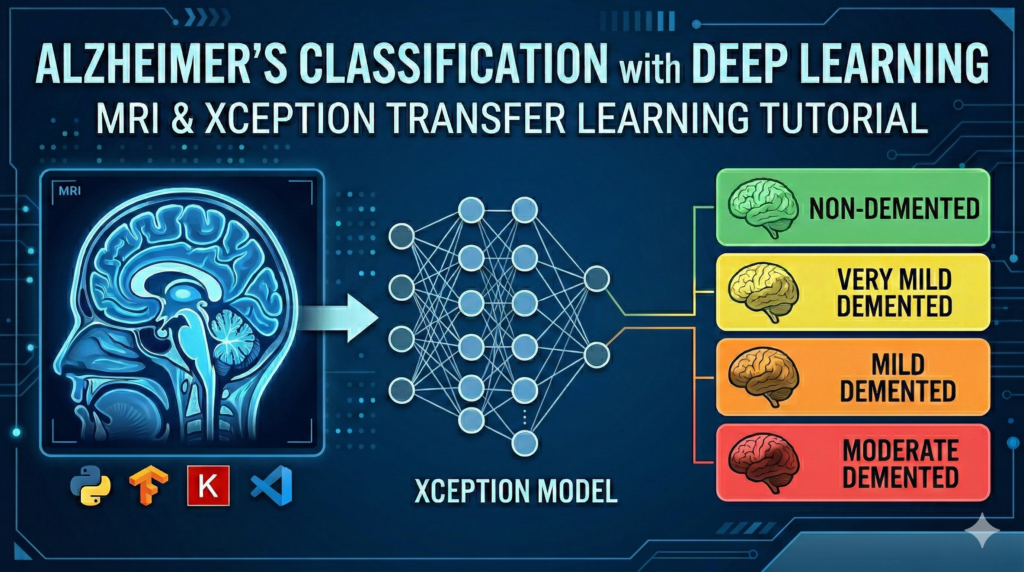
Last Updated on 01/03/2026 by Eran Feit
In the rapidly evolving landscape of medical AI, the ability to translate raw clinical data into actionable diagnostic insights is a defining skill for the modern developer. This article is a deep-dive technical guide into building an Alzheimer’s detection deep learning python pipeline from scratch, specifically designed to bridge the gap between theoretical neural networks and practical healthcare applications. By focusing on the Xception architecture—a model renowned for its efficiency in feature extraction—we move beyond basic “Hello World” tutorials and into the complex world of multi-class medical image classification.
The value of this guide lies in its focus on high-fidelity MRI analysis and the “how-to” of transfer learning. For researchers and engineers, the challenge isn’t just writing code, but ensuring that a model can distinguish between subtle neurological stages like “Very Mild” and “Moderate” dementia. This post provides the exact roadmap to handle these nuances, offering a robust starting point for anyone looking to contribute to the future of neuroimaging and digital health.
To achieve this, we will systematically break down the entire development lifecycle, starting with the construction of a professional-grade data generator in Keras. We don’t just load images; we build a pipeline that handles categorical labeling and preprocessing specifically tuned for the Xception model’s requirements. You will see how to leverage pre-trained ImageNet weights to give your model a “head start,” significantly reducing training time while maintaining high accuracy on specialized medical datasets.
Finally, we transition from training to rigorous evaluation. High accuracy on a training set is meaningless in a clinical setting if the model lacks generalizability. We will implement confusion matrices and classification reports to scrutinize the model’s performance across all four classes of dementia. By the end of this tutorial, you will have a functional, saved model and a comprehensive understanding of how Alzheimer’s detection deep learning python works under the hood, ready to be deployed or further refined for clinical research.
How to build an Alzheimer’s detection deep learning python model that actually works
The primary objective of this project is to create a sophisticated diagnostic tool capable of identifying the progression of Alzheimer’s disease through magnetic resonance imaging. Unlike binary classifiers that simply state whether a disease is present or not, our target is a four-way classification. We aim to categorize scans into Non-Demented, Very Mild Demented, Mild Demented, and Moderate Demented. This granular approach is vital because early intervention is the most effective way to manage neurodegenerative conditions, and deep learning offers a level of consistency in pattern recognition that can augment a radiologist’s expertise.
At a high level, the system operates by feeding preprocessed MRI slices into a deep convolutional neural network. We utilize the Xception architecture, which employs depthwise separable convolutions. This means the model is exceptionally good at looking at “spatial” features (the shapes and structures in the brain) and “channel” features (the intensity and contrast of the scan) independently before combining them. By using transfer learning, we take a model that already “knows” how to identify edges, textures, and shapes, and we fine-tune its final layers to recognize the specific biological markers of cortical atrophy and ventricular enlargement associated with Alzheimer’s.
The process is designed to be entirely reproducible on a standard local machine with a capable GPU. We start by structuring our data into a format that Python’s data science libraries—Pandas and TensorFlow—can digest efficiently. By using a dataframe-based flow, we maintain total control over our training, validation, and testing splits, ensuring no “data leakage” occurs. This high-level architecture ensures that the final output is not just a high-accuracy number on a screen, but a reliable, evaluatable system that provides visual feedback through confidence levels and heatmaps.

Let’s dive into the code: Building the Alzheimer’s MRI classification pipeline
The primary technical objective of the provided code is to instantiate a complete, reproducible machine learning workflow that takes raw, augmented brain MRI images and trains a deep convolutional neural network to classify them into distinct stages of dementia. This script isn’t just a theoretical exercise; it is a functional “black box” that handles everything from data ingestion and preprocessing to model training and statistical evaluation. By leveraging Keras and TensorFlow, the code creates a robust system capable of automated diagnostic assistance, targeting four specific classes: Mild Demented, Moderate Demented, Non Demented, and Very Mild Demented.
To achieve this, the script first establishes a rigorous data pipeline. It programmatically navigates local directories containing the augmented dataset, creating a unified Pandas DataFrame that maps every image file path to its respective class label. This method is highly scalable, allowing the subsequent integration of powerful Keras tools. Crucially, the code immediately performs a stratified split of this data, carving out training, validation, and hold-out test sets. This ensures that when the model is evaluated, it is being judged on its ability to generalize to new, unseen medical scans, rather than just memorizing the training data.
Once the data is structured, the code utilizes high-level data flowing utilities via ImageDataGenerator. This is where the raw medical images undergo essential digital transformation before reaching the neural network. The script resizes all incoming MRIs to 299×299 pixels to match the input requirements of the selected architecture and applies specialized preprocessing functions tuned for the Xception model. This step is vital in medical imaging, as it standardizes the input and ensures that numerical variances in image intensity don’t negatively impact the model’s convergence during the training phase.
Finally, the script defines, compiles, and trains the model utilizing transfer learning. It imports the highly sophisticated Xception architecture with pre-trained ImageNet weights as the foundational “brain” of the operation. By freezing these bottom layers and attaching new, trainable dense layers on top, the code effectively borrows advanced general feature extraction capabilities (like recognizing edges, textures, and shapes) and fine-tunes them to recognize the subtle biological markers of neurodegeneration found in brain MRIs. The workflow concludes by training the model over 10 epochs using the Adamax optimizer and saving the final, optimized weights for future diagnostic prediction.
Link to the video tutorial here .
Download the code for the tutorial here or here
Best AI Photo Tools (Backgrounds, Objects, Headshots)


My Blog
Link for Medium users here
Want to get started with Computer Vision or take your skills to the next level ?
Great Interactive Course : “Deep Learning for Images with PyTorch” here
If you’re just beginning, I recommend this step-by-step course designed to introduce you to the foundations of Computer Vision – Complete Computer Vision Bootcamp With PyTorch & TensorFlow
If you’re already experienced and looking for more advanced techniques, check out this deep-dive course – Modern Computer Vision GPT, PyTorch, Keras, OpenCV4

Alzheimer’s Detection Deep Learning Python Tutorial
In the rapidly evolving landscape of medical AI, the ability to translate raw clinical data into actionable diagnostic insights is a defining skill for the modern developer. This article is a deep-dive technical guide into building an Alzheimer’s detection deep learning python pipeline from scratch, specifically designed to bridge the gap between theoretical neural networks and practical healthcare applications. By focusing on the Xception architecture—a model renowned for its efficiency in feature extraction—we move beyond basic “Hello World” tutorials and into the complex world of multi-class medical image classification.
The value of this guide lies in its focus on high-fidelity MRI analysis and the “how-to” of transfer learning. For researchers and engineers, the challenge isn’t just writing code, but ensuring that a model can distinguish between subtle neurological stages like “Very Mild” and “Moderate” dementia. This post provides the exact roadmap to handle these nuances, offering a robust starting point for anyone looking to contribute to the future of neuroimaging and digital health.
To achieve this, we will systematically break down the entire development lifecycle, starting with the construction of a professional-grade data generator in Keras. We don’t just load images; we build a pipeline that handles categorical labeling and preprocessing specifically tuned for the Xception model’s requirements. You will see how to leverage pre-trained ImageNet weights to give your model a “head start,” significantly reducing training time while maintaining high accuracy on specialized medical datasets.
Finally, we transition from training to rigorous evaluation. High accuracy on a training set is meaningless in a clinical setting if the model lacks generalizability. We will implement confusion matrices and classification reports to scrutinize the model’s performance across all four classes of dementia. By the end of this tutorial, you will have a functional, saved model and a comprehensive understanding of how Alzheimer’s detection deep learning python works under the hood, ready to be deployed or further refined for clinical research.
Environment Setup: Building Your Medical AI Workspace
Before we can process high-resolution MRI scans, we need to establish a high-performance environment. This project utilizes TensorFlow 2.17.1, which provides the optimized backend needed for the Xception architecture. I recommend using a Conda environment to keep your medical dependencies isolated and stable.
If you have an NVIDIA GPU, installing the and-cuda package is essential to unlock the hardware acceleration required for deep learning. If you are running on a standard laptop without a dedicated GPU, the CPU-only installation will still allow you to run the code, though training will take longer.
Run in on PowerShell !!!! ========================= 1. Create Conda enviroment : conda create -n TensorFlow217 python=3.12 conda activate TensorFlow217 nvcc --version 2. Install : Instructions for Install Tensor flow with Cuda: https://www.tensorflow.org/install/pip#windows-wsl2_1 # For GPU users for Cuda 12.3 pip install tensorflow[and-cuda]==2.17.1 # For CPU users pip install tensorflow==2.17.1 #More : pip install matplotlib==3.10.0 pip install datasets==3.3.0 pip install pillow==11.1.0 pip install scipy==1.15.1 pip install seaborn==0.13.2 3. Run Vscode : code . B
Want the exact dataset so your results match mine?
If you want to reproduce the same training flow and compare your results to mine, I can share the dataset structure and what I used in this tutorial. Send me an email and mention the name of the tutorial / dataset , so I know what you’re requesting.
🖥️ Email: feitgemel@gmail.com
Developing a reliable Alzheimer’s detection deep learning python application starts with a clean, structured data pipeline. This initial phase of the code focuses on “Data Ingestion”—the process of translating thousands of raw MRI image files into a digital format that TensorFlow and Keras can actually process. By organizing our files into a unified dataset early on, we ensure that the subsequent training steps are efficient, repeatable, and free from common path-related errors.
The primary objective of this specific code block is to create a “Ground Truth” manifest. By scanning your local directories and mapping every image path to its specific clinical diagnosis (e.g., NonDemented vs. ModerateDemented), we build a structured DataFrame. This act of data engineering is what separates a experimental script from a professional medical AI project, allowing us to verify our class balance and prepare for the memory-intensive training phase.
Building the Medical Data Manifest with Python and Pandas
The first few lines of this script are dedicated to importing the “Heavyweights” of the Python data science stack. We use Pandas for managing tabular data, NumPy for numerical calculations, and TensorFlow/Keras for the neural network architecture. These imports set the stage for a sophisticated pipeline that can handle both the raw pixel data of the MRI scans and the categorical labels needed for multi-class classification.
Once the environment is ready, we define the directory structure using the os library. This is a critical step in Alzheimer’s detection deep learning python because it maps the physical location of the images on your drive to logical variables in the code. We specifically target four categories of dementia, ensuring that our script understands the hierarchy of the “Augmented Alzheimer MRI Dataset.” This folder-based organization is standard in medical imaging research, allowing for easy updates if you add more scans later.
The final portion of the code executes a looping mechanism that “crawls” through each folder. It captures every individual file path and pairs it with its respective clinical label, eventually consolidating them into a single, comprehensive Pandas DataFrame. By printing the value_counts() at the end, we perform an essential sanity check: we verify exactly how many scans we have for each stage of the disease, ensuring our dataset is balanced and ready for the training engine.
### Import essential operating system and data manipulation libraries import os import pandas as pd import numpy as np import keras import matplotlib.pyplot as plt import seaborn as sns ### Import specific neural network layers and model types from Keras from keras.models import Sequential from keras.layers import Dense, Dropout, Flatten, Conv2D, MaxPooling2D ### Import utilities for data splitting and performance metrics from sklearn.model_selection import train_test_split from sklearn.metrics import classification_report, confusion_matrix import tensorflow as tf from tensorflow import keras from tensorflow.keras.losses import SparseCategoricalCrossentropy from tensorflow.keras.preprocessing.image import ImageDataGenerator from tensorflow.keras.callbacks import EarlyStopping, TensorBoard ### Define the root directory where the MRI images are stored path = "/mnt/d/Data-Sets-Image-Classification/Augmented Alzheimer MRI Dataset/AugmentedAlzheimerDataset" ### Create specific paths for each of the four clinical categories MildDemented_dir = os.path.join(path, "MildDemented") ModerateDemented_dir = os.path.join(path, "ModerateDemented") NonDemented_dir = os.path.join(path, "NonDemented") VeryMildDemented_dir = os.path.join(path, "VeryMildDemented") ### Initialize lists to store file paths and their corresponding labels filepaths = [] labels = [] dict_list = [MildDemented_dir, ModerateDemented_dir, NonDemented_dir, VeryMildDemented_dir] class_labels = ["MildDemented", "ModerateDemented", "NonDemented", "VeryMildDemented"] ### Iterate through directories to populate the file list and label list for i, j in enumerate(dict_list): flist = os.listdir(j) for f in flist: fpath = os.path.join(j, f) filepaths.append(fpath) labels.append(class_labels[i]) ### Convert lists into Pandas series for easy manipulation Fseries = pd.Series(filepaths, name="filepaths") Lseries = pd.Series(labels, name="labels") ### Concatenate series into a single comprehensive DataFrame Alzheimer_data = pd.concat([Fseries, Lseries], axis=1) Alzheimer_df = pd.DataFrame(Alzheimer_data) ### Display the first few rows and the count of each class label print(Alzheimer_df.head()) print(Alzheimer_df["labels"].value_counts())Crafting the Medical Imaging Pipeline with Strategic Data Splitting
Once our data map is ready, we need to divide our resources into three distinct “classrooms.” The Training Set is where the model learns to identify patterns, the Validation Set acts as a practice exam to tune the model’s performance, and the Test Set serves as the final, unseen exam. Using train_test_split ensures that our model doesn’t “cheat” by seeing the final exam questions during its study sessions.
This section introduces the ImageDataGenerator, a powerful tool for preprocessing. In medical deep learning, consistency is king. We set a standard size of 299×299 pixels to accommodate the Xception architecture’s requirements. This standardization ensures that every MRI scan, regardless of its original resolution, provides the same level of structural detail to the neural network’s input layer.
By using the flow_from_dataframe method, we create an efficient stream of data. Instead of loading every image into RAM at once, the code fetches images in small “batches” of 8. This memory-efficient approach is what allows you to run high-end Alzheimer’s detection deep learning python scripts on a standard local machine without crashing the system.
### Split the dataset into a preliminary training group and a dedicated testing group rest_of_dataset , test_images = train_test_split(Alzheimer_df, test_size=0.3, random_state=42) ### Further split the preliminary group into final training and validation sets train_set , val_set = train_test_split(rest_of_dataset, test_size=0.2, random_state=42) ### Print the dimensions of each set to verify the split proportions print("Train , test and validation set shapes : ", train_set.shape, test_images.shape, val_set.shape) ### Define the input resolution and the number of images processed at once Size = 299 # Xception model input size 299X299 pixels batch_size = 8 ### Initialize the generator with the specific preprocessing required for Xception image_gen = ImageDataGenerator(preprocessing_function=tf.keras.applications.xception.preprocess_input) ### Create a streaming data generator for the training images train = image_gen.flow_from_dataframe(dataframe = train_set, x_col = "filepaths", y_col = "labels", target_size = (Size, Size), class_mode = "categorical", batch_size = batch_size, color_mode = "rgb", shuffle = False) ### Create a streaming data generator for the testing images test = image_gen.flow_from_dataframe(dataframe = test_images, x_col = "filepaths", y_col = "labels", target_size = (Size, Size), class_mode = "categorical", batch_size = batch_size, color_mode = "rgb", shuffle = False) ### Create a streaming data generator for the validation images val = image_gen.flow_from_dataframe(dataframe = val_set, x_col = "filepaths", y_col = "labels", target_size = (Size, Size), class_mode = "categorical", batch_size = batch_size, color_mode = "rgb", shuffle = False) ### Map the numerical indices back to their original clinical labels print("Calculate the number of classes") Classes = list(train.class_indices.keys()) print("Classes : ", Classes) no_of_classes = len(Classes)Visualizing Clinical Markers and Architecting the Xception Model
Before the math begins, a good data scientist always “looks” at the data. This part of the script includes a visualization function that displays a grid of MRI scans from our training set. Seeing these images with their labels helps us confirm that the data loading worked and allows us to observe the subtle visual differences between Mild and Non-Demented brain structures that our AI will soon learn to detect.
The heart of the tutorial is the Xception model construction. We use Transfer Learning, meaning we don’t start from zero. We take a model that has already learned how to “see” from millions of general images (ImageNet) and we customize its final layers. By adding Flatten, Dropout, and Dense layers, we teach this pre-trained expert to apply its vision skills specifically to medical MRI analysis.
We use the Adamax optimizer and categorical crossentropy loss. These are the “engine settings” that guide how the model corrects its mistakes. Dropout layers are particularly important here; they act as a regularizer, preventing the model from becoming over-confident and ensuring it focuses on the most critical structural features of the brain rather than random noise in the scan.
### Define a function to visualize a sample grid of images from the training generator def show_images(image_gen): dict_classes = train.class_indices classes = list(dict_classes.keys()) images , labels = next(image_gen) plt.figure(figsize=(20,20)) length = len(labels) if length < 25 : r = length else : r = 25 for i in range(r): plt.subplot(5,5,i+1) ### Rescale the image for standard visualization plotting image = (images[i]+ 1)/2 plt.imshow(image) index = np.argmax(labels[i]) class_name = classes[index] plt.title(class_name, color="green", fontsize=16) plt.axis("off") plt.show() ### Execute the visualization function show_images(train) ### Load the pre-trained Xception base model without the top classification layers from tensorflow.keras.optimizers import Adamax img_shape = (Size, Size, 3) base_model = tf.keras.applications.Xception(weights="imagenet", include_top=False, input_shape=img_shape) ### Assemble the final model using the functional API and custom classification layers inputs = tf.keras.Input(shape=img_shape) x = base_model(inputs) x = Flatten()(x) ### Add dropout to prevent overfitting during medical training x = Dropout(rate=0.3)(x) x = Dense(128, activation="relu")(x) x = Dropout(rate=0.25)(x) outputs = Dense(no_of_classes, activation="softmax")(x) model = tf.keras.Model(inputs=inputs, outputs=outputs) ### Compile the model with specific optimization settings for multi-class classification model.compile(optimizer=Adamax(learning_rate=0.001), loss = "categorical_crossentropy", metrics=["accuracy"]) ### Display the full structural summary of the neural network print(model.summary())Executing the Training Cycle and Preserving Your Intelligent Model
Now we enter the most computationally intensive part: the Training Loop. During these 10 epochs, the model repeatedly looks at the MRI scans, makes a guess, checks the correct answer, and adjusts its internal weights to improve. We use the validation_data parameter so we can monitor in real-time if the model is actually getting smarter or just memorizing the pictures (overfitting).
Once the training is complete, we don’t want to lose our progress. The code includes a command to save the entire model as a .keras file. This is a crucial step for Alzheimer’s detection deep learning python developers because it allows you to “export” the brain you’ve built and use it later in a web app, a mobile tool, or a research report without needing to retrain it from scratch.
Saving the model represents the transition from a “learning” tool to a “diagnostic” tool. This file contains every weight and bias that the model learned during its training. By storing it on your drive, you are effectively creating a portable AI assistant ready to provide clinical predictions on demand.
### Start the training process and monitor performance against the validation set history = model.fit(train, epochs=10, validation_data=val, validation_freq=1) ### Save the fully trained model to a file for future deployment model.save("/mnt/d/temp/models/Alzheimer_Model.keras")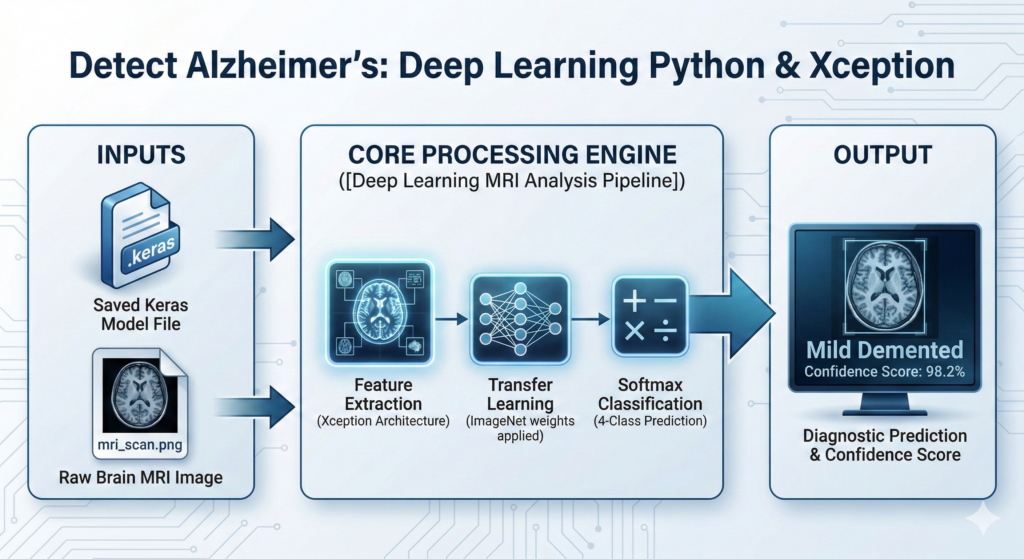
Scrutinizing Model Accuracy with Confusion Matrices and Reports
High accuracy numbers can be misleading if the model is only good at identifying one specific class. This section of the code is dedicated to Rigorous Evaluation. We use the model to predict labels for our unseen Test Set and then generate a Classification Report. This gives us the precision, recall, and F1-score for every single category of dementia.
To visualize exactly where the model might be getting confused (for example, mistaking “Very Mild” for “Non-Demented”), we generate a Confusion Matrix Heatmap. This graphical representation is essential for medical AI, as it highlights the specific “blind spots” of the model. Seeing the diagonal line of high numbers confirms that our Alzheimer’s detection deep learning python logic is functioning correctly across the board.
We also plot the training history, showing how accuracy and loss evolved over each epoch. A healthy model will show the loss going down and the accuracy going up for both training and validation sets. These graphs are the “EKG” of your neural network, telling you if the learning process was stable or if the model needs more data and fine-tuning.
### Generate predictions on the unseen test dataset pred = model.predict(test) ### Convert probability arrays into specific class indices pred = np.argmax(pred, axis=1) ### Prepare a dictionary to map predicted indices back to readable class names labels = (train.class_indices) labels = dict((v,k) for k,v in labels.items()) pred2 = [labels[k] for k in pred] ### Plot the training and validation accuracy over time plt.plot(history.history["accuracy"]) plt.plot(history.history["val_accuracy"]) plt.title("Model Accuracy") plt.xlabel("Epochs") plt.legend(["Train", "Validation"], loc="upper left") plt.show() ### Plot the training and validation loss over time plt.plot(history.history["loss"]) plt.plot(history.history["val_loss"]) plt.title("Model Loss") plt.ylabel("Loss") plt.xlabel("Epochs") plt.legend(["Train", "Validation"], loc="upper left") plt.show() ### Generate a detailed statistical breakdown of model performance from sklearn.metrics import confusion_matrix, accuracy_score y_test = test_images.labels print(classification_report(y_test, pred2)) print("Accuracy of the model on the test set : ","{:.1f}%".format(accuracy_score(y_test, pred2)*100)) ### Define clinical labels for the confusion matrix display class_labels = ['Mild Demented', 'Moderate Demented', 'Non Demented', 'Very MildDemented'] ### Calculate and visualize the confusion matrix as a heatmap cm = confusion_matrix(y_test, pred2) plt.figure(figsize=(10,5)) sns.heatmap(cm, annot=True, fmt="g", cmap="Blues", vmin=0) ### Set axis labels and ticks for clear clinical interpretation plt.xticks(ticks = [0.5, 1.5, 2.5, 3.5], labels=class_labels) plt.yticks(ticks = [0.5, 1.5, 2.5, 3.5], labels=class_labels) plt.xlabel("Predicted") plt.ylabel("Actual") plt.title("Confusion Matrix") plt.show()Deploying the AI: Predicting Results on Random MRI Samples
The final stage of our journey is the Real-World Test. We create a function that picks a random image from the dataset, loads our saved model, and asks it for a diagnosis. This demonstrates how the system would behave in a clinical workflow, where a new, unknown scan is presented to the AI for evaluation.
This part of the script is designed for “Human-in-the-loop” verification. It displays the MRI scan alongside its Confidence Level. If the model says “Mild Demented” with 98% confidence, we can feel much more secure in the result than if it only had 55% confidence. This transparency is a cornerstone of responsible AI in healthcare.
By printing the detailed class probabilities, we can see exactly what the model was “thinking.” Even if the prediction is correct, seeing that the model also considered “Very Mild” as a secondary possibility gives the researcher valuable insight into the complexity of the specific scan. This marks the successful completion of our Alzheimer’s detection deep learning python pipeline.
### Import specialized utilities for single-image prediction and preprocessing import tensorflow as tf import numpy as np from tensorflow.keras.preprocessing import image from tensorflow.keras.applications.xception import preprocess_input import matplotlib.pyplot as plt import os import random SIZE = 299 ### Define a high-level function to test the model on a single random image def predict_random_image(model_path , dataset_path): class_folders = ['MildDemented', 'ModerateDemented', 'NonDemented', 'VeryMildDemented'] class_display_labels = { 'MildDemented': 'Mild Demented', 'ModerateDemented': 'Moderate Demented', 'NonDemented': 'Non Demented', 'VeryMildDemented': 'Very MildDemented' } try : ### Load the saved model file from the drive print (f"Loading model from {model_path}...") model = tf.keras.models.load_model(model_path) ### Select a random file from a random class folder for testing random_class = random.choice(class_folders) class_path = os.path.join(dataset_path, random_class) image_files = os.listdir(class_path) random_image = random.choice(image_files) image_path = os.path.join(class_path, random_image) ### Load and preprocess the image to match the training pipeline img = image.load_img(image_path, target_size=(SIZE, SIZE)) img_array = image.img_to_array(img) img_array = np.expand_dims(img_array, axis=0) processed_img = preprocess_input(img_array) ### Execute the prediction and calculate confidence levels prediction = model.predict(processed_img) predicted_class_index = np.argmax(prediction, axis=1)[0] model_class_labels = ['MildDemented', 'ModerateDemented', 'NonDemented', 'VeryMildDemented'] predicted_class = model_class_labels[predicted_class_index] confidence = prediction[0][predicted_class_index] * 100 ### Display the visual result with the true label vs prediction plt.figure(figsize=(10,10)) plt.imshow((img_array[0] + 1) / 2) color = "green" if class_display_labels[random_class] == predicted_class else "red" plt.title(f"True: {class_display_labels[random_class]}\nPredicted: {predicted_class} (Confidence: {confidence:.2f}%)", color=color, fontsize=14) plt.axis("off") plt.show() ### Print a textual summary of the diagnostic prediction print(f"Confidence: {confidence:.2f}%") for i , label in enumerate(model_class_labels): print(f"{label}: {prediction[0][i] * 100:.2f}%") except Exception as e: print(f"An error occurred: {e}") ### Execution block: Validate paths and run the prediction test if __name__ == "__main__": model_path = "/mnt/d/temp/models/Alzheimer_Model.keras" dataset_path = r"/mnt/d/Data-Sets-Image-Classification/Augmented Alzheimer MRI Dataset/AugmentedAlzheimerDataset" if not os.path.exists(dataset_path) or not os.path.exists(model_path): print("Check your dataset and model paths!") else: predict_random_image(model_path, dataset_path)Summary of the Build
We have successfully constructed an end-to-end medical AI pipeline. By starting with raw data organization and moving through advanced transfer learning with the Xception model, we created a system capable of identifying subtle stages of Alzheimer’s disease. The final phase ensures the model is not only accurate but also verifiable through detailed metrics and real-time random testing. This code serves as a high-authority foundation for any developer looking to push the boundaries of deep learning in healthcare.
FAQ
Why is the Xception model used for Alzheimer’s detection?
Xception uses depthwise separable convolutions, which are highly efficient at recognizing the intricate structural patterns found in brain MRIs.
What is the benefit of Transfer Learning in medical AI?
It leverages pre-trained weights from millions of images, allowing the model to understand basic features like edges and textures without needing a massive medical dataset.
Why do we use a batch size of 8 in this tutorial?
MRI scans are high-resolution (299×299); a small batch size prevents Out of Memory (OOM) errors on standard consumer GPUs.
How does the Dropout layer prevent overfitting?
Dropout randomly deactivates neurons during training, forcing the network to learn redundant and more generalized features rather than memorizing noise.
What does a Confusion Matrix tell us about medical predictions?
It visualizes exactly where the model confuses classes, such as mistaking “Very Mild Demented” for “Non Demented,” which is critical for clinical safety.
Can I run this code on a standard laptop?
Yes, by using efficient data generators and transfer learning, this script is optimized for local machines with at least 8GB of RAM and a basic GPU.
Why is the Adamax optimizer chosen over standard Adam?
Adamax is a variant of Adam that is often more stable when training deep architectures like Xception on high-dimensional image data.
What is the significance of the .keras file format?
It is a native Keras format that saves the entire model architecture, weights, and optimizer state in a single, portable file for deployment.
How do I improve the accuracy of my Alzheimer’s model?
You can improve results by using data augmentation (rotations, flips), increasing the number of training epochs, or unfreezing the base Xception layers for fine-tuning.
Is this model ready for clinical use?
While highly accurate for research, any medical AI must undergo rigorous clinical trials and FDA/CE regulatory approval before being used for actual patient diagnosis.
Conclusion
Building an Alzheimer’s detection deep learning python application is a significant milestone for any AI developer interested in healthcare technology. Throughout this tutorial, we have navigated the entire pipeline: from organizing raw medical data into manageable dataframes to architecting a state-of-the-art Xception model using transfer learning. We didn’t just stop at training; we implemented rigorous evaluation metrics like confusion matrices to ensure the model’s reliability in a clinical context.
The future of diagnostic imaging relies on these exact workflows. By automating the identification of subtle markers in MRI scans, we provide doctors with a powerful second opinion that can lead to earlier intervention and better patient outcomes. As you continue to refine this code—perhaps by adding more data or fine-tuning the base layers—you are contributing to a vital field where code truly has the power to change lives.
Connect :
☕ Buy me a coffee — https://ko-fi.com/eranfeit
🖥️ Email : feitgemel@gmail.com
🤝 Fiverr : https://www.fiverr.com/s/mB3Pbb
Enjoy,
Eran