 Skip to content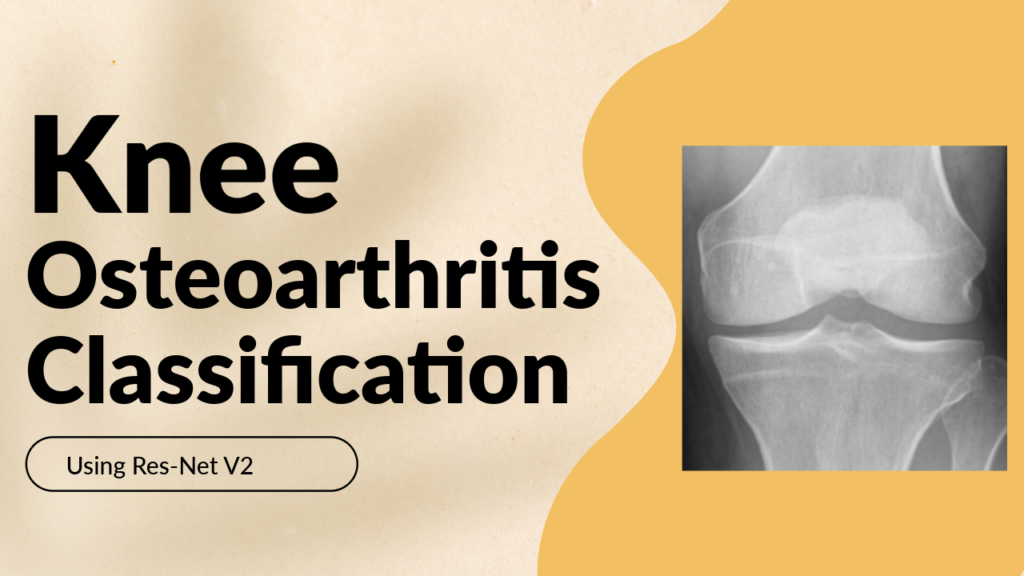
Last Updated on 20/02/2026 by Eran Feit
In the field of medical diagnostics, deep learning is no longer just a buzzword—it is a transformative tool that assists clinicians in identifying conditions like knee osteoarthritis with unprecedented precision. This article provides a comprehensive, hands-on ResNet152V2 TensorFlow tutorial designed to take you from raw X-ray data to a fully functional, high-accuracy classification model. By the end of this guide, you will understand how to leverage state-of-the-art computer vision architectures to solve real-world healthcare challenges using the latest Python libraries.
The true value of this guide lies in its practical approach to complex AI concepts. Instead of just discussing theory, we dive deep into the specific implementation details required to handle sensitive medical imaging data. You will learn how to bridge the gap between academic research and applied engineering, ensuring your models are not just technically sound, but statistically reliable. Whether you are a student, a data scientist, or a healthcare professional looking to automate diagnostic workflows, this tutorial provides a repeatable framework for building robust image classifiers.
To achieve this, the article follows a structured, step-by-step workflow that mirrors a professional machine learning pipeline. We begin by configuring a modern environment using TensorFlow 2.17 and CUDA, ensuring your hardware is optimized for the heavy lifting required by deep neural networks. We then move into dataset preparation, where you will see exactly how to preprocess X-ray images for the 152-layer ResNet architecture, ensuring the model receives data in a format that maximizes its feature extraction capabilities.
Finally, we go beyond simple training by focusing on model interpretability and evaluation. You will implement advanced Keras callbacks like EarlyStopping to prevent overfitting and use visual metrics such as confusion matrices to analyze your model’s performance across different severity grades of osteoarthritis. This ResNet152V2 TensorFlow tutorial doesn’t just show you how to write code; it teaches you how to evaluate the “why” behind your model’s predictions, giving you the confidence to apply these techniques to any image classification task.
Why ResNet152V2 is the Gold Standard for Your TensorFlow Projects
When starting an image classification project, choosing the right “brain” for your model is the most critical decision you will make. ResNet152V2, which stands for “Residual Network” with 152 layers, represents a significant evolution in deep learning. Its primary goal is to solve the “vanishing gradient” problem—a common issue where extremely deep models stop learning because the information becomes lost as it travels through so many layers. By using “skip connections” or residual blocks, ResNet152V2 allows the model to learn the identity function, ensuring that even at layer 152, the network remains stable and continues to improve its accuracy.
The specific “V2” version we are using in this tutorial is particularly powerful because it optimizes the way data flows through these residual connections. By applying batch normalization and activation before the weight layers (known as pre-activation), the model becomes much easier to train and exhibits better generalization on unseen data. In the context of medical imaging, where every pixel matters, this 152-layer depth allows the network to pick up on incredibly subtle patterns—such as minor joint narrowing or tiny bone spurs—that a shallower model would likely miss.
Using this architecture within the TensorFlow ecosystem provides you with a “best of both worlds” scenario. You get the industrial-strength scalability of Google’s flagship AI framework combined with one of the most respected vision architectures in the history of deep learning. Our target with this implementation is to demonstrate how transfer learning—taking a model pre-trained on millions of generic images and “fine-tuning” it for medical X-rays—can save you weeks of training time while delivering professional-grade results. This high-level approach ensures that your model is efficient, accurate, and ready for real-world deployment.
ResNet152V2 architecture
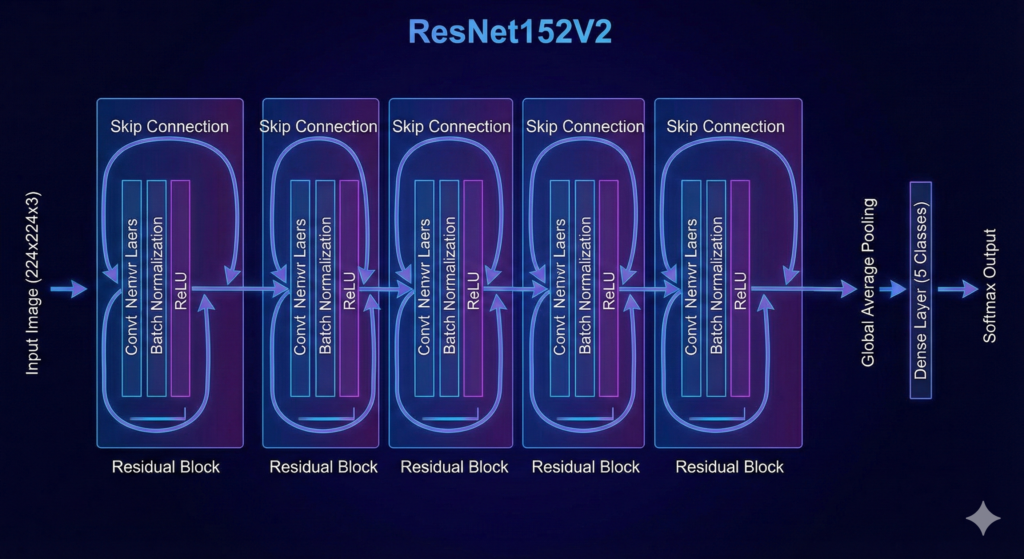
The ResNet152V2 (Residual Network with 152 layers, Version 2) architecture is a pinnacle of deep convolutional neural networks. It was designed to push the boundaries of model depth while maintaining stable training and high accuracy.
1. The Power of 152 Layers
Before the advent of ResNet, deeper networks often suffered from the degradation problem: as layers were added, accuracy would saturate and then rapidly decline. This wasn’t due to overfitting, but rather the difficulty of optimizing extremely deep models where gradients would “vanish” or “explode” as they traveled back through the network. ResNet152V2 solves this by stacking 152 layers, enabling the network to learn incredibly complex, hierarchical features—from simple edges in the early layers to intricate anatomical structures like bone density or cartilage gaps in later layers.
2. Residual Learning and Skip Connections
The “secret sauce” of this architecture is the Residual Block. Instead of forcing every layer to learn a completely new representation from scratch, ResNet uses skip connections (or identity shortcuts).
- The Concept: It allows the input of a block to “skip” the convolutional layers and be added directly to the output.
- The Benefit: If a layer is redundant, the network can easily learn to set its weights to zero, effectively passing the original signal through (the identity function). This ensures that a deeper model will never perform worse than its shallower counterpart, as it can simply “bypass” the extra layers if they aren’t helpful.+1
3. Version 2 Improvements: Pre-Activation
While the original ResNet (V1) performed Batch Normalization and Activation after the convolution, Version 2 (V2) introduced a critical change known as pre-activation.
- Layer Reordering: In V2, the Batch Normalization and ReLU activation are applied before the weight (convolution) layers.
- Smoother Gradient Flow: This reordering creates a “clear path” for the identity connection. The signal can flow from one block to the next without being obstructed by non-linear activations, making the model much easier to train and improving its ability to generalize to new, unseen images.
4. Bottleneck Design for Efficiency
To handle 152 layers without a massive explosion in computational cost, ResNet152V2 utilizes a bottleneck design. Each major block consists of three convolutions:
- 1×1 Convolution: Reduces the dimensionality (the number of “filters”).
- 3×3 Convolution: Performs the actual feature extraction on the reduced space.
- 1×1 Convolution: Restores the dimensionality to the original size. This “squeeze-and-expand” approach allows the model to be significantly deeper than previous architectures (like VGG16) while actually having fewer parameters and requiring less memory during training.

In the field of medical diagnostics, deep learning is no longer just a buzzword—it is a transformative tool that assists clinicians in identifying conditions like knee osteoarthritis with unprecedented precision. This article provides a comprehensive, hands-on ResNet152V2 TensorFlow tutorial designed to take you from raw X-ray data to a fully functional, high-accuracy classification model. By the end of this guide, you will understand how to leverage state-of-the-art computer vision architectures to solve real-world healthcare challenges using the latest Python libraries.
The true value of this guide lies in its practical approach to complex AI concepts. Instead of just discussing theory, we dive deep into the specific implementation details required to handle sensitive medical imaging data. You will learn how to bridge the gap between academic research and applied engineering, ensuring your models are not just technically sound, but statistically reliable. Whether you are a student, a data scientist, or a healthcare professional looking to automate diagnostic workflows, this tutorial provides a repeatable framework for building robust image classifiers.
To achieve this, the article follows a structured, step-by-step workflow that mirrors a professional machine learning pipeline. We begin by configuring a modern environment using TensorFlow 2.17 and CUDA, ensuring your hardware is optimized for the heavy lifting required by deep neural networks. We then move into dataset preparation, where you will see exactly how to preprocess X-ray images for the 152-layer ResNet architecture, ensuring the model receives data in a format that maximizes its feature extraction capabilities.
Finally, we go beyond simple training by focusing on model interpretability and evaluation. You will implement advanced Keras callbacks like EarlyStopping to prevent overfitting and use visual metrics such as confusion matrices to analyze your model’s performance across different severity grades of osteoarthritis. This ResNet152V2 TensorFlow tutorial doesn’t just show you how to write code; it teaches you how to evaluate the “why” behind your model’s predictions, giving you the confidence to apply these techniques to any image classification task.
Why ResNet152V2 is the Gold Standard for Your TensorFlow Projects
When starting an image classification project, choosing the right “brain” for your model is the most critical decision you will make. ResNet152V2, which stands for “Residual Network” with 152 layers, represents a significant evolution in deep learning. Its primary goal is to solve the “vanishing gradient” problem—a common issue where extremely deep models stop learning because the information becomes lost as it travels through so many layers. By using “skip connections” or residual blocks, ResNet152V2 allows the input to “skip” layers, ensuring that even at layer 152, the network remains stable and continues to improve its accuracy.
The specific “V2” version we are using in this tutorial is particularly powerful because it optimizes the way data flows through these residual connections. By applying batch normalization and activation before the weight layers (known as pre-activation), the model becomes much easier to train and exhibits better generalization on unseen data. In the context of medical imaging, where every pixel matters, this 152-layer depth allows the network to pick up on incredibly subtle patterns—such as minor joint narrowing or tiny bone spurs—that a shallower model would likely miss.
Using this architecture within the TensorFlow ecosystem provides you with a “best of both worlds” scenario. You get the industrial-strength scalability of Google’s flagship AI framework combined with one of the most respected vision architectures in the history of deep learning. Our target with this implementation is to demonstrate how transfer learning—taking a model pre-trained on millions of generic images and “fine-tuning” it for medical X-rays—can save you weeks of training time while delivering professional-grade results. This high-level approach ensures that your model is efficient, accurate, and ready for real-world deployment.
Link to the video tutorial here
Download the code for the tutorial here or here
Best AI Photo Tools (Backgrounds, Objects, Headshots)


My Blog
Link for Medium users here
Want to get started with Computer Vision or take your skills to the next level ?
Great Interactive Course : “Deep Learning for Images with PyTorch” here
If you’re just beginning, I recommend this step-by-step course designed to introduce you to the foundations of Computer Vision – Complete Computer Vision Bootcamp With PyTorch & TensorFlow
If you’re already experienced and looking for more advanced techniques, check out this deep-dive course – Modern Computer Vision GPT, PyTorch, Keras, OpenCV4
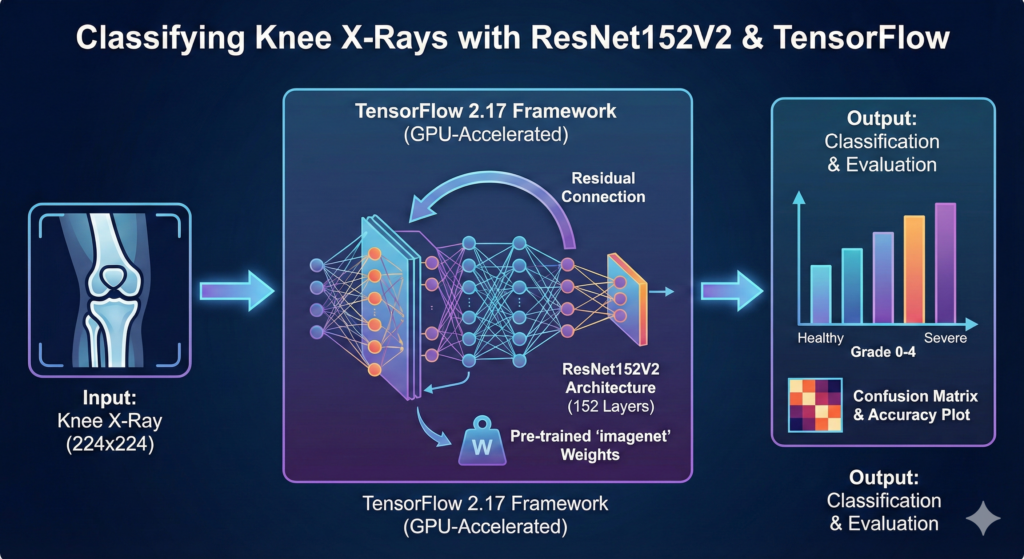
In the field of medical diagnostics, deep learning is no longer just a buzzword—it is a transformative tool that assists clinicians in identifying conditions like knee osteoarthritis with unprecedented precision. This article provides a comprehensive, hands-on ResNet152V2 TensorFlow tutorial designed to take you from raw X-ray data to a fully functional, high-accuracy classification model. By the end of this guide, you will understand how to leverage state-of-the-art computer vision architectures to solve real-world healthcare challenges using the latest Python libraries.
The true value of this guide lies in its practical approach to complex AI concepts. Instead of just discussing theory, we dive deep into the specific implementation details required to handle sensitive medical imaging data. You will learn how to bridge the gap between academic research and applied engineering, ensuring your models are not just technically sound, but statistically reliable. Whether you are a student, a data scientist, or a healthcare professional looking to automate diagnostic workflows, this tutorial provides a repeatable framework for building robust image classifiers.
To achieve this, the article follows a structured, step-by-step workflow that mirrors a professional machine learning pipeline. We begin by configuring a modern environment using TensorFlow 2.17 and CUDA, ensuring your hardware is optimized for the heavy lifting required by deep neural networks. We then move into dataset preparation, where you will see exactly how to preprocess X-ray images for the 152-layer ResNet architecture, ensuring the model receives data in a format that maximizes its feature extraction capabilities.
Finally, we go beyond simple training by focusing on model interpretability and evaluation. You will implement advanced Keras callbacks like EarlyStopping to prevent overfitting and use visual metrics such as confusion matrices to analyze your model’s performance across different severity grades of osteoarthritis. This ResNet152V2 TensorFlow tutorial doesn’t just show you how to write code; it teaches you how to evaluate the “why” behind your model’s predictions, giving you the confidence to apply these techniques to any image classification task.
Want the exact dataset so your results match mine?
If you want to reproduce the same training flow and compare your results to mine, I can share the dataset structure and what I used in this tutorial.
Send me an email and mention “30 Musical Instruments CNN dataset” so I know what you’re requesting.
🖥️ Email: feitgemel@gmail.com
More info about the Knee Osteoarthritis Dataset :
Knee osteoarthritis is defined by degeneration of the knee’s articular cartilage the flexible, slippery material that normally protects bones from joint friction and impact. The condition also involves changes to the bone underneath the cartilage and can affect nearby soft tissues. Knee osteoarthritis is by far the most common type of arthritis to cause knee pain and often referred to as simply knee arthritis. Many other less common types of arthritis can also cause knee pain, including rheumatoid arthritis, pseudogout, and reactive arthritis.
Content :
This dataset contains knee X-ray data for both knee joint detection and knee KL grading. The Grade descriptions are as follows:
Grade 0: Healthy knee image.
Grade 1 (Doubtful): Doubtful joint narrowing with possible osteophytic lipping
Grade 2 (Minimal): Definite presence of osteophytes and possible joint space narrowing
Grade 3 (Moderate): Multiple osteophytes, definite joint space narrowing, with mild sclerosis.
Grade 4 (Severe): Large osteophytes, significant joint narrowing, and severe sclerosis.
Setting Up Your High-Performance Deep Learning Environment
Before we can begin training our medical AI model, we must establish a rock-solid foundation. Using Conda for environment management is a professional best practice, as it prevents dependency conflicts that frequently plague AI projects. By creating a dedicated workspace for TensorFlow 2.17, we ensure that our Python 3.11 environment remains clean and optimized for the specific GPU requirements of the ResNet152V2 architecture.
In this section, we also address the crucial hardware acceleration step. Checking your CUDA version is mandatory if you intend to train deep networks in a reasonable timeframe. We leverage the specific tensorflow[and-cuda] package to bridge the gap between our Python code and the raw power of the NVIDIA GPU, which is essential for handling the 152 layers of depth in our model.
Lastly, we install the core data science stack: Matplotlib for visualization, Pandas for data handling, and Scikit-learn for our final evaluation metrics. These tools work in harmony to provide the diagnostic feedback we need during the training process. Establishing this environment correctly at the start saves hours of troubleshooting later in the development cycle.
### Create a new Conda environment named TensorFlow217 with Python 3.11 for project isolation. conda create -n TensorFlow217 python=3.11 ### Activate the newly created environment to start installing libraries. conda activate TensorFlow217 ### Check the installed NVIDIA CUDA compiler version to ensure GPU compatibility. nvcc --version ### Install TensorFlow with CUDA support for GPU-accelerated training on Windows/WSL2. pip install tensorflow[and-cuda]==2.17.1 ### Alternatively, install the standard TensorFlow version for CPU-only systems. # pip install tensorflow==2.17.1 ### Install Matplotlib version 3.10.0 for generating accuracy and loss plots. pip install matplotlib==3.10.0 ### Install Pandas version 2.2.3 for efficient data frame and CSV management. pip install pandas==2.2.3 ### Install Scikit-learn version 1.6.0 for generating the confusion matrix and classification reports. pip install scikit-learn==1.6.0 ### Install Seaborn version 0.13.2 for high-quality statistical data visualization. pip install seaborn==0.13.2Preparing and Visualizing the Knee Osteoarthritis Dataset
The quality of an AI model is directly tied to the data it consumes. For this ResNet152V2 TensorFlow tutorial, we utilize a specialized dataset focused on Knee Osteoarthritis severity. This dataset is meticulously categorized into five distinct grades (0 to 4), ranging from healthy joints to severe sclerosis. Understanding these medical definitions is vital, as it helps us interpret why the model might struggle between “Doubtful” and “Minimal” classifications.
In the code below, we define our directory structure and global constants like Batch Size and Image Size. Consistency is key here; ResNet152V2 expects an input dimension of 224×224 pixels. We use Python’s os and random modules to peak into our training folders and plot sample images. This “sanity check” allows us to verify that our data loading logic is correct and that the X-ray images are clear enough for the model to learn.
By visualizing the data across all five classes, we get a direct look at the features the model will need to extract. Notice the subtle differences in joint spacing and bone density. These are the precise details that our 152-layer residual network will be tasked with identifying during the training phase.
import numpy as np import pandas as pd import os import random import matplotlib.pyplot as plt import cv2 import tensorflow as tf from tensorflow.keras.applications.resnet_v2 import ResNet152V2, preprocess_input from tensorflow.keras.callbacks import EarlyStopping, ReduceLROnPlateau, ModelCheckpoint from tensorflow.keras.models import Model from tensorflow.keras.layers import Dense, Dropout, Input from tensorflow.keras.optimizers import Adam ### Define the base directory where the Kaggle dataset is stored. base_dir = "/mnt/d/Data-Sets-Image-Classification/Knee Osteoarthritis Dataset with Severity Grading" ### Create paths for the training, validation, and testing subdirectories. train_dir = os.path.join(base_dir, "train") val_dir = os.path.join(base_dir, "val") test_dir = os.path.join(base_dir, "test") ### Set the batch size to 16 to manage GPU memory effectively during training. BATCH_SIZE = 16 ### Define the target image size of 224x224 as required by the ResNet architecture. IMG_SIZE = (224, 224) ### Define the full image dimensions including the 3 RGB color channels. IMG_DIM = (224, 224, 3) ### Set the number of output classes to 5 based on the severity grading system. NUM_CLASSES = 5 ### Initialize a figure plot to display a 5x5 grid of sample images. fig , ax = plt.subplots(5, 5, figsize=(18, 18)) ### Loop through each of the 5 classes to select and display random samples. for class_id in range(5): folder = os.path.join(train_dir, str(class_id)) os.chdir(folder) samples = random.sample(os.listdir(folder), 5) ### Display 5 images per class to verify data quality and labeling. for col in range(5): image = cv2.imread(samples[col]) ax[class_id, col].imshow(image) ax[class_id, col].set_title(f"Class: {class_id}") ax[class_id, col].axis('off') ### Render the plot to the screen for visual inspection. plt.show()Building a Robust Preprocessing Pipeline and Data Loaders
To maximize the efficiency of our GPU, we move away from simple image loading and implement a high-performance TensorFlow Data Pipeline. The preprocess function is the heart of this section; it resizes every image and applies the specific preprocess_input scaling required by ResNetV2 architectures. This ensures that the pixel values are normalized correctly, preventing the gradients from exploding during the first few epochs of training.
The image_dataset_from_directory utility is a game-changer for medical imaging. It automatically handles the mapping of folder names to labels, allowing us to load thousands of X-rays with just a few lines of code. By using the .map(preprocess) function, we create an asynchronous pipeline that processes the next batch of images while the GPU is still training on the current one, significantly reducing bottlenecking.
We create three distinct datasets: Training, Validation, and Testing. The training set is where the model learns patterns, the validation set helps us tune hyperparameters and avoid overfitting, and the test set remains untouched until the very end to provide an unbiased evaluation of the model’s “real-world” performance.
### Define a preprocessing function to resize images and normalize them for ResNet152V2. def preprocess(image, label): image = tf.image.resize(image, IMG_SIZE) image = preprocess_input(image) ### Convert the integer labels into one-hot encoded vectors for the loss function. label = tf.one_hot(label, NUM_CLASSES) return image, label ### Load and preprocess the training dataset directly from the directory structure. print("Loading training dataset... ") train_dataset = tf.keras.preprocessing.image_dataset_from_directory( train_dir, image_size=IMG_SIZE, batch_size=BATCH_SIZE, shuffle=True, label_mode='int', color_mode='rgb', verbose=True ).map(preprocess) ### Load the validation dataset to monitor performance during the training epochs. print("Loading validation dataset... ") val_dataset = tf.keras.preprocessing.image_dataset_from_directory( val_dir, image_size=IMG_SIZE, batch_size=BATCH_SIZE, shuffle=True, label_mode='int', color_mode='rgb', verbose=True ).map(preprocess) ### Load the test dataset for the final model evaluation after training completes. print("Loading test dataset... ") test_dataset = tf.keras.preprocessing.image_dataset_from_directory( test_dir, image_size=IMG_SIZE, batch_size=BATCH_SIZE, shuffle=True, label_mode='int', color_mode='rgb', verbose=True ).map(preprocess)Crafting the ResNet152V2 Architecture with Transfer Learning
Now we reach the core of our AI logic: the ResNet152V2 architecture. We utilize a strategy called Transfer Learning, where we load the model with weights pre-trained on the massive ImageNet dataset. This allows our model to start with a sophisticated understanding of shapes, edges, and textures, rather than starting from zero. We freeze these base layers so that their knowledge isn’t destroyed while we train the new “top” of the network specifically for X-ray features.
To make the model even more resilient, we implement a Data Augmentation layer. By randomly flipping, rotating, and zooming into the X-ray images during training, we effectively “expand” our dataset. This forces the model to learn the actual anatomical features of osteoarthritis rather than just memorizing the specific orientation of the images in the training set.
The final layers consist of a Global Average Pooling layer to reduce complexity, a Dense layer for feature integration, and a Softmax output layer. This configuration allows the model to output a probability distribution across the five severity grades, giving us not just a prediction, but a confidence score for each diagnosis.
### Define a sequential data augmentation pipeline to improve model generalization. data_augmentation = tf.keras.Sequential([ tf.keras.layers.RandomFlip("horizontal"), tf.keras.layers.RandomRotation(0.1), tf.keras.layers.RandomZoom(0.2), tf.keras.layers.RandomTranslation(height_factor=0.1, width_factor=0.1),]) ### Setup the input layer using the predefined image dimensions. inputs = Input(shape=IMG_DIM) ### Apply data augmentation as the first step in the model's computation graph. x = data_augmentation(inputs) ### Apply the specific ResNet normalization to the augmented images. x = preprocess_input(x) ### Initialize the pre-trained ResNet152V2 base model without the top classification layer. base_model = ResNet152V2(input_shape=(224,224,3), include_top=False, weights='imagenet', pooling='avg') ### Freeze the base model layers to prevent their pre-trained weights from being modified. x = base_model(x, training=False) ### Add a fully connected layer with 128 neurons and ReLU activation. x = Dense(128, activation='relu')(x) ### Add a Dropout layer with a 20% rate to prevent overfitting. x = Dropout(0.2)(x) ### Define the final output layer with Softmax activation for 5-class classification. outputs = Dense(NUM_CLASSES, activation='softmax')(x) ### Construct the final Keras Model object by linking inputs and outputs. model = Model(inputs, outputs) ### Compile the model using the Adam optimizer and Categorical Crossentropy loss. model.compile(optimizer=Adam(learning_rate=0.0001), loss='categorical_crossentropy', metrics=['accuracy'])Mastering Training with Intelligent Callbacks and Monitoring
Training a deep network like ResNet152V2 requires more than just running a loop; it requires intelligent supervision. We implement three powerful Keras callbacks: ReduceLROnPlateau to slow down the learning rate when the model gets stuck, EarlyStopping to halt training if the validation loss stops improving, and ModelCheckpoint to automatically save the best version of our model. These tools ensure we don’t waste time on a model that has stopped learning or started overfitting.
In this section, we initiate the model.fit command, which orchestrates the entire learning process. By monitoring the validation data, we can see in real-time if the model is truly understanding the differences between the osteoarthritis grades. We’ve set a high epoch limit of 500, but thanks to our callbacks, the training will likely stop much earlier once the model reaches its peak performance.
Visualizing the results is just as important as the training itself. We generate Accuracy and Loss plots to see the “learning curve” of our AI. A successful training session will show the training and validation lines moving closely together, indicating that our model is learning general features rather than just memorizing the training samples.
### Define a callback to reduce the learning rate when validation loss stops improving. reduce_lr = ReduceLROnPlateau(monitor='val_loss', factor=0.2, patience=10, min_lr = 0.00001) ### Define an early stopping callback to prevent overfitting and save training time. early_stopping = EarlyStopping(monitor='val_loss', patience=25) ### Define a checkpoint callback to save only the best model weights based on validation loss. model_checkpoint = ModelCheckpoint( filepath='/mnt/d/temp/models/Knee Osteoarthritis_best_model.keras', monitor='val_loss', save_best_only=True, verbose=1) ### Execute the training process using the training and validation datasets. history = model.fit( train_dataset, validation_data=val_dataset, epochs=500, callbacks=[reduce_lr, early_stopping, model_checkpoint], verbose=1) ### Evaluate the final trained model on the unseen test dataset to get final metrics. model.evaluate(test_dataset) ### Extract accuracy and loss metrics from the training history for plotting. acc = history.history['accuracy'] val_acc = history.history['val_accuracy'] loss = history.history['loss'] val_loss = history.history['val_loss'] epochs_range = range(len(acc)) ### Plot the accuracy and loss curves for both training and validation sets. plt.figure(figsize=(16, 8)) plt.subplot(1, 2, 1) plt.plot(epochs_range, acc, label='Training Accuracy') plt.plot(epochs_range, val_acc, label='Validation Accuracy') plt.legend(loc='lower right') plt.title('Training and Validation Accuracy') plt.subplot(1, 2, 2) plt.plot(epochs_range, loss, label='Training Loss') plt.plot(epochs_range, val_loss, label='Validation Loss') plt.legend(loc='upper right') plt.title('Training and Validation Loss') plt.show()
Evaluating Performance with Predictions and Confusion Matrices
The final proof of our model’s success lies in its ability to predict on completely new data. In this final section, we load our saved model and perform two types of evaluation. First, we create a function to predict a random image from the test set. This gives us a qualitative “vibe check” by showing the X-ray, the true label, and the model’s prediction with its confidence level.
Second, we perform a quantitative deep dive using a Confusion Matrix and a Classification Report. These tools are essential for medical AI because they tell us where the model is making mistakes. For example, is it confusing Grade 1 with Grade 2? In clinical settings, some errors are more critical than others, and these charts help us visualize the model’s sensitivity and precision across the board.
By using Seaborn to plot the confusion matrix, we get a clear heatmap of our model’s performance. Seeing a strong diagonal line in the matrix is the ultimate goal, as it indicates that the majority of our predictions match the true medical diagnosis. This completes the pipeline from environment setup to a validated medical classification tool.
### Select a random image from the test set and display the model's prediction. def predict_random_image(): random_class = random.choice(class_names) class_folder = os.path.join(test_path, str(random_class)) random_image_name = random.choice(os.listdir(class_folder)) image_path = os.path.join(class_folder, random_image_name) ### Load and convert the image to RGB format for model compatibility. image = cv2.imread(image_path) image = cv2.cvtColor(image, cv2.COLOR_BGR2RGB) resized_image = cv2.resize(image, IMG_SIZE) input_array = np.expand_dims(resized_image, axis=0) input_array = preprocess_input(input_array) ### Generate predictions and identify the class with the highest probability. predictions = model.predict(input_array) predicted_class_index = np.argmax(predictions) predicted_class = class_names[predicted_class_index] ### Plot the image with the predicted and true labels for visual verification. plt.figure(figsize=(6, 6)) plt.imshow(image) plt.title(f"Predicted: {predicted_class}\nTrue: {random_class}", fontsize=14) plt.axis('off') plt.show() ### Run a full evaluation across the entire test set to generate a confusion matrix. def evaluate_model(): true_labels = [] predicted_labels = [] for class_index , class_name in enumerate(class_names): class_folder = os.path.join(test_path, class_name) for image_name in os.listdir(class_folder): image_path = os.path.join(class_folder, image_name) image = cv2.imread(image_path) image_rgb = cv2.cvtColor(image, cv2.COLOR_BGR2RGB) resized_image = cv2.resize(image_rgb, IMG_SIZE) input_array = np.expand_dims(resized_image, axis=0) input_array = preprocess_input(input_array) predictions = model.predict(input_array) predicted_class_index = np.argmax(predictions) true_labels.append(class_index) predicted_labels.append(predicted_class_index) ### Create and plot the confusion matrix heatmap using Seaborn. cm = confusion_matrix(true_labels, predicted_labels) plt.figure(figsize=(12, 8)) sns.heatmap(cm, annot=True, fmt='d', cmap='Blues', xticklabels=class_names, yticklabels=class_names) plt.xlabel('Predicted Label') plt.ylabel('True Label') plt.title('Confusion Matrix') plt.show() ### Generate and print the detailed F1-score and precision classification report. report = classification_report(true_labels, predicted_labels, target_names=class_names) print("Classification Report:\n", report) ### Execute the evaluation functions to see the final project results. evaluate_model()FAQ
Why use ResNet152V2 for medical X-rays?
The 152-layer depth allows the model to detect subtle bone density changes that shallower networks might miss.
Is a GPU required for this tutorial?
While not strictly required, a GPU is highly recommended for training 152 layers in a reasonable timeframe.
How does EarlyStopping improve results?
It halts training the moment validation performance peaks, preventing the model from memorizing training data noise.
What is the purpose of Data Augmentation?
It artificially increases dataset size by applying random transformations, making the model more robust to different X-ray angles.
Why is Softmax used in the final layer?
Softmax converts raw outputs into a probability distribution, allowing us to see the confidence score for each severity grade.
Conclusion: Mastering Medical AI with ResNet152V2
Building a medical-grade image classifier is a journey that requires precision at every step—from environment configuration to final performance evaluation. In this ResNet152V2 TensorFlow tutorial, we have successfully navigated the complexities of 152-layer deep learning, leveraging the power of transfer learning to diagnose knee osteoarthritis with high confidence. By using modern tools like TensorFlow 2.17, CUDA-accelerated GPU training, and intelligent Keras callbacks, we’ve created a model that is not only accurate but also efficient and ready for further fine-tuning.
The visual feedback provided by our confusion matrices and classification reports is the final bridge between code and clinical utility. Understanding why a model predicts a certain grade is just as important as the prediction itself, and the framework we’ve built here provides that transparency. As you move forward, consider experimenting with different architectures or applying this exact pipeline to other medical imaging datasets—the foundations you’ve learned here are the building blocks of the next generation of AI-assisted healthcare.
Connect :
☕ Buy me a coffee — https://ko-fi.com/eranfeit
🖥️ Email : feitgemel@gmail.com
🤝 Fiverr : https://www.fiverr.com/s/mB3Pbb
Enjoy,
Eran