 Skip to content
Last Updated on 14/02/2026 by Eran Feit
Xception Transfer Learning Tensorflow is the fastest way to build a strong ship image classifier without training a deep network from scratch. In this tutorial, you’ll train Xception on ship categories like Cargo, Military, Carrier, Cruise, and Tankers using a full end-to-end TensorFlow pipeline.
In this article, you’ll build a practical ship image classification project from end to end using Xception and transfer learning in TensorFlow. The goal is simple: take real ship photos and train a model that can recognize categories like Cargo, Military, Carrier, Cruise, and Tankers.
Transfer learning is one of the fastest ways to get strong results without training a deep network from scratch. Instead of starting with random weights, you reuse what Xception already learned from a large image dataset, then teach it your ship categories. This approach helps you reach solid accuracy with less data, less time, and a cleaner training workflow.
You’ll also learn the parts that usually decide whether a model works in the real world: consistent preprocessing, correct label encoding, and image augmentation that improves generalization. Along the way, you’ll see how to validate properly, interpret a confusion matrix, and understand what the model gets right (and where it struggles).
By the end, you’ll have a saved model you can reload and run on a new image for a real prediction. You’ll walk away with a complete template you can reuse for other image classification problems, and a clear understanding of how xception transfer learning tensorflow fits into a modern, practical deep learning pipeline.
Xception transfer learning tensorflow, explained in plain English
xception transfer learning tensorflow is a strategy for building an image classifier by starting from a proven deep learning backbone (Xception) and adapting it to your own categories. Xception is designed to extract rich visual features—edges, textures, shapes, and higher-level patterns—so instead of training those features from scratch, you reuse them and focus training on the final classification layer for your task.
The “transfer” part matters because it saves you from needing a massive dataset to get useful performance. In many real projects, you don’t have millions of labeled images. Transfer learning helps close that gap by reusing patterns learned from broad image experience, then specializing the model so it can learn what makes a Cargo ship look different from a Cruise ship, or a Carrier different from a Tanker.
In practice, this approach is about building a reliable pipeline: preparing your dataset so images are consistently sized, encoding labels correctly, splitting the dataset into train/validation/test so your evaluation is meaningful, and using augmentation to make the model robust to changes in viewpoint, scale, and rotation. The target isn’t only high accuracy during training—it’s a model that keeps working when you feed it a fresh photo taken under different conditions.
This is why xception transfer learning tensorflow is a popular choice for educational projects and real applications: it combines strong performance with a workflow that’s easy to reproduce. Once you understand the pattern—data prep → augmentation → training → evaluation → inference—you can reuse the same structure for many classification problems beyond ships.
What this code builds and why it works so well
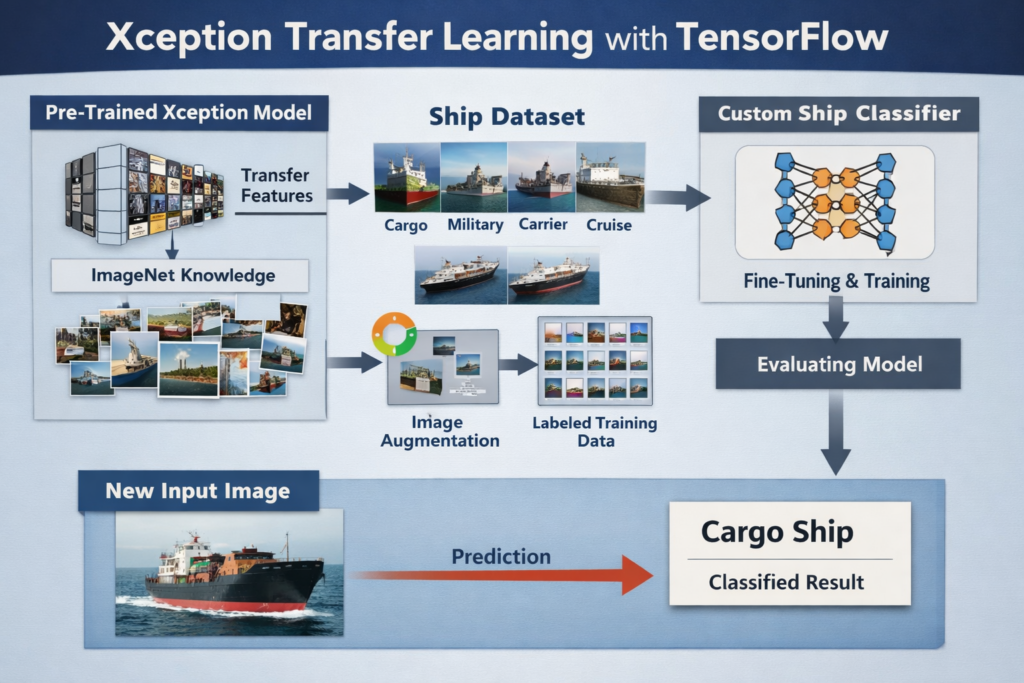
This tutorial code builds a complete ship image classification pipeline around xception transfer learning tensorflow. The target is to take a labeled ship dataset, turn it into clean training arrays, and train a Keras model that can recognize five ship categories: Cargo, Military, Carrier, Cruise, and Tankers.
The workflow starts by focusing on consistency. Every image is loaded, converted to RGB, resized to a fixed input shape, and stored as a NumPy array. That might feel “basic,” but it’s a huge part of what makes training stable. When every sample has the same shape and color format, you avoid subtle bugs and get a model that learns patterns instead of fighting messy inputs.
Next, the code turns your labels into a format neural networks can learn from. The categories are mapped cleanly, then one-hot encoded so the model can output a probability distribution across the five classes. After that, the dataset is split into train/validation/test sets so you can measure performance honestly and avoid accidentally “testing” on data the model already saw during training.
The training section applies augmentation with ImageDataGenerator to simulate real-world variation—rotation, zoom, and shifting—so the model learns to handle different angles and framing. Then Xception is loaded with ImageNet weights and used as a powerful feature extractor, while a lightweight classification head is trained on top. This is the practical heart of xception transfer learning tensorflow: you reuse strong visual features and focus learning on your specific ship classes.
Finally, the code evaluates the model in a way that’s actually useful. You generate predictions on a held-out test set, build a confusion matrix to see which categories are being confused, and save the model as a .keras file. The last script reloads that model and runs inference on a single image, then draws the predicted class directly on the image—so you finish with something you can demo immediately and reuse in future projects.
Link to the video tutorial here .
Download the code for the tutorial here or here
Best AI Photo Tools (Backgrounds, Objects, Headshots)


My Blog
Link for Medium users here .
Want to get started with Computer Vision or take your skills to the next level ?
Great Interactive Course : “Deep Learning for Images with PyTorch” here
If you’re just beginning, I recommend this step-by-step course designed to introduce you to the foundations of Computer Vision – Complete Computer Vision Bootcamp With PyTorch & TensorFlow
If you’re already experienced and looking for more advanced techniques, check out this deep-dive course – Modern Computer Vision GPT, PyTorch, Keras, OpenCV4
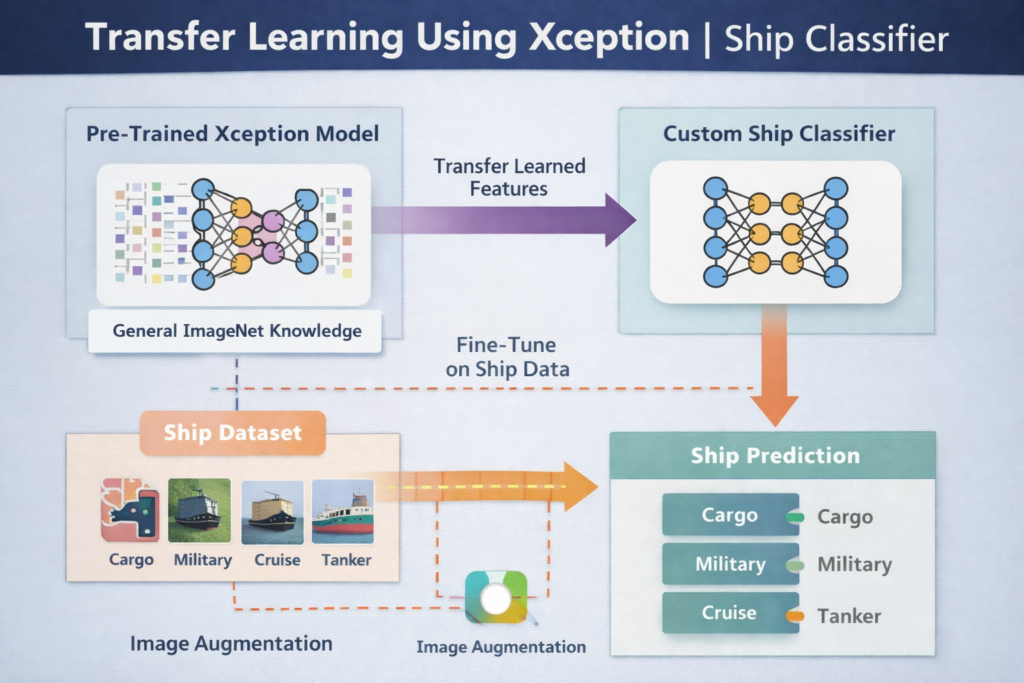
Transfer learning using Xception | ship classifier
xception transfer learning tensorflow is the backbone of this tutorial.
You’ll take a real ship dataset, prepare it into clean training arrays, and train a model that predicts five ship categories: Cargo, Military, Carrier, Cruise, and Tankers.
The code is designed to be practical and repeatable.
It shows a full workflow from reading labels, resizing images, and one-hot encoding targets, all the way to training Xception with augmentation and validating results with a confusion matrix.
You’ll finish with something you can actually reuse.
A saved .keras model plus a small inference script that loads a test image, runs prediction, and writes the predicted ship class directly on the image.
If you want to get the same results as shown in the tutorial, send me an email and I’ll share the dataset package and the exact folder structure used in the code.
Set up a clean TensorFlow environment before you touch the data
A clean environment is the easiest way to avoid “random” errors later.
This setup gives you a reproducible TensorFlow installation, plus the exact libraries needed for OpenCV loading, NumPy arrays, Pandas labels, and evaluation tools.
The goal of this section is not just installing packages.
It’s creating a workspace where your model training behaves consistently, and where you can restart your session without losing hours to dependency conflicts.
Once this is done, you’ll be able to run every script exactly as written.
That includes saving the .npy array, training Xception, saving the final model, and testing inference on a single image.
Short summary before code: Run these commands once to prepare your environment.
### Run PowerShell as administrator so WSL and installs behave consistently. Run PowerShell as admin ### Start WSL so your paths like /mnt/d/... match the tutorial. run wsl ### Create a clean Conda environment for TensorFlow 2.16.2 and Python 3.11. conda create -n TensorflowTutorial python=3.11 ### Activate the new environment so installs go into the right place. conda activate TensorflowTutorial ### Install TensorFlow with CUDA support if you are using an NVIDIA GPU. pip install tensorflow[and-cuda]==2.16.2 ### Install TensorFlow CPU-only if you are not using a GPU. pip install tensorflow==2.16.2 ### Install OpenCV for reading, resizing, and drawing on images. pip install opencv-python ### Install NumPy for array storage and fast numerical operations. pip install numpy ### Install Pandas for CSV handling and label processing. pip install pandas ### Install Seaborn for clean charts and confusion matrix plots. pip install seaborn ### Install scikit-learn for train/test split, one-hot encoding, and metrics. pip install scikit-learn ### Open the current folder in VSCode to run scripts and debug faster. code . Short summary after code: You now have a stable environment that can run the full ship classifier pipeline end to end.
Get the ship labels right so training actually means something
If you want to follow this tutorial with the exact same dataset structure and get results similar to mine, send me an email and I’ll share the dataset package for this project.
Before you load thousands of images, you want clarity about your labels.
This part reads the training CSV, maps numeric categories to readable class names, and gives you a quick chart of class distribution.
That distribution chart matters more than most people think.
If one class dominates, your model can look “accurate” while silently failing on rare ship types, so this is your early warning system.
By the end of this section, you’ll have a labeled dataframe you trust.
That dataframe becomes the “source of truth” for building the image array and generating correct one-hot targets later.
Short summary before code: This block loads the CSV, maps labels, and visualizes class balance.
### Import OpenCV for image operations used later in the pipeline. import cv2 ### Import Pandas to load and manipulate the CSV labels. import pandas as pd ### Import Seaborn for visualizing category distribution. import seaborn as sns ### Import Matplotlib for plotting charts in a readable way. import matplotlib.pyplot as plt ### Import os to work with file paths and directories. import os ### Import NumPy for arrays used throughout training. import numpy as np ### Point to the training CSV file that contains image names and category ids. path_to_train_csv = '/mnt/d/Data-Sets-Image-Classification/Ships-dataset/train/train.csv' ### Load the data from the CSV file into a dataframe. data_csv = pd.read_csv(path_to_train_csv) ### Print dataset shape to confirm rows and columns loaded correctly. print("data shape: ", data_csv.shape) ### Define a readable mapping from integer id to ship category name. categories = {0: 'Cargo' , 1: 'Military', 2: 'Carrier', 3: 'Cruise', 4: 'Tankers'} ### Shift category ids so they start at 0 instead of 1. data_csv['category'] = data_csv['category'] - 1 ### Map numeric categories to human-readable labels. data_csv['label'] = data_csv['category'].map(categories) ### Convert labels to a categorical dtype for cleaner analysis. data_csv['label'] = pd.Categorical(data_csv['label']) ### Print a preview to verify labels were created correctly. print(data_csv.head()) ### Create a count plot to visualize class distribution. sns.countplot(data_csv['label']) ### Add a title so the plot is clear in screenshots or slides. plt.title("Ship Category distribution") ### Label the x-axis so categories are easy to read. plt.xlabel("category") ### Label the y-axis so counts are easy to interpret. plt.ylabel("count") ### Show the plot window. plt.show() Short summary after code: You now have verified labels and a quick picture of how balanced the dataset is.
Turn raw ship photos into a NumPy dataset you can train fast
Deep learning training is much smoother when your images are consistent.
This section loads each ship image, converts it to RGB, resizes it to 128×128, and stores everything in one NumPy array.
Saving the array to disk is a practical performance trick.
Instead of decoding images from disk every time you experiment, you load one .npy file and start training immediately.
By the end, you’ll have X ready for splitting and augmentation.
That means your training script becomes focused on modeling, not on slow file IO.
Short summary before code: This block reads images from disk, resizes them, builds X, and saves it.
### Define the folder that contains the training images. path_Train_images = "/mnt/d/Data-Sets-Image-Classification/Ships-dataset/train/images" ### Extract the list of image filenames from the CSV. img_list = list(data_csv['image']) ### Create an empty list to hold resized RGB images. data_img = [] ### Loop over every image filename from the CSV. for img in img_list: ### Print the image name to track progress while loading. print("img: ", img) ### Build the full path for the current image. each_path = os.path.join(path_Train_images, img) ### Read the image from disk in BGR format. each_img = cv2.imread(each_path) ### Convert BGR to RGB so colors match Matplotlib and common DL expectations. each_img = cv2.cvtColor(each_img, cv2.COLOR_BGR2RGB) ### Resize to the model input size used later in training. each_img_resized = cv2.resize(each_img, (128, 128)) ### Append the resized image to the dataset list. data_img.append(each_img_resized) ### Convert the list of images into a NumPy array. X = np.array(data_img) ### Print shape to confirm (num_images, height, width, channels). print("X shape: ", X.shape) ### Save the NumPy array to disk for fast loading in the training script. np.save("/mnt/d/temp/data/ships_data.npy", X) Short summary after code: You now have a reusable .npy dataset that loads instantly for training and experimentation.
One-hot labels, smart splits, and augmentation that improves accuracy
Model performance depends heavily on the data pipeline.
This section loads the .npy image array, one-hot encodes the labels, and splits the dataset into train, validation, and test sets.
The split strategy matters because it protects your evaluation.
Training accuracy alone is not enough, so validation tells you when you are overfitting, and test data is your final reality check.
Augmentation is the last key piece here.
By adding flips, rotations, zoom, and shifts, you teach the model to handle the messy variety of real images instead of memorizing training samples.
Short summary before code: This block loads X, creates one-hot y, splits the dataset, and defines augmentation generators.
### Import OpenCV because it is part of the full environment used in this script. import cv2 ### Import Pandas to read the CSV labels again in the training script. import pandas as pd ### Import Seaborn for plots used later in evaluation. import seaborn as sns ### Import Matplotlib for plotting confusion matrix later. import matplotlib.pyplot as plt ### Import os for any path operations needed in training. import os ### Import NumPy to load the saved dataset array. import numpy as np ### Point to the same training CSV so labels match the image array. path_to_train_csv = '/mnt/d/Data-Sets-Image-Classification/Ships-dataset/train/train.csv' ### Load the CSV into a dataframe. data_csv = pd.read_csv(path_to_train_csv) ### Print shape to confirm the CSV matches expectations. print("data shape: ", data_csv.shape) ### Define label mapping for the five ship categories. categories = {0: 'Cargo' , 1: 'Military', 2: 'Carrier', 3: 'Cruise', 4: 'Tankers'} ### Shift categories so they start from 0. data_csv['category'] = data_csv['category'] - 1 ### Map numeric category to readable label. data_csv['label'] = data_csv['category'].map(categories) ### Store labels as categorical values. data_csv['label'] = pd.Categorical(data_csv['label']) ### Load the preprocessed image array from disk. X = np.load("/mnt/d/temp/data/ships_data.npy") ### Print shape to confirm the array loaded correctly. print("X shape: ", X.shape) ### Import OneHotEncoder to convert class ids into one-hot vectors. from sklearn.preprocessing import OneHotEncoder ### Fit one-hot encoding to categories and transform into a 2D array. y = OneHotEncoder(dtype='int8', sparse_output=False).fit_transform(data_csv['category'].values.reshape(-1, 1)) ### Print shape to verify you have (num_images, num_classes). print("y shape: ", y.shape) ### Import train_test_split to create train, validation, and test sets. from sklearn.model_selection import train_test_split ### Split off a final test set for unbiased evaluation. X_data , X_test, y_data, y_test = train_test_split(X, y, test_size=0.15 , random_state=42) ### Split remaining data into training and validation sets. X_train, X_val, y_train, y_val = train_test_split(X_data, y_data, test_size=0.2 , random_state=42) ### Print training shapes for sanity check. print("X_train shape: ", X_train.shape) ### Print training label shapes for sanity check. print("y_train shape: ", y_train.shape) ### Print validation shapes to confirm split worked. print("X_val shape: ", X_val.shape) ### Print validation label shapes to confirm split worked. print("y_val shape: ", y_val.shape) ### Import ImageDataGenerator to apply augmentation during training. from tensorflow.keras.preprocessing.image import ImageDataGenerator ### Create an augmentation generator for training batches. train_gen = ImageDataGenerator(horizontal_flip=True, rotation_range=45, zoom_range=0.2, width_shift_range=0.5, height_shift_range=0.5 ) ### Create an augmentation generator for validation batches. validation_gen = ImageDataGenerator(horizontal_flip=True, rotation_range=45, zoom_range=0.2, width_shift_range=0.5, height_shift_range=0.5 ) Short summary after code: Your data is now encoded, split correctly, and ready to feed into an Xception training loop.
Build the Xception transfer learning TensorFlow model for ships
This is where xception transfer learning tensorflow becomes the real advantage.
Instead of training a deep network from scratch, you load Xception with pretrained ImageNet weights and reuse its visual feature extractor.
The code attaches a small classification head on top.
Global average pooling compresses the feature maps into a single vector, then a dense layer outputs five probabilities using softmax.
This structure is a strong baseline that is easy to improve.
You can later fine-tune by unfreezing layers, adjusting augmentation, or changing learning rate, but this version already gives a practical and teachable pipeline.
Short summary before code: This block builds the Xception model, compiles it, and trains it with augmented batches.
### Import the Keras Model class to assemble a custom architecture. from tensorflow.keras.models import Model ### Import layers used to build the classification head. from tensorflow.keras.layers import Dense, Input, Dropout, GlobalAveragePooling2D ### Import Xception as the pretrained backbone for transfer learning. from tensorflow.keras.applications import Xception ### Import Adam optimizer for stable training. from tensorflow.keras.optimizers import Adam ### Define batch size for the data generator. batch_size = 16 ### Define number of epochs for training. epochs = 50 ### Load Xception without the top classification layers, using ImageNet weights. base = Xception(weights='imagenet', include_top=False, input_shape=(128, 128, 3)) ### Take the output tensor from the base model. x = base.output ### Pool spatial dimensions into a single feature vector. x = GlobalAveragePooling2D()(x) ### Create the final softmax layer for five ship classes. head = Dense(5, activation='softmax')(x) ### Build the full model linking base input to the new head output. model = Model(inputs=base.input, outputs=head) ### Compile the model with a small learning rate for transfer learning stability. model.compile(optimizer=Adam(learning_rate=0.0001), loss='categorical_crossentropy', metrics=['accuracy']) ### Train the model using augmented batches and validation monitoring. history = model.fit( train_gen.flow(X_train, y_train, batch_size=batch_size), epochs=epochs, validation_data = validation_gen.flow(X_val, y_val, batch_size=batch_size), steps_per_epoch=X_train.shape[0] // batch_size, ) Short summary after code: You now have a trained Xception-based ship classifier and a history object you can use to analyze training behavior.
Evaluate, save, and run inference on a brand-new ship image
Training is only half the story.
This section evaluates your model on the held-out test set, builds a confusion matrix, and makes it obvious which ship categories are being confused.
Saving the model is what makes the work reusable.
Once the model is saved as a .keras file, you can load it in a new script, share it, or deploy it without retraining.
The inference script is the final payoff.
It loads a single image, resizes it to the model input size, predicts the class, and draws the predicted ship label on the image so the result is instantly readable.
Short summary before code: This block evaluates the model, saves it, and runs a separate inference test on one image.
Here is the ship test image :

### Import metrics tools to evaluate predictions beyond accuracy. from sklearn.metrics import classification_report, confusion_matrix ### Run model prediction on the test set. y_pred = model.predict(X_test) ### Convert predicted probabilities into class indices. y_pred_classes = np.argmax(y_pred, axis=1) ### Convert one-hot ground truth into class indices. y_test_classes = np.argmax(y_test, axis=1) ### Build the confusion matrix to see class-by-class behavior. confmx = confusion_matrix(y_test_classes, y_pred_classes) ### Create a large figure for a readable heatmap. f , ax = plt.subplots(figsize=(8, 8)) ### Plot the confusion matrix as a heatmap. sns.heatmap(confmx, annot=True, fmt='.1f' , ax=ax) ### Label the x-axis so prediction direction is clear. plt.xlabel("Predicted labels") ### Label the y-axis so ground truth direction is clear. plt.ylabel("True labels") ### Add a title to the chart for clarity. plt.title("Confusion Matrix") ### Show the confusion matrix plot. plt.show() ### Save the trained model to disk for reuse and deployment. model.save("/mnt/d/temp/models/ships_xception_model.keras") ### Import NumPy for preprocessing and argmax in inference. import numpy as np ### Import OpenCV for reading, resizing, and drawing on the image. import cv2 ### Import Matplotlib for displaying the final annotated image. import matplotlib.pyplot as plt ### Import model loader to reload the saved classifier. from tensorflow.keras.models import load_model ### Import img_to_array to convert images into model-ready arrays. from tensorflow.keras.preprocessing.image import img_to_array ### Define the path to the saved model file. model_path = "/mnt/d/temp/models/ships_xception_model.keras" ### Load the saved model from disk. model = load_model(model_path) ### Define the path to a test image you want to classify. image_path = "Best-image-classification-models/Xception-Ships-classifications/Cargo_Ship_Puerto_Cortes.jpg" ### Read the image from disk. image = cv2.imread(image_path) ### Resize the image to the input size used during training. image_resized = cv2.resize(image, (128, 128)) ### Convert the resized image into a Keras-compatible array. image_array = img_to_array(image_resized) ### Add a batch dimension so the model receives shape (1, 128, 128, 3). image_array = np.expand_dims(image_array, axis=0) ### Run prediction on the single image. predictions = model.predict(image_array) ### Extract the predicted class index. predicted_class_idx = np.argmax(predictions, axis=1)[0] ### Define the same category mapping used in training. categories = {0: 'Cargo' , 1: 'Military', 2: 'Carrier', 3: 'Cruise', 4: 'Tankers'} ### Convert the predicted index into a readable ship label. predicted_class = categories[predicted_class_idx] ### Define font type for overlay text. font = cv2.FONT_HERSHEY_SIMPLEX ### Define font scale for readable label size. font_scale = 2 ### Define font color for the label. font_color = (255,255,255) # white color ### Define thickness so the label is visible on high-detail images. Thickness = 4 ### Define line type for smoother text rendering. line_type = cv2.LINE_AA ### Compute text size so we can place a background rectangle behind it. text_size = cv2.getTextSize(predicted_class, font, font_scale, Thickness)[0] ### Choose an x position near the top-left corner. text_x = 10 # constant x position ### Choose a y position near the top-left corner. text_y = 100 # Position the text at the top-left corner ### Draw a rectangle behind the text so it stays readable on busy backgrounds. cv2.rectangle(image, (text_x - 10 , text_y - text_size[1] - 10), (text_x + text_size[0] + 10, text_y + 10), (0,0,0), -1) ### Put the predicted label text on the image. cv2.putText(image, predicted_class, (text_x, text_y), font, font_scale, font_color, Thickness, line_type) ### Display the annotated image in RGB format. plt.imshow(cv2.cvtColor(image, cv2.COLOR_BGR2RGB)) ### Hide axes so the result looks clean. plt.axis('off') ### Render the final image window. plt.show() Short summary after code: You now have an evaluation view (confusion matrix), a saved .keras model, and a working inference demo that labels a ship image automatically.
FAQ
Do I need a GPU to run this Xception ship classifier?
A GPU helps a lot with training speed, but the code can run on CPU as well. If you use CPU, reduce epochs to keep experiments manageable.
Why does the code convert images from BGR to RGB?
OpenCV loads images in BGR order, while many visualization tools expect RGB. Converting early avoids confusing color shifts and keeps preprocessing consistent.
What input shape does Xception use in this tutorial?
This tutorial uses 128×128×3 to match the resized dataset array. The model is built with input_shape=(128, 128, 3) to match that preprocessing.
Should I normalize images to 0–1 for better training?
Yes, normalization usually improves stability and convergence. If you add rescaling, keep it consistent between training and inference so predictions remain correct.
What does transfer learning actually transfer here?
You transfer the pretrained visual features learned from ImageNet into your ship task. The new dense head learns the ship-specific decision boundaries.
Why is one-hot encoding needed for 5 ship classes?
The model outputs 5 probabilities with softmax, so labels must match that format. One-hot vectors pair directly with categorical cross-entropy.
How do I know if my model is overfitting?
Overfitting often appears when training accuracy rises while validation accuracy stalls or drops. You can reduce it with stronger regularization, better augmentation, or careful fine-tuning.
What does the confusion matrix tell me that accuracy cannot?
It reveals which ship types are confused with each other. That helps you target data collection, balancing, or augmentation for specific categories.
Why save the model as .keras instead of retraining each time?
Saving lets you reuse the exact trained weights for inference and deployment. It also makes debugging and comparisons between experiments much easier.
What is a simple next upgrade after this baseline?
Freeze Xception first, then fine-tune a small number of top layers with a lower learning rate. This often improves accuracy without destabilizing training.
Conclusion
This tutorial gives you a complete, practical path to a working ship classifier built on xception transfer learning tensorflow.
You start by validating labels, building a clean image array, and setting up proper splits so your evaluation is meaningful and repeatable.
The Xception backbone is the key performance boost, but the real win is the full pipeline.
Once you understand how preprocessing, one-hot encoding, augmentation, and training connect together, you can reuse the same structure for almost any image classification dataset.
The evaluation and inference scripts turn your model into something you can trust and demonstrate.
A confusion matrix shows which classes need more data or cleaner examples, and the final overlay prediction step gives you an immediate “demo-ready” result.
If you want to keep improving, the next natural step is controlled fine-tuning.
Unfreeze a small portion of the Xception base, lower the learning rate, and watch validation carefully to gain accuracy while avoiding overfitting.
Connect :
☕ Buy me a coffee — https://ko-fi.com/eranfeit
🖥️ Email : feitgemel@gmail.com
🤝 Fiverr : https://www.fiverr.com/s/mB3Pbb
Enjoy,
Eran